Quick Answer
Continuous deployment automatically moves qualifying, validated changes into production without a separate manual release step. Every code commit that successfully passes a rigorous sequence of automated checks is packaged, built, and pushed directly to live production servers or container orchestration platforms, enabling organizations to ship features and bug fixes to users instantly.
Quick Answer
Continuous deployment is an automated software release practice where every code change passing all automated testing phases is automatically released into the production environment without human intervention. Unlike continuous delivery—which requires a manual click to approve releases—continuous deployment removes human gatekeepers entirely, relying instead on comprehensive automated test suites, deployment gates, health checks, and instant rollback mechanisms to ensure stability. This approach minimizes lead time, reduces batch sizes, and provides rapid feedback to development teams, but it demands exceptionally high discipline in automated testing and monitoring.
What Is Continuous Deployment?
To understand continuous deployment thoroughly, it helps to examine its exact place in the modern software development lifecycle and distinguish it clearly from adjacent concepts like continuous integration and continuous delivery. Continuous integration focuses on merging code changes frequently into a shared repository, where automated builds and unit tests run against every commit. Continuous delivery takes this a step further by ensuring that every build is always in a releasable state, yet it retains a manual approval gate where a release manager or product owner explicitly authorizes the push to production.
Continuous deployment eliminates that final manual authorization step entirely. Once a developer merges code into the main branch, the deployment pipeline takes over completely. If the code compiles correctly, passes unit tests, passes integration tests, satisfies security scans, and clears all automated staging verifications, it is immediately routed to production environments. This shift transforms software delivery from an infrequent, high-stress ritual into a continuous, low-friction background process. However, moving to this automated model requires a fundamental culture shift. Developers must take full ownership of their code's behavior in live production environments, and teams must invest heavily in automated testing infrastructure, robust observability platforms, and fast recovery mechanisms.
Pipeline Flow
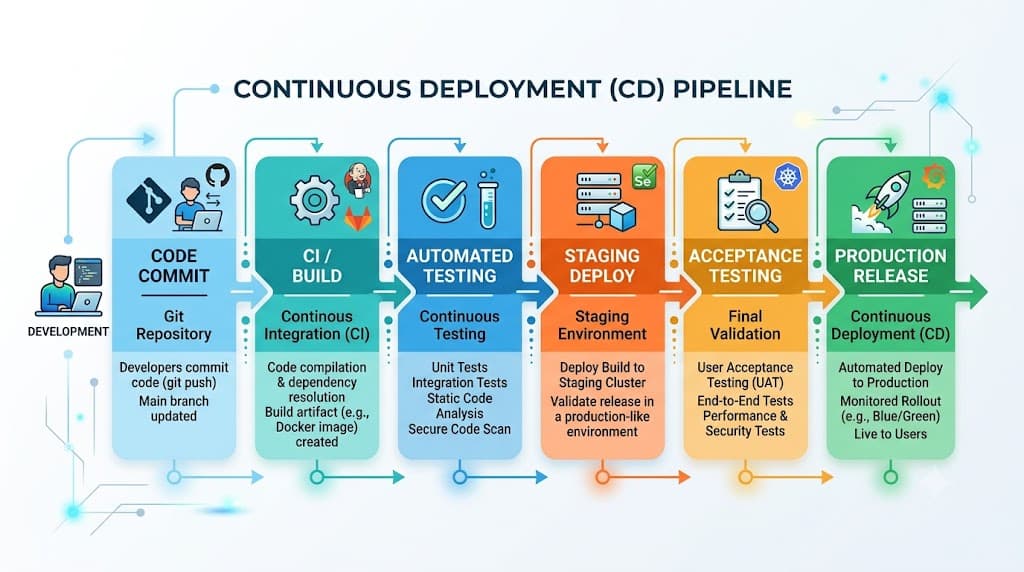
An effective continuous deployment pipeline operates as a deterministic, multi-stage state machine that shepherds source code from developer workstations all the way to live production infrastructure. Every stage acts as a quality filter, rejecting faulty changes before they can impact real users.
Commit and Build Stage
The pipeline triggers automatically whenever a developer pushes commits or merges pull requests into the primary trunk branch. The version control system webhook notifies the CI/CD orchestration engine, which provisions an isolated runner environment. This runner checks out the source code, resolves dependencies, compiles binaries or packages interpreted languages, and compiles immutable artifacts such as container images or compressed archives. Caching strategies are applied here to speed up dependency resolution, ensuring rapid feedback for developers.
Artifact Packaging and Staging
Once the build completes successfully, the resulting artifact is tagged with a unique version identifier, such as a git commit hash or semantic version number, and pushed to a secure artifact repository or container registry. The pipeline then deploys this exact artifact into one or more non-production environments that mirror production as closely as possible. These staging environments allow for deeper validation, performance profiling, and end-to-end integration testing against mock or sanitized data sets.
Production Deployment Stage
Upon successful validation in staging and the clearance of any required automated gates, the pipeline executes the production deployment step. Modern infrastructure tools orchestrate this rollout, replacing old instances with new ones or updating running containers in a controlled manner. Throughout this phase, the pipeline continuously queries health endpoints and metrics collectors to verify that the newly deployed version is functioning correctly before marking the pipeline run as successful.
Required Controls
Automating production releases requires robust guardrails. Without proper controls, continuous deployment can rapidly amplify bad code and cause widespread outages.
Deployment Gates and Approvals
Even in a fully automated pipeline, strategic deployment gates help maintain control over business-critical releases. Time-based windows can prevent major deployments during peak business hours or holiday periods. Automated compliance checks can scan for security vulnerabilities or license compliance violations, halting the pipeline if critical thresholds are breached. Furthermore, progressive delivery gates allow engineering teams to release changes to a tiny percentage of internal users before opening traffic to the broader public.
Access Control and Least Privilege
Strict access controls must govern every component of the deployment pipeline. Developers should not have direct SSH access to production servers; instead, all changes must flow through the audited CI/CD pipeline. Pipeline execution agents must operate with the principle of least privilege, possessing only the specific permissions required to deploy designated services to specific environments. Service accounts and runner tokens must be rotated regularly and audited for anomalous behavior.
Secrets Management
Hardcoding API keys, database credentials, or private certificates into source code or pipeline configuration files represents a critical security risk. A secure continuous deployment workflow relies on dedicated secrets management systems. During pipeline execution, secrets are injected securely into the environment variables or runtime configuration files just-in-time, ensuring that sensitive credentials never reside in git history, container image layers, or persistent logs.
Automated Testing
Automated testing forms the absolute backbone of continuous deployment. Because no human inspects the release candidate before it reaches production, the automated test suite must catch regressions, logic errors, and integration failures autonomously.
Unit and Integration Suites
Unit tests validate individual functions, classes, and modules in isolation, running in milliseconds to provide instant feedback. Integration suites verify that different modules, databases, and external APIs interact correctly. In a mature pipeline, these tests run in parallel across distributed runners to minimize execution time while maximizing code coverage. Any failing unit or integration test immediately halts the pipeline and notifies the author.
Smoke Testing in Production
A smoke test is a lightweight, non-destructive automated test executed immediately after a production deployment to verify that the application is fundamentally alive and responsive. For example, a smoke test might send an HTTP GET request to the application health check endpoint, verify that the expected JSON payload is returned with a 200 OK status code, execute a minor database read query, and confirm that critical static assets load correctly. If the smoke test fails, the deployment orchestration tool immediately triggers an automated rollback.
Monitoring
Observability and continuous monitoring are vital complements to automated deployment. Releasing code automatically means teams must detect regressions, error rate spikes, and performance degradations in real time.
Deployment Health Check and Metrics
A deployment health check continuously evaluates key application performance indicators immediately following a release. Teams monitor metrics such as HTTP error rates (5xx and 4xx status codes), CPU and memory utilization, database connection pool saturation, and request latency percentiles. If any of these metrics deviate significantly from established baseline thresholds within a defined observation window, the monitoring system raises an alert and can initiate an automated remediation workflow.
Log Aggregation and Distributed Tracing
Centralized log aggregation ensures that application logs from all ephemeral production instances are streamed instantly to a searchable datastore. Coupled with distributed tracing, engineering teams can track individual user requests as they traverse microservices, quickly isolating the root cause of any anomaly introduced by a recent deployment.
Rollback
Despite rigorous testing, faulty code can occasionally reach production. A reliable continuous deployment pipeline must therefore include fast, automated rollback capabilities to minimize downtime and user impact.
Execution and Failure Modes
When monitoring systems detect an anomaly or a smoke test fails, the pipeline management tool initiates a rollback. For containerized workloads, this typically involves instructing the orchestrator to revert the deployment specification to the previously known good container image tag. For virtual machine deployments, immutable infrastructure practices mean spinning up instances of the previous golden image and draining traffic from the faulty nodes.
Recovery Verification
Executing a rollback is only half the battle; the system must also verify recovery. Post-rollback monitoring checks ensure that error rates subside, latency returns to normal baselines, and health checks pass successfully. Once stability is restored, the engineering team investigates the root cause, writes a regression test covering the failure mode, and updates the pipeline configuration to prevent recurrence.
Best Practices
Implementing continuous deployment successfully requires adhering to proven industry best practices that balance velocity with operational safety.
Progressive Delivery and Feature Flags
Instead of releasing every feature to 100 percent of users simultaneously, adopt progressive delivery techniques. Use feature flags to decouple code deployment from feature release, allowing you to deploy code safely in a dormant state and enable features incrementally for specific user cohorts. Combine this with canary deployments, routing a small fraction of production traffic to the new version while monitoring error rates closely before scaling up to full production traffic.
Managing Database Schema Migrations
Database changes present unique challenges in continuous deployment pipelines because dropping a column or renaming a table can break older running instances of the application. Practice backward-compatible database migrations using the expand-and-contract pattern. Deploy schema additions first, update the application code to write to both old and new schemas, and only remove legacy columns in a subsequent deployment after all running instances have been upgraded.
Fostering a Blameless Culture
Automation cannot compensate for a toxic organizational culture. When automated deployments fail, treat the incident as a system failure rather than an individual mistake. Conduct blameless post-mortems, continuously refine your automated test suites and deployment gates, and empower every engineer to halt the pipeline when anomalies arise.
📌 Recommended Next Guides & References
  <li>
    <a href="/article/docker-and-kubernetes-how-they-work-together-2" class="text-primary hover:underline font-semibold flex items-center gap-2">
      <span>→</span> <span>Docker and Kubernetes: How They Work Together</span>
    </a>
  </li>

  <li>
    <a href="/article/kubernetes-ingress-explained" class="text-primary hover:underline font-semibold flex items-center gap-2">
      <span>→</span> <span>Kubernetes Ingress Explained: Routing, Controllers, and TLS</span>
    </a>
  </li>

  <li>
    <a href="/article/kubernetes-ingress-controller-explained" class="text-primary hover:underline font-semibold flex items-center gap-2">
      <span>→</span> <span>Kubernetes Ingress Controller Explained: Architecture, Routing, and Implementation</span>
    </a>
  </li>