Quick Answer
A well-structured continuous integration and continuous deployment process is the backbone of modern engineering teams. By automating the journey from code creation to production release, development teams reduce manual error, accelerate feedback loops, and ship reliable software safely.
Quick Answer
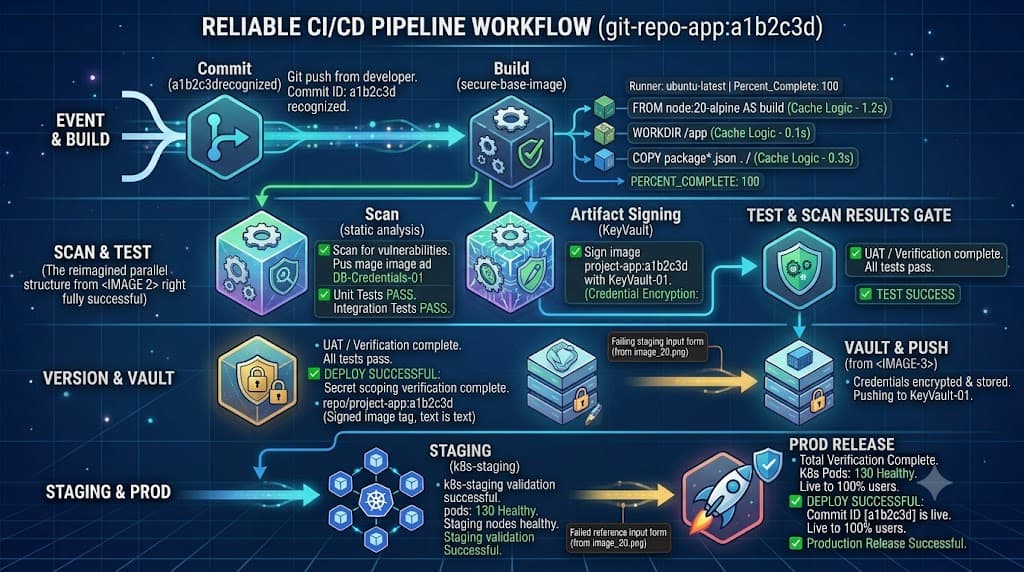
A ci/cd pipeline is an automated sequence of steps and scripts that validates code changes and moves them through build, test, release, and deployment stages. Instead of relying on manual handoffs and local testing, developers commit changes to a central repository, triggering an automated runner to execute validation checks, build application binaries or container images, run automated test suites, scan for security vulnerabilities, and push the verified package directly to staging or production environments without human intervention for automated environments.
Pipeline Overview
Understanding pipeline architecture requires looking past generic definitions and examining the continuous flow of events that occur after a developer pushes code. While many tutorials present a single universal pipeline, in reality, pipelines vary dramatically by organization, technology stack, business domain, and compliance requirements. A startup might deploy directly to a cloud container service after basic unit testing, whereas a financial institution may require multiple approval gates, static and dynamic security analysis, and immutable artifact signing before any staging release occurs.
At its core, however, every pipeline shares a similar chronological spine. It begins with version control triggers, moves through compilation and dependency resolution, executes rigorous test matrices, packages a deployable artifact, applies progressive deployment strategies, and finally monitors the running application for anomalies. Examining each of these distinct phases provides the practical insight needed to design, maintain, and troubleshoot modern delivery workflows effectively.
Source
The source stage represents the initial trigger of the delivery lifecycle. Whenever a developer pushes commits, opens a pull request, or merges code into a protected branch, the version control system emits a webhook event to the CI/CD orchestration engine. This event signals the pipeline runner to spin up an isolated execution environment, check out the specific commit SHA, and prepare the workspace.
To see this in action, consider a standard developer workflow using Git. When a developer executes a git push origin feature-branch command, the remote repository notifies the CI platform. The platform reads a configuration file located inside the repository root, such as a GitHub Actions workflow YAML or a GitLab CI configuration file, which defines the exact steps required for the incoming commit. Properly configuring this phase ensures that only authorized branches trigger builds, preventing unauthorized code execution and wasted runner compute resources.
Build
Once the source code is checked out into the runner environment, the build stage compiles raw source code into executable binaries or packages it into deployable container images. During this phase, package managers fetch required external dependencies, compilers transform source code into machine code or bytecode, and asset bundlers minify frontend scripts.
For a containerized application, this stage typically involves creating a Docker image. The pipeline executes instructions to pull a secure base image, copy the application code, install runtime dependencies, and commit the result to a local or remote container registry. For compiled languages like Go or Rust, the build step generates a standalone binary optimized for the target operating environment. Ensuring build reproducibility by pinning dependency versions and avoiding floating tags prevents subtle bugs from creeping into downstream environments.
Test
Automated testing forms the quality assurance core of any reliable pipeline. Without comprehensive test automation, teams risk pushing regressions directly to production. The test stage typically executes multiple layers of validation in a specific sequence, starting with fast unit tests and progressing to integration and functional tests.
Unit tests validate individual functions or classes in complete isolation, mocking external dependencies to guarantee speed. Integration tests verify that different modules, databases, and external APIs interact correctly. In a typical pipeline, a test script runs commands like npm test or pytest to execute these suites. If any test fails, the pipeline halts immediately, reporting the exact failure logs back to the developer via chat notifications or pull request status checks, preventing broken code from progressing further down the line.
Security
Modern delivery workflows must integrate security checks early and often, a practice commonly referred to as DevSecOps. The security stage incorporates automated scanning tools to detect vulnerabilities before code reaches production environments. These tools typically include Static Application Security Testing to analyze source code for insecure patterns, Software Composition Analysis to check third-party package dependencies for known CVEs, and secret detection tools to catch accidentally committed API keys or credentials.
When a vulnerability is discovered, the pipeline can be configured to either warn the development team or fail the build entirely based on severity thresholds. Integrating these checks directly into the automated workflow ensures that security is treated as an ongoing validation gate rather than an afterthought performed manually right before a scheduled release window.
Artifacts
As code passes through build and test stages, it transforms into an immutable package known as an artifact. Managing these artifacts correctly is essential for traceability and reliable deployments. The artifact stage is responsible for packaging compiled binaries, helm charts, configuration bundles, or container images, and uploading them to a secure, centralized repository such as an artifact registry, Nexus, Artifactory, or a cloud storage bucket.
For example, after successfully building a container image, the pipeline executes an artifact upload command to push the tagged image to a private container registry. Storing immutable artifacts ensures that the exact same package tested in the test and staging environments is deployed to production, eliminating discrepancies caused by rebuilding code directly on production servers.
Staging
Before releasing changes to live users, the pipeline deploys the verified artifact into a staging environment. Staging environments are designed to mirror production as closely as possible, featuring identical infrastructure topologies, database configurations, and network security policies. This phase allows automated integration testing, end-to-end browser testing, and manual user acceptance testing to run in a production-like setting.
Deploying to staging validates that environment variables, external API integrations, and infrastructure-as-code scripts function correctly under realistic conditions. Catching configuration drifts or environment-specific bugs in staging prevents catastrophic failures when the same deployment scripts are eventually executed against live production infrastructure.
📌 Recommended Next Guides & References
  <li>
    <a href="/article/docker-and-kubernetes-how-they-work-together-2" class="text-primary hover:underline font-semibold flex items-center gap-2">
      <span>→</span> <span>Docker and Kubernetes: How They Work Together</span>
    </a>
  </li>

  <li>
    <a href="/article/kubernetes-ingress-explained" class="text-primary hover:underline font-semibold flex items-center gap-2">
      <span>→</span> <span>Kubernetes Ingress Explained: Routing, Controllers, and TLS</span>
    </a>
  </li>

  <li>
    <a href="/article/kubernetes-ingress-controller-explained" class="text-primary hover:underline font-semibold flex items-center gap-2">
      <span>→</span> <span>Kubernetes Ingress Controller Explained: Architecture, Routing, and Implementation</span>
    </a>
  </li>