Introduction and What the Internet Is
Quick Answer
At its core, the internet is a massive global network that connects billions of electronic devices together. This includes personal computers, mobile phones, tablets, smart home devices, and powerful computers called servers located in data centers around the world. When you use your device to send a message, watch a video, or browse a website, you are participating in this massive web of interconnected technology.
Every device connected to the internet has a unique numerical label known as an IP address, which stands for Internet Protocol address. Think of it like a mailing address for your computer. When data travels across the internet, it is broken down into small chunks called packets. These packets find their way across wires, underwater cables, and wireless routers to reach their correct destination. Understanding this foundational setup makes it much easier to explore how everyday websites and web applications function behind the scenes.
The Journey of a Website Request
When you open a web browser on your computer or phone and type in a website address, a fascinating journey begins. Your device does not instantly display the webpage; instead, it initiates a carefully coordinated sequence of communications across the globe.
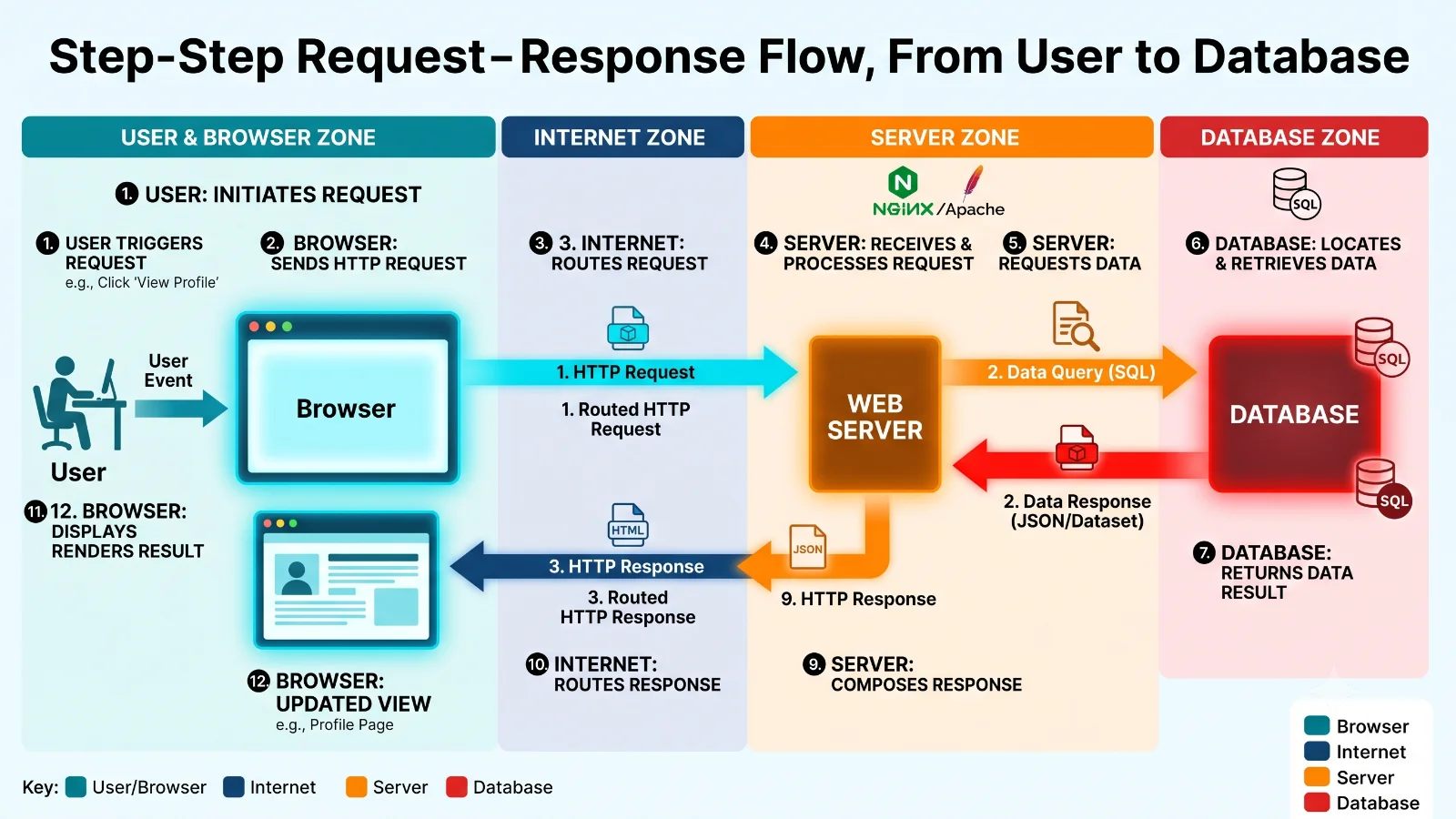
Here is the step-by-step path that information takes:
- User: You decide to visit a website and type the address or click a link.
- Browser: Your web browser acts as your personal representative, packaging your intent into a structured digital message.
- Internet: The message travels across network cables and wireless signals to reach its physical destination.
- Server: A remote computer designed to host the website receives your message and processes what you asked for.
- Database: If the website needs specific information, such as your user account details, the server asks a database to fetch it.
- Server: The server collects the raw data and builds the final webpage content.
- Browser: The browser receives the data and translates it into the text, images, and buttons you see on your screen.
- User: You view and interact with the finished webpage.
This entire journey usually happens in less than a second, making it feel completely instantaneous to the everyday user.
Clients, Servers, Requests, and Responses
To understand how websites actually load, you must become familiar with two essential roles in technology: the client and the server. This setup is commonly referred to as client-server architecture.
A client is any device or software program that initiates a request for information. Your web browser, a mobile app on your phone, or a desktop application can all act as clients. They do not store the website files themselves; instead, they ask for them.
A server, on the other hand, is a powerful computer that stays online 24 hours a day, waiting to receive requests from clients. When a server gets a request, it processes the instructions, performs any necessary calculations, and sends a response back.
This exchange relies on two primary actions known as a request and a response:
- HTTP Request: When you type a website address, your browser sends an HTTP request to the web server. This request includes instructions on what page or file you want to see.
- HTTP Response: The server processes this request, retrieves the necessary code, and sends an HTTP response back to your browser containing the webpage data.
For example, if you visit a weather website, your browser sends a request asking for today's forecast. The server processes that request, packages the forecast details, and sends a response that your browser displays as sunny skies and temperatures.
The Role of Databases in Web Applications
While web servers are great at sending out files like text, images, and styling code, modern websites do much more than display static pages. They store user accounts, shopping carts, posts, and personal settings. This is where a database comes into play.
A database is an organized collection of structured information or data stored electronically in a computer system. Web servers often need to communicate with a database to retrieve or store information dynamically.
Consider what happens when you log into a web application. First, your browser sends your username and password to the server as part of a request. The web server cannot verify your password on its own, so it queries a database. The database checks its records to see if your password matches the stored account data. Once the database confirms your identity, it sends a success message back to the server, which then lets your browser log you in and display your personalized profile page.
From a Single Server to Scalable Systems
When a new software application or website launches, it usually runs on a single web server connected to a single database. For a few dozen or even a few hundred users, this simple setup works perfectly fine. The server easily handles incoming requests, fetches data from the database, and sends responses back without breaking a sweat.
However, problems arise when an application grows rapidly and attracts thousands or millions of users. A single server quickly faces serious limitations:
- High traffic causes massive congestion.
- Processing power maxes out, leading to very slow response times.
- Server overload can cause complete crashes and downtime.
- Database load increases exponentially, causing login and data loading failures.
This exact challenge introduces the core purpose of system design. System design is the process of defining the architecture, components, modules, interfaces, and data for a system to satisfy specified requirements. Good system design ensures that software applications can handle massive increases in traffic while remaining fast, reliable, available, and scalable.
As you continue learning about software architecture, you will encounter powerful tools and concepts designed to solve these exact scaling challenges. Future lessons in this series will cover load balancers, multiple web servers, caching mechanisms, content delivery networks (CDNs), advanced databases, message queues, database replication, database sharding, API gateways, user authentication, system monitoring, distributed systems, and overall scalability.
Up next in our learning journey is the dedicated guide on Client and Server, which will break down this digital communication in even greater detail.
Related Reading: Docker and Kubernetes architecture guide


