Quick Answer
Jenkins is an automation server commonly used to implement continuous integration and continuous deployment (jenkins ci/cd) pipelines through jobs, agents, plugins, and pipeline-as-code. By orchestrating build, test, and deployment phases, it enables engineering teams to automate their software delivery lifecycle and catch regressions early.
Quick Answer
Jenkins is an extensible, open-source automation server designed to orchestrate software build, test, and deployment pipelines. Through its robust plugin ecosystem, distributed controller-agent architecture, and declarative pipeline definitions, it allows teams to implement continuous integration and continuous deployment (jenkins ci/cd) at scale. It transforms manual release steps into repeatable, automated workflows triggered by source code repository webhooks.
What Is Jenkins?
At its core, Jenkins serves as the central nervous system for modern software delivery. While software development teams write code, manage versions in Git, and containerize applications with Docker, Jenkins acts as the orchestrator that ties these tools together into a unified workflow. When developers push code to a shared repository, webhook notifications can instantly trigger a Jenkins job to compile binaries, run unit tests, perform static code analysis, and package the output for staging or production environments.
The philosophy behind jenkins ci/cd revolves around early feedback and repeatable automation. Instead of relying on manual build scripts executed on developer laptops, Jenkins provides a centralized, headless environment where builds run identically every time. This consistency eliminates the classic "it works on my machine" problem. Furthermore, the platform's modular nature means teams are not locked into a single vendor's toolchain; whether your stack is Java, Node.js, Python, or Go, Jenkins can integrate with your preferred compilers, testing frameworks, and artifact repositories.
Architecture
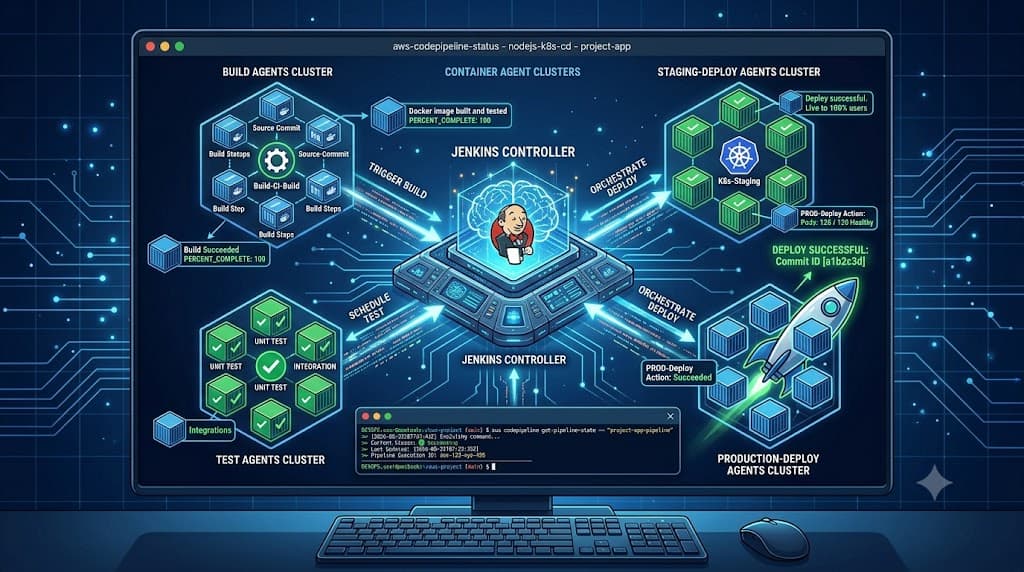
Understanding the foundational architecture of Jenkins is critical for designing scalable and reliable build environments. Historically referred to as the master-slave model, modern Jenkins terminology designates these components as the controller and the agents. The controller is the primary Jenkins instance responsible for managing the overall environment. It handles the web user interface, configures security realms, schedules build jobs, dispatches workloads to remote nodes, and stores global configuration settings and build history.
To prevent the controller from becoming a performance bottleneck, Jenkins offloads the heavy lifting of executing builds to separate nodes known as agents. An agent is a designated compute instance—ranging from a dedicated virtual machine to an ephemeral Docker container or a Kubernetes pod—that connects back to the controller and waits for instructions. When a job is triggered, the controller evaluates resource availability and assigns the build to an appropriate agent. The agent then executes the assigned workspace steps, streams console logs back to the controller, and terminates or idles upon completion.
Deploying this architecture effectively requires careful planning regarding network security and resource allocation. Controllers should run behind secure reverse proxies with strict authentication controls, while agents should operate with minimal necessary privileges. In containerized environments, dynamic provisioning via the Kubernetes plugin ensures that agents spin up only when a build is queued and spin down immediately after, optimizing cloud compute costs and guaranteeing a pristine, isolated workspace for every single pipeline execution.
Jobs and Agents
Jobs and agents form the operational backbone of any jenkins ci cd deployment. A job represents an automated task or sequence of tasks configured within the server. Over the evolution of the platform, job types have matured from traditional freestyle projects—where administrators clicked through numerous UI checkboxes to configure build steps—to modern pipeline projects defined entirely as code.
Agents are the workers that execute these jobs. To ensure that builds run in the correct environment, Jenkins utilizes agent labels and node selectors. For instance, a pipeline can be configured to target an agent labeled "linux-docker" or "windows-net" depending on the target operating system required for compilation. This capability is vital for cross-platform applications that must verify compatibility across multiple operating systems and runtime versions.
Configuring agents securely involves managing communication protocols between the controller and the node. Connections can be established via SSH, JNLP (Java Network Launch Protocol), or inbound TCP ports. Administrators must ensure that cryptographic keys and authentication tokens are properly secured, preventing unauthorized nodes from registering with the controller and executing malicious code within the build infrastructure.
Jenkinsfile
A Jenkinsfile is a text file that contains the definition of a Jenkins pipeline and is checked into source control alongside project source code. This approach, known as pipeline-as-code, brings all the benefits of software development—such as versioning, code reviews, audit trails, and branching strategies—to the CI/CD configuration itself. When a developer creates a feature branch, they can modify the Jenkinsfile to test experimental build steps without disrupting the main production pipeline.
Jenkins supports two distinct syntaxes for writing a Jenkinsfile: Declarative and Scripted. Declarative pipeline syntax offers a structured, opinionated framework with predefined blocks, making it easier to read, write, and validate. Scripted pipeline syntax, built upon Groovy, provides advanced procedural control and flexibility for complex, dynamic workflows. For most modern jenkins ci/cd implementations, the Declarative syntax is strongly recommended due to its built-in error checking and standardized layout.
Below is a practical example of a Declarative Jenkinsfile demonstrating core structural elements including the pipeline block, agent assignment, sequential stages, and post-execution actions:
pipeline {
    agent {
        docker {
            image 'maven:3.8.6-openjdk-11'
            args '-v /root/.m2:/root/.m2'
        }
    }
    environment {
        APP_NAME = 'my-java-service'
    }
    stages {
        stage('Checkout') {
            steps {
                echo 'Cloning repository...'
                checkout scm
            }
        }
        stage('Build & Test') {
            steps {
                echo 'Compiling code and running unit tests...'
                sh 'mvn clean package'
            }
        }
        stage('Containerize') {
            steps {
                echo 'Building Docker container image...'
                sh 'docker build -t ${APP_NAME}:${BUILD_NUMBER} .'
            }
        }
    }
    post {
        always {
            echo 'Cleaning up workspace temporary files...'
            cleanWs()
        }
        success {
            echo 'Pipeline completed successfully!'
        }
        failure {
            echo 'Pipeline failed. Check console logs for errors.'
        }
    }
}
Pipeline Stages
A Jenkins pipeline is organized into a hierarchical structure that breaks down the software delivery process into logical phases. At the highest level, the pipeline block encapsulates the entire workflow. Within it, the agent directive dictates where the execution takes place. Below these structural declarations lie the core operational building blocks: stages, steps, and post blocks.
The stages container holds a sequential or parallel list of individual stage blocks. Each stage represents a distinct phase in the software delivery lifecycle, such as Code Checkout, Unit Testing, Security Scanning, Artifact Publication, and Deployment. Within each stage, the steps block defines the exact sequence of shell commands, plugin invocations, or script executions that must be performed.
To handle outcomes gracefully, pipelines utilize post blocks. These conditional blocks execute after the main stages complete, based on the final status of the run. Common conditions include always, success, failure, unstable, and changed. Engineers leverage post blocks for critical housekeeping tasks, such as wiping out temporary workspace files, sending Slack notifications to engineering channels, pushing build metrics to monitoring systems, or archiving test result reports.
Credentials
Managing sensitive information securely is a paramount concern in any production jenkins ci cd environment. Hardcoding passwords, API tokens, SSH private keys, or cloud provider credentials directly into a Jenkinsfile or job configuration represents a severe security vulnerability that can lead to credential theft and unauthorized access to downstream production systems.
Jenkins addresses this requirement through its built-in Credentials Provider plugin. This subsystem allows administrators to store secrets securely within the controller's encrypted internal database, referencing them in pipeline code via unique string IDs. Supported credential types include username-password pairs, secret text strings, SSH keys with passphrases, and x509 certificates.
When writing a Declarative Jenkinsfile, secrets are safely injected into environment variables using the credentials() helper method inside an environment block. This ensures that sensitive values are automatically masked in the console output logs, preventing accidental exposure during build execution. Furthermore, role-based access control (RBAC) plugins should be configured to restrict which jobs and teams can access specific credential stores, enforcing the principle of least privilege across the organization.
Best Practices
Maintaining a robust and performant jenkins ci/cd infrastructure requires adhering to proven operational standards, avoiding common pitfalls, and establishing rigorous verification and maintenance protocols.
Plugin Management and Security
The Jenkins plugin ecosystem is its greatest strength, but unchecked plugin proliferation is a primary cause of system instability and security vulnerabilities. Administrators must audit installed plugins regularly, keep them updated to patch CVEs, and avoid installing deprecated or unmaintained plugins. Always test plugin upgrades in a staging instance before applying them to production controllers.
Pipeline Modularization and Shared Libraries
As organizations scale, teams often find themselves duplicating identical build logic across dozens of repositories. To eliminate this anti-pattern, utilize Jenkins Shared Libraries. By placing common Groovy script functions and declarative pipeline templates into a centralized Git repository, teams can import standardized workflows with a single @Library annotation, enforcing organizational compliance and drastically reducing maintenance overhead.
Resource Monitoring and Workspace Cleanup
Unmonitored Jenkins controllers frequently suffer from disk exhaustion caused by accumulating build histories, large artifact caches, and bloated workspaces. Implement automated workspace cleanup routines using tools like the cleanWs() step or periodic garbage collection jobs. Monitor controller CPU, memory, and I/O metrics closely using Prometheus and Grafana integration to detect resource starvation before it impacts developer productivity.
Failure Modes and Disaster Recovery
Inevitably, Jenkins instances will face unexpected outages due to hardware failures, kernel panics, or corrupted configuration files. To mitigate disaster risks, implement automated configuration-as-code (JCasC) practices to define system settings declaratively, and maintain regular, tested backups of the $JENKINS_HOME directory. Practicing restoration drills ensures that recovery time objectives (RTO) are met during critical incidents.
📌 Recommended Next Guides & References
  <li>
    <a href="/article/docker-and-kubernetes-how-they-work-together-2" class="text-primary hover:underline font-semibold flex items-center gap-2">
      <span>→</span> <span>Docker and Kubernetes: How They Work Together</span>
    </a>
  </li>

  <li>
    <a href="/article/kubernetes-ingress-explained" class="text-primary hover:underline font-semibold flex items-center gap-2">
      <span>→</span> <span>Kubernetes Ingress Explained: Routing, Controllers, and TLS</span>
    </a>
  </li>

  <li>
    <a href="/article/kubernetes-ingress-controller-explained" class="text-primary hover:underline font-semibold flex items-center gap-2">
      <span>→</span> <span>Kubernetes Ingress Controller Explained: Architecture, Routing, and Implementation</span>
    </a>
  </li>


