Quick Answer
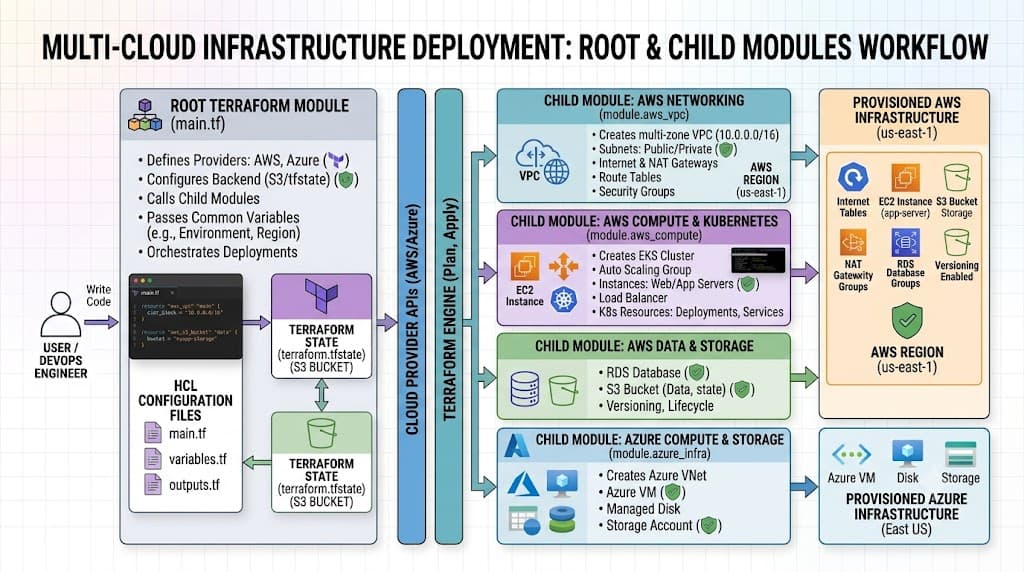
A terraform module is a container for multiple resources that are used together, serving as the primary mechanism for packaging, sharing, and reusing infrastructure code across projects, teams, and environments. Instead of duplicating configuration blocks for every virtual network or database cluster, engineers bundle them into a single, parameterized unit. Below is a quick example of calling a module in your main configuration:
module "vpc" {
  source = "./modules/vpc"
  cidr_block = "10.0.0.0/16"
  environment = "production"
}
To verify this setup safely in your terminal, run terraform init to initialize working directories, followed by terraform plan to inspect the execution graph without making actual cloud changes:
terraform init
terraform plan
Quick Answer
A terraform module is essentially a self-contained directory of HashiCorp Configuration Language (HCL) files that manage a logical group of infrastructure resources. Every Terraform configuration has at least one module, known as the root module, which consists of the working directory containing your primary .tf files. By creating child modules, you can abstract away low-level resource boilerplate, enforce compliance guardrails across an enterprise, and accelerate delivery speeds. When writing reusable terraform code, your goal is to expose only the necessary configuration variables while keeping internal implementation details hidden. For example, a networking module might expose a CIDR block and a boolean flag for public subnets, while managing all individual route tables, internet gateways, and subnet associations internally. To consume a module, you define a module block specifying a valid source path and any required input variables. You then execute terraform init to download or link dependencies, run terraform plan to review the anticipated resource creation, and execute <a href="/article/terraform-apply-create-and-update-infrastructure-2" class="text-primary font-semibold hover:underline">terraform apply</a> to provision the infrastructure. Safe verification involves checking the resulting resource outputs, reviewing state files, or utilizing validation commands to ensure the infrastructure matches your design expectations.
Understanding the Concept
Infrastructure as Code has revolutionized how modern engineering teams build, scale, and maintain cloud environments across platforms like AWS, GCP, and Azure. However, as infrastructure codebases grow, maintaining raw, flat resource declarations quickly becomes unsustainable. Copying and pasting blocks of resource definitions across multiple environments leads to configuration drift, security vulnerabilities, and massive technical debt. This is where the concept of modularity becomes essential in modern software delivery pipelines.
Modular design principles from software engineering apply directly to infrastructure code. Just as functions encapsulate business logic in programming languages, a terraform module encapsulates infrastructure definitions. By treating infrastructure as modular software components, organizations can establish standardized patterns for deploying common architectures, such as secure virtual private clouds, container clusters, or database tiers. This modularity ensures that when a security baseline or compliance requirement changes—such as updating encryption standards on storage buckets—platform engineers can update a single shared module rather than hunting down dozens of disparate configuration files.
Furthermore, embracing reusable terraform code fosters collaboration between centralized platform teams and application development teams. Platform engineers can author, test, and publish well-architected modules into private or public registries, complete with built-in security controls and compliance guardrails. Application developers can then consume these modules without needing to master every intricate detail of the underlying cloud provider APIs. This division of labor reduces onboarding friction, minimizes human error during deployments, and aligns infrastructure management with established software development life cycle best practices.
How It Works
Understanding the mechanics of module execution requires looking closely at how Terraform parses configuration blocks, manages state files, and interacts with provider plugins during runtime execution phases.
Syntax and configuration
A module block in HCL consists of a unique local name, a mandatory source argument, and various input variables defined by the module author. The source argument can point to a local relative directory, a Git repository, a Terraform Registry path, or an HTTP URL. Inside the module directory, input variables are declared using variable blocks, resources are defined using resource blocks, and values returned to the calling configuration are exposed using output blocks. This strict separation of inputs, logic, and outputs establishes a clear interface contract for anyone consuming the module.
CLI workflow
The Terraform CLI workflow governs how your modules are loaded, verified, and applied to target environments. First, terraform init scans your configuration, identifies all module sources, and downloads them into the local .terraform directory or module cache. Next, terraform validate checks your syntax and internal consistency. After validation, you execute terraform plan to generate an execution plan, which compares your desired state against the actual remote state. Finally, terraform apply executes the planned actions against your cloud provider APIs.
Practical Terraform Example
Implementing a practical, real-world module setup demonstrates how modularity simplifies complex configurations.
Example
Consider a scenario where you need to deploy a standardized compute instance with associated security groups across multiple environments. Instead of repeating resource blocks, you create a module in ./modules/compute.
Inside ./modules/compute/main.tf, you define the instance resource:
resource "aws_instance" "this" {
  ami           = var.ami_id
  instance_type = var.instance_type
  tags = {
    Name = var.instance_name
  }
}

variable "ami_id" {
  type = string
}

variable "instance_type" {
  type    = string
  default = "t3.micro"
}

variable "instance_name" {
  type = string
}

output "instance_id" {
  value = aws_instance.this.id
}
In your root configuration, you call this module as follows:
module "web_server" {
  source        = "./modules/compute"
  ami_id        = "ami-0c55b159cbfafe1f0"
  instance_type = "t3.small"
  instance_name = "production-web-01"
}

output "web_id" {
  value = module.web_server.instance_id
}
When you run terraform plan, Terraform evaluates the module inputs, resolves dependencies, and outputs an execution plan showing that an EC2 instance will be created with the specified AMI and instance type.
Verification
Verifying that your infrastructure has been deployed correctly and that your modules are behaving as expected is a critical phase of any deployment pipeline.
Verification
Post-apply verification involves both CLI inspection and cloud-level validation. After running terraform apply, you can inspect the state file using terraform show or query specific outputs using terraform output. For deeper validation, you can combine Terraform with testing frameworks or run cloud CLI commands to confirm that resources are active and healthy. For instance, running aws ec2 describe-instances --instance-ids <instance_id> verifies that the resource created by your module is fully operational in your AWS account.
Common Mistakes
Even experienced engineers occasionally stumble into common anti-patterns when designing and consuming infrastructure modules.
Failure modes
The most frequent mistake is skipping terraform plan and executing terraform apply blindly in production environments. Another critical error is hard-coding credentials, sensitive keys, or environment-specific IP addresses directly inside module code rather than passing them securely via variables or environment variables. Misunderstanding state file scoping—such as nesting remote states improperly or failing to configure state locking—can lead to concurrent write collisions, corrupted state files, and orphaned cloud resources. Destructive actions, such as accidental module refactoring that causes resource replacement rather than in-place updates, can also cause catastrophic downtime if execution plans are not thoroughly reviewed.
Best Practices
To ensure long-term maintainability and safety across shared environments, adhere to established production best practices.
When building modules, keep them focused on a single logical responsibility rather than trying to build monolithic configurations that handle every possible use case. Use semantic versioning for modules hosted in remote registries to prevent unexpected breaking changes from disrupting your CI/CD pipelines. Always configure remote state storage with encryption at rest and enable state locking via mechanisms like DynamoDB locks to prevent concurrent modifications. Implement strict access controls and role-based permissions on your state backends to protect sensitive infrastructure metadata from unauthorized exposure.
Troubleshooting
When module deployments fail, taking a systematic approach to debugging saves valuable time and prevents cascading errors.
Troubleshooting
A common issue occurs when a module source cannot be resolved during initialization, often due to incorrect relative paths or authentication failures when pulling from private Git repositories. If you encounter missing variable errors or type mismatch warnings, use terraform validate to pinpoint the exact line of failure. When state drift occurs between your local configuration and the remote cloud provider, examine the specific resource address using <a href="/article/terraform-state-explained-2" class="text-primary font-semibold hover:underline">terraform state</a> show and reconcile discrepancies using terraform refresh or targeted imports if resources were manually modified outside of Terraform management.
terraform validate
terraform state list
By carefully examining error messages, verifying input variable types, and reviewing execution plans line by line, you can resolve most module configuration errors quickly and safely.
📌 Recommended Next Guides & References
  <li>
    <a href="/article/docker-and-kubernetes-how-they-work-together-2" class="text-primary hover:underline font-semibold flex items-center gap-2">
      <span>→</span> <span>Docker and Kubernetes: How They Work Together</span>
    </a>
  </li>

  <li>
    <a href="/article/kubernetes-ingress-explained" class="text-primary hover:underline font-semibold flex items-center gap-2">
      <span>→</span> <span>Kubernetes Ingress Explained: Routing, Controllers, and TLS</span>
    </a>
  </li>

  <li>
    <a href="/article/kubernetes-ingress-controller-explained" class="text-primary hover:underline font-semibold flex items-center gap-2">
      <span>→</span> <span>Kubernetes Ingress Controller Explained: Architecture, Routing, and Implementation</span>
    </a>
  </li>