Quick Answer
Managing the complete lifecycle of cloud infrastructure requires not only the ability to provision resources efficiently through Infrastructure as Code (IaC) but also the capability to decommission them cleanly and securely when they are no longer needed. Whether you are spinning down ephemeral testing environments, cleaning up proof-of-concept AWS architectures, or retiring obsolete microservices running on Kubernetes clusters, knowing how to dismantle your environment without leaving orphaned artifacts behind is a critical operational skill for developers, DevOps engineers, and platform administrators alike.
Quick Answer
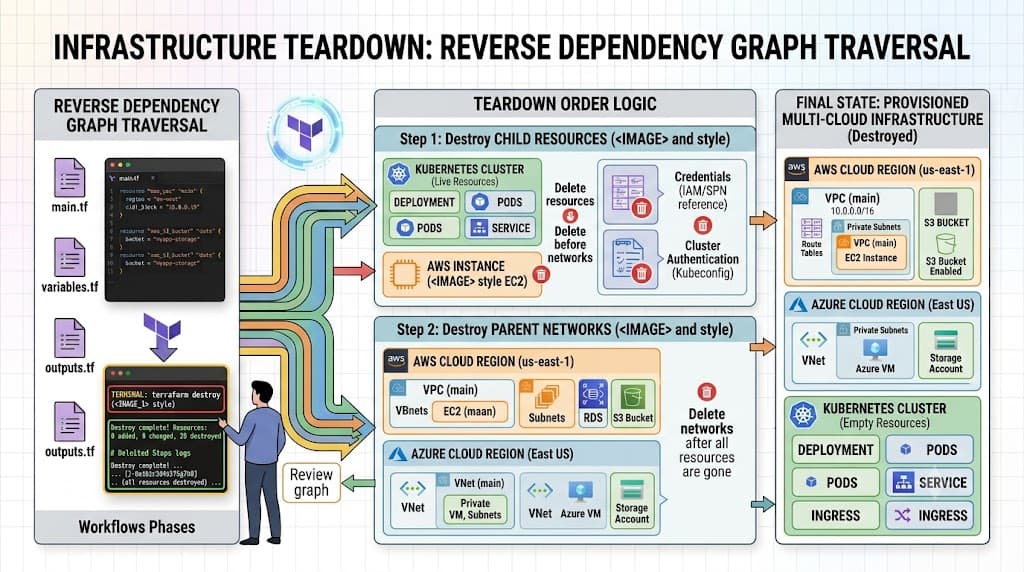
The terraform destroy command is a core utility provided by HashiCorp Terraform used to tear down all the remote infrastructure objects managed by a specific Terraform configuration and state file. By reading your current state, building an inverse dependency graph, and executing API calls against your cloud provider, it safely reverses the provisioning process. It is commonly invoked via the terminal using the command 'terraform destroy', which parses your active HCL files, computes a planned destruction set, prompts for user confirmation unless automated with approval flags, and systematically deletes resources in the precise reverse order of their creation to respect underlying hardware, networking, and security dependencies.
Understanding the Concept
Within the broader scope of Infrastructure as Code, declarative tools like Terraform abstract complex cloud APIs into human-readable configuration files known as HashiCorp Configuration Language (HCL). When resources are created via 'terraform apply', Terraform records every single resource identifier, attribute, and inter-resource dependency inside a state file, which typically resides locally or in a remote backend like an S3 bucket with state locking enabled via DynamoDB.
Understanding what happens under the hood during a teardown operation requires recognizing that infrastructure is never isolated. A virtual private cloud (VPC) contains subnets; subnets contain route tables and security groups; security groups attach to network interfaces; and those interfaces bind directly to virtual machine instances or container workloads. If you attempt to delete a foundational networking component before its dependent compute instances are fully terminated, the cloud provider's API will reject the request, resulting in deployment failures and half-deleted states.
This is why state management implications are paramount. Terraform evaluates the resource dependency graph recorded in your state file, determines the exact leaf nodes that have no incoming dependencies, and destroys them first. Moving progressively upward through the graph, it ensures that parent resources are only purged after all child components have completely vanished from the target environment. Maintaining this strict sequencing prevents dangling references, prevents orphaned cloud bills, and keeps your infrastructure state file fully synchronized with actual cloud reality.
How It Works
Terraform operates by comparing your desired configuration against your actual infrastructure state using a three-phase execution model: refresh, plan, and execute. When you initiate a teardown, Terraform first queries the cloud provider's API to refresh the current status of all resources listed in your state. This refresh phase ensures that manual changes made outside of Terraform—such as someone deleting a server via the web console—do not cause fatal state drift errors during the destruction run.
Once the state is fully synchronized, Terraform constructs an execution plan that marks every single managed resource for deletion. This plan outlines the exact sequence of actions it will take, highlighting dependent relationships and showing you precisely what will be removed before a single API delete request is transmitted. This mechanism gives engineering teams a clear window for review, ensuring that production databases or core networking tiers are never accidentally caught in a broad sweep.
Syntax and configuration
The primary command interface relies on the standard Terraform CLI executable. The base syntax is straightforward, yet several flags allow operators to customize its behavior for local testing versus automated CI/CD pipelines:
terraform destroy [options]
Key flags and options include:
-auto-approve: Skptics the interactive confirmation prompt, forcing the destruction plan to execute immediately. Use with extreme caution in shared or production environments.-target=resource_type.name: Restricts the destruction operation to a specific resource and its dependencies, leaving the rest of your infrastructure intact.-var 'key=value'or-var-file=filename: Passes required input variables if your configuration relies on dynamic values to locate state or connect to providers.-lock=false: Disables state locking during the operation. This should almost never be used unless recovering from a catastrophic lock failure.-refresh=false: Skips the state refresh phase, relying entirely on cached local state data.
CLI workflow
To fully appreciate the destruction workflow, it helps to contrast it against day-to-day provisioning commands. While 'terraform apply' calculates a diff between your local HCL files and your remote state to add or modify resources, the destruction workflow effectively treats an empty configuration or an explicit teardown trigger as an instruction to reduce all managed resource counts to zero.
When you run 'terraform plan -destroy', Terraform generates a preview file showing every resource that will be removed. This serves the exact same review function as a standard plan, allowing you to verify that critical infrastructure is excluded if you are using target flags. Once verified, executing 'terraform destroy' triggers the actual API communication phase, streaming progress logs directly to your terminal as each resource transitions through termination states.
Practical Terraform Example
To see this workflow in action, consider a minimal, self-contained HCL configuration that provisions a basic cloud resource—such as an AWS security group or a local Docker container—and then removes it cleanly. Using a local provider like the Docker provider makes local testing fast, safe, and entirely free of cloud costs.
terraform {
  required_providers {
    docker = {
      source  = "kreuzwerker/docker"
      version = "~> 3.0.2"
    }
  }
}

provider "docker" {}

resource "docker_image" "nginx" {
  name         = "nginx:alpine"
  keep_locally = false
}

resource "docker_container" "nginx_server" {
  image = docker_image.nginx.image_id
  name  = "tutorial_nginx"
  ports {
    internal = 80
    external = 8080
  }
}
Example
With the configuration defined in a file named main.tf, you first initialize the working directory to download the required provider plugins:
terraform init
Next, provision the infrastructure by running the apply command and confirming the prompt:
<a href="/article/terraform-apply-create-and-update-infrastructure-2" class="text-primary font-semibold hover:underline">terraform apply</a>
Once the container is running and verified, you are ready to tear it down. Execute the destruction command for this specific configuration:
terraform destroy
Terraform will output an execution plan indicating that docker_container.nginx_server and docker_image.nginx will be destroyed. After typing yes at the confirmation prompt, Terraform communicates with the local Docker daemon, stops the running container, removes it, and subsequently deletes the downloaded container image from local storage, leaving your environment completely clean.
Verification
Verification is an indispensable final step in any infrastructure teardown procedure. Assuming that the command finishes with a success message does not guarantee that every underlying cloud object, security rule, or persistent volume has been completely purged from your provider account.
Verification
To confirm that resources have been successfully and completely removed, combine CLI inspection commands with state file validation. First, run a fresh plan to ensure Terraform detects zero remaining infrastructure:
terraform plan
A clean environment will output: No changes. Your infrastructure matches the configuration. Next, inspect your local or remote state backend to verify that the resource inventory is empty:
terraform show
If using cloud-specific environments such as AWS, supplement these checks with native CLI tools—such as running aws ec2 describe-instances or checking your cloud provider's billing and resource dashboards—to verify that no zombie resources or hanging storage volumes continue incurring costs.
Common Mistakes
Even experienced engineers occasionally run into pitfalls when tearing down cloud environments. Recognizing these common errors helps prevent accidental outages and data loss.
Failure modes
- Skipping the Plan Phase: Executing automated scripts with
-auto-approvewithout reviewing the destruction scope can wipe out production databases or core networking layers instantly. - Hard-Coding Credentials: Embedding access keys directly inside provider blocks exposes secrets in source control and makes secure teardowns impossible if credentials expire.
- Misunderstanding State Drift: If someone manually deletes a resource via a cloud console, a subsequent destruction run may fail because Terraform attempts to delete an object that no longer exists in the provider API.
- Ignoring Upstream Dependencies: Forcing deletions without respecting provider dependency graphs leads to persistent errors where parent networks or security groups refuse to delete because child interfaces are still active.
Best Practices
Implementing rigorous operational safeguards ensures that infrastructure teardowns remain controlled, auditable, and safe for team environments.
- Utilize Remote State Backends: Always store your state file in collaborative, encrypted backends (such as AWS S3 with DynamoDB locking) rather than keeping local state files on individual developer laptops.
- Enforce Least Privilege Access: Ensure that the IAM roles or service accounts executing destruction commands possess only the permissions required for that specific workspace, preventing blast-radius expansion.
- Integrate CI/CD Safeguards: In enterprise pipelines connected to GitHub or GitLab, configure pull request checks to output destruction plans automatically, requiring mandatory peer review before any merge triggers a teardown.
- Backup Critical Data: Always ensure that persistent databases, object storage buckets, and critical logs have independent snapshots or backups before executing any sweeping infrastructure removal.
Troubleshooting
When a teardown operation encounters errors, diagnosing the root cause requires methodical analysis of state files, provider logs, and dependency trees.
Troubleshooting example
Consider a scenario where running terraform destroy fails with a persistent error indicating that an AWS VPC cannot be deleted because dependent subnets or network interfaces still exist:
Error: Error deleting VPC: DependencyViolation: The vpc 'vpc-0123456789abcdef0' has dependencies and cannot be deleted.
To resolve this dependency failure, investigate whether external resources—such as a Kubernetes cluster load balancer or an orphaned Docker container—created attachments outside of your declarative HCL configuration. If manual changes created orphaned dependencies, you must either import those resources into your state file temporarily using <a href="/article/terraform-import-bring-existing-infrastructure-under-management" class="text-primary font-semibold hover:underline">terraform import</a> so Terraform can manage and remove them, or manually delete the interfering child resources via your cloud console before re-running the destruction command. If a specific resource is permanently stuck and blocking the entire teardown, you can use <a href="/article/terraform-state-explained-2" class="text-primary font-semibold hover:underline">terraform state</a> rm to untrack the stubborn resource from the state file, though you must then clean up the physical cloud resource manually to avoid orphaned infrastructure.
Additionally, enabling detailed logging can help diagnose stubborn provider API timeouts during large-scale teardowns:
export TF_LOG=DEBUG
terraform destroy
Analyzing these debug logs reveals exact HTTP request and response payloads exchanged with cloud APIs, allowing engineers to pinpoint exact permission denials, rate limits, or locking conflicts that caused the operation to stall.
📌 Recommended Next Guides & References
  <li>
    <a href="/article/docker-and-kubernetes-how-they-work-together-2" class="text-primary hover:underline font-semibold flex items-center gap-2">
      <span>→</span> <span>Docker and Kubernetes: How They Work Together</span>
    </a>
  </li>

  <li>
    <a href="/article/kubernetes-ingress-explained" class="text-primary hover:underline font-semibold flex items-center gap-2">
      <span>→</span> <span>Kubernetes Ingress Explained: Routing, Controllers, and TLS</span>
    </a>
  </li>

  <li>
    <a href="/article/kubernetes-ingress-controller-explained" class="text-primary hover:underline font-semibold flex items-center gap-2">
      <span>→</span> <span>Kubernetes Ingress Controller Explained: Architecture, Routing, and Implementation</span>
    </a>
  </li>


