Quick Answer
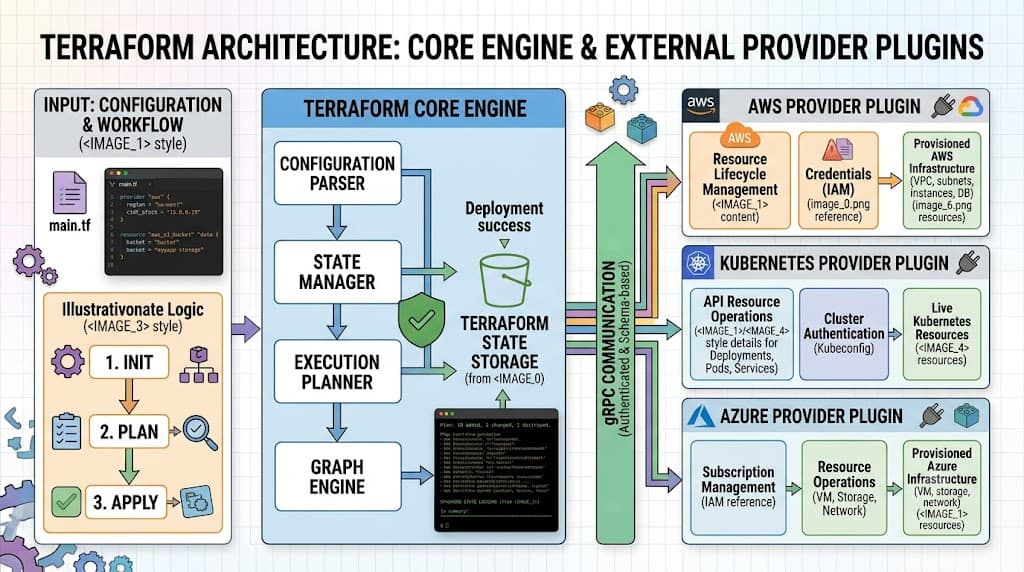
Terraform providers are the foundational plugins that enable HashiCorp Configuration Language (HCL) to interact with external Application Programming Interfaces (APIs). When you declare infrastructure inside your configuration files, Terraform itself does not natively know how to communicate with AWS, Kubernetes, GitHub, or any other specific platform. Instead, Terraform acts as an orchestrator, delegating the actual creation, modification, and deletion of resources to individual provider binaries. These plugins handle authentication, translate your abstract resource declarations into provider-specific API requests, and parse the responses back into the local state file. For instance, declaring an aws_instance resource triggers the AWS provider to invoke the EC2 API under the hood, abstracting away complex HTTP request formatting and error handling from the developer.
Quick Answer
Terraform providers are external plugins that act as translators between your HCL configuration and target platform APIs. When you execute Terraform commands, the core engine communicates via a secure Remote Procedure Call (RPC) protocol with these provider plugins to manage infrastructure lifecycle events. For example, a simple configuration snippet declares the required provider block:
terraform {
  required_providers {
    aws = {
      source  = "hashicorp/aws"
      version = "~> 5.0"
    }
  }
}

provider "aws" {
  region = "us-east-1"
}

resource "aws_vpc" "main" {
  cidr_block = "10.0.0.0/16"
}
To verify that this provider initializes correctly, you execute terraform init, which downloads the binary from the public registry. Running terraform plan previews the execution graph before terraform apply provisions the actual AWS VPC resource. This decoupled architecture separates the core engine from platform-specific integration logic.
Understanding the Concept
The concept of a provider stems from the core design philosophy of Infrastructure as Code: separating the orchestration engine from the managed targets. In the early days of automation, custom scripts tightly coupled business logic with proprietary SDKs. Terraform decouples these concerns completely. The core engine manages dependency graphs, execution plans, and state synchronization, while specialized plugins handle the domain-specific logic of interacting with cloud vendors, container platforms, and SaaS tools.
Providers live inside the broader ecosystem of the terraform registry, a centralized repository hosting thousands of official, verified, and community-maintained plugins. Each provider exposes a specific set of resources and data sources. Resources represent infrastructural components you want to create, update, or destroy, such as virtual servers, subnets, or repository webhooks. Data sources allow you to query existing infrastructure or external data to inject dynamic values into your configurations.
State implications are tightly bound to how providers operate. During every execution, providers query the target API and compare the live infrastructure against the state file. This process detects drift, ensuring that manual out-of-band changes are accurately flagged and reconciled. Understanding this relationship prevents common architectural pitfalls, such as orphaned resources or state lock conflicts in shared team environments.
How It Works
Under the hood, Terraform operates as a standalone CLI application that spawns provider plugins as separate operating system processes. Communication between the core Terraform binary and these provider plugins occurs over a gRPC-based protocol via standard input and output streams. When you run a CLI command, the core engine constructs an internal directed acyclic graph (DAG) representing the dependency tree of all declared resources and data sources.
Once the dependency graph is established, the core engine sends serialized execution instructions to the respective provider processes. Each provider plugin executes these instructions by converting them into authenticated HTTPS requests, gRPC calls, or native SDK operations targeted at the remote API. The remote service processes the request and returns a response, which the provider plugin normalizes and reports back to the core engine. The core engine then updates the state file to reflect the new reality of the managed infrastructure. This decoupled, asynchronous process ensures that bugs or panics within a single provider plugin do not crash the core Terraform orchestrator.
Syntax and configuration
Configuring providers requires strict adherence to HCL syntax rules within your root and module configurations. The terraform block contains a required_providers nested block, which explicitly defines the source namespace and version constraints for each plugin your project depends on. Omitting explicit version constraints is a major anti-pattern because automatic upgrades to new major provider versions can introduce breaking changes and unexpected resource replacement.
Provider configuration blocks themselves are defined at the root level using the provider keyword, followed by the provider name and a set of configuration attributes such as regions, endpoints, and authentication tokens. While authentication credentials like access keys can theoretically be passed directly as HCL arguments, doing so creates severe security risks if committed to version control. Production workflows instead rely on environment variables, shared credential files, or IAM instance profiles that providers automatically read from the executing environment.
CLI workflow
The Terraform command-line interface provides a deterministic lifecycle workflow that governs how providers and resources are interacted with. Mastering this workflow is vital for safe infrastructure management.
terraform init
terraform validate
terraform plan
terraform apply
Each command serves a distinct purpose in the execution chain. terraform init scans your configuration files, identifies required providers, downloads the appropriate binaries from the registry into the local .terraform directory, and initializes backend state storage. terraform validate performs static analysis to ensure syntactical correctness without making network calls. terraform plan queries the provider APIs to generate an execution preview, highlighting what will be created, modified, or destroyed. Finally, terraform apply executes the planned actions against the target APIs after a final confirmation prompt.
Practical Terraform Example
A practical example demonstrates how providers, resources, and CLI commands come together in a real-world scenario. Consider provisioning a basic Linux-based virtual server inside an AWS environment. The configuration requires declaring the AWS provider, setting up a networking VPC and subnet, and defining an EC2 instance resource.
terraform {
  required_version = ">= 1.5.0"
  required_providers {
    aws = {
      source  = "hashicorp/aws"
      version = "~> 5.30"
    }
  }
}

provider "aws" {
  region = "us-west-2"
}

resource "aws_vpc" "prod_vpc" {
  cidr_block           = "10.100.0.0/16"
  enable_dns_hostnames = true

  tags = {
    Name = "production-vpc"
  }
}

resource "aws_subnet" "prod_subnet" {
  vpc_id            = aws_vpc.prod_vpc.id
  cidr_block        = "10.100.1.0/24"
  availability_zone = "us-west-2a"

  tags = {
    Name = "production-subnet"
  }
}

resource "aws_instance" "web_server" {
  ami           = "ami-0c55b159cbfafe1f0"
  instance_type = "t3.micro"
  subnet_id     = aws_subnet.prod_subnet.id

  tags = {
    Name = "web-app-server"
  }
}
Example
Walking through the expected plan and apply behavior clarifies why each step is executed. When you execute terraform plan, the AWS provider plugin queries the AWS EC2 and VPC APIs to check the current account state. Because no resources exist yet, the plan output displays three additions marked with green plus signs (+), indicating that a new VPC, subnet, and EC2 instance will be created. The attributes inside the HCL configuration are validated against the AWS provider schema to ensure required fields like ami and cidr_block are populated with valid data types.
Executing terraform apply sends the concrete create requests to the AWS API in an order dictated by the dependency graph. Specifically, the VPC is created first, because the subnet resource explicitly references aws_vpc.prod_vpc.id. Once the VPC ID is returned, the subnet creation request is dispatched. Finally, after the subnet is provisioned, the EC2 instance launch request is transmitted. Each successful API response returns unique resource identifiers, which are immediately serialized into the local or remote state file for future tracking.
Verification
Confirming that your infrastructure has been successfully provisioned without introducing unintended risks requires safe verification methods. Never rely solely on a successful terminal exit code; always cross-reference the state file and perform read-only checks against the target platform.
To inspect the managed resources locally without making destructive API calls, utilize the state inspection commands:
terraform state list
terraform state show aws_instance.web_server
The terraform state list command outputs a clean list of all resource addresses currently tracked in your state file, verifying that the provider successfully registered them. Running terraform state show prints the exact attribute values stored in state, allowing you to confirm properties like private IP addresses, security group attachments, and assigned tags.
For external platform verification, use read-only CLI tools native to the target environment, such as the AWS CLI or Kubernetes kubectl, to inspect live resource tags and statuses. This double-validation approach ensures that your local state accurately mirrors production reality.
Common Mistakes
Even experienced engineers occasionally fall into recurring traps when working with Terraform providers and infrastructure configurations. Recognizing these common mistakes prevents costly production outages and security breaches.
- Skipping
terraform plan: Executingterraform apply -auto-approvewithout reviewing the execution plan frequently leads to accidental resource deletions or unintended modifications of production systems. - Hard-coding credentials: Embedding secret access keys, API tokens, or passwords directly into provider HCL blocks exposes sensitive credentials if the codebase is accidentally pushed to public repositories.
- Misunderstanding state: Manually editing the state JSON file or failing to configure remote state locking in collaborative teams results in state corruption and concurrent write conflicts.
- Using outdated provider arguments: Relying on deprecated attributes or failing to pin provider versions causes unexpected failures when registry maintainers push breaking schema updates.
- Assuming universal provider behavior: Assuming that error handling, eventual consistency, and rate-limiting behaviors are identical across different cloud providers often leads to flaky deployment pipelines.
Best Practices
Adopting rigorous production best practices ensures that your infrastructure deployments remain secure, repeatable, and maintainable at scale. Establish strict guidelines for state management and version control across your engineering organization.
Always configure a remote backend with native state locking, such as an encrypted cloud object store paired with a distributed locking table, to prevent concurrent modifications by multiple engineers or CI/CD pipelines. Pin your provider versions explicitly using strict constraint operators (such as ~> 5.0) in your root configurations to guarantee reproducible builds and protect against breaking API updates.
Manage all provider authentication securely by utilizing ephemeral credentials, environment variables, IAM roles, or secret management tools rather than storing long-lived keys in plain text files. Integrate automated static analysis, security scanners, and format checks into your version control workflows to catch misconfigurations before they reach review stages.
Troubleshooting
When infrastructure deployments stall or fail, systematic troubleshooting isolates the root cause quickly. Provider-related errors typically fall into three categories: initialization failures, authentication issues, and API timeout errors.
If terraform init fails with a checksum or registry download error, verify your network connectivity, proxy configurations, and ensure the specified provider version exists in the registry. For authentication errors, export the required debug flags to inspect verbose API traffic:
export TF_LOG=DEBUG
export TF_LOG_PATH="terraform_debug.log"
<a href="/article/terraform-apply-create-and-update-infrastructure-2" class="text-primary font-semibold hover:underline">terraform apply</a>
Enabling debug logging dumps detailed HTTP request and response payloads generated by the provider plugin into your specified log file, revealing exact permission denials, malformed payload structures, or upstream API rate-limit throttling responses. When dealing with transient API timeouts, configure provider-level retry blocks or adjust timeout parameters to gracefully handle temporary network congestion from cloud vendors.
📌 Recommended Next Guides & References
  <li>
    <a href="/article/docker-and-kubernetes-how-they-work-together-2" class="text-primary hover:underline font-semibold flex items-center gap-2">
      <span>→</span> <span>Docker and Kubernetes: How They Work Together</span>
    </a>
  </li>

  <li>
    <a href="/article/kubernetes-ingress-explained" class="text-primary hover:underline font-semibold flex items-center gap-2">
      <span>→</span> <span>Kubernetes Ingress Explained: Routing, Controllers, and TLS</span>
    </a>
  </li>

  <li>
    <a href="/article/kubernetes-ingress-controller-explained" class="text-primary hover:underline font-semibold flex items-center gap-2">
      <span>→</span> <span>Kubernetes Ingress Controller Explained: Architecture, Routing, and Implementation</span>
    </a>
  </li>


