Quick Answer
Managing cloud storage reliably requires treating infrastructure definitions as code, ensuring that every resource is version-controlled, repeatable, and transparently reviewed before changes reach production environments. When engineering teams build cloud infrastructure on Amazon Web Services, creating secure object storage is a foundational requirement for applications ranging from static asset hosting to data lakes and backup systems. Utilizing Infrastructure as Code (IaC) tools streamlines this process by replacing manual console clicks with declarative configuration files that define the desired target state of your cloud environment.
Quick Answer
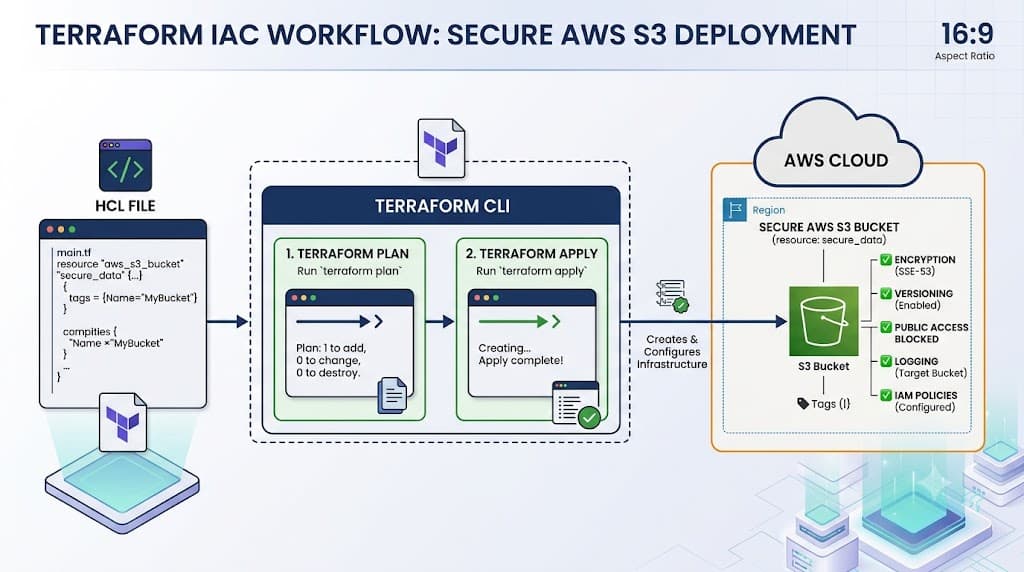
A terraform s3 bucket refers to the definition and provisioning of an Amazon Simple Storage Service (Amazon S3) object storage container using HashiCorp Terraform. To create an S3 bucket, engineers write a declarative resource block in HashiCorp Configuration Language (HCL) using the official AWS provider. Specifically, the configuration defines an aws_s3_bucket resource, specifying a globally unique name and optional configuration blocks such as versioning, server-side encryption, and public access blocks. Once written, engineers initialize the working directory with terraform init, inspect the proposed changes using terraform plan, and provision the actual cloud resources by executing terraform apply in their terminal or CI/CD automation pipeline.
Understanding the Concept
Infrastructure as Code has fundamentally transformed how system administrators and DevOps engineers provision cloud resources. Instead of interacting with proprietary web consoles or running unverified shell scripts, teams declare their target architecture in plain text configuration files. These files act as the single source of truth for the organization's infrastructure state. When working with AWS object storage, the declarative model abstracts away the underlying API mechanics, allowing engineers to focus on parameters such as bucket naming policies, access control lists, lifecycle rules, and data encryption standards.
HashiCorp Configuration Language (HCL) serves as the human-readable language for expressing these resource definitions. HCL balances readability with programmatic expressiveness, enabling operators to use variables, locals, data sources, and modules to construct modular, reusable configurations. When managing a storage bucket, HCL allows you to explicitly link dependencies, such as associating an IAM policy or a bucket notification rule directly to the storage container. Because these configuration files are stored in version control systems like GitHub alongside application source code, every modification undergoes peer review, automated linting, and continuous integration testing before deployment.
Furthermore, IaC enforces consistency across multiple environments. A staging environment and a production environment can share identical storage configurations while varying only in scale parameters or retention policies. This reduces human error, eliminates configuration drift between manual setups, and ensures that disaster recovery scenarios can be executed predictably by reapplying the exact same codebase to a fresh AWS region.
How It Works
Terraform operates by comparing the declarative configuration files against the real-world infrastructure managed through cloud provider APIs. This reconciliation process relies entirely on a state file, which maps your HCL resources to actual remote objects in AWS. Understanding how this state mechanism functions is critical for maintaining healthy infrastructure.
Syntax and configuration
The syntax for defining an object storage resource in Terraform follows a rigid structural pattern defined by the AWS provider schema. At its core, a configuration requires an explicit provider declaration to authenticate and communicate with AWS, followed by one or more resource blocks. The resource block declares the provider-specific resource type—in this case, aws_s3_bucket—and assigns it a local name that other blocks within your configuration can reference.
Within the resource block, arguments dictate the properties of the cloud object. Because Amazon S3 bucket names must be globally unique across all AWS accounts worldwide, choosing a unique naming convention is paramount. Additional configuration blocks, such as aws_s3_bucket_versioning or aws_s3_bucket_server_side_encryption_configuration, are often appended as separate companion resources to enforce enterprise security standards, separating distinct operational concerns into maintainable modular blocks.
CLI workflow
The foundational Terraform CLI workflow governs how your local HCL definitions translate into remote cloud resources. The lifecycle begins with initialization, where the working directory downloads required provider plugins and configures the state backend. Once initialized, operators execute the planning phase to preview changes before execution.
Distinguishing between planning and execution is a core operational discipline. The terraform plan command performs a read-only analysis against the current state and remote AWS APIs, generating a detailed execution plan that highlights additions, modifications, or destructions. No actual infrastructure is altered during this step. Conversely, terraform apply executes the approved plan, sending API requests to AWS to create or update the resources while updating the local or remote state file to reflect the new reality.
During concurrent operations in shared teams or CI/CD pipelines, state locking prevents multiple users from modifying the state simultaneously, avoiding race conditions and state corruption. This locking mechanism is typically handled via remote backends such as S3 with DynamoDB locking or HashiCorp Cloud Platform.
Practical Terraform Example
Implementing object storage safely requires a complete, syntactically valid configuration that incorporates essential security best practices, such as encryption and public access prevention, right from the start.
Example
To put these concepts into practice, execute the following step-by-step terminal and HCL workflow. First, create a dedicated directory for your Terraform configuration, navigate into it, and create a main configuration file containing the provider setup and storage definitions.
terraform {
  required_version = ">= 1.5.0"
  required_providers {
    aws = {
      source  = "hashicorp/aws"
      version = "~> 5.0"
    }
  }
}

provider "aws" {
  region = "us-east-1"
}

resource "aws_s3_bucket" "data_lake" {
  bucket        = "my-company-production-data-lake-bucket-xyz"
  force_destroy = false

  tags = {
    Environment = "Production"
    ManagedBy   = "Terraform"
    Team        = "DataEngineering"
  }
}

resource "aws_s3_bucket_ownership_controls" "example" {
  bucket = aws_s3_bucket.data_lake.id
  rule {
    object_ownership = "BucketOwnerEnforced"
  }
}

resource "aws_s3_bucket_public_access_block" "secure" {
  bucket                  = aws_s3_bucket.data_lake.id
  block_public_acls       = true
  block_public_policy     = true
  ignore_public_acls      = true
  restrict_public_buckets = true
}
To execute this configuration, open your terminal in the directory containing the file and run the initialization command to download the AWS provider plugin:
terraform init
Next, generate and review the dry-run execution plan to verify that Terraform intends to create the exact resources you expect without any unintended modifications:
terraform plan -out=tfplan
Finally, apply the saved plan file to provision the storage bucket in your AWS account:
<a href="/article/terraform-apply-create-and-update-infrastructure-2" class="text-primary font-semibold hover:underline">terraform apply</a> tfplan
Verification
Ensuring that your cloud resources have been provisioned exactly as specified is a mandatory step before handing workloads over to application developers or connecting automated CI/CD pipelines.
Verification
Verification can be performed using both Terraform's native state inspection tools and direct AWS CLI validation commands. To inspect the resources tracked in your current state, run the following command to view detailed attribute data:
terraform show
Alternatively, you can query the AWS API directly using the AWS CLI to confirm that the bucket exists and that your credentials possess the necessary permissions to access it:
aws s3api head-bucket --bucket my-company-production-data-lake-bucket-xyz
A successful execution returns a zero exit code and no error output, confirming that the storage container is active and reachable.
Common Mistakes
Deploying cloud storage without adhering to established operational standards frequently leads to security vulnerabilities, naming collisions, or state corruption.
Failure modes
One of the most frequent mistakes is hard-coding AWS access keys and secret keys directly into the provider block. This practice creates severe security risks if the configuration file is accidentally committed to public code repositories. Always authenticate using environment variables, AWS shared credentials files, or IAM instance profiles.
Another common failure mode involves global naming collisions. Because S3 bucket names must be globally unique across all AWS customers worldwide, attempting to provision a common name like my-bucket will result in an immediate API conflict error. Additionally, developers often skip reviewing the terraform plan output, leading to accidental resource destruction when modifying existing attribute names that force replacement.
Outdated provider versions can also introduce unexpected behavior. The AWS provider undergoes rapid evolution, and deprecated arguments can cause configuration applications to fail unexpectedly if version constraints are omitted.
Best Practices
Production environments demand rigorous adherence to security and operational standards. When provisioning cloud storage, always enforce server-side encryption by default and enable S3 bucket versioning to protect critical data assets against accidental deletion or overwriting. Furthermore, implement strict public access blocking policies on every storage container unless public website hosting is explicitly required by business logic.
In team settings, store your state files remotely in a secure backend such as an encrypted S3 bucket coupled with a DynamoDB table for state locking. Integrate your Terraform workflows into automated CI/CD pipelines so that pull requests automatically trigger a terraform plan check, allowing team members to review infrastructure modifications as part of code review before any apply step occurs.
Troubleshooting
Diagnosing unexpected deployment failures requires systematically examining error logs, state consistency, and IAM permissions.
Troubleshooting
If an apply operation fails due to access denied errors, verify that the local execution environment possesses sufficient IAM permissions to create S3 buckets and associated security blocks. If you encounter state drift—where manual changes made in the AWS console conflict with your HCL files—run terraform refresh or inspect the discrepancy using terraform plan to reconcile the differences before attempting further modifications. When dealing with buckets that refuse to delete because they contain objects, remember that setting force_destroy = true in your HCL configuration permits Terraform to purge all stored objects during destruction, though this should be used with extreme caution in production environments.
📌 Recommended Next Guides & References
  <li>
    <a href="/article/docker-and-kubernetes-how-they-work-together-2" class="text-primary hover:underline font-semibold flex items-center gap-2">
      <span>→</span> <span>Docker and Kubernetes: How They Work Together</span>
    </a>
  </li>

  <li>
    <a href="/article/kubernetes-ingress-explained" class="text-primary hover:underline font-semibold flex items-center gap-2">
      <span>→</span> <span>Kubernetes Ingress Explained: Routing, Controllers, and TLS</span>
    </a>
  </li>

  <li>
    <a href="/article/kubernetes-ingress-controller-explained" class="text-primary hover:underline font-semibold flex items-center gap-2">
      <span>→</span> <span>Kubernetes Ingress Controller Explained: Architecture, Routing, and Implementation</span>
    </a>
  </li>