Quick Answer
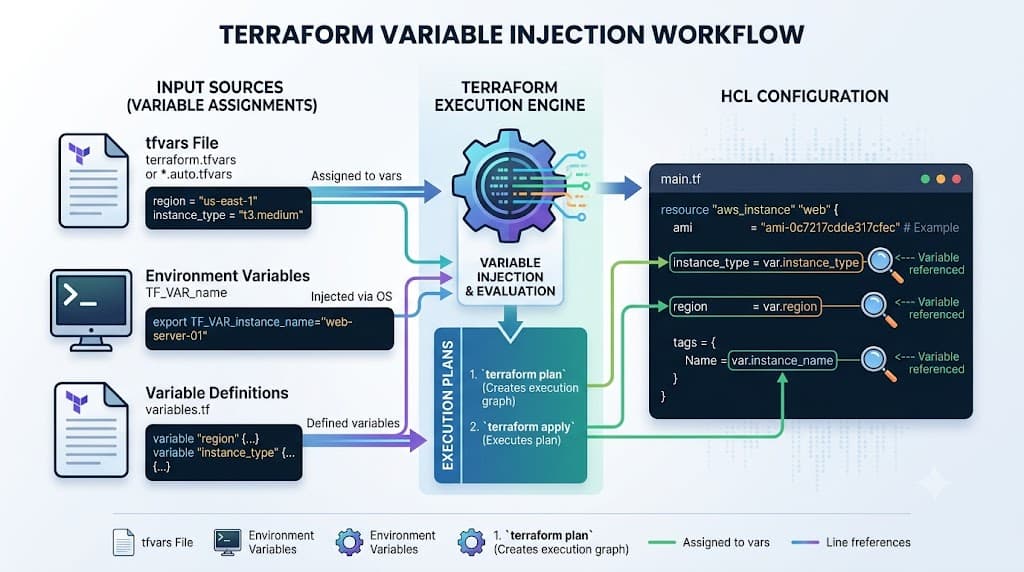
Terraform variables provide the dynamic foundation required to parameterize Infrastructure as Code deployments across multiple environments. Instead of hard-coding values directly into your HCL configurations, variables allow you to decouple your infrastructure definition from environment-specific data such as instance sizes, region names, scaling limits, and environment tags. By passing these inputs dynamically via command-line flags, environment variables, or dedicated variable files, platform engineers can maintain a single, reusable codebase that safely provisions development, staging, and production infrastructure without manual code duplication. This comprehensive guide explores how input variables work under the hood, how state implications affect their usage, and how to implement robust variable validation and secure handling in production environments.
Quick Answer
Terraform variables are input parameters defined within HCL configurations that allow you to inject dynamic values into your infrastructure code at runtime. They act much like function arguments in traditional programming languages, enabling a single set of configuration files to adapt across different environments, regions, and deployments. You declare them using the variable block syntax, supply values via command-line flags like -var, environment variables prefixed with TF_VAR_, or external .tfvars files, and reference them in your resources using var.variable_name. To verify that your variables are correctly interpreted before making any real-world changes, you run terraform plan, which evaluates the inputs against your resource definitions and displays an execution preview.
Understanding the Concept
Infrastructure as Code thrives on modularity and reusability. When engineering complex cloud environments spanning AWS, Kubernetes clusters, and supporting Linux or Docker hosting layers, hard-coding configuration parameters quickly leads to maintenance bottlenecks. Terraform variables solve this challenge by separating the structural blueprint of your infrastructure from its volatile input data. When you declare an input variable, you establish an explicit contract for what data your module or root configuration expects to receive.
This separation has profound implications for state management and team collaboration. Terraform state tracks resource mappings against configuration parameters. When variables change, Terraform evaluates whether the modification can be handled via an in-place update or if it requires destroying and recreating the underlying resource. Understanding this lifecycle is critical when managing production resources where unexpected downtime must be avoided at all costs. By centralizing inputs, teams can version control their infrastructure configurations while keeping sensitive or environment-specific data isolated in secure files or CI/CD secrets storage.
How It Works
To master how variable resolution functions in practice, you must understand the underlying syntax, type constraints, and execution workflow. Terraform evaluates variables during the initialization and planning phases, merging default values, user-supplied files, environment variables, and command-line inputs according to a strict precedence order.
Syntax and configuration
Terraform utilizes HashiCorp Configuration Language (HCL) to define variables. A standard variable block includes an optional type constraint, a default value, a description, and validation rules. Supported built-in types include primitive types such as string, number, and bool, as well as complex structural types like list, map, set, and object. Type constraints ensure that invalid data types are caught immediately during the planning phase rather than failing mid-deployment during cloud provider API calls.
variable "instance_type" {
  type        = string
  description = "The EC2 instance type for the application server."
  default     = "t3.medium"

  validation {
    condition     = can(regex("^t3\.", var.instance_type))
    error_message = "The instance_type must be a valid t3 family instance."
  }
}

variable "environment_tags" {
  type = map(string)
  default = {
    Environment = "development"
    ManagedBy   = "terraform"
  }
}
These validation blocks enforce strict data hygiene, ensuring that cloud architects and junior engineers alike adhere to organizational standards before any infrastructure provisioning begins. Complex objects and lists allow nested configurations to scale cleanly without sprawling into unmanageable parameter lists.
CLI workflow
Execution flow in Terraform relies heavily on how and when variable values are supplied to the CLI. When executing commands like terraform plan or terraform apply, Terraform checks several sources for variable values in a specific order of precedence, moving from least specific to most specific:
- Default values defined within the variable block itself.
- Any
.auto.tfvarsor*.auto.tfvars.jsonfiles found in the working directory. - Any
-varor-var-fileflags passed directly in the Terraform CLI invocation. - Environment variables formatted with the
TF_VAR_prefix.
Understanding this cascade is vital for debugging unexpected configuration behavior. For instance, if an environment variable TF_VAR_instance_type="t3.large" is set in your Linux shell or CI/CD pipeline agent, it will override the default value specified in your HCL code. When running automated pipelines, explicitly passing -var-file=production.tfvars ensures complete predictability across staging and production targets.
Practical Terraform Example
Implementing a robust variable structure requires combining HCL variable definitions with clean provider configurations and structured input files. Below is a realistic example demonstrating how input parameters drive an AWS infrastructure setup.
Example
Consider a root module configuration that provisions an AWS security group and an associated EC2 instance. Rather than hard-coding ports or instance sizes, we define our inputs in a dedicated variables file and reference them across our resource blocks.
# variables.tf
variable "aws_region" {
  type        = string
  description = "Target AWS region for resource deployment."
  default     = "us-east-1"
}

variable "allowed_ports" {
  type        = list(number)
  description = "List of inbound ports to open on the security group."
  default     = [80, 443, 22]
}

# main.tf
provider "aws" {
  region = var.aws_region
}

resource "aws_security_group" "web" {
  name        = "web-server-sg"
  description = "Security group for web application"

  dynamic "ingress" {
    for_each = var.allowed_ports
    content {
      from_port   = ingress.value
      to_port     = ingress.value
      protocol    = "tcp"
      cidr_blocks = ["0.0.0.0/0"]
    }
  }
}
To supply values for these parameters in a production environment, you maintain a corresponding .tfvars file:
# production.tfvars
aws_region    = "us-west-2"
allowed_ports = [443, 8443]
When invoking the CLI, you bind these parameters explicitly:
terraform plan -var-file="production.tfvars" -out="tfplan"
This command compiles the execution plan, locking in the resolved variable values and saving the compiled plan binary to disk. This guarantees that the exact configuration reviewed during planning is what gets executed during the subsequent apply phase.
Verification
Verifying that your variable injections behave as expected before touching production infrastructure is a core tenet of safe Infrastructure as Code practices. The primary mechanism for this verification is the execution preview generated by terraform plan.
When you run terraform plan, Terraform parses your input variables, applies default and overridden values, evaluates any custom validation conditions, and compares the resulting desired state against your current remote state backend. Reviewing the terminal output allows you to inspect every attribute change.
terraform plan -var-file="production.tfvars"
Examine the resulting output carefully. If a variable was overridden incorrectly, the plan will highlight resource modifications or replacements that you did not anticipate. Additionally, you can utilize terraform show to inspect a saved plan file in detail. For deeper inspection, configuring output blocks (output "server_ip" { value = aws_instance.web.public_ip }) exposes computed or variable-derived attributes to the console and to downstream automation scripts once the apply phase completes successfully.
Failure modes
When variable configurations go wrong, Terraform halts execution during the planning phase and emits specific error diagnostics. Common failure modes include:
- Missing Required Variables: If a variable has no default value and no value is supplied via CLI flags, environment variables, or tfvars files, Terraform pauses and prompts interactively in local terminals or fails immediately in non-interactive CI/CD pipelines.
- Type Mismatch Errors: Supplying a string where a list or number is strictly expected triggers an immediate HCL type conversion error during evaluation.
- Validation Failures: If a custom
validationcondition evaluates to false, Terraform outputs the exact custom error message defined by the author, preventing flawed configurations from reaching cloud APIs.
Common Mistakes
Engineers frequently encounter avoidable pitfalls when managing parameter inputs across team environments. Recognizing these mistakes prevents costly outages and security breaches.
Skipping terraform plan is perhaps the most dangerous habit. Applying changes directly without reviewing the execution preview can result in accidental resource destructions caused by subtle variable type coercions or unexpected default overrides. Another critical error is hard-coding credentials or sensitive access tokens directly into variable definitions or default values. Sensitive data should always be marked with sensitive = true or injected securely via secret management systems rather than plaintext files.
Misunderstanding state implications is another frequent issue. Changing certain variable values—such as storage volume sizes, database engine versions, or immutable identifier tags—may force replacement rather than an in-place update. Always check whether your variable modification triggers a replacement action in the execution plan. Finally, mismanaging tfvars file precedence by having conflicting variable definitions spread across multiple unmanaged files makes debugging exceptionally difficult.
Best Practices
Adopting rigorous conventions ensures your configurations remain maintainable, secure, and collaborative across engineering teams.
Always provide clear, descriptive documentation strings for every input variable you declare. A comprehensive description helps other engineers understand the purpose, expected format, and constraints of the parameter without needing to read the underlying resource implementation. Enforce strict type constraints rather than relying on default any types, as explicit types catch structural errors early.
Establish consistent naming conventions using lowercase snake_case for all variable identifiers. Separate sensitive variables from standard configuration inputs by utilizing the sensitive = true argument, which prevents values from accidentally printing to console logs during execution plans. For shared team environments and CI/CD pipelines, store environment-specific tfvars files securely alongside your code repositories, while ensuring all actual secrets remain externalized in secure parameter stores or vaults.
Troubleshooting
When troubleshooting variable-related issues in complex deployments, follow a systematic diagnostic methodology.
Start by isolating the failing module or root configuration. If Terraform throws a syntax or type mismatch error, inspect the exact line number referenced in the CLI error message. If a variable value appears incorrect during runtime, use the console feature by running terraform console to interactively evaluate expressions and inspect variable values in real-time.
terraform console
> var.allowed_ports
[443, 8443]
If environment variables are behaving unexpectedly, verify that your shell environment correctly exports the TF_VAR_ prefix and that no conflicting .auto.tfvars files in your working directory are overriding your intended explicit flags. By systematically verifying precedence, inspecting types, and validating state files, you can resolve configuration discrepancies quickly and maintain stable, reliable infrastructure deployments.
📌 Recommended Next Guides & References
  <li>
    <a href="/article/docker-and-kubernetes-how-they-work-together-2" class="text-primary hover:underline font-semibold flex items-center gap-2">
      <span>→</span> <span>Docker and Kubernetes: How They Work Together</span>
    </a>
  </li>

  <li>
    <a href="/article/kubernetes-ingress-explained" class="text-primary hover:underline font-semibold flex items-center gap-2">
      <span>→</span> <span>Kubernetes Ingress Explained: Routing, Controllers, and TLS</span>
    </a>
  </li>

  <li>
    <a href="/article/kubernetes-ingress-controller-explained" class="text-primary hover:underline font-semibold flex items-center gap-2">
      <span>→</span> <span>Kubernetes Ingress Controller Explained: Architecture, Routing, and Implementation</span>
    </a>
  </li>


