Quick Answer
Building reliable and repeatable software delivery workflows on cloud infrastructure requires a solid understanding of managed orchestration tools. When engineering teams implement an aws ci/cd strategy, they replace fragile, self-managed build servers with robust, scalable cloud-native services. This comprehensive cloud architecture guide explores the entire lifecycle of modern application deployment, detailing how source control, automated building, rigorous testing, secure artifact storage, and containerized deployments integrate seamlessly within a production-grade aws ci/cd pipeline.
Quick Answer
AWS provides managed services that can be combined into CI/CD pipelines for building, testing, storing artifacts, and deploying applications. These services include AWS CodePipeline for workflow orchestration, AWS CodeBuild for compilation and test execution, Amazon S3 and Amazon ECR for artifact storage, and AWS CodeDeploy for automated deployments across compute targets like Amazon EC2, AWS Lambda, ECS, and EKS. By leveraging these managed components, organizations eliminate the heavy lifting of maintaining physical or virtual build agents, ensuring consistent, auditable, and automated software releases from source commit to production.
AWS CI/CD Overview
An aws ci/cd pipeline operates on the core principles of continuous integration—where developers frequently merge code changes into a central repository to trigger automated validation—and continuous deployment or delivery, which automates the release process to staging and production environments. Understanding how an aws pipeline works requires looking at its event-driven nature. When a developer pushes code to a repository, a webhook triggers the orchestration engine, which pulls the source bundle, provisions temporary compute environments, executes build instructions, runs test suites, saves versioned artifacts, and pushes updates to target servers or container clusters.
Core Pipeline Stages
A standard production pipeline flows through sequential stages designed to catch defects early and prevent broken code from reaching end users. The typical progression moves from source ingestion to build compilation, automated testing, artifact preservation, and finally deployment. Each stage acts as a quality gate. If any stage fails—such as a unit test returning a non-zero exit code—the pipeline halts immediately, preventing downstream stages from executing and notifying the engineering team via integrated monitoring and notification channels.
Source
The foundation of any software release workflow begins with source code management. Code ingestion serves as the starting trigger for your automation workflows. AWS provides its own managed Git repository service, but teams also frequently integrate external providers like GitHub, GitLab, or Bitbucket Cloud.
CodeCommit and External Repositories
AWS CodeCommit offers secure, scalable managed private Git repositories without requiring infrastructure provisioning. However, many organizations already host their source code on third-party platforms. AWS CodePipeline supports seamless native connections to GitHub (including GitHub Enterprise), GitLab, and Bitbucket through webhook integrations or OAuth tokens. When configuring your source stage, you specify the repository name, branch, and trigger mechanism (such as webhook events or polling). The source stage captures the exact commit hash and repository state, packaging the source tree into a zip archive and uploading it to an intermediary Amazon S3 bucket for downstream consumption by build and test runners.
Build
Once code is ingested and packaged, the build stage compiles source code, resolves package dependencies, and prepares executable binaries or container images. This heavy lifting is primarily handled by AWS CodeBuild, a fully managed continuous integration service that compiles source code, runs unit tests, and produces deployable artifacts.
Buildspec Configurations and Compilation
AWS CodeBuild relies on a configuration file named buildspec.yml located at the root of your source repository. This YAML file defines environment variables, runtime versions, shell commands executed during different build phases (install, pre_build, build, post_build), and the specific artifact paths to export upon completion. CodeBuild runs these commands inside ephemeral Docker containers managed entirely by AWS, scaling dynamically from small instances for simple scripts to powerful GPU-backed compute environments for heavy machine learning or compilation tasks. Below is a practical example of a standard buildspec configuration for a Node.js application:
version: 0.2
phases:
  install:
    runtime-versions:
      nodejs: 18
    commands:
      - echo Installing source dependencies...
      - npm ci
  pre_build:
    commands:
      - echo Running unit tests...
      - npm test
  build:
    commands:
      - echo Build started on `date`
      - npm run build
  post_build:
    commands:
      - echo Build completed successfully
artifacts:
  files:
    - '**/*'
  base-directory: dist
Test
Automated testing is the primary quality safeguard in a robust deployment pipeline. While basic unit tests often run directly inside the build phase, integration, security, and end-to-end acceptance tests frequently occupy dedicated validation stages within the pipeline workflow.
Verification Steps and Failure Modes
Structuring verification steps effectively ensures that bugs, regressions, and vulnerability regressions are caught before reaching production. A typical test stage might execute API integration test suites, static code analysis tools (such as SonarQube or AWS CodeGuru), and container vulnerability scans. When designing verification steps, engineers must account for common failure modes such as network timeouts when talking to external databases, flaky test suites caused by asynchronous race conditions, or insufficient resource quotas during parallelized test execution. If a test step fails, the pipeline aborts, preventing broken builds from generating deployable artifacts and triggering alerts to developer communication channels.
Artifacts
After code is successfully built and tested, the resulting assets must be securely stored and versioned before deployment. Artifact management ensures that the exact binary or container image validated by testing is what ultimately deploys to production.
Amazon S3 and ECR for Storage
Depending on the application architecture, compiled artifacts are stored in different managed repositories. For traditional server applications, static web apps, or serverless functions, Amazon S3 serves as the primary artifact repository, storing versioned zip archives or packaged AWS Serverless Application Model (SAM) templates. For containerized microservices, Amazon Elastic Container Registry (ECR) acts as the secure, private Docker container registry where immutable container images are stored and tagged. CodePipeline manages the passing of these artifacts between stages by referencing S3 bucket locations or ECR image digests, ensuring complete traceability from a specific Git commit to the deployed production asset.
Deploy
Deployment orchestration bridges the gap between verified build artifacts and live customer-facing environments. AWS provides dedicated deployment automation engines alongside flexible CLI integration options to handle complex rollout strategies across diverse compute platforms.
CodeDeploy and Deployment Commands
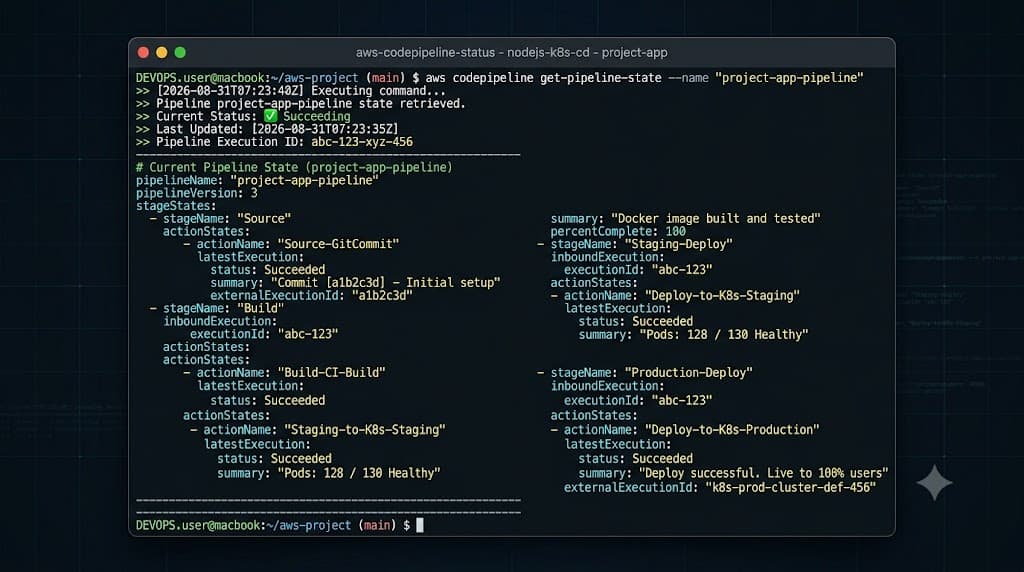
AWS CodeDeploy automates software deployments to Amazon EC2 instances, on-premises servers, AWS Lambda functions, and Amazon ECS services. CodeDeploy supports multiple deployment strategies, including in-place updates, rolling updates, and sophisticated blue/green deployments that minimize downtime by routing traffic gradually to newly updated instances. Teams can also drive deployments imperatively or programmatically using command-line tools. For instance, interacting with pipeline orchestrations or inspecting workflow status relies on executing commands via the AWS CLI:
aws codepipeline get-pipeline-state --name MyProductionPipeline
For Kubernetes-based environments, deployments are often orchestrated using kubectl to apply updated Kubernetes manifest files, rolling out new ReplicaSets and pods cluster-side:
kubectl apply -f k8s/deployment.yaml --namespace production
Containers
Containerized application workflows are a cornerstone of modern cloud architecture. Managing container lifecycles requires tight integration between code repositories, build runners, container registries, and orchestrators like Amazon ECS and Amazon EKS.
Containerized Workflows and Docker Push
In a containerized pipeline, AWS CodeBuild acts as the Docker host, pulling base images, compiling application layers, and building the final container image using a Dockerfile. Once built and tested locally within the build container, the build runner authenticates with Amazon ECR and pushes the image using standard container tooling. A practical example of authenticating and pushing an image within a CodeBuild phase includes:
aws ecr get-login-password --region us-east-1 | docker login --username AWS --password-stdin 123456789012.dkr.ecr.us-east-1.amazonaws.com
docker build -t my-app:latest .
docker tag my-app:latest 123456789012.dkr.ecr.us-east-1.amazonaws.com/my-app:latest
docker push 123456789012.dkr.ecr.us-east-1.amazonaws.com/my-app:latest
Following the push, CodeDeploy or your container orchestrator updates the task definition or deployment spec to pull the newly pushed immutable image tag.
Monitoring
Observability is critical for maintaining healthy delivery pipelines. Without proper visibility, transient build failures, stalled deployments, and silent configuration errors can disrupt developer velocity and impact production stability.
CloudWatch Tracking and Alerts
Amazon CloudWatch provides comprehensive tracking for pipeline execution, system metrics, and execution logs. CodePipeline automatically emits state-change events to Amazon EventBridge, which can trigger CloudWatch Alarms or Amazon SNS notifications when a pipeline execution fails or stalls. Furthermore, AWS CodeBuild streams all compilation and test logs directly to CloudWatch Logs in real time, allowing engineers to inspect stack traces, dependency resolution errors, and compilation warnings without needing direct access to the underlying build runner instances.
Security
Securing your delivery workflow is paramount, as a compromised pipeline provides an attacker with direct access to production infrastructure and sensitive source code repositories.
IAM Permissions and Least Privilege
AWS Identity and Access Management (IAM) governs all interactions between pipeline components. Adhering to the principle of least privilege is essential: AWS CodePipeline, CodeBuild, and CodeDeploy must be granted strictly scoped IAM service roles with only the permissions required to perform their specific tasks. For example, a build role should only have access to read from specific S3 source buckets, write logs to designated CloudWatch log groups, and push images to authorized ECR repositories. Avoid sharing broad administrative roles across multiple pipelines, and routinely audit IAM policies to prevent privilege escalation vulnerabilities.
Common Mistakes and Warnings
Navigating managed cloud deployment services requires vigilance regarding evolving service capabilities, pricing models, and architectural anti-patterns. AWS service names, default instance limits, and underlying capabilities frequently evolve, so teams must regularly consult official documentation to verify current availability and recommended architectural patterns.
Avoiding Pitfalls and Cost Overrides
One common mistake is neglecting resource cleanup in build environments, leading to bloated S3 artifact buckets and runaway storage costs; always configure lifecycle rules to expire old build artifacts automatically. Another frequent pitfall is hardcoding sensitive credentials, API keys, or database passwords inside buildspec files or source repositories. Always utilize AWS Secrets Manager or Systems Manager Parameter Store to inject sensitive data securely at runtime. Finally, avoid treating CI/CD pipelines as black boxes; failing to implement comprehensive error handling, automated rollback triggers, and proactive monitoring will inevitably lead to extended downtime during faulty production deployments.
📌 Recommended Next Guides & References
  <li>
    <a href="/article/docker-and-kubernetes-how-they-work-together-2" class="text-primary hover:underline font-semibold flex items-center gap-2">
      <span>→</span> <span>Docker and Kubernetes: How They Work Together</span>
    </a>
  </li>

  <li>
    <a href="/article/kubernetes-ingress-explained" class="text-primary hover:underline font-semibold flex items-center gap-2">
      <span>→</span> <span>Kubernetes Ingress Explained: Routing, Controllers, and TLS</span>
    </a>
  </li>

  <li>
    <a href="/article/kubernetes-ingress-controller-explained" class="text-primary hover:underline font-semibold flex items-center gap-2">
      <span>→</span> <span>Kubernetes Ingress Controller Explained: Architecture, Routing, and Implementation</span>
    </a>
  </li>