Quick Answer
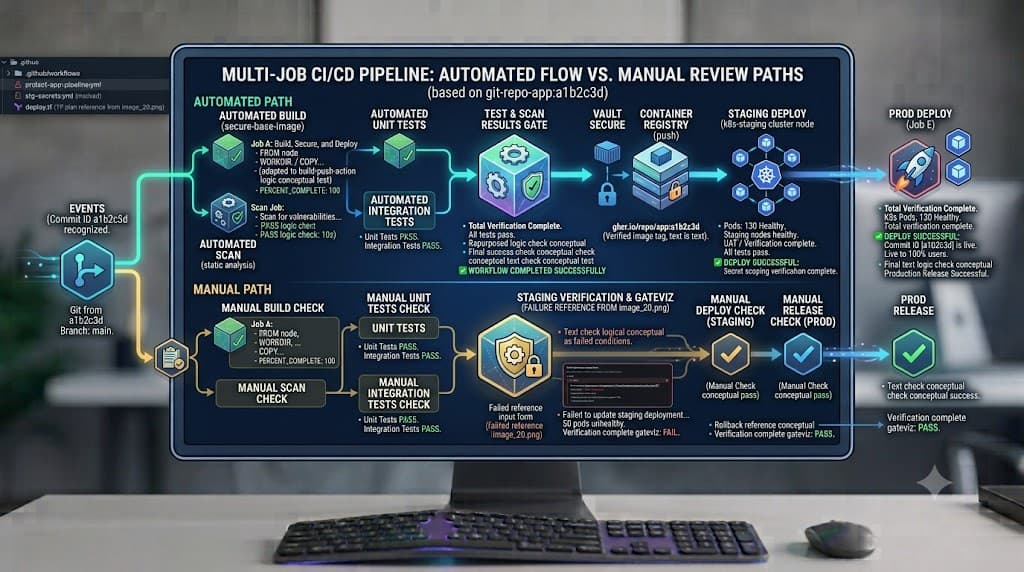
Good CI/CD automation removes repetitive validation and release work while preserving appropriate controls for security, production risk, and exceptions. When teams first adopt software delivery pipelines, the common impulse is to automate every conceivable step from code commit to production push. However, undisciplined automation can introduce silent failures, bypass critical compliance requirements, and accelerate the blast radius of broken code. Finding the optimal balance requires a structured approach to evaluation: identifying which tasks benefit from machine execution and which demand human judgment, context, and accountability.
Quick Answer
Good CI/CD automation removes repetitive validation and release work while preserving appropriate controls for security, production risk, and exceptions. Automated systems handle deterministic, high-frequency tasks such as compilation, unit testing, static analysis, container packaging, and staging deployments reliably and rapidly. Conversely, human review remains vital for risk-weighted approvals, exploratory testing, architectural governance, and authorizing destructive production operations. By establishing clear boundaries between autonomous machine execution and manual gates, engineering organizations achieve high delivery velocity without sacrificing system stability or compliance.
What to Automate
Deciding what to automate in a CI/CD pipeline starts with analyzing the repetitiveness, predictability, and feedback speed of individual engineering tasks. If a human engineer performs an action dozens of times per week following a documented, deterministic checklist, that action is a prime candidate for pipeline automation.
Core criteria for automation eligibility include:
- Repetitive Execution: Tasks performed on every commit, pull request, or release tag.
- Deterministic Outcomes: Operations that yield identical results given the same inputs and environment.
- Speed and Efficiency: Activities where manual execution introduces unacceptable bottlenecks or human fatigue.
- Error Reduction: Processes prone to human error when performed manually, such as manual file copying or environment configuration.
Conversely, tasks that require contextual business knowledge, real-time risk assessment, creative problem-solving, or cross-functional negotiation should remain manual or semi-automated with mandatory human checkpoints. The goal of pipeline automation is not to eliminate humans from the software delivery lifecycle entirely, but to elevate human effort away from mechanical execution toward higher-value oversight, architecture, and incident analysis.
Build and Test
The foundation of any reliable delivery pipeline rests on automated compilation, linting, and testing. These processes provide the immediate feedback loop developers need to catch regressions before code merges into shared branches.
Builds and Linting
Automated builds ensure that source code can be successfully compiled and packaged into executable formats across target architectures. Linting and static code analysis run alongside builds to enforce style guides, detect syntax anomalies, and catch common anti-patterns before runtime.
Here is an example of a GitHub Actions configuration snippet illustrating an automated build and lint stage:
name: CI Build and Lint
on: [push, pull_request]
jobs:
  build-and-lint:
    runs-on: ubuntu-latest
    steps:
      - name: Checkout Repository
        uses: actions/checkout@v4
      - name: Set up Node.js
        uses: actions/setup-node@v4
        with:
          node-version: '20'
      - name: Install Dependencies
        run: npm ci
      - name: Run Linter
        run: npm run lint
      - name: Build Application
        run: npm run build
Automated Testing
Testing must be layered to ensure both local correctness and system-wide integration integrity. Unit tests run quickly and validate isolated functions or classes. Integration tests verify that individual modules work correctly together, including database interactions and external API integrations.
Below is an expanded testing step integrated into the pipeline:
      - name: Run Unit Tests
        run: npm run test:unit
      - name: Run Integration Tests
        run: npm run test:integration
If any unit or integration test fails, the pipeline halts immediately, preventing faulty code from progressing downstream.
Security
Security scanning must be integrated directly into the pipeline rather than treated as a manual gate at the end of the development cycle. Automated security checks catch vulnerabilities early, reducing the cost and complexity of remediation.
Vulnerability Scanning and Policies
Modern pipelines incorporate several layers of automated security scanning:
- Static Application Security Testing (SAST): Scans source code for known vulnerability patterns.
- Software Composition Analysis (SCA): Inspects third-party dependencies and open-source libraries for published Common Vulnerabilities and Exposures (CVEs).
- Container Image Scanning: Evaluates base images and compiled artifacts for OS-level and package-level vulnerabilities.
Here is an example of a container image scan configuration using a standard security scanner CLI tool:
    steps:
      - name: Build Container Image
        run: docker build -t myapp:${{ github.sha }} .
      - name: Run Container Vulnerability Scan
        uses: aquasecurity/trivy-action@master
        with:
          image-ref: 'myapp:${{ github.sha }}'
          format: 'table'
          exit-code: '1'
          severity: 'CRITICAL,HIGH'
Failing the build on critical or high vulnerabilities ensures that insecure images never reach artifact registries or production environments.
Artifacts
Once code passes builds, linter checks, tests, and security scans, the resulting binary or package must be securely stored as an immutable artifact. Artifact management is a critical pillar of traceable software delivery.
Versioning and Immutable Packaging
An artifact should never be overwritten once published. Each build produces a uniquely versioned package tied directly to the commit SHA and semantic versioning tags. Storing these artifacts in secure, access-controlled repositories such as Artifactory, GitHub Packages, or AWS ECR guarantees that downstream promotion steps deploy the exact binary that was tested and scanned.
Key practices for artifact management include:
- Tagging images and binaries with cryptographic checksums.
- Maintaining strict retention policies to clean up old, non-production artifacts while preserving compliance records.
- Restricting write permissions so that only authorized pipeline runners can push new artifacts.
Deployment
Automating deployments eliminates configuration drift between environments and ensures consistent, repeatable releases from development through staging to production.
Automated Deployment Strategies
Non-production environments like development and QA should deploy automatically upon successful merging to trunk branches. Production deployments, while automated in their execution mechanics, often incorporate progressive delivery patterns such as blue-green deployments or canary rollouts.
Below is a practical deployment example deploying a containerized application to a Kubernetes cluster via Helm:
    steps:
      - name: Authenticate to Kubernetes
        uses: azure/k8s-set-context@v3
        with:
          method: kubeconfig
          kubeconfig: ${{ secrets.KUBE_CONFIG }}
      - name: Deploy via Helm
        run: |
          helm upgrade --install myapp-release ./charts/myapp \
            --namespace production \
            --set image.tag=${{ github.sha }} \
            --wait --timeout 10m
Using declarative deployment tools ensures that the actual state of the cluster matches the desired state defined in version control.
Notifications
Pipeline transparency relies on timely, targeted notifications that inform stakeholders of build statuses, deployment events, and failures without inducing notification fatigue.
Routing Alerts Efficiently
To keep development and operations teams informed without overwhelming them, configure notifications based on severity and audience:
- Chat Channels (Slack, Microsoft Teams): Send detailed failure logs and deployment success notices to dedicated engineering channels.
- PagerDuty or Incident Management Tools: Trigger urgent alerts for critical production deployment failures or security scan stoppages.
- Pull Request Comments: Report test coverage changes and security scan summaries directly on the active pull request.
Filtering noisy success messages and prioritizing actionable alerts ensures engineers pay attention when a real pipeline failure occurs.
Rollback
Even with comprehensive automated testing and security validation, faulty deployments can occasionally reach production. Automated rollback mechanisms minimize downtime and mitigate the impact of bad releases.
Failure Recovery and Safety Requirements
Automated rollbacks require careful design to avoid compounding errors. A rollback mechanism should monitor health checks and error rates immediately following a deployment. If error thresholds are breached within a defined observation window, the pipeline or orchestrator initiates a traffic switch back to the previous stable version.
Important safety requirements for rollbacks include:
- Database Migrations: Ensure database changes are backward-compatible so older application versions can run against updated schemas during a rollback.
- State Management: Avoid automated destructive actions, such as dropping tables or purging persistent storage volumes during a rollback sequence.
- Explicit Safeguards: Require human confirmation if an automated rollback fails or if the failure mode is ambiguous.
Manual Gates
While automation drives speed and consistency, certain milestones in the software delivery lifecycle require human oversight to maintain governance, security compliance, and organizational risk management.
Approvals and Risk Sign-Offs
Human review adds irreplaceable value in specific scenarios:
- Production Promotion Approvals: Requiring explicit sign-off from a product owner, security lead, or release manager before code promotes to production.
- Cost and Infrastructure Changes: Reviewing pull requests that provision expensive cloud resources or alter network perimeter security.
- Exception Handling: Granting temporary waivers for non-blocking security vulnerabilities under documented risk assessments.
- Destructive Operations: Manual execution or explicit authorization for destructive database drops, infrastructure teardowns, or emergency hotfix overrides.
Combining robust automated verification with strategic human review creates a resilient, high-velocity delivery pipeline that protects the business while empowering developers.
📌 Recommended Next Guides & References
  <li>
    <a href="/article/docker-and-kubernetes-how-they-work-together-2" class="text-primary hover:underline font-semibold flex items-center gap-2">
      <span>→</span> <span>Docker and Kubernetes: How They Work Together</span>
    </a>
  </li>

  <li>
    <a href="/article/kubernetes-ingress-explained" class="text-primary hover:underline font-semibold flex items-center gap-2">
      <span>→</span> <span>Kubernetes Ingress Explained: Routing, Controllers, and TLS</span>
    </a>
  </li>

  <li>
    <a href="/article/kubernetes-ingress-controller-explained" class="text-primary hover:underline font-semibold flex items-center gap-2">
      <span>→</span> <span>Kubernetes Ingress Controller Explained: Architecture, Routing, and Implementation</span>
    </a>
  </li>