Quick Answer
Infrastructure as Code workflows often require provisioning complex resources across cloud providers such as AWS while needing a reliable method to surface critical attributes—like public IP addresses, load balancer DNS names, database connection strings, and cluster endpoints—for operational use or downstream automation. Managing these data handoffs requires a deep understanding of output mechanics, state management, and command-line execution patterns. This guide explores the complete lifecycle of exposing and querying infrastructure values safely in production.
Quick Answer
A terraform output block in your configuration exposes specific values from your root or child modules after a deployment. You define outputs using the output keyword in your HCL files, specifying a name, a value reference, and optionally a description and sensitivity flag. Once your infrastructure is deployed via terraform apply, you can view these exposed values instantly by running the terraform output command in your terminal, or query them in JSON format using terraform output -json for programmatic consumption in continuous integration and continuous deployment pipelines.
Understanding the Concept
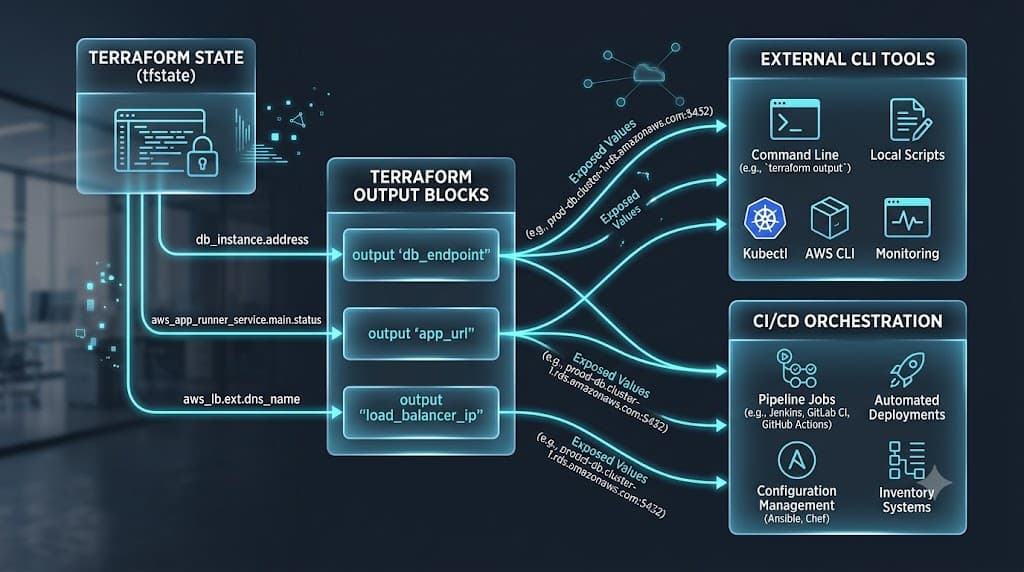
Output values in Terraform serve as the public API of your infrastructure stack. When you provision resources, whether they are compute instances, virtual private clouds, or managed Kubernetes clusters, those resources generate internal identifiers, IP addresses, and state attributes that are not immediately visible outside the configuration directory. Outputs bridge the gap between isolated infrastructure deployments and the external systems that rely on them.
In multi-layered architectures, outputs are crucial for module composition. A base networking module might provision a VPC and subnets, then export the subnet IDs as outputs so that a downstream compute module can attach virtual machines to the correct subnets without hard-coding identifiers. Similarly, in enterprise environments, platform engineers use outputs to feed provisioned infrastructure data directly into configuration management tools, monitoring agents, or container orchestration pipelines.
Furthermore, outputs are deeply tied to the Terraform state file. They do not store values independently; instead, they act as queries against the current state file generated during a successful apply operation. When state changes, outputs recalculate dynamically during subsequent plans and applies, ensuring that consuming applications always receive up-to-date infrastructure metadata.
How It Works
The mechanics of exposing infrastructure attributes involve a structured interaction between your HashiCorp Configuration Language files, the state file, and the Terraform CLI engine. During the planning phase, Terraform builds a dependency graph of all resources and modules. Output blocks are evaluated at the end of this graph traversal, ensuring that all referenced resource attributes have been fully computed and registered in the state database.
Syntax and configuration
An output block is structured with specific arguments designed to control how data is exposed, documented, and secured. The syntax requires an output label followed by a configuration block containing mandatory and optional arguments.
output "instance_public_ip" {
  description = "The public IP address of the primary web server instance."
  value       = aws_instance.web.public_ip
  sensitive   = false
}
Every output block requires the value argument, which points to a specific attribute of a resource or module using standard dot-notation referencing. The description argument is a string that documents the purpose of the output for team members and automated tooling. The sensitive boolean argument instructs Terraform to redact the value in standard terminal output displays, protecting sensitive strings from accidental exposure in logs.
Advanced output configurations can also include validation blocks or explicit dependency declarations using depends_on. While dependency declarations are rarely needed for outputs—since Terraform automatically infers dependencies from the resource attribute references inside the value expression—they can be used when an output relies on side effects that are not directly represented in the primary attribute expression.
CLI workflow
Once your infrastructure configurations are applied, the Terraform CLI provides robust subcommands to query and manipulate exposed data. The primary command is simply terraform output, which lists every configured output name alongside its evaluated value in plain text.
terraform output
When you need to extract a single specific value rather than printing the entire collection, you append the name of the desired output directly to the command:
terraform output instance_public_ip
For automated workflows, shell scripts, and CI/CD integrations, reading plain text output can be fragile and difficult to parse. You can serialize all exposed attributes into a structured format by passing the json flag:
terraform output -json
This command returns a JSON object where each key corresponds to an output name, and the value is wrapped in an object containing both the data type and the actual value string. This structured representation allows automation scripts to parse cloud resource endpoints programmatically without relying on brittle text scraping.
Practical Terraform Example
To see how output values function in a real-world scenario, consider a configuration that provisions an AWS EC2 instance and exposes its connection details. This example demonstrates the complete HCL structure required to create a resource and make its attributes accessible to operators and automation platforms.
terraform {
  required_version = ">= 1.6.0"
  required_providers {
    aws = {
      source  = "hashicorp/aws"
      version = "~> 5.0"
    }
  }
}

provider "aws" {
  region = "us-east-1"
}

resource "aws_vpc" "main" {
  cidr_block           = "10.0.0.0/16"
  enable_dns_hostnames = true
  enable_dns_support   = true

  tags = {
    Name = "production-vpc"
  }
}

resource "aws_subnet" "public" {
  vpc_id                  = aws_vpc.main.id
  cidr_block              = "10.0.1.0/24"
  map_public_ip_on_launch = true

  tags = {
    Name = "production-public-subnet"
  }
}

resource "aws_instance" "web" {
  ami           = "ami-0c7217cdde317cfec"
  instance_type = "t3.micro"
  subnet_id     = aws_subnet.public.id

  tags = {
    Name = "web-server-node"
  }
}

output "web_server_id" {
  description = "The unique identifier of the EC2 web server instance."
  value       = aws_instance.web.id
}

output "web_server_public_ip" {
  description = "The public IP address assigned to the web server for HTTP traffic."
  value       = aws_instance.web.public_ip
}
When you execute <a href="/article/terraform-apply-create-and-update-infrastructure-2" class="text-primary font-semibold hover:underline">terraform apply</a> against this configuration, Terraform provisions the VPC, subnet, and EC2 instance in sequence. Upon successful completion, the CLI prints the defined output names and their newly computed values to the terminal. If you run terraform apply again without modifying any configuration files, Terraform detects zero infrastructure changes and leaves the existing state intact, while still allowing you to query the outputs at any time using terraform output.
Verification
Verifying that your outputs accurately reflect deployed infrastructure is a critical step in any deployment pipeline. Because outputs depend entirely on the state file, verifying them ensures that your local environment or remote state backend is synchronized with the actual cloud provider resources.
To perform a quick verification check after an apply operation, run the raw CLI inspection command:
terraform output
If you are managing infrastructure inside an automated pipeline, you should validate that specific critical endpoints are non-empty before proceeding to subsequent deployment stages. You can combine the json flag with command-line parsing utilities to verify output values programmatically:
terraform output -json | jq -r '.web_server_public_ip.value'
This command extracts the exact public IP string from the JSON payload. If the returned string is empty or invalid, your pipeline can intercept the failure before attempting to run configuration management tools or health checks against a nonexistent host.
It is also essential to distinguish between a dry-run plan and an actual deployment. Running terraform plan analyzes your configuration and calculates proposed changes, but it does not update the state file or generate new output values for newly created resources. Outputs only update when terraform apply successfully executes and commits the resulting resource attributes to state.
Common Mistakes
Working with output values introduces several common pitfalls that can compromise security, break automation workflows, or cause confusion during collaborative development.
One frequent error is skipping the terraform plan phase before applying changes. While outputs themselves are descriptive, modifying underlying resource attributes without reviewing a plan can lead to unexpected resource replacement, changing IP addresses, and stale output references that break dependent systems.
Another critical mistake is hard-coding sensitive credentials directly into output blocks. Exposing database passwords, private keys, or API tokens without marking the output as sensitive (sensitive = true) causes those credentials to print in plain text to terminal consoles, build server logs, and state storage backends.
Misunderstanding state behavior is also widespread. Developers often attempt to query outputs in a directory where no state file exists or where remote state locking fails, resulting in empty responses or authentication errors. Always ensure your backend configuration is properly initialized using terraform init before attempting to inspect outputs.
Finally, using outdated syntax from older versions of Terraform—such as referencing child module outputs incorrectly without proper scoping—frequently leads to evaluation errors during the graph traversal phase.
Best Practices
Implementing robust output management requires adhering to security and architectural best practices across your infrastructure repositories.
Always mark outputs containing passwords, tokens, connection strings with embedded credentials, or private cryptographic keys as sensitive:
output "database_connection_string" {
  description = "Sensitive database connection URI for internal applications."
  value       = "postgresql://admin:${aws_db_instance.db.password}@${aws_db_instance.db.endpoint}/app"
  sensitive   = true
}
When an output is marked sensitive, Terraform conceals its value in standard CLI output displays, replacing the string with <sensitive>. Authorized users can still view sensitive values when necessary by passing the raw flag to the CLI command:
terraform output -raw database_connection_string
In collaborative environments and shared cloud platforms, store your Terraform state in a secure remote backend—such as AWS S3 with state locking via DynamoDB—rather than keeping state files locally on developer machines. This guarantees that team members and CI/CD runners always access a consistent, locked state when querying infrastructure outputs.
When integrating Terraform with continuous deployment platforms like GitHub Actions, capture output values as environment variables or pipeline artifacts securely, ensuring that sensitive strings are masked in build logs.
Troubleshooting
When output values fail to resolve correctly or return unexpected results, systematic diagnostic steps can identify the root cause quickly.
Troubleshooting
If an output returns a missing attribute error or states that a resource does not exist, verify that the resource is fully defined in your configuration and that its attributes match the current provider schema version. Run a state refresh to reconcile local state with real cloud provider resources:
terraform refresh
If you encounter type mismatch errors—such as attempting to pass a list where a string is expected—inspect your HCL expression to ensure data types align correctly. You can use built-in Terraform functions like tostring(), tolist(), or try() to handle optional attributes safely.
If outputs appear stale after modifying resource attributes, confirm that you executed terraform apply rather than just terraform plan. Remember that plans do not update state; only successful applies persist new attribute values to the state database.
Finally, if remote state access fails in a team environment, verify your backend credentials, network connectivity, and state locking status to ensure no concurrent processes are blocking state read operations.
📌 Recommended Next Guides & References
  <li>
    <a href="/article/docker-and-kubernetes-how-they-work-together-2" class="text-primary hover:underline font-semibold flex items-center gap-2">
      <span>→</span> <span>Docker and Kubernetes: How They Work Together</span>
    </a>
  </li>

  <li>
    <a href="/article/kubernetes-ingress-explained" class="text-primary hover:underline font-semibold flex items-center gap-2">
      <span>→</span> <span>Kubernetes Ingress Explained: Routing, Controllers, and TLS</span>
    </a>
  </li>

  <li>
    <a href="/article/kubernetes-ingress-controller-explained" class="text-primary hover:underline font-semibold flex items-center gap-2">
      <span>→</span> <span>Kubernetes Ingress Controller Explained: Architecture, Routing, and Implementation</span>
    </a>
  </li>
Recommended next