Quick Answer
When managing infrastructure using declarative Infrastructure as Code tools, engineering teams occasionally encounter scenarios where cloud APIs fall short of complete environment readiness. A terraform provisioner is a mechanism within HashiCorp Terraform designed to execute scripts, configuration commands, or bootstrapping logic on a newly created resource or locally during the execution lifecycle. While highly versatile, provisioners represent a tool of last resort within the Terraform ecosystem. They bridge the gap between resource creation and configuration management, allowing operators to bootstrap applications, register nodes with orchestration clusters, or execute clean-up scripts. However, they introduce procedural side effects into an otherwise purely declarative system, making them prone to silent failures, idempotency challenges, and complex state synchronization issues.
Quick Answer
A terraform provisioner is a block used inside a resource definition to execute scripts or commands on the local machine where Terraform is running or remotely on a newly provisioned resource. They are primarily implemented via local-exec and remote-exec blocks. You should use a terraform provisioner only when no native provider argument, cloud-init configuration, or immutable image building pipeline (such as Packer) can achieve the required setup. Avoid them for general configuration management, software installation, or continuous deployments, as native configuration management tools and cloud-init offer superior idempotency, error handling, and state management.
Understanding the Concept
Infrastructure as Code has largely shifted from procedural scripting languages to declarative specifications. In a purely declarative model, engineers define the desired end state of infrastructure, and the automation engine figures out how to reach that state safely and predictably. Terraform excels at this declarative orchestration across AWS, Kubernetes, GitHub, and thousands of other providers. However, cloud infrastructure provisioning rarely stops at allocating raw compute instances or storage volumes. Virtual machines often require specialized runtime bootstrapping, internal certificate generation, or custom agent registrations that cannot be expressed purely through cloud provider resource attributes.
This is where provisioners fit into the architectural puzzle. They exist to handle the transitional gap between infrastructure existence and operational readiness. Yet, HashiCorp explicitly discourages their routine use because provisioners break the core guarantees of declarative state tracking. Unlike standard resource arguments, the actions inside a provisioner block are not tracked inside the state file in terms of their granular output or fine-grained internal changes. If a remote script modifies a system file, Terraform does not know about that modification unless it causes a resource taint or failure. Understanding this fundamental philosophy helps engineering teams evaluate whether a provisioner is truly necessary or if a better architectural pattern exists, such as utilizing cloud-init user data, baking custom machine images, or leveraging modern CI/CD pipelines.
How It Works
Terraform provisioners execute during specific phases of the resource lifecycle. By default, provisioners run during the creation phase of the resource they are nested within. When Terraform evaluates an apply operation, it first communicates with the target provider API to provision the underlying infrastructure component—such as an EC2 instance in AWS or a container in Docker. Once the cloud provider confirms that the resource has reached its running or created state, Terraform evaluates and executes the configured provisioner blocks sequentially.
In addition to creation-time execution, provisioners can be configured to run during the destruction phase before a resource is permanently deleted. These are known as destroy-time provisioners. They are particularly useful for draining application traffic, unregistering node agents from cluster control planes, or securely purging sensitive local artifacts. However, destroy-time provisioners introduce unique operational risks. If a destroy-time script fails, the destruction process halts or leaves the resource in an orphaned state, potentially requiring manual intervention in the cloud console or state file manipulation. Managing these lifecycles requires careful consideration of execution order, dependencies, and failure handling strategies.
Syntax and configuration
Configuring a provisioner involves embedding a provisioner block directly inside a resource definition. Terraform supports two primary types out of the box: local-exec and remote-exec. The local-exec provisioner runs a command on the machine executing the Terraform CLI, whereas the remote-exec provisioner connects via SSH or WinRM to the newly created remote resource to execute commands.
The syntax requires specifying the provisioner type followed by configuration attributes. For remote execution, a connection block is mandatory to define authentication parameters such as type, host, user, private key material, and timeout thresholds. Understanding this syntax is essential for configuring reliable command execution without exposing sensitive credentials in plain text. Engineers must carefully parameterize these blocks using resource attributes and input variables to maintain clean, reusable infrastructure codebases.
CLI workflow
Executing infrastructure code containing provisioners requires a firm grasp of the standard Terraform CLI workflow, specifically distinguishing between the planning phase and the application phase. During the planning stage via terraform plan, Terraform evaluates the declarative resource graph and determines what infrastructure changes need to occur. Crucially, Terraform does not execute provisioners during a plan operation. Because provisioners depend on runtime attributes—such as dynamically assigned IP addresses or generated passwords—that only exist after the resource is created, the plan output cannot preview the exact execution results of a provisioner script.
When you execute terraform apply, Terraform creates the underlying resources first, then runs the provisioner blocks against them. If a provisioner fails during terraform apply, Terraform marks the parent resource as tainted. During the subsequent execution, Terraform will destroy and recreate the tainted resource from scratch. This behavior highlights why understanding the CLI workflow is critical: a minor script syntax error in a remote-exec block can force an entire virtual machine to be destroyed and rebuilt, leading to unexpected downtime in shared environments.
Practical Terraform Example
To illustrate a real-world scenario, consider provisioning an AWS EC2 instance where a local automation script needs to be notified and a remote bootstrapping command must be executed to prepare the operating system. Below is a complete, syntactically accurate HCL configuration demonstrating both local-exec and remote-exec provisioners working in tandem.
provider "aws" {
  region = "us-east-1"
}

resource "aws_instance" "web_server" {
  ami           = "ami-0c55b159cbfafe1f0"
  instance_type = "t2.micro"

  tags = {
    Name = "ProductionWebServer"
  }

  provisioner "local-exec" {
    command = "echo 'Instance ${self.public_ip} created successfully' >> instance_ips.txt"
  }

  connection {
    type        = "ssh"
    user        = "ec2-user"
    private_key = file("~/.ssh/id_rsa")
    host        = self.public_ip
  }

  provisioner "remote-exec" {
    inline = [
      "sudo yum update -y",
      "sudo amazon-linux-extras install nginx1 -y",
      "sudo systemctl start nginx"
    ]
  }
}
In this configuration, the local-exec block appends the newly created public IP address to a local tracking file on the operator's machine using the self object reference. Simultaneously, the connection block establishes secure SSH connectivity to the remote instance, allowing the remote-exec block to update package repositories, install Nginx, and start the web server daemon automatically.
Example
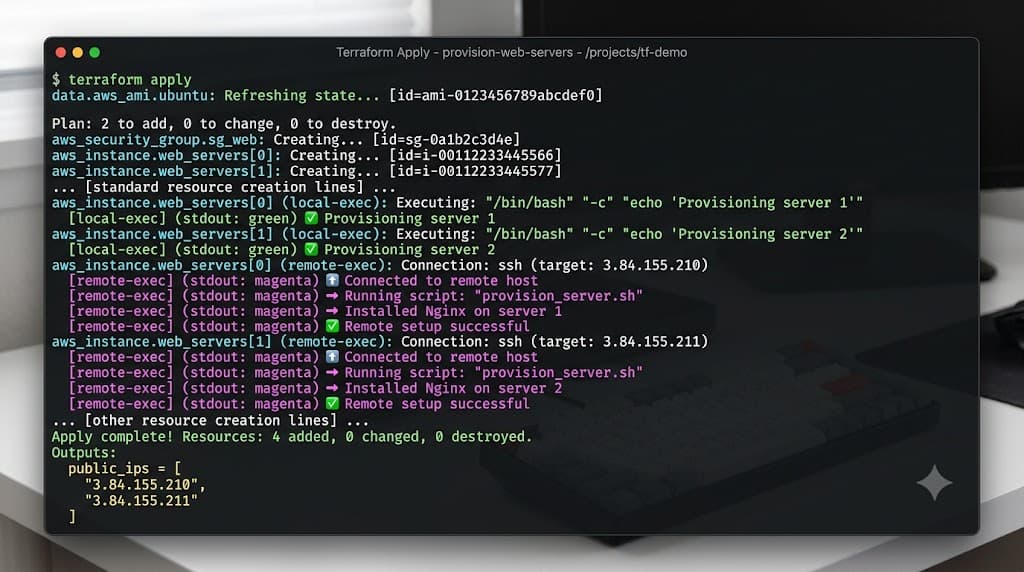
When executing terraform apply on the configuration above, the process unfolds in a precise, predictable sequence. First, Terraform sends an API request to AWS to create the EC2 instance. Terraform then enters a polling state, waiting for the instance state to transition to running and for a public IP address to be allocated and returned by the cloud provider API.
Once the instance is fully accessible, Terraform evaluates the local-exec provisioner, executing the local shell command and recording the IP address locally. Next, Terraform initiates an SSH handshake with the target instance using the provided private key and user context. Upon successful authentication, the remote-exec inline commands are piped to the remote shell sequentially. If any command exits with a non-zero status code, Terraform halts the execution, reports a failure, and flags the aws_instance resource as tainted.
Verification
Verifying that a provisioner executed successfully requires a combination of checking local artifacts, reviewing remote system states, and examining Terraform execution logs. Because provisioners operate outside the core declarative state graph, verification cannot be performed solely by inspecting the terraform show output. Engineers must actively validate that the side effects produced by the scripts match the intended operational state.
Verification
To verify the local-exec portion of our previous example, check the contents of the local tracking file generated during the apply phase. Run the following command in your terminal:
cat instance_ips.txt
You should see an output line displaying the newly assigned public IP address of the AWS instance. To verify the remote-exec portion, use SSH to connect directly to the server or query its HTTP endpoint:
curl -I http://<INSTANCE_PUBLIC_IP>
A successful HTTP 200 OK response from the Nginx web server confirms that the remote provisioning script completed successfully and the application stack is operational.
Common Mistakes
Deploying provisioners incorrectly is a frequent source of brittle infrastructure and pipeline failures. One of the most severe mistakes is hard-coding credentials, private keys, or sensitive API tokens directly into the provisioner or connection blocks. This exposes secrets in plain text within version control systems like GitHub, posing a critical security vulnerability. Credentials should always be injected via secure environment variables, input variables marked as sensitive, or fetched dynamically from secret managers.
Another widespread mistake is misusing provisioners for long-running configuration management tasks that belong in dedicated tools like Ansible, Chef, or Puppet. Provisioners are not designed to handle complex loops, conditional rollbacks, or stateful drift correction over time. Additionally, engineers frequently skip terraform plan when testing provisioner changes, assuming that local script modifications will apply cleanly without affecting underlying resource lifecycles.
Failure modes
When a provisioner fails during execution, Terraform enters a distinct error state. Because Terraform cannot guarantee the exact internal state of a resource after a failed script execution, it applies the tainted status to the resource. For example, if a remote-exec script fails halfway through installing packages, the resource is tainted.
During the next terraform apply, Terraform will attempt to destroy the tainted resource and recreate it from scratch. This can lead to unexpected data loss or prolonged recovery times if persistent storage or database connections are attached. To handle partial failures safely, engineers should implement robust error handling within shell scripts, utilize on_failure settings if appropriate, or refactor the workflow to rely on immutable infrastructure patterns where failed instances are simply discarded and replaced.
Best Practices
Adopting production-grade standards for provisioner usage ensures that infrastructure remains maintainable, secure, and resilient against unexpected failures. The golden rule of Terraform is to use provisioners only as an absolute last resort. Whenever possible, replace remote-exec blocks with native cloud initialization mechanisms such as cloud-init user data scripts. Cloud-init executes natively within the operating system initialization phase, offering superior logging, error reporting, and independence from SSH connectivity.
For complex software installations, configuration management, and ongoing state reconciliation, integrate specialized tools like Ansible or CI/CD pipelines running inside GitHub Actions or GitLab CI. If provisioners are unavoidable, ensure all connection strings and authentication secrets are sourced securely, utilize strict timeouts, and design your scripts to be idempotent so they can be re-run safely if needed.
Troubleshooting
Troubleshooting provisioner failures often requires diagnosing network connectivity barriers, authentication rejections, or script syntax errors. Common issues include SSH connection timeouts caused by overly restrictive security groups, incorrect private key permissions, or missing user privileges on the remote operating system.
Troubleshooting
When a remote-exec provisioner fails with a connection timeout error, follow this step-by-step troubleshooting workflow:
- Inspect the security group rules associated with the compute instance to ensure inbound TCP port 22 is open to your management CIDR block.
- Verify local SSH key permissions on the machine running Terraform by ensuring the private key file has restrictive permissions set via chmod 400 ~/.ssh/id_rsa.
- Increase the connection timeout parameter within the HCL connection block if the target operating system takes longer than expected to initialize networking services:
connection {
  type        = "ssh"
  user        = "ec2-user"
  private_key = file("~/.ssh/id_rsa")
  host        = self.public_ip
  timeout     = "10m"
}
- Enable verbose Terraform logging to inspect raw SSH handshake diagnostics by setting the environment variable export TF_LOG=DEBUG before running your apply command.
📌 Recommended Next Guides & References
  <li>
    <a href="/article/docker-and-kubernetes-how-they-work-together-2" class="text-primary hover:underline font-semibold flex items-center gap-2">
      <span>→</span> <span>Docker and Kubernetes: How They Work Together</span>
    </a>
  </li>

  <li>
    <a href="/article/kubernetes-ingress-explained" class="text-primary hover:underline font-semibold flex items-center gap-2">
      <span>→</span> <span>Kubernetes Ingress Explained: Routing, Controllers, and TLS</span>
    </a>
  </li>

  <li>
    <a href="/article/kubernetes-ingress-controller-explained" class="text-primary hover:underline font-semibold flex items-center gap-2">
      <span>→</span> <span>Kubernetes Ingress Controller Explained: Architecture, Routing, and Implementation</span>
    </a>
  </li>