Quick Answer
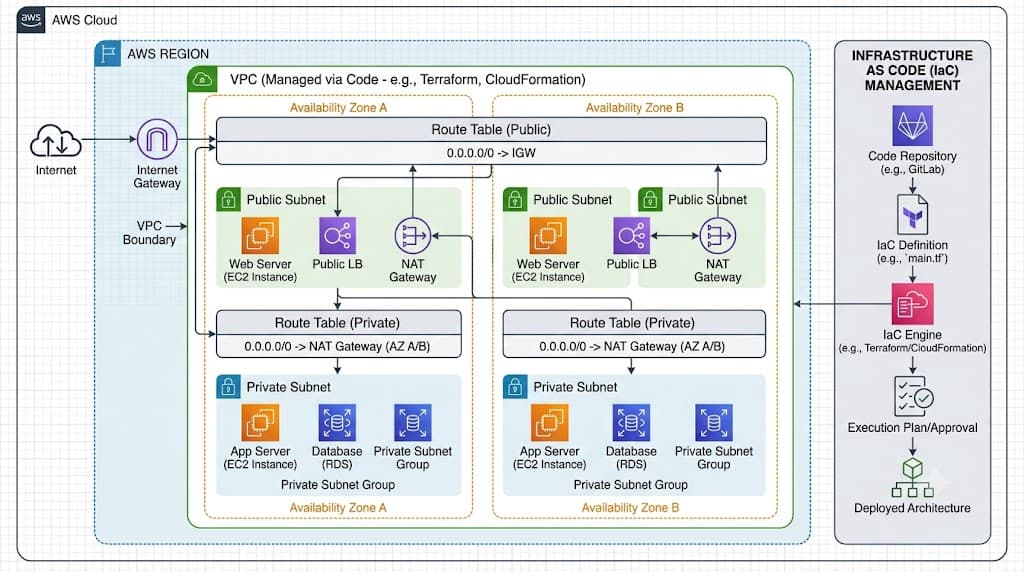
Terraform vpc refers to the practice of provisioning, configuring, and managing Amazon Virtual Private Clouds using HashiCorp Configuration Language (HCL) and the Terraform CLI. By treating network infrastructure as declarative code, teams can spin up isolated virtual networks complete with public subnets, private subnets, internet gateways, and route tables in a repeatable, version-controlled manner. This approach eliminates manual console configuration drift and integrates smoothly into automated CI/CD pipelines alongside applications running on Linux, Docker, or Kubernetes.
Quick Answer
Terraform vpc is the declarative definition of an AWS Virtual Private Cloud using HashiCorp Configuration Language. Instead of manually clicking through the AWS Management Console to create subnets and route tables, you write an HCL resource block such as aws_vpc and apply it via the Terraform CLI. The core function is to provision an isolated network boundary in the cloud, control IP address ranges, manage DNS resolution settings, and orchestrate routing components programmatically. When executed, Terraform reads your configuration, compares it against the existing cloud state, calculates an execution plan, and communicates with the AWS API to create, modify, or destroy resources safely while maintaining state history.
Understanding the Concept
When architecting cloud infrastructure, the foundational layer is almost always the network. An AWS VPC establishes a secure, logically isolated virtual network dedicated to your AWS account. Historically, administrators built these networks by hand, leading to undocumented configurations, inconsistencies between staging and production environments, and human error during setup. Infrastructure as Code solves this by treating network definitions as software source code that can be reviewed, tested, and audited.
To build an aws vpc terraform implementation, engineers rely on the official HashiCorp AWS provider. This provider translates your HCL configurations into specific AWS API calls. While you can write raw resource blocks for every single network component—such as individual subnets, internet gateways, and route tables—many teams also explore using a pre-packaged terraform vpc module to accelerate delivery and enforce organizational networking standards. Whether you author custom resource definitions or leverage modules, the underlying objective remains identical: establishing a resilient, secure, and extensible IP routing topology for downstream workloads like container orchestrators and microservices.
Syntax and configuration
Every Terraform configuration relies on declarative HCL blocks. To provision a basic networking environment, you must define at least a provider block, a primary VPC resource, and associated child resources such as subnets. The provider block specifies the target cloud provider, such as aws, and configures regional parameters like us-east-1.
Inside your main configuration file, the aws_vpc resource block defines the CIDR block for your network, such as 10.0.0.0/16. Additional arguments within this block enable DNS support and DNS hostnames, which are essential for services resolving internal domain names. Child resources like aws_subnet reference the VPC ID dynamically using interpolation syntax, ensuring that Terraform understands the dependency order. For instance, a subnet resource will reference aws_vpc.main.id so that Terraform knows the VPC must be created before any subnets are provisioned inside it.
How It Works
Terraform operates on a state-driven execution model. When you initialize a workspace, Terraform downloads the required provider plugins and establishes a local or remote state file. This state file acts as the single source of truth, mapping your declarative HCL declarations directly to the real-world resources currently existing in your AWS account.
During execution, Terraform does not simply run commands blindly. It performs a refresh of the current infrastructure state by querying the cloud provider API, builds an internal dependency graph, and evaluates your configuration files. This meticulous mapping guarantees that resources are provisioned in the correct logical sequence—for example, ensuring an internet gateway is created before route tables attempt to attach routes to it.
CLI workflow
Working with Terraform involves a strict, repeatable command-line workflow that moves from initialization to destruction. Understanding each command and its safety implications is critical for operating in production environments.
First, terraform init initializes the working directory by downloading provider binaries and configuring backend state storage. Next, terraform validate checks your HCL syntax and configuration validity without contacting any cloud APIs. Once validated, running terraform plan instructs Terraform to generate an execution plan, comparing your local code against the remote state and displaying a detailed preview of resources that will be added, modified, or destroyed. This preview is read-only and makes no changes to your actual AWS environment.
When you are fully satisfied with the execution plan, running terraform apply executes the planned changes against the AWS API, creating or updating your network infrastructure. Conversely, when resources are no longer needed, terraform destroy tears down everything managed by the configuration. Because apply and destroy perform destructive or altering actions, they should always be preceded by a careful review of a generated plan.
Practical Terraform Example
Implementing a custom VPC configuration requires careful composition of multiple related resources. Below is a complete, working HCL example that provisions a Virtual Private Cloud, attaches an internet gateway, creates both a public and a private subnet, and configures appropriate routing tables.
terraform {
  required_version = ">= 1.0.0"
  required_providers {
    aws = {
      source  = "hashicorp/aws"
      version = "~> 5.0"
    }
  }
}

provider "aws" {
  region = "us-east-1"
}

resource "aws_vpc" "main" {
  cidr_block           = "10.100.0.0/16"
  enable_dns_hostnames = true
  enable_dns_support   = true

  tags = {
    Name = "production-vpc"
  }
}

resource "aws_subnet" "public" {
  vpc_id                  = aws_vpc.main.id
  cidr_block              = "10.100.1.0/24"
  map_public_ip_on_launch = true

  tags = {
    Name = "public-subnet"
  }
}

resource "aws_subnet" "private" {
  vpc_id     = aws_vpc.main.id
  cidr_block = "10.100.2.0/24"

  tags = {
    Name = "private-subnet"
  }
}

resource "aws_internet_gateway" "gw" {
  vpc_id = aws_vpc.main.id

  tags = {
    Name = "main-igw"
  }
}

resource "aws_route_table" "public" {
  vpc_id = aws_vpc.main.id

  route {
    cidr_block = "0.0.0.0/0"
    gateway_id = aws_internet_gateway.gw.id
  }

  tags = {
    Name = "public-route-table"
  }
}

resource "aws_route_table_association" "public_assoc" {
  subnet_id      = aws_subnet.public.id
  route_table_id = aws_route_table.public.id
}
Example
When you execute terraform plan against the configuration shown above, Terraform evaluates the dependency tree and outputs a detailed execution plan. The output will indicate that seven new resources are scheduled for creation. Specifically, it will display the aws_vpc.main resource with CIDR 10.100.0.0/16, followed by the public and private subnets, the internet gateway, the route table with its default route pointing to the gateway, and the route table association linking the public subnet to that table.
The plan output uses intuitive color coding and symbols—such as a green plus sign (+)—to indicate that resources will be created. Reviewing this output confirms that interpolation variables like aws_vpc.main.id resolved correctly before any API requests were dispatched to AWS.
Verification
Once your infrastructure has been successfully applied, verifying that the network is operational and correctly configured is an essential step. Verification ensures that resources match your intended design and are ready to accept downstream application workloads.
You can verify your deployment using both Terraform state inspection commands and native AWS CLI utilities. Terraform state commands allow you to query what Terraform believes exists, while AWS CLI commands query the actual cloud control plane directly to confirm real-world status.
Verification
To inspect the deployed resources through Terraform, run terraform show to view a human-readable summary of all resources currently tracked in the state file. Alternatively, running terraform state list outputs a clean list of resource identifiers such as aws_vpc.main, aws_subnet.public, and aws_internet_gateway.gw.
To cross-verify directly against AWS, use the AWS CLI from your terminal. Execute aws ec2 describe-vpcs --filters "Name=tag:Name,Values=production-vpc" to confirm that the VPC exists in the correct region and has an 'available' state. Similarly, you can run aws ec2 describe-subnets --filters "Name=vpc-id,Values=<YOUR_VPC_ID>" to verify that both the public and private subnets were correctly created with their assigned CIDR blocks.
Common Mistakes
Infrastructure as Code introduces powerful automation capabilities, but it also creates opportunities for operational errors if proper habits are not established.
One of the most frequent mistakes is skipping the execution plan review phase and blindly running <a href="/article/terraform-apply-create-and-update-infrastructure-2" class="text-primary font-semibold hover:underline">terraform apply</a> --auto-approve in production environments. This bypasses critical human oversight and can lead to accidental resource destruction or unintended modifications. Another common error is hard-coding sensitive cloud credentials or access keys directly into configuration files or version control repositories, creating severe security vulnerabilities. Additionally, misunderstanding how state files work—such as failing to configure a shared remote backend for team environments—frequently results in state file corruption, conflicting concurrent runs, and split-brain infrastructure scenarios.
Failure modes
When things go wrong, recognizing common error messages helps accelerate resolution. State lock conflicts occur when two engineers attempt to run terraform apply simultaneously against an un-locked or improperly configured backend, resulting in an error stating that the state file is locked by another process.
Another common failure mode involves dependency ordering errors, where a resource references an attribute that cannot be evaluated yet, or deletion errors where a resource cannot be destroyed because dependent child resources still exist. When a partial application failure occurs due to network timeouts or invalid parameters, Terraform records the partial state. Recovering from this usually requires fixing the underlying HCL configuration, resolving any out-of-band manual changes made in the AWS console, and re-running terraform apply to converge the state back to the desired configuration.
Best Practices
Operating infrastructure code successfully at scale requires adopting robust engineering standards and operational safety controls.
Always utilize a remote backend with native state locking, such as an AWS S3 bucket combined with a DynamoDB table, to enable safe collaboration across engineering teams. Encrypt your state files at rest and in transit, as state data often contains sensitive metadata about your network topology. Never store static AWS credentials in your source code; instead, leverage environment variables, IAM instance profiles, or secure OIDC federation mechanisms used in your CI/CD pipelines.
Encapsulate complex or recurring network patterns into reusable modules rather than duplicating raw resource blocks across multiple environments. Implement rigorous peer code reviews for all pull requests that modify infrastructure code, treating HCL files with the exact same security and quality rigor applied to application source code.
Troubleshooting
When troubleshooting persistent deployment errors, follow a structured, methodical debugging approach. Start by checking your provider and Terraform CLI versions to ensure compatibility with the modules and resource arguments you are utilizing. Version mismatches often manifest as cryptic attribute errors or unexpected provider behavior.
If Terraform reports missing resource attributes or invalid references, inspect your interpolation syntax and verify that parent resources have completed creation before child resources attempt to reference them. For deeper visibility into underlying API interactions, enable verbose logging by setting the environment variable TF_LOG=DEBUG before running your CLI commands. This exposes the raw HTTP request and response payloads exchanged between Terraform and the AWS API, allowing you to pinpoint exact validation failures or permission denied errors returned by cloud IAM policies.
📌 Recommended Next Guides & References
  <li>
    <a href="/article/docker-and-kubernetes-how-they-work-together-2" class="text-primary hover:underline font-semibold flex items-center gap-2">
      <span>→</span> <span>Docker and Kubernetes: How They Work Together</span>
    </a>
  </li>

  <li>
    <a href="/article/kubernetes-ingress-explained" class="text-primary hover:underline font-semibold flex items-center gap-2">
      <span>→</span> <span>Kubernetes Ingress Explained: Routing, Controllers, and TLS</span>
    </a>
  </li>

  <li>
    <a href="/article/kubernetes-ingress-controller-explained" class="text-primary hover:underline font-semibold flex items-center gap-2">
      <span>→</span> <span>Kubernetes Ingress Controller Explained: Architecture, Routing, and Implementation</span>
    </a>
  </li>


