Quick Answer
When evaluating infrastructure automation platforms, engineering teams frequently find themselves comparing tools like Terraform, Ansible, CloudFormation, and Pulumi. Choosing the right tool depends heavily on whether your primary objective is provisioning immutable cloud resources, managing configuration state on existing hosts, or writing imperative deployment scripts. This guide provides a deep, production-aware analysis of these options, focusing specifically on Terraform alongside related comparisons like cloudformation vs terraform and pulumi vs terraform. By understanding how state management, declarative models, and execution workflows differ across these ecosystems, developers, system administrators, and platform engineers can design robust, safe deployment pipelines that scale across environments.
Quick Answer
Terraform is a declarative Infrastructure as Code (IaC) tool designed primarily for provisioning and managing cloud infrastructure resources across multiple providers using HashiCorp Configuration Language (HCL). In contrast, Ansible is predominantly a configuration management and orchestration tool that uses imperative or declarative YAML playbooks to configure operating systems and software packages on existing nodes. When exploring cloudformation vs terraform, CloudFormation offers native, deeply integrated AWS provisioning at the cost of being locked into a single cloud vendor, whereas Terraform supports multi-cloud environments. Meanwhile, pulumi vs terraform highlights a philosophical divide: Pulumi allows engineers to write infrastructure definitions in general-purpose programming languages like Python, TypeScript, or Go instead of a domain-specific language like HCL. If your goal is multi-cloud resource provisioning with explicit state tracking, Terraform remains the industry standard. However, understanding the exact boundaries of each tool prevents catastrophic configuration drift, accidental resource deletion, and team friction during CI/CD pipeline integration.
Understanding the Concept
Infrastructure as Code has fundamentally transformed how modern engineering organizations deploy and maintain software systems. Instead of relying on manual point-and-click actions in cloud management consoles or logging into remote Linux servers to execute ad-hoc shell commands, teams encode their desired infrastructure states into version-controlled text files. This practice brings the discipline of software engineering—such as code reviews, automated testing, version control, and continuous integration—directly to cloud infrastructure.
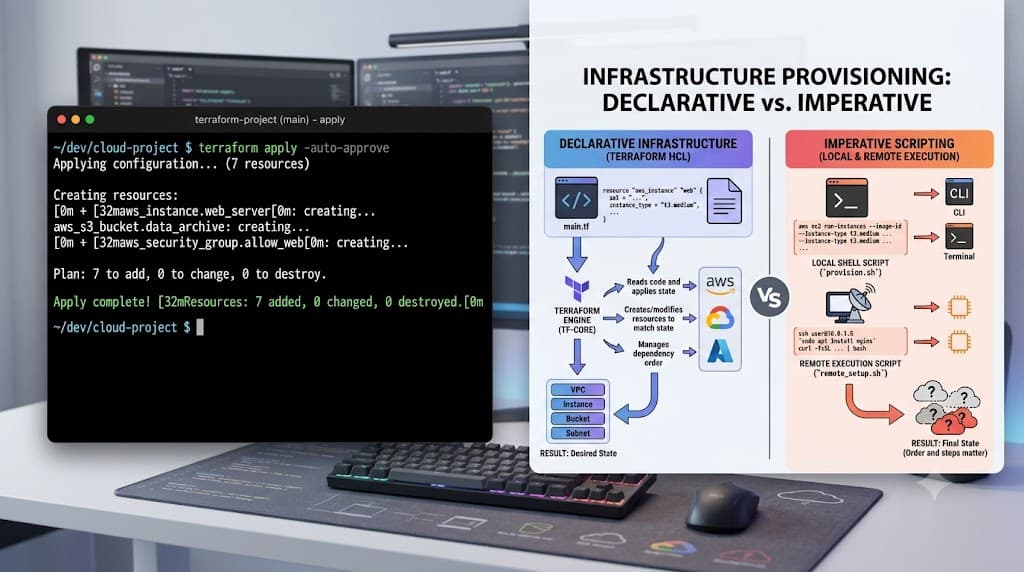
However, not all IaC tools operate under the same operational paradigms. Declarative tools allow engineers to define the final desired state of the infrastructure; the underlying engine compares this desired state against the current actual state and calculates the exact delta required to bridge the gap. Terraform, CloudFormation, and Pulumi largely follow this declarative model. Conversely, imperative tools focus on the step-by-step procedural execution of commands to achieve a goal. Ansible operates largely in this procedural space, executing tasks sequentially against target hosts over SSH or WinRM, though it does strive for idempotency where possible.
Furthermore, the choice of language shapes the developer experience. HashiCorp HCL is purpose-built for describing resource relationships, whereas Pulumi leverages general-purpose languages, enabling advanced looping, custom abstractions, and native unit testing frameworks. CloudFormation relies heavily on large JSON or YAML templates, which can become verbose and difficult to modularize as architectures scale. Evaluating these models requires looking past simple syntax preferences to examine how state, secrets, and provider updates are managed in production environments.
How It Works
To understand how these automation platforms execute changes, we must examine their underlying architectural mechanics. Terraform relies heavily on a state file, typically stored in a secure remote backend such as AWS S3 with state locking handled via DynamoDB. This state file acts as a map between your HCL configuration and the real-world resources deployed in your cloud environment. When you run an execution, Terraform queries the cloud provider APIs, compares the live reality against the recorded state, and evaluates your configuration files to construct a comprehensive execution plan.
Provider architecture is another critical component. Terraform core communicates with independent, versioned provider plugins (such as the AWS provider, Kubernetes provider, or GitHub provider) via an RPC protocol. These providers translate your abstract resource declarations into specific API calls to the target platform. When an attribute changes in your configuration, Terraform determines whether the underlying cloud provider API supports an in-place update or requires the resource to be destroyed and recreated from scratch.
In contrast, Ansible does not maintain a central state file tracking cloud resources in the same manner. It connects directly to target Linux or Windows nodes via SSH or WinRM, reading system facts and executing tasks module by module. While Ansible can provision cloud resources using specific collection modules, its primary strength lies in software configuration, package installation, and service orchestration once the infrastructure has already been brought online by a provisioning tool like Terraform. This distinction makes Terraform and Ansible highly complementary rather than purely competitive.
Practical Terraform Example
Implementing a robust infrastructure pipeline starts with clean, well-structured HCL code. Below is a practical, production-aware Terraform configuration that provisions a secure AWS VPC and a corresponding subnet, demonstrating proper resource declaration and variable usage without hard-coding sensitive credentials.
Syntax and configuration
terraform {
  required_version = ">= 1.6.0"
  required_providers {
    aws = {
      source  = "hashicorp/aws"
      version = "~> 5.0"
    }
  }
}

provider "aws" {
  region = var.aws_region
}

variable "aws_region" {
  type        = string
  description = "Target AWS region for infrastructure deployment"
  default     = "us-east-1"
}

variable "environment" {
  type        = string
  description = "Deployment environment name"
  default     = "production"
}

resource "aws_vpc" "main" {
  cidr_block           = "10.100.0.0/16"
  enable_dns_hostnames = true
  enable_dns_support   = true

  tags = {
    Name        = "${var.environment}-vpc"
    Environment = var.environment
    ManagedBy   = "Terraform"
  }
}

resource "aws_subnet" "public" {
  vpc_id                  = aws_vpc.main.id
  cidr_block              = "10.100.1.0/24"
  map_public_ip_on_launch = true

  tags = {
    Name        = "${var.environment}-public-subnet"
    Environment = var.environment
    ManagedBy   = "Terraform"
  }
}

output "vpc_id" {
  description = "The ID of the provisioned Virtual Private Cloud"
  value       = aws_vpc.main.id
}

output "subnet_id" {
  description = "The ID of the public subnet"
  value       = aws_subnet.public.id
}
This configuration defines required provider versions to ensure consistency across developer workstations and CI/CD pipelines. It utilizes explicit input variables to make the code reusable across environments, tags resources for operational visibility, and exposes output values so downstream modules or deployment scripts can reference the created networking identifiers.
CLI workflow
Once your HCL files are written, interacting with the Terraform CLI requires a disciplined sequence of commands. Never execute modifications blindly; always follow the preview-and-apply workflow.
First, initialize your working directory to download the required provider plugins and configure your backend:
terraform init
Next, generate and review an execution plan. This command compares your local configuration against the remote state and cloud provider APIs, displaying exactly which resources will be created, modified, or destroyed:
terraform plan -out=tfplan
Reviewing the plan output is critical. Look closely for forced resource replacements, which are indicated by forces replacement warnings in the CLI output. Once the plan is verified and approved, apply the saved execution plan file:
<a href="/article/terraform-apply-create-and-update-infrastructure-2" class="text-primary font-semibold hover:underline">terraform apply</a> "tfplan"
Distinguishing terraform plan from terraform apply is your primary safeguard against production outages. The plan phase is read-only and safe to run in automated pull request validation pipelines, while the apply phase performs actual mutating API calls against your cloud provider.
Verification
Verifying that your infrastructure was provisioned successfully involves both checking the output of your IaC tool and querying the target environment directly. After a successful apply execution, Terraform outputs any defined variables and resource identifiers.
To verify the health and existence of the resources created in our example, you can use the AWS CLI alongside Linux utilities to inspect the VPC and subnet configuration:
aws ec2 describe-vpcs --vpc-ids $(terraform output -raw vpc_id)
Expected behavior includes a JSON response detailing the VPC state as available, verifying that the CIDR block matches your HCL declaration and that DNS hostnames are enabled. For configuration management tasks handled via Ansible, verification often involves running an ad-hoc ping command or checking service statuses across managed nodes:
ansible all -m ping -i inventory.ini
Regular verification helps catch configuration drift early, ensuring that manual changes made in cloud consoles or server terminals do not quietly invalidate your declarative definitions.
Common Mistakes
Even experienced engineers encounter recurring pitfalls when managing infrastructure automation. Recognizing these failure modes prevents security breaches and corrupted state repositories.
Skipping the execution plan review is one of the most dangerous habits. Running terraform apply without saving and reviewing a plan file can lead to unintended resource destructions, especially when modifying resource names or computed attributes. Another widespread error is hard-coding credentials, access keys, or secret tokens directly into HCL configuration files or Ansible playbooks. Secrets should always be injected via environment variables, secure secret managers, or encrypted vault systems.
Misunderstanding state implications also causes severe operational headaches. Manually deleting cloud resources in the provider console without updating the Terraform state file leaves dangling references, causing subsequent plan runs to fail or attempt impossible modifications. Similarly, failing to configure remote state locking in collaborative environments can lead to concurrent writes, corrupting the state file and locking out your entire engineering team.
Best Practices
Operating infrastructure code in enterprise environments demands strict adherence to architectural best practices. Always configure a remote state backend with encryption at rest and state locking enabled—such as using an S3 bucket combined with a DynamoDB table for state locking in AWS. This ensures that multiple engineers or CI/CD runners cannot modify the infrastructure simultaneously.
Implement rigorous access controls and principle-of-least-privilege IAM roles for your automation pipelines. CI/CD runners should only possess the specific permissions required to provision the target architecture, preventing compromised tokens from granting full administrative access to your entire cloud environment. Furthermore, modularize your HCL code into reusable components, separating networking, compute, and data layers into distinct directories or modules.
Integrate automated linting and policy-as-code tools into your version control workflow. Tools like tflint for syntax validation and security scanners like tfsec or Checkov should run automatically on every pull request, catching misconfigurations, open security groups, and deprecated resource attributes before they ever reach the staging or production environments.
Troubleshooting
When infrastructure deployments fail, systematic troubleshooting is required to isolate the root cause. Common failure modes include provider version incompatibilities, API rate limiting, and state lock acquisition timeouts.
Suppose you encounter an error stating that a provider plugin version is incompatible with your current configuration or that a resource attribute is deprecated. To resolve this, inspect your provider block and lock file:
<a href="/article/terraform-providers-explained-how-providers-work" class="text-primary font-semibold hover:underline">terraform providers</a>
If state locking fails because a previous CI/CD run crashed or was forcefully terminated, you may encounter an error indicating that the state is locked. You can inspect the lock details and force-unlock the state using the locking ID provided in the error message (exercise extreme caution and verify that no active runs are occurring before executing this command):
terraform force-unlock <LOCK_ID>
For complex debugging, increase the verbosity of the CLI logs by setting the environment variable before running your command:
export TF_LOG=DEBUG
terraform apply
Reviewing these debug logs exposes the exact HTTPS requests and responses exchanged between the Terraform provider and the cloud provider API, enabling you to pinpoint malformed payloads, permission denied errors, or upstream service outages quickly.
📌 Recommended Next Guides & References
  <li>
    <a href="/article/docker-and-kubernetes-how-they-work-together-2" class="text-primary hover:underline font-semibold flex items-center gap-2">
      <span>→</span> <span>Docker and Kubernetes: How They Work Together</span>
    </a>
  </li>

  <li>
    <a href="/article/kubernetes-ingress-explained" class="text-primary hover:underline font-semibold flex items-center gap-2">
      <span>→</span> <span>Kubernetes Ingress Explained: Routing, Controllers, and TLS</span>
    </a>
  </li>

  <li>
    <a href="/article/kubernetes-ingress-controller-explained" class="text-primary hover:underline font-semibold flex items-center gap-2">
      <span>→</span> <span>Kubernetes Ingress Controller Explained: Architecture, Routing, and Implementation</span>
    </a>
  </li>


