Quick Answer
Quick Answer
GitHub Actions secrets provide protected values for workflows without requiring credentials to be committed to source control. They encrypt sensitive data such as API tokens, private keys, and cloud deployment credentials, storing them securely within GitHub's infrastructure. When a workflow runs, GitHub automatically decrypts these values and injects them into the execution environment as runtime variables or environment variables. To safeguard your infrastructure, GitHub automatically masks any value assigned to a secret in the build logs, preventing unauthorized exposure or accidental leakage during testing and deployment cycles.
What Are GitHub Actions Secrets?
Modern software development relies heavily on third-party services, cloud providers, and external application programming interfaces. Connecting to these services requires authentication tokens, passwords, and private keys. Historically, developers often faced the temptation to hardcode these credentials directly into source code repositories. This practice creates severe security vulnerabilities, exposing sensitive data to anyone with read access to the project.
GitHub Actions secrets solve this problem by decoupling sensitive configuration data from application source code and workflow definitions. Every secret is encrypted using modern cryptographic standards before it is stored at rest. When a runner executes a job, the runner requests the necessary values dynamically. The GitHub Actions runner environment then makes these values available to specific steps while keeping them hidden from casual inspection.
Understanding the underlying mechanics of these encrypted variables helps engineering teams design robust continuous integration and continuous deployment pipelines. Because workflows run across distributed runner machines, isolating sensitive material is paramount. Secrets prevent hardcoded tokens from living in your repository history, ensuring that even if a branch is public or compromised, internal deployment keys remain secure.
Secret Scopes
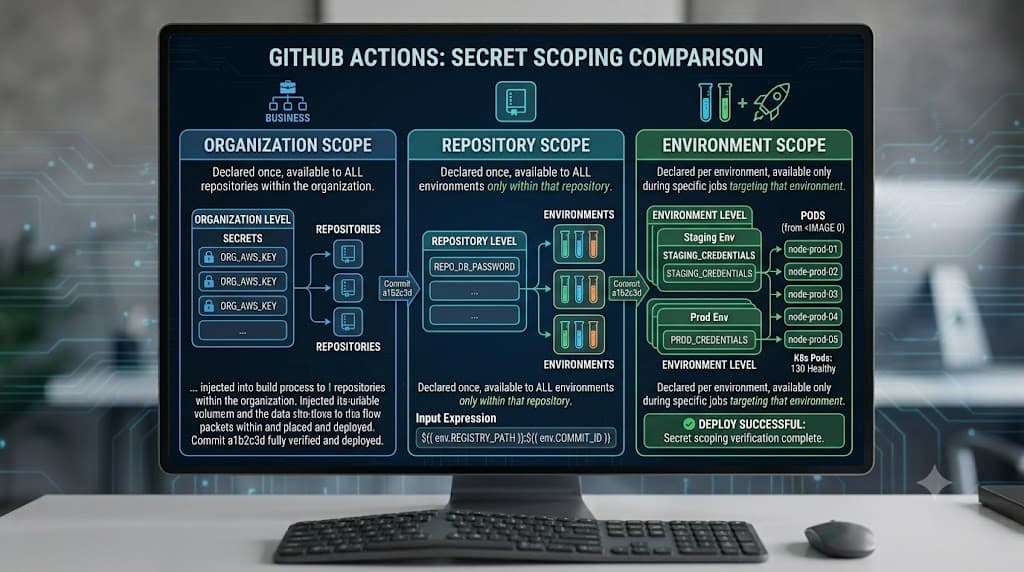
GitHub organizes secrets across three distinct hierarchical tiers: repository, environment, and organization. Choosing the correct scope is critical for adhering to the principle of least privilege and preventing unauthorized workflows from accessing high-privilege credentials.
Repository Secrets
Repository secrets are scoped to a single repository. Any workflow defined within that specific repository can access these secrets, provided the workflow has been granted the necessary permissions. These are ideal for standalone projects that require dedicated deployment credentials, such as a specific staging server SSH key or a dedicated testing database password. Repository secrets are managed directly within the repository settings under the security tab, where administrators can create, update, and delete them as needed.
Environment Secrets
Environment secrets add another layer of granularity by tying secrets to specific deployment environments, such as production, staging, or development. Unlike repository secrets, environment secrets are only accessible to workflows that explicitly target that environment in their configuration. This ensures that a test runner executing a pull request cannot access production database keys, even if the workflow runs within the same repository. Environment secrets also support protection rules, requiring manual approval before a job can access them.
Organization Secrets
Organization secrets allow administrators to share sensitive values across multiple repositories within an entire GitHub organization. Instead of duplicating secrets across dozens of individual repositories, an organization owner can define a secret once and configure its visibility. Organization secrets can be made available to all repositories, selected repositories, or private repositories only. This scope is particularly useful for enterprise environments sharing common artifact registry credentials, enterprise code-scanning tokens, or centralized cloud provider authentication roles.
Using Secrets
Effectively utilizing github actions secrets requires a solid understanding of how values are passed from storage into runner environments. Workflows access these values via specific context objects, making them available to shell commands, setup actions, and containerized steps without exposing the raw text in configuration files.
Accessing Secrets via Context
Workflows reference stored values using the secrets context. For example, a standard repository secret named API_KEY is referenced in YAML configuration files using secrets.API_KEY. It is vital to note that secrets cannot be accessed directly in the top-level env map of a workflow file if you attempt to use them across different job boundaries, but they can be passed down to individual steps or assigned to job-level environment variables safely.
name: Deploy Application
on:
  push:
    branches: [ main ]
jobs:
  deploy:
    runs-on: ubuntu-latest
    steps:
      - name: Checkout code
        uses: actions/checkout@v4
      - name: Authenticate and Deploy
        env:
          PROD_API_KEY: ${{ secrets.REPOSITORY_SECRET_EXAMPLE }}
        run: |
          echo "Deploying application using secure credentials..."
          ./deploy.sh --token "$PROD_API_KEY"
Handling Environment and Repository Secrets in Practice
When designing complex pipelines, mixing repository secrets and environment secrets helps maintain clear boundaries. Repository secrets handle general integration tasks, while environment secrets handle sensitive promotion steps. Below is an example illustrating an environment-specific deployment job:
name: Production Release
on:
  release:
    types: [published]
jobs:
  release-to-prod:
    runs-on: ubuntu-latest
    environment: production
    steps:
      - name: Deploy to Production Cloud
        env:
          CLOUD_SECRET: ${{ secrets.ENVIRONMENT_SECRET_EXAMPLE }}
        run: |
          node release-tool.js --key "$CLOUD_SECRET"
Environment Protection
As deployment pipelines grow in complexity, relying solely on encrypted variables is insufficient; teams must also control when and who can access those variables. Environment protection rules provide a robust mechanism to safeguard critical environments like production.
Deployment Protection Rules and Required Reviewers
By configuring environment protection rules within your repository settings, you can enforce mandatory human oversight before any workflow is allowed to access environment secrets. When a workflow targets a protected environment, execution pauses before running the job that requests the secret. Designated reviewers receive notifications and must manually approve or reject the deployment through the GitHub web interface or API.
OpenID Connect (OIDC) Integration
Modern cloud providers such as AWS, Google Cloud Platform, and Microsoft Azure support OpenID Connect (OIDC). Instead of storing long-lived static credentials—such as permanent access keys that risk compromise—workflows can exchange short-lived tokens directly with the cloud provider. GitHub Actions acts as an OIDC identity provider, issuing a JSON Web Token (JWT) to the runner. The cloud provider verifies this token and grants temporary access. This eliminates the need to store long-term cloud keys as repository secrets altogether, drastically reducing your security attack surface.
Permissions
Controlling what actions and workflows can do is just as important as protecting the secrets themselves. Misconfigured token permissions can allow compromised workflows to exfiltrate data or alter repository settings.
Token Permissions and Least Privilege
Every workflow run receives a unique GitHub Actions token (GITHUB_TOKEN) with specific permissions to interact with the repository. By default, these permissions may be overly broad depending on organization settings. Best practices dictate explicitly defining permissions at the workflow or job level using the permissions key. Restricting write access and granting only read access where writing is unnecessary prevents malicious code injection from altering repository contents.
name: Secure Build
on: [push]
permissions:
  contents: read
jobs:
  build:
    runs-on: ubuntu-latest
    steps:
      - uses: actions/checkout@v4
      - run: npm ci && npm test

### Fork Behavior and Security Risks

Forks present a unique security challenge for open-source projects using GitHub Actions. By default, pull requests from public forks do not receive access to repository secrets. This restriction prevents malicious contributors from submitting a pull request with a modified workflow file that echoes out secrets into public build logs. Maintainers must exercise extreme caution when modifying workflow triggers—such as switching from `pull_request` to `pull_request_target`—because the latter runs in the context of the base branch and *does* have access to secrets, potentially exposing them to untrusted fork code if not handled with rigorous input validation.

## Common Mistakes

Even with robust platform protections, human error remains the leading cause of security incidents in CI/CD pipelines. Recognizing and avoiding common credential-handling anti-patterns is essential for maintaining a secure posture.

### The Danger of Echoing and Logging Secrets

Never echo secrets or place credentials directly in workflow files. A common mistake involves debugging a failing workflow by printing environment variables to the console. While GitHub automatically redacts known secret values by replacing them with asterisks (`***`), developers frequently slip up by transforming secrets—such as base64-encoding or hashing them—which alters the string signature and defeats automatic masking.

```yaml
# INCORRECT: Never print secrets or derived secret strings to logs
- name: Bad Debug Step
  run: echo "The secret is ${{ secrets.API_KEY }}"
Log Inspection and Masking Limitations
Masking relies on exact string matching. If a secret value is shorter than four characters, GitHub refuses to mask it to prevent excessive false-positive redactions that could break normal log readability. Furthermore, if your workflow modifies a secret—such as splitting a string or appending characters—the resulting string is no longer masked, exposing the credential in plain text within the job output logs.
Hardcoding Credentials in Workflow Files
Another critical mistake is embedding passwords, tokens, or private keys directly into YAML workflow files instead of using GitHub Actions secrets. Hardcoded credentials are committed directly to version history, making them permanently visible to anyone who clones or views the repository, regardless of subsequent commits deleting the file.
Ignoring Secret Rotation and Auditing
Secrets should never be treated as permanent fixtures. Failing to rotate API keys, deployment tokens, and database credentials regularly leaves systems vulnerable if an old token is ever silently leaked. Establishing a routine schedule for auditing secret usage, removing obsolete repository secrets, and updating environment credentials ensures long-term pipeline hygiene and resilience against undetected breaches.
📌 Recommended Next Guides & References
  <li>
    <a href="/article/docker-and-kubernetes-how-they-work-together-2" class="text-primary hover:underline font-semibold flex items-center gap-2">
      <span>→</span> <span>Docker and Kubernetes: How They Work Together</span>
    </a>
  </li>

  <li>
    <a href="/article/kubernetes-ingress-explained" class="text-primary hover:underline font-semibold flex items-center gap-2">
      <span>→</span> <span>Kubernetes Ingress Explained: Routing, Controllers, and TLS</span>
    </a>
  </li>

  <li>
    <a href="/article/kubernetes-ingress-controller-explained" class="text-primary hover:underline font-semibold flex items-center gap-2">
      <span>→</span> <span>Kubernetes Ingress Controller Explained: Architecture, Routing, and Implementation</span>
    </a>
  </li>