Quick Answer
Running autonomous and semi-autonomous AI agents locally provides absolute data privacy, cost predictability, and zero reliance on external API vendors. For developers and privacy-conscious organizations, pairing an advanced execution framework with a local inference runner unlocks powerful automation capabilities without exposing sensitive codebases or corporate documentation to third-party endpoints. Configuring your environment to execute tasks entirely on-device requires careful orchestration between your runtime agent and your model server.
Quick Answer: Connecting Hermes Agent to Ollama
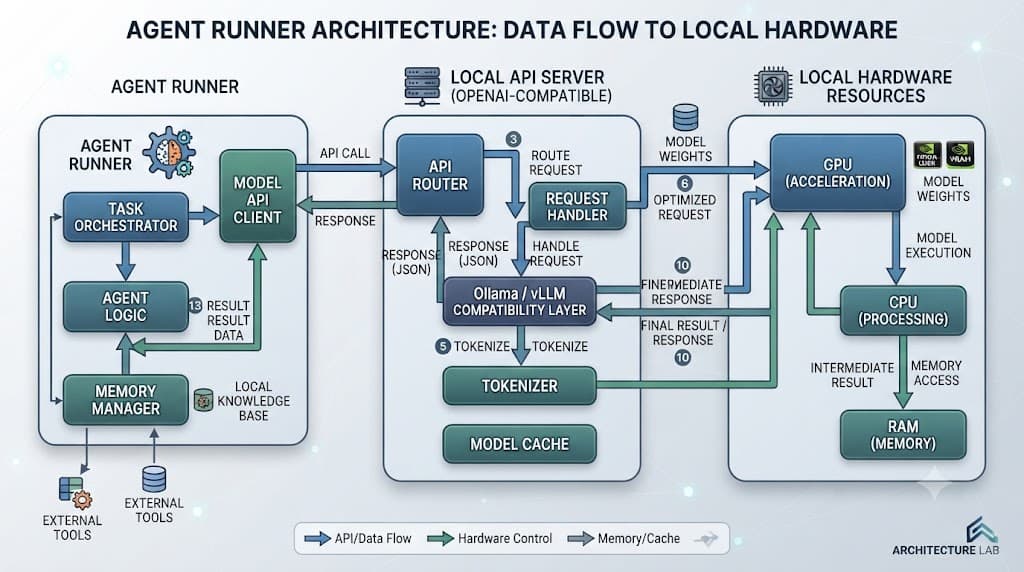
To configure hermes agent ollama integration successfully, you need to point your agent configuration file to your local Ollama server's OpenAI-compatible API endpoint, pull a capable model such as Qwen or Llama, and execute a simple verification task before deploying heavier workloads. By default, Ollama serves a local server on port 11434, exposing an API route that mimics standard chat completion structures.
Before launching advanced automated routines, always test connectivity using a lightweight prompt or a dry run. This verifies that your model correctly parses tool calls, handles JSON structures, and maintains context lengths without throwing unexpected out-of-memory errors on your hardware.
Prerequisites and Local Environment Setup
Setting up a self-hosted agent environment requires installing both the local inference backend and the agent runtime framework. First, download and install Ollama for your operating system (Linux, macOS, or Windows via WSL2). Ensure your graphics drivers or Metal support are correctly configured to offload model calculations onto your GPU, as running inference purely on CPU severely impacts agent performance and response latency.
Once Ollama is running in the background, you can pull your desired model weights directly via your terminal:
ollama pull qwen2.5:7b-instruct
Next, install Hermes Agent following its official repository instructions, typically via a Python virtual environment or containerized setup. Ensure you have Python 3.10 or higher installed along with standard package management utilities. Verify your local environment by running ollama list to confirm that the model weights are fully downloaded and active before touching any configuration files.
[!TIP] Pro Tip: Always run your local inference server as a persistent system service (such as a systemd service on Linux) so that automated agent workflows never fail due to a terminated background terminal session.
Endpoint and Model Configuration
Connecting your runner to a local instance involves editing your environment variables or the primary configuration YAML file. Because Ollama provides a native OpenAI-compatible interface, you can configure hermes agent local model parameters by specifying the base URL as http://localhost:11434/v1 and setting your API key to a placeholder string like ollama if authentication is not enforced.
Below is an example configuration snippet demonstrating how to map your local endpoint and select a high-performance open-weight model like Qwen or Llama for agentic execution:
agent:
  name: "LocalHermesRunner"
  provider: "openai"
  base_url: "http://localhost:11434/v1"
  api_key: "ollama"
  model: "qwen2.5:7b-instruct"
  temperature: 0.1
  max_tokens: 4096
When working with a hermes agent local llm setup, keeping the temperature low (between 0.0 and 0.2) is critical. Agentic frameworks rely heavily on strict structured outputs and valid tool-calling syntax; high temperatures introduce formatting drift that can break multi-step reasoning chains.
Resource Considerations and Hardware Planning
Hardware capacity is the single most important bottleneck when operating self-hosted AI stacks. Running a hermes agent self hosted deployment means your local machine or dedicated server must absorb both the memory overhead of the language model weights and the active context window required during complex, multi-turn agent execution.
For smaller 7B or 8B parameter models, a GPU with at least 12GB to 16GB of VRAM allows for comfortable token generation speeds and sufficient room for intermediate context caching. If you attempt to run larger 32B or 70B parameter models, you will either need multi-GPU setups, Mac Studio unified memory configurations, or accept significantly slower token-per-second rates via CPU offloading.
[!WARNING] Warning: Exceeding your available VRAM forces Ollama to offload layers to system RAM and CPU, which can cause agent execution speeds to plummet by up to 90%, triggering timeout errors in strict agent loops.
Comparing Local Models and Hosted APIs
Choosing between self-hosted open-weights models and traditional commercial cloud APIs involves a clear trade-off between privacy, operational control, and raw reasoning horsepower. While cloud-hosted frontier models handle complex edge-case reasoning with greater reliability, local configurations offer unmatched data security for sensitive enterprise workflows.
✓ Local Models (Ollama)
- Complete data privacy and offline operational capability
- Zero per-token API costs or subscription fees
- Full control over model versions and updates
- Custom fine-tuning potential for specialized tasks
✕ Hosted APIs
- High recurring costs scaled by usage volume
- Data transmitted to third-party cloud infrastructure
- Vulnerable to upstream rate limits and outages
- Strict vendor terms of service restrictions
For development, testing, and handling internal codebase automation, local execution provides a frictionless sandbox. Production environments requiring multi-step financial calculations or complex enterprise orchestration may still benefit from hybrid routing, but local models continue to close the capability gap rapidly.
Troubleshooting Common Setup Mistakes
Even with straightforward configurations, developers occasionally run into roadblocks when deploying local agent workflows. Recognizing these frequent missteps saves hours of debugging time and ensures robust autonomous execution.
- Incorrect Endpoint URL: Specifying
http://localhost:11434instead of appending the required/v1suffix will cause HTTP 404 errors in frameworks expecting OpenAI-compatible schema structures. - Oversized Model Selection: Attempting to load a model that exceeds physical hardware memory limits results in silent failures, infinite hanging, or abrupt crash dumps from the underlying inference runtime.
- Insufficient Context Windows: Default context sizes in some local runtimes are restricted to 2048 tokens. Complex agent scratchpads quickly overflow this limit, causing truncation of crucial tool outputs.
Always inspect your local logs by running ollama logs or monitoring your agent's verbose output stream to pinpoint where communication breakdowns occur between the execution loop and the inference backend.