Quick Answer
Building resilient, specialized autonomous workflows requires more than just raw base models and generic prompt wrappers. As developers push autonomous assistants toward complex operational environments, they need structured mechanisms to inject reusable domain knowledge, custom execution rules, and specialized behaviors. This is where hermes agent skills come into play, serving as modular components that dramatically upgrade what your assistants can achieve without requiring full codebase rewrites or brittle prompt hacks.
Understanding Hermes Agent Skills and the Quick Answer
At their core, hermes agent skills provide reusable instructions and capabilities that extend how Hermes Agent handles particular tasks. Rather than forcing developers to re-explain a specific workflow, data format, or operational constraint in every single chat session or system prompt, the hermes agent skill system allows you to package these definitions into clean, isolated modules.
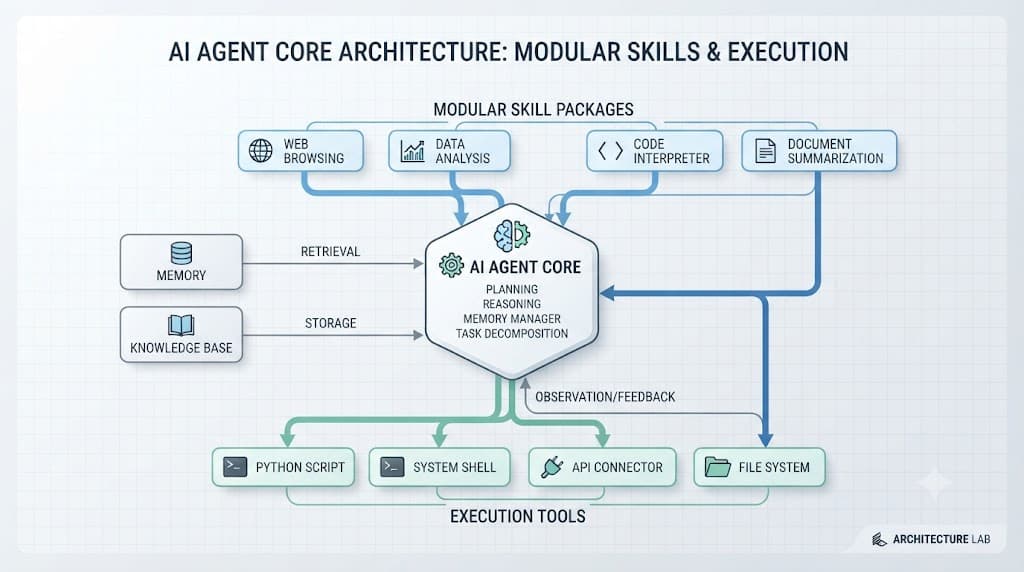
When an assistant encounters a task matching an activated skill, it dynamically incorporates the bundled instructions and routing logic into its operational context. This mechanism bridges the gap between general-purpose conversational models and narrow, specialized automation engines. Whether you are standardizing database query generation, enforcing strict security linting rules, or integrating proprietary internal APIs, structured skills ensure consistent execution.
[!NOTE] Architectural Note: Skills do not replace the underlying neural network weights; instead, they act as dynamic contextual overlays and policy guides that dictate tool selection and reasoning steps.
To visualize how these modular layers interact with the central assistant architecture during a typical user interaction, examine the data and execution flow below:
Comparing Skills, Prompts, and Tools
Developers frequently confuse skills, prompts, and tools because all three alter agent behavior. However, each serves a distinct architectural purpose within the ecosystem. Understanding these differences prevents bloated system prompts and ensures you use the right abstraction for your use case.
A system prompt is a broad, foundational instruction set that establishes the assistant's overall persona, safety boundaries, and general operational tone. A tool, conversely, is an executable function or API wrapper—such as a Python script execution environment, a bash shell connector, or a web scraper—that lets the model interact with the external world. A skill sits precisely between them: it is a packaged bundle that combines specific contextual guidance, step-by-step reasoning protocols, and designated tool permissions for a defined domain.
✓ Advantages of Skills
- Modular and easily shareable across agent instances
- Combines instructions and tool access in one package
- Reduces prompt token overhead by loading only when needed
✕ Common Missteps
- Treating skills as simple chat prompt substitutes
- Overloading a single skill with unrelated workflows
- Granting unrestricted tool access without boundary validation
To clarify how these three concepts contrast across operational dimensions, review the comparison matrix below:
| Feature | System Prompts | Tools | Hermes Agent Skills |
|---|---|---|---|
| Scope | Global baseline persona | Atomic execution unit | Domain-specific workflow bundle |
| Lifespan | Persistent throughout session | Called dynamically on-demand | Activated based on task context |
| Composition | Natural language text | Executable code / APIs | Instructions, policies, and tool bindings |
Anatomy of the Hermes Agent Skill System
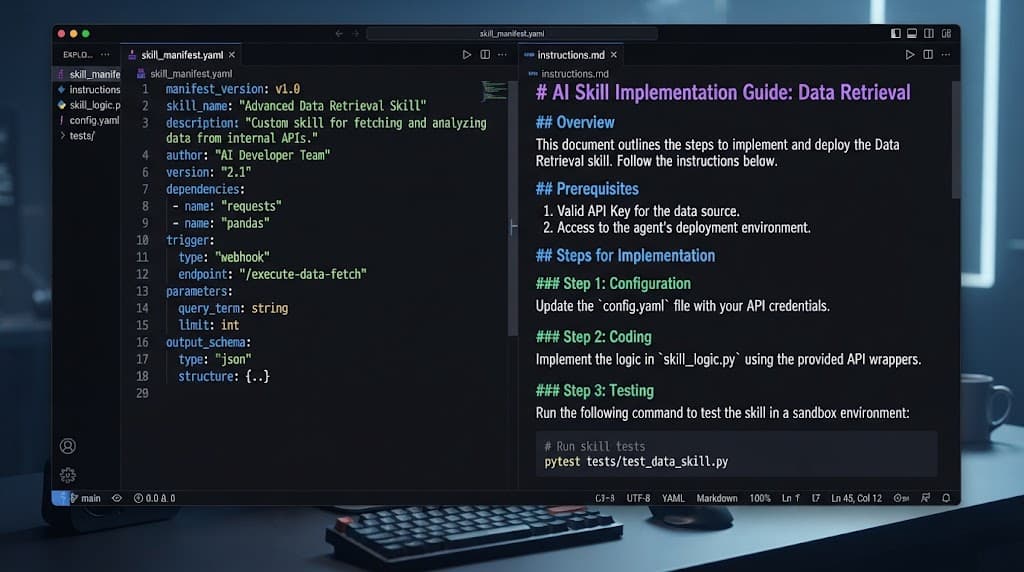
Mastering the hermes agent custom skills framework requires understanding its underlying file structure and lifecycle management. Every well-formed skill package is structured around a predictable directory layout that includes a primary manifest, descriptive markdown instructions, and optional validation schemas.
- Manifest Definition: A configuration file (typically YAML or JSON) that declares the skill's name, unique identifier, version, and required permissions.
- Instruction Body: A structured markdown document detailing the operational steps, edge cases, and expected output formats the assistant must follow.
- Tool Bindings: Explicit declarations stating which tools or execution environments the skill is authorized to invoke.
- Test Suite: Sample evaluation prompts and expected outputs used to verify that the skill functions correctly before deployment.
Activation happens automatically when the agent parses user inputs against registered skill metadata, or manually when invoked via explicit configuration flags. Testing these capabilities involves running isolated evaluation loops where mock user inputs trigger the skill, allowing developers to inspect whether the assistant correctly applies the bundled instructions without leaking unauthorized tool commands.
Building Custom Skills: A Complete Safe Example
To solidify your understanding, let us walk through a complete, safe, and functional example of a custom skill designed to generate standardized database migration reports. This example demonstrates how metadata, markdown instructions, and safety constraints integrate into a single package.
First, define the skill manifest in skill.yaml:
name: "db-migration-auditor"
version: "1.0.0"
description: "Audits SQL migration scripts for safety risks and performance anti-patterns."
author: "DevOps Team"
permissions:
  - read_local_files
  - parse_sql_ast
allowed_tools:
  - sql_syntax_parser
Next, provide the core instructions in instructions.md:
# Database Migration Auditor Guidelines

When a user requests a migration review, execute the following steps strictly:

1. **Schema Integrity Check:** Scan the provided SQL file for destructive commands such as `DROP TABLE` or `ALTER COLUMN` without fallback clauses.
2. **Index Evaluation:** Verify that every newly created foreign key constraint includes a corresponding index creation statement.
3. **Formatting Report:** Output findings in a clear table detailing the Severity Level, Line Number, and Recommended Mitigation.

> [!WARNING]
> **Safety Rule:** Never execute live database modifications. This skill is strictly for static analysis and report generation.
By packaging these guidelines together, you ensure that any agent instance loading this configuration adheres strictly to secure database review standards without requiring repetitive prompting.
Common Mistakes and Security Risks in Skill Extension
Extending agent capabilities introduces architectural risks if security boundaries and design principles are ignored. One of the most frequent mistakes is creating overly broad skills that attempt to handle too many disparate tasks at once. When a skill's instructions become too sprawling, the assistant's attention degrades, leading to erratic execution and missed constraints.
Another major pitfall involves conflicting instructions. If a global system prompt mandates strict brevity while an imported custom skill instructs the agent to write exhaustive multi-page reports, the model may enter an infinite loop of uncertainty or hallucinate a compromise. Always audit instruction hierarchies to ensure subordinate skills do not contradict core safety directives.
[!WARNING] Security Warning: Unchecked tool access in custom skills can lead to remote code execution vulnerabilities or unauthorized data exfiltration. Always restrict skill permissions to the absolute minimum required toolset.
Untested automation represents a final critical danger. Deploying complex automation scripts or data manipulation workflows without rigorous test harnesses can result in corrupted datasets or unintended system modifications. Always validate skills in sandboxed environments before rolling them out to production agent clusters.
Best Practices for Organizing Reusable Capabilities
Maintaining a clean, scalable library of reusable capabilities requires disciplined organization and version control strategies. As your organization builds out dozens of specialized workflows, treating your skill repositories like production software packages becomes essential.
Store each capability in its own dedicated version-controlled repository or directory structure. Implement semantic versioning (SemVer) so that agent deployments can lock into stable skill releases rather than pulling untested bleeding-edge code. Furthermore, establish a peer-review workflow where changes to skill instructions or tool permissions require sign-off from both security and engineering leads.
[!TIP] Pro Tip: Maintain a centralized registry catalog with automated documentation generation so developers across your team can easily discover existing skills before building duplicates from scratch.
By following these organizational patterns, you can scale your assistant infrastructure efficiently, ensuring that custom extensions remain secure, maintainable, and highly performant over time.