Quick Answer
When managing infrastructure as code, maintaining continuous availability and protecting critical resources from accidental deletion are paramount. Terraform lifecycle meta-arguments give engineers fine-grained control over how resources are created, updated, and destroyed during execution phases. By configuring parameters like create_before_destroy, prevent_destroy, ignore_changes, and replace_triggered_by directly inside your HCL resource blocks, you can prevent downtime during updates and safeguard production databases from accidental removal.
Quick Answer
The terraform lifecycle meta-arg block allows you to customize the default behavior of Terraform resources during execution phases. Instead of the standard destroy-then-create workflow, you can enforce policies such as creating a replacement resource before destroying the old one, locking down production databases to prevent deletion, ignoring external drifts on specific attributes, or triggering replacements based on external resource changes. These rules are defined locally inside any standard resource block using the nested lifecycle block.
Understanding the Concept
Infrastructure as code engines like Terraform manage resources through a state file that maps real-world cloud objects to your configuration declarations. By default, when a resource property changes and cannot be modified in place, Terraform performs a destructive update: it destroys the existing resource and provisions a brand-new one in its place. While standard for stateless tiers, this approach introduces inevitable downtime for stateful workloads, load balancers, and production data stores.
State management relies on strict dependency graphs and execution plans. Understanding how Terraform evaluates state changes is essential for maintaining robust pipelines in AWS, Kubernetes, and Linux environments. When resource properties change, the execution engine calculates a diff between your desired configuration and the current state file. If a replacement is required, understanding the underlying resource lifecycle ensures you do not inadvertently take down production traffic during a routine CI/CD deployment pipeline run.
How It Works
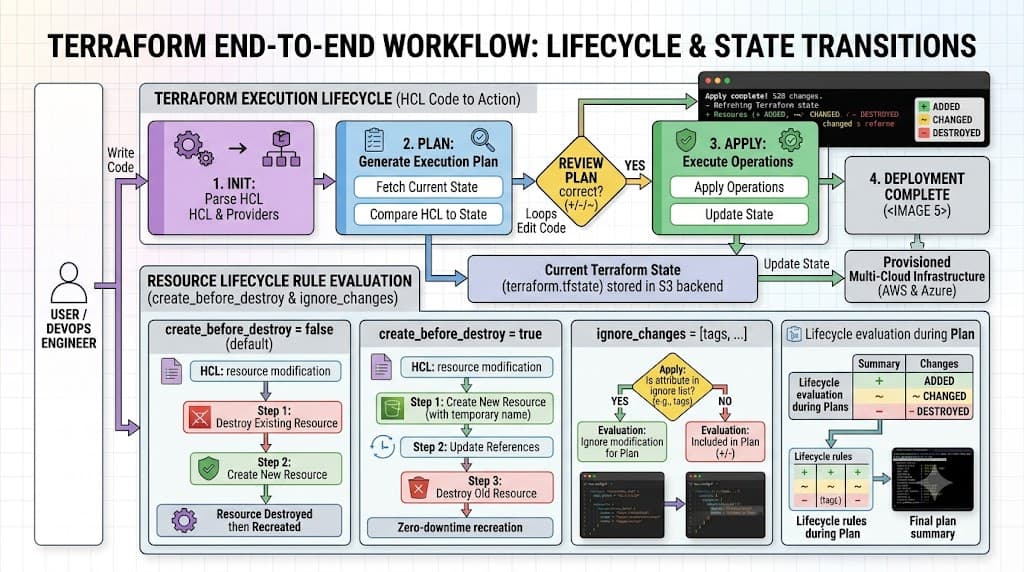
Terraform executes changes in distinct phases: planning, plan evaluation, and application. During the planning phase, the Terraform CLI builds a directed acyclic graph representing your resource dependencies. It then evaluates the metadata arguments specified in each resource block to modify the standard execution sequence. If a resource has a specific rule attached, the plan generator alters its state machine transitions accordingly.
For instance, instructing Terraform to instantiate a replacement object before tearing down the old one modifies dependency resolution order. Rather than queuing a sequential delete-then-create operation, the engine prioritizes provisioning the new resource, attaching network interfaces or security groups, updating dependent routing tables, and finally executing the deletion of the legacy object. This sophisticated sequencing prevents broken references and maintains operational continuity.
Syntax and configuration
Configuring these behaviors requires placing a nested lifecycle block inside your resource declaration. The syntax supports several distinct meta-arguments designed for specific operational scenarios. Below is a breakdown of the primary arguments supported within the lifecycle block:
- create_before_destroy: A boolean value (true or false) that alters replacement order. When set to true, Terraform provisions the new replacement resource first, updates references in the state file, and then destroys the old resource.
- prevent_destroy: A boolean safety latch. When set to true, any execution plan that attempts to delete the resource will throw an explicit error, halting the operation immediately.
- ignore_changes: A list of resource attribute strings that Terraform will completely disregard when evaluating plan diffs. This is exceptionally useful when external systems, auto-scaling groups, or manual interventions modify tags or configuration values outside of Terraform's direct management.
- replace_triggered_by: A list of resource or attribute references that, when modified, force the current resource to be replaced even if its own configuration parameters remain unchanged.
These arguments can be combined within a single resource block to address complex deployment requirements across cloud providers and container orchestration layers.
CLI workflow
The Terraform CLI workflow remains consistent, but the execution engine reacts differently based on the metadata rules you have declared. When you run terraform plan, the output explicitly reflects any active lifecycle constraints. If a resource has prevent_destroy enabled and a plan is generated that includes its deletion, Terraform halts and displays an error message directly in the terminal before any infrastructure is touched.
When running terraform apply, the execution output details the altered order of operations. For example, when create_before_destroy is active, you will see Terraform create the new resource instance, modify dependent bindings, and finally destroy the outdated instance. Reviewing these plan outputs carefully is a critical step in verifying that your HCL instructions translate into safe, predictable runtime behavior.
Practical Terraform Example
Consider a production environment where you are managing an AWS launch template or a Kubernetes deployment configuration. Changing AMI IDs or container image tags typically triggers a resource replacement. To avoid downtime, you must enforce a zero-downtime update pattern using lifecycle rules.
Below is a practical HCL example demonstrating how to configure create_before_destroy on an AWS instance while safeguarding a persistent storage volume with prevent_destroy:
provider "aws" {
  region = "us-east-1"
}

resource "aws_instance" "web_server" {
  ami           = "ami-0c55b159cbfafe1f0"
  instance_type = "t3.medium"

  tags = {
    Name        = "ProductionWebServer"
    Environment = "Production"
  }

  lifecycle {
    create_before_destroy = true
    ignore_changes        = [tags["LastModified"]]
  }
}

resource "aws_ebs_volume" "database_storage" {
  availability_zone = "us-east-1a"
  size              = 50

  tags = {
    Name = "ProductionDatabaseStorage"
  }

  lifecycle {
    prevent_destroy = true
  }
}
In this configuration, the web server instance will be safely replaced without dropping traffic, while the EBS volume is permanently locked against accidental destruction. If an engineer attempts to remove the volume block from the configuration and runs terraform apply, Terraform will reject the execution and protect your data.
Verification
Verifying that your lifecycle rules behave correctly requires combining CLI execution checks with direct state inspection. Never assume a rule is working without inspecting the planned execution graph.
First, run terraform plan and examine the execution order displayed in your terminal. When create_before_destroy is configured correctly, the plan output will show the creation of the new resource before the destruction of the old one. Next, inspect your state file using terraform state show or query specific resource attributes to ensure that remote infrastructure matches your expectations.
For ignored changes, you can intentionally modify a resource attribute out-of-band—such as updating a tag directly via the cloud console or a CLI tool—and then run terraform plan. If ignore_changes is working properly, Terraform will report zero changes required, confirming that external drift on those specific attributes is successfully bypassed.
Common Mistakes
Managing infrastructure definitions involves navigating several frequent operational pitfalls. Being aware of these common mistakes helps prevent accidental outages and configuration deadlocks.
- Skipping terraform plan: Applying configurations blindly without reviewing the execution plan can lead to unexpected resource replacements, especially when default provider behaviors change across versions.
- Hard-coding credentials: Embedding sensitive API keys or secret tokens directly into HCL files creates severe security vulnerabilities. Always use environment variables or secure vault integrations.
- Misunderstanding state dependencies: Creating circular dependencies between resources with create_before_destroy enabled can cause provisioning deadlocks that Terraform cannot resolve automatically.
- Ignoring provider version updates: Major provider version upgrades frequently alter resource schemas and attribute deprecation rules, which can break existing lifecycle configurations.
Best Practices
Adopting production-grade standards ensures your infrastructure remains resilient, secure, and easy to maintain across team collaborations and CI/CD pipelines.
- Centralize and lock remote state: Always store your state files in a secure remote backend (such as encrypted object storage) equipped with state locking mechanisms to prevent concurrent modifications by multiple engineers or CI/CD runners.
- Enforce pull request reviews: Require peer reviews on all HCL changes, specifically checking resource lifecycle blocks before merging code into main deployment branches.
- Use prevent_destroy on stateful assets: Apply destruction guards to databases, persistent disks, and core networking components to protect critical data against accidental removal.
- Document exception cases: When using ignore_changes to handle external tooling or third-party controllers, add clear inline comments explaining why the attribute is ignored.
Troubleshooting
Even with careful planning, engineers occasionally encounter complex deployment errors when managing resource lifecycles. Knowing how to diagnose and resolve these issues is essential for maintaining high availability.
A frequent failure mode involves cyclical dependency errors when create_before_destroy is applied to resources with strict naming or uniqueness constraints. For example, if two resources reference each other and both demand pre-creation, Terraform's dependency graph may deadlock. To resolve this, break the circular reference by decoupling the dependent attribute or redesigning the resource hierarchy.
Another common issue is locked state files caused by interrupted CLI runs. If a CI/CD pipeline fails midway through an apply phase, subsequent runs may be blocked by a stale state lock. Use terraform force-unlock with the appropriate lock ID only after verifying that no other process is actively modifying the remote state.
Finally, unexpected resource replacements often stem from subtle schema updates in cloud providers. If a provider update alters an optional attribute's default value, Terraform may flag the resource for recreation. Reviewing the provider changelog and utilizing ignore_changes for volatile computed attributes will stabilize your deployments and eliminate unwanted downtime.
📌 Recommended Next Guides & References
  <li>
    <a href="/article/docker-and-kubernetes-how-they-work-together-2" class="text-primary hover:underline font-semibold flex items-center gap-2">
      <span>→</span> <span>Docker and Kubernetes: How They Work Together</span>
    </a>
  </li>

  <li>
    <a href="/article/kubernetes-ingress-explained" class="text-primary hover:underline font-semibold flex items-center gap-2">
      <span>→</span> <span>Kubernetes Ingress Explained: Routing, Controllers, and TLS</span>
    </a>
  </li>

  <li>
    <a href="/article/kubernetes-ingress-controller-explained" class="text-primary hover:underline font-semibold flex items-center gap-2">
      <span>→</span> <span>Kubernetes Ingress Controller Explained: Architecture, Routing, and Implementation</span>
    </a>
  </li>