Quick Answer
Managing code repositories, organization memberships, webhook configurations, and team permissions through a graphical user interface often leads to configuration drift, undocumented manual adjustments, and auditing challenges as engineering teams grow. Adopting an Infrastructure as Code approach solves these operational bottlenecks by treating your version control organization configuration with the same rigor, version control, and review pipelines applied to application codebases. This comprehensive guide details how to leverage the terraform github provider to declare, provision, and maintain your entire version control workspace programmatically and safely.
Quick Answer
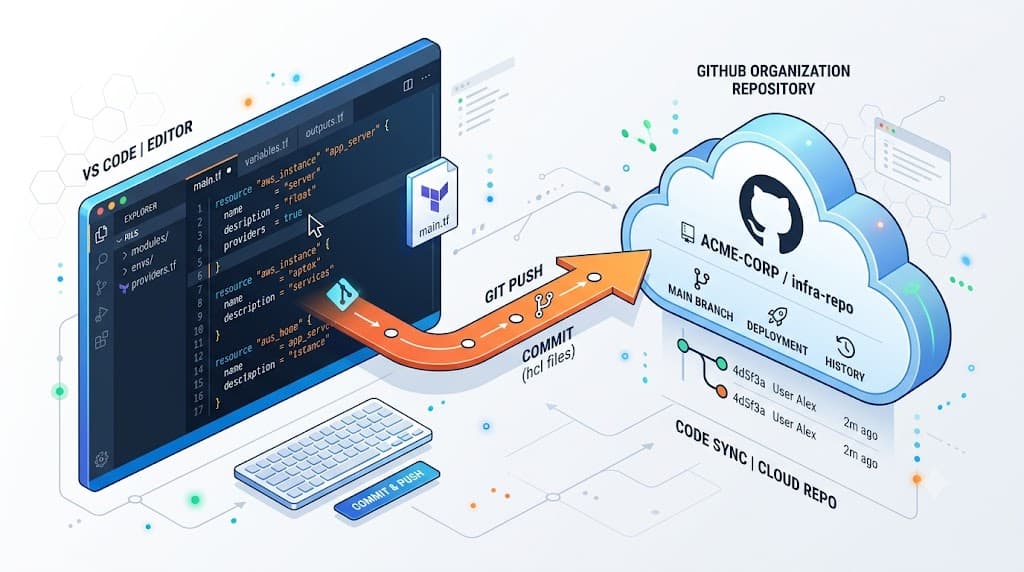
The terraform github provider is an official HashiCorp-maintained plugin that enables engineers to manage version control resources—such as repositories, branch protection rules, teams, collaborators, and organization webhooks—using HashiCorp Configuration Language. Instead of clicking through web settings panels, you declare desired state blocks in configuration files and apply them through the command line. To get started quickly, define your provider block with a personal access token or OAuth token, add a resource declaration for a repository, run an initialization command, and execute an apply workflow to provision the remote infrastructure. For example, declaring a simple managed repository involves setting up the provider block with an environment variable for authentication, initializing the plugin, running an inspection plan, and committing the change to state.
Understanding the Concept
At its core, Infrastructure as Code replaces manual point-and-click operations with declarative configuration files. When working with the terraform github provider, every resource—whether it is a private repository, a team of developers, a repository webhook, or a branch protection rule—is represented as an HCL resource block. This abstraction brings immense organizational consistency, allowing engineering leaders to enforce baseline security rules, naming conventions, and access control policies across hundreds of repositories without repetitive manual intervention.
When you execute your terminal commands, the tool compares your local HCL declarations against the current remote setup managed via the remote API, calculating the exact delta required to reach your declared target state. This state is tracked in a designated state file, which acts as the single source of truth mapping your configuration to real-world resources. By codifying your organization setup, you gain the ability to review changes via standard pull request workflows before anything is executed in production, preventing unauthorized alterations and maintaining a complete historical audit trail.
How It Works
Syntax and configuration
Configuring the terraform github provider requires establishing a secure connection to the remote API using authentication credentials, typically supplied via environment variables to prevent leaking sensitive secrets into source control repositories. The provider block defines connection parameters such as the organization name and the authentication token. Below is an example demonstrating how the provider is initialized within your configuration files, utilizing an environment variable for secure credential handling.
terraform {
  required_version = ">= 1.0.0"
  required_providers {
    github = {
      source  = "integrations/github"
      version = "~> 5.0"
    }
  }
}

provider "github" {
  owner = "my-organization-name"
}
In this configuration block, the required_providers section specifies that we are pulling the official integration plugin from the registry, locking the version major tier to maintain stability across updates. The provider "github" block sets the target organization context so that subsequent resource definitions do not need to repeatedly declare the organization owner.
CLI workflow
Working with the terraform github provider relies on a structured sequence of CLI commands designed to safely inspect, plan, and execute modifications. Understanding each command and its specific purpose is critical for avoiding unintended alterations to production environments.
First, terraform init scans your configuration files, downloads the necessary provider plugins into a local hidden directory, and prepares the working environment. Next, terraform plan queries the remote API, inspects your local state file, and generates an execution plan outlining every addition, modification, or deletion that will occur. Crucially, terraform plan is a read-only operation that does not make any changes to your remote infrastructure, allowing engineers to review the proposed diff safely.
Once the plan has been reviewed and approved, running <a href="/article/terraform-apply-create-and-update-infrastructure-2" class="text-primary font-semibold hover:underline">terraform apply</a> instructs the execution engine to take the approved plan and transmit the corresponding API calls to enact the changes. Conversely, if a managed resource is no longer required, <a href="/article/terraform-destroy-safely-remove-managed-infrastructure-4" class="text-primary font-semibold hover:underline">terraform destroy</a> systematically tears down all resources managed within the state file. It is vital to note that destroy operations are highly destructive and will permanently delete remote repositories and associated data if not carefully restricted or managed.
Practical Terraform Example
Example
To see the terraform github provider in action, consider a complete, working configuration that provisions a secure repository, sets up a developer team, and assigns team permissions with specific access levels. This pattern ensures that every newly onboarded repository automatically inherits baseline security policies and team memberships without manual administrator intervention.
resource "github_repository" "core_service" {
  name        = "core-service-api"
  description = "Core microservice handling user authentication and data processing"
  visibility  = "private"

  auto_init          = true
  has_issues         = true
  has_projects       = false
  has_wiki           = false
  delete_branch_on_merge = true
}

resource "github_team" "engineering" {
  name        = "Core Engineering"
  description = "Core engineering team with write access"
  privacy     = "closed"
}

resource "github_team_repository" "team_membership" {
  team_id    = github_team.engineering.id
  repository = github_repository.core_service.name
  permission = "push"
}
In this example, three distinct resources work together. The github_repository block creates a private repository with built-in initialization and automatic branch cleanup upon merge. The github_team block defines an internal engineering team. Finally, the github_team_repository resource associates that team with the newly created repository, granting explicit push permissions. When you execute terraform plan against this configuration, the output will display a clear visual preview of the three new remote objects that will be created under your organization.
Verification
Ensuring that your configuration has been applied correctly requires a combination of CLI output inspection, state verification, and remote API checks. After executing your apply command, the terminal will output a success message detailing the resource addresses that were successfully provisioned. You can inspect the local state file using terraform show to verify that all resource attributes match your expectations and that the unique identifiers returned by the remote API have been correctly recorded.
Additionally, you can perform external verification by navigating to your organization's web interface to confirm that the repository and team memberships appear correctly configured with the specified access levels. For automated pipelines running in continuous integration environments, you can also query the remote API directly using curl or official command-line interfaces to assert that the resources exist and possess the correct metadata before allowing subsequent deployment stages to proceed.
Common Mistakes
Operating with the terraform github provider introduces several frequent pitfalls that can lead to configuration drift, broken state files, or security vulnerabilities. One of the most common mistakes is skipping the execution plan review phase and blindly piping automated apply commands into production environments without inspecting the diff.
Another critical error is hard-coding personal access tokens or OAuth credentials directly into configuration files. Credentials should always be injected securely via environment variables or secret management systems. Furthermore, engineers frequently run into trouble by manually modifying resources in the web interface after they have been placed under management, which creates state drift where the local state no longer matches remote reality, causing unexpected diffs during subsequent plan executions.
Best Practices
To maintain a robust, secure, and scalable infrastructure management workflow, adopt proven production practices. Always store your state files in a secure, remote backend with encryption enabled at rest and state locking active to prevent concurrent conflicting modifications from multiple developers or continuous integration pipelines.
Organize your configuration into modular components rather than lumping all organization resources into a single monolithic file. For instance, separate repository definitions from team membership and access control lists into distinct modules or directories. Finally, always use fine-grained personal access tokens with the minimum necessary permission scopes required to perform the specific provisioning tasks, adhering strictly to the principle of least privilege.
Troubleshooting
When working with remote APIs, engineers occasionally encounter error states, authentication failures, or rate-limiting blocks. A common failure mode is receiving an unauthorized or invalid token error during the initialization or planning phase. This typically occurs when the authentication token lacks the required administrative scopes or has expired. To resolve this, generate a new fine-grained token with appropriate repository and organization permissions, and export it to your terminal session before re-running your commands.
Another frequent issue involves API rate limiting when managing large organizations with hundreds of resources. If your apply operation fails due to secondary rate limits, introduce targeted dependencies using explicit depends_on meta-arguments or adjust your batch sizes to throttle the frequency of concurrent API requests issued by the provider plugin. Always review the detailed error message returned by the provider, as it usually pinpoints the exact resource block and API response code responsible for the failure.
📌 Recommended Next Guides & References
  <li>
    <a href="/article/docker-and-kubernetes-how-they-work-together-2" class="text-primary hover:underline font-semibold flex items-center gap-2">
      <span>→</span> <span>Docker and Kubernetes: How They Work Together</span>
    </a>
  </li>

  <li>
    <a href="/article/kubernetes-ingress-explained" class="text-primary hover:underline font-semibold flex items-center gap-2">
      <span>→</span> <span>Kubernetes Ingress Explained: Routing, Controllers, and TLS</span>
    </a>
  </li>

  <li>
    <a href="/article/kubernetes-ingress-controller-explained" class="text-primary hover:underline font-semibold flex items-center gap-2">
      <span>→</span> <span>Kubernetes Ingress Controller Explained: Architecture, Routing, and Implementation</span>
    </a>
  </li>