Quick Answer
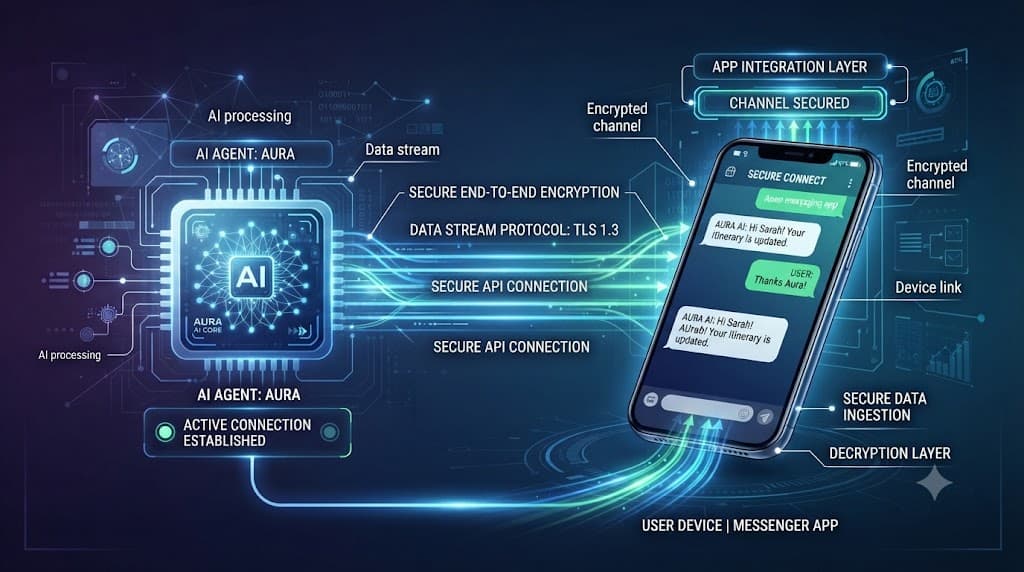
Connecting an autonomous AI assistant to a mobile messaging platform transforms how you interact with your tools and scripts. By establishing a reliable communication bridge, you can trigger complex agent tasks, inspect running workflows, and review notifications directly from your phone. This comprehensive guide walks you through the exact technical steps needed to bring your digital helper online securely.
Quick Answer: Connecting Hermes Agent to Telegram
To bridge your system with a messaging client, you first create a dedicated bot account via BotFather, extract the API token, and plug it into your local agent configuration. Once active, the agent listens for incoming webhook requests or polls the Telegram Bot API for messages. After confirming that the bot responds to test phrases, you must lock down user permissions to prevent unauthorized execution of system tools. This workflow turns your automation engine into a portable, pocket-sized assistant capable of handling remote tasks.
[!TIP] Pro Tip: Keep your local test environment running inside a screen or tmux session while establishing initial connectivity so you can monitor live debug logs.
Prerequisites and Bot Creation
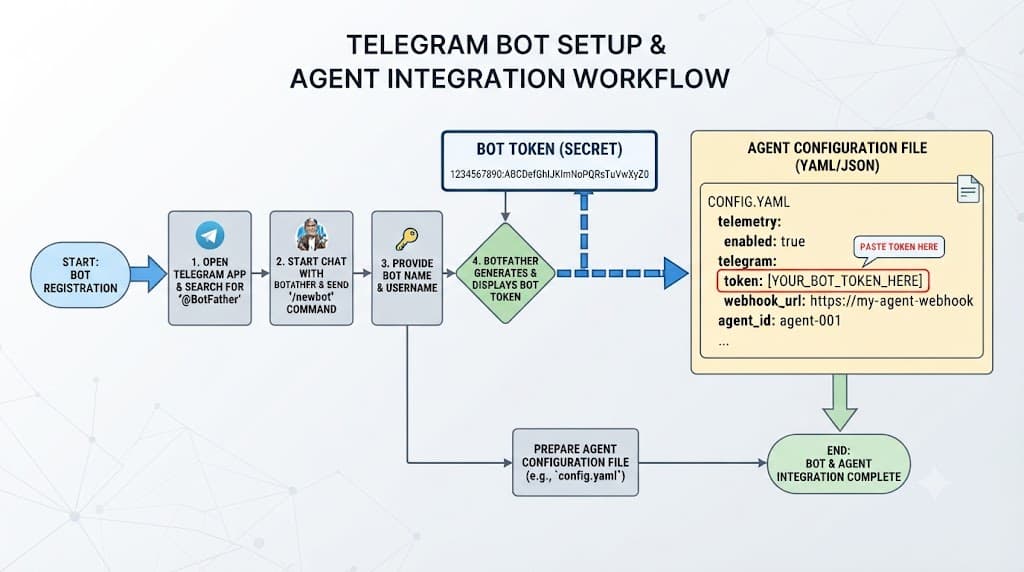
Before diving into configuration files, ensure you have a running local instance of Hermes Agent along with an active account on the messaging platform. Setting up the underlying bot interface requires interacting with Telegram's official management tool, commonly known as BotFather.
- Open your messaging app and search for the verified
@BotFatheraccount. - Send the command
/newbotto start the creation wizard. - Follow the conversational prompts to give your bot a clear display name and a unique username ending in
botor_bot. - Once creation finishes, BotFather will output a long cryptographic HTTP API token. Copy this string immediately and store it securely.
This token acts as the master key to control your bot. Anyone who obtains it can read messages and send commands on behalf of your assistant, making secure storage paramount from the very beginning.
Hermes Agent Bot Mode and Configuration
With your API token safely generated, you can now configure your hermes agent bot mode. Hermes supports a modular messaging architecture where communication channels run as independent background daemons or adapters. You need to supply your credentials inside the core configuration file or environment variables.
Open your primary configuration file (typically named config.yaml or located within your agent profile directory) and locate the messaging section. Insert your newly generated token under the designated Telegram adapter block:
channels:
  telegram:
    enabled: true
    token: "YOUR_BOT_FATHER_API_TOKEN"
    poll_interval: 1
    allowed_users:
      - 123456789
By defining an allowed_users array containing your numeric user identifier, you prevent random accounts from interacting with your system. Next, initialize the agent service using your standard startup command, passing the flag to enable messaging daemons. You should see logs indicating that the polling loop has successfully connected to the Telegram servers.
Telegram Interface vs CLI Comparison
Choosing between a messaging interface and a standard command-line interface depends heavily on your daily workflow requirements. While the CLI offers raw speed and direct shell piping, a mobile interface grants asynchronous freedom.
✓ Telegram Interface Advantages
- Accessible from mobile devices anywhere
- Asynchronous notifications and alerts
- Friendly conversational chat format
- Good for quick status checks and lightweight tasks
✕ Telegram Interface Limitations
- File size and payload limits on chat APIs
- Less suited for massive multi-line script editing
- Requires external API connectivity
- Prone to formatting quirks for rich code outputs
The traditional terminal interface remains unmatched for deep debugging, inspecting verbose error traces, and managing raw configuration files. However, pairing Hermes with a messaging app bridges the gap when you are away from your workstation but need immediate action taken on an ongoing pipeline.
Security, Risks, and Common Mistakes
Deploying an autonomous assistant that possesses local file system or tool execution capabilities introduces serious security considerations. A misconfigured bot can become an open door for malicious actors if proper safeguards are omitted.
[!WARNING] Warning: Never hardcode your BotFather token directly into public Git repositories. Always utilize environment variables or encrypted secrets managers.
Common pitfalls include:
- Exposing Bot Tokens: Committing API keys to version control exposes your bot instantly to automated scrapers.
- Unrestricted Access: Failing to filter incoming user IDs allows anyone on the internet to issue commands to your agent.
- Unbounded Tool Execution: Giving an agent unchecked shell execution powers over chat without human-in-the-loop confirmation can lead to accidental data loss.
Always ensure your user allowlist is strictly enforced and that high-impact tools require explicit confirmation prompts before running system-level mutations.
Testing and Troubleshooting Your Bot Setup
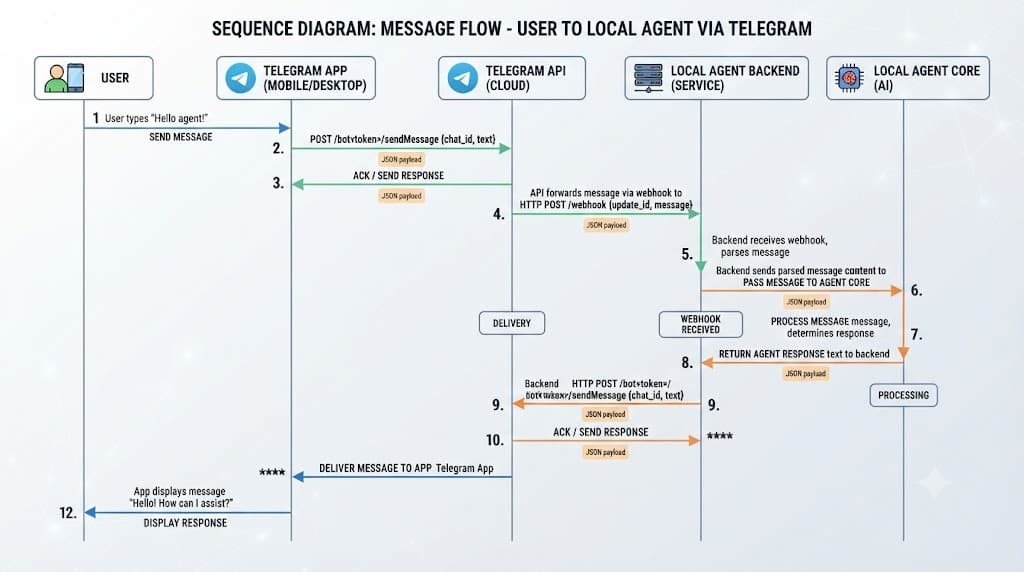
Once your configurations are saved and the service is running, systematic verification ensures everything operates as expected. Open your Telegram client, navigate to your bot's username, and send a simple /start greeting.
If the agent fails to reply, step through this troubleshooting checklist:
- Check Network Connectivity: Verify that your host machine can reach the Telegram Bot API endpoints without being blocked by local firewalls.
- Review Authentication Logs: Inspect your terminal output for invalid token errors or unauthorized polling responses.
- Verify User ID Whitelists: Ensure your numeric Telegram ID matches the entry in your configuration file.
- Restart the Daemon: Completely stop and restart the agent process to flush stale polling connections.
When messages begin flowing smoothly, you can proceed to test more complex queries and multi-step tasks to validate your complete hermes agent telegram setup.
By following this structured validation process, you ensure a resilient, secure, and highly responsive automation assistant ready for daily deployment.