Quick Answer
Passing configuration data securely and dynamically into containerized applications is a core operational requirement for modern cloud-native systems. Managing kubernetes environment variables allows developers to decouple application code from environment-specific configurations like database URLs, feature flags, and debug toggles. Without proper environment variable management, software delivery pipelines quickly break down as teams attempt to hardcode staging parameters into production deployments or struggle with manual credential distribution across clusters.
Kubernetes provides multiple native mechanisms to inject runtime configuration data into Pods. You can assign static variables directly inside your deployment manifests, pull specific keys out of shared cluster objects, or bulk-load entire configuration dictionaries into your running application processes. Understanding these mechanisms helps maintain clean container images that remain immutable and portable across development, testing, and production clusters.
Quick Answer
You can configure kubernetes environment variables directly inside a Pod specification using the env array within your container definitions, or dynamically by referencing external resources like ConfigMaps and Secrets. To inject configuration safely, define an env block in your container YAML and specify either a literal value or a dynamic valueFrom reference pointing to specific keys in your cluster configuration maps. For large configuration sets, you can also inject entire groups of variables simultaneously using the envFrom field in your container specification.
apiVersion: v1
kind: Pod
metadata:
  name: demo-pod
spec:
  containers:
  - name: app
    image: my-app:latest
    env:
    - name: APP_MODE
      value: "production"
Setting Environment Variables
Configuring runtime settings directly within a Pod specification is the most straightforward method for passing parameters to containers, though it requires careful planning regarding maintenance and security. When building scalable microservices architectures, developers often need to adjust logging levels, timeout thresholds, or external API endpoints without rebuilding container images. Kubernetes handles these runtime injections gracefully at the container startup phase, ensuring that applications read their expected environment state immediately upon execution.
However, deciding how and where to define these variables impacts your overall deployment workflow. While inline definitions are excellent for simple debugging or single-use testing pods, they quickly become unmanageable in enterprise environments with dozens of microservices spanning multiple distinct environments.
env
The direct env configuration approach allows you to inject literal strings directly into your container environment. Each entry inside the env array requires a name key representing the environment variable identifier and a value key holding the corresponding string data. This approach is straightforward and requires no external Kubernetes objects to be created beforehand, making it ideal for quick testing, bootstrapping, or setting non-sensitive global constants that never change between deployment stages.
apiVersion: v1
kind: Pod
metadata:
  name: direct-env-pod
spec:
  containers:
  - name: web
    image: nginx:alpine
    env:
    - name: PORT
      value: "8080"
    - name: LOG_LEVEL
      value: "info"
Despite its simplicity, hardcoding environment variables directly into Pod manifests is generally discouraged for production environments. When configuration values are embedded directly in deployment templates, updating a single parameter requires modifying, reviewing, and redeploying the entire Pod specification. Furthermore, hardcoded manifests risk exposing non-sensitive operational settings across public version control repositories if proper templating tools like Helm or Kustomize are not strictly enforced.
valueFrom
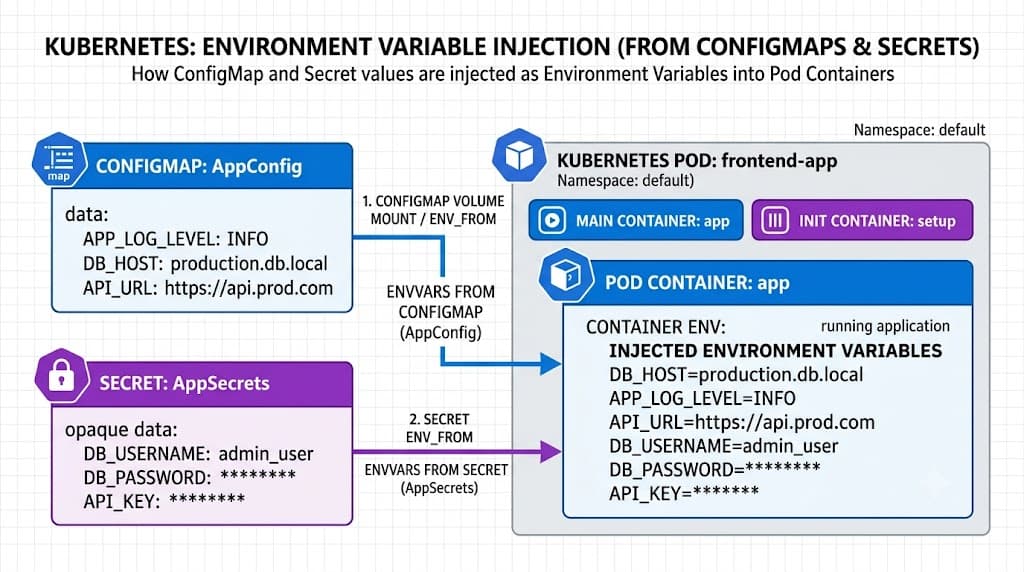
When your application requires dynamic references or needs to pull data from other Kubernetes objects, the valueFrom field provides granular control over individual environment variables. Instead of specifying a static value, you use valueFrom to point directly to specific keys inside a ConfigMap or Secret. This decouples your operational configurations from your application deployment code, allowing operators to modify cluster parameters independently of developer release cycles.
The valueFrom block supports several sub-selectors, most notably configMapKeyRef and secretKeyRef. These sub-selectors explicitly name the target configuration object, specify the exact key you wish to extract, and determine whether the presence of that key is mandatory or optional for the Pod to start successfully. If a referenced key is missing and marked as mandatory, Kubernetes prevents the container from starting, protecting your application from failing silently due to incomplete environment initialization.
ConfigMaps
Kubernetes ConfigMaps provide a dedicated API object used to store non-sensitive configuration data as key-value pairs. By separating configuration from container images, ConfigMaps ensure that your compiled application artifacts remain completely environment-agnostic. You can build a single container image and promote it seamlessly from development to staging and production simply by binding it to different ConfigMaps in each respective namespace.
ConfigMaps can store simple properties files, configuration fragments, or entire JSON blobs. Once created in your cluster, these objects can be consumed by Pods in multiple ways: as individual environment variables, as injected configuration files mounted into container volumes, or as command-line arguments. Using ConfigMaps for standard application settings drastically reduces configuration drift and simplifies auditing across your cluster infrastructure.
configMapKeyRef
The configMapKeyRef syntax is used within a container's env specification to select a single specific key out of an existing ConfigMap and expose it as an environment variable. To use configMapKeyRef, you must provide the name of the ConfigMap object and the specific key whose value you want to retrieve. This approach is highly efficient when your container only requires a few isolated configuration values rather than an entire dictionary of variables.
apiVersion: v1
kind: ConfigMap
metadata:
  name: app-config
data:
  DATABASE_HOST: "db.internal.net"
  DATABASE_PORT: "5432"
---
apiVersion: v1
kind: Pod
metadata:
  name: configmap-ref-pod
spec:
  containers:
  - name: backend
    image: my-backend:latest
    env:
    - name: DB_HOST
      valueFrom:
      	configMapKeyRef:
          name: app-config
          key: DATABASE_HOST
    - name: DB_PORT
      valueFrom:
        configMapKeyRef:
          name: app-config
          key: DATABASE_PORT
When deploying configurations this way, always ensure the referenced ConfigMap exists in the same namespace as the Pod before applying the deployment manifest. If the ConfigMap is absent, the Pod scheduling will stall or fail with container creation errors until the missing configuration resource is successfully provisioned.
Secrets
Kubernetes Secrets serve a similar structural purpose to ConfigMaps but are specifically engineered for handling sensitive information such as passwords, OAuth tokens, SSH keys, and TLS certificates. While ConfigMaps store data in plain text, Secrets encode data values in Base64 format and offer advanced security features, including namespace-based isolation, encrypted etcd storage options, and role-based access control restrictions.
To inject sensitive data into your containers securely, you reference a Secret using secretKeyRef within your container's environment variable definitions. This functions identically to configMapKeyRef, pulling only the required secret key into an isolated environment variable without exposing the entire secret payload to the container process. By fetching credentials dynamically at startup, you avoid burning sensitive passwords into static build artifacts or configuration files.
envFrom and valueFrom
Choosing between granular injection and bulk injection depends largely on the size of your configuration dataset and your application's architecture. While valueFrom and configMapKeyRef provide precise control over individual variable names, managing dozens of individual references in a large YAML manifest can become tedious and error-prone. For applications that require an entire suite of configuration keys simultaneously, Kubernetes provides bulk injection mechanisms.
When utilizing bulk injection, you must be mindful of precedence rules and potential variable name collisions. If you define an environment variable using direct env alongside an envFrom bulk block that contains a duplicate key, the direct env definition takes precedence and overrides the bulk value. Understanding these override hierarchies prevents silent configuration bugs where default cluster settings accidentally overwrite application-specific overrides.
envFrom
The envFrom directive allows you to ingest every single key-value pair from an entire ConfigMap or Secret and inject them all as environment variables into your container in a single operation. This eliminates boilerplate YAML configuration and ensures that any updates made to the source ConfigMap or Secret are cleanly available to your deployment architecture upon container restart.
apiVersion: v1
kind: ConfigMap
metadata:
  name: global-settings
data:
  CACHE_ENABLED: "true"
  TIMEOUT_SECONDS: "30"
  MAX_RETRIES: "5"
---
apiVersion: v1
kind: Pod
metadata:
  name: envfrom-pod
spec:
  containers:
  - name: worker
    image: my-worker:latest
    envFrom:
    - configMapRef:
        name: global-settings
You can also apply an optional prefix string to all keys imported via envFrom. For example, adding prefix: "CONFIG_" transforms keys like TIMEOUT_SECONDS into CONFIG_TIMEOUT_SECONDS inside the container environment. This is an effective pattern for preventing naming collisions when injecting multiple ConfigMaps into the same container runtime.
Verification
Verifying that your runtime environment variables have been injected correctly is an essential troubleshooting step during deployment validation. Because environment variables are evaluated at container startup, misconfigured ConfigMap references or syntax errors will often prevent containers from initializing properly. Mastering standard inspection commands ensures you can diagnose configuration failures quickly without digging through complex log aggregators.
The most direct way to inspect running environment variables is by executing commands inside the active container using kubectl exec. This allows you to verify the exact state of the environment as seen by your running application process.
kubectl exec -it my-pod -- env
If a Pod fails to start due to a missing ConfigMap or Secret reference, you can inspect the scheduling events and container creation failures using kubectl describe pod. This command reveals critical error messages such as ConfigMap "app-config" not found or secret key not found, guiding you directly to the root cause of the deployment failure.
kubectl describe pod my-pod
Security Considerations
Securing operational parameters requires adhering to strict security baselines across your cluster infrastructure. Never expose sensitive credentials in plaintext command-line arguments, build scripts, or application logs. While Kubernetes Secrets protect data at rest and in transit within the cluster network, standard Base64 encoding is merely an obfuscation layer, not true encryption. Ensure your cluster enables encryption at rest for Secrets in etcd, and restrict access to Secret resources using Kubernetes Role-Based Access Control (RBAC).
Additionally, audit your application code to ensure it does not dump the entire environment variable dictionary to standard output upon startup, as this is a common vector for credential leakage into centralized log management systems. By following these operational safeguards, you can maintain robust, secure, and flexible application configurations across all your Kubernetes deployments.
📌 Recommended Next Guides & References
  <li>
    <a href="/article/docker-and-kubernetes-how-they-work-together-2" class="text-primary hover:underline font-semibold flex items-center gap-2">
      <span>→</span> <span>Docker and Kubernetes: How They Work Together</span>
    </a>
  </li>

  <li>
    <a href="/article/kubernetes-ingress-explained" class="text-primary hover:underline font-semibold flex items-center gap-2">
      <span>→</span> <span>Kubernetes Ingress Explained: Routing, Controllers, and TLS</span>
    </a>
  </li>

  <li>
    <a href="/article/kubernetes-ingress-controller-explained" class="text-primary hover:underline font-semibold flex items-center gap-2">
      <span>→</span> <span>Kubernetes Ingress Controller Explained: Architecture, Routing, and Implementation</span>
    </a>
  </li>