Quick Answer
Managing containerized applications requires robust tools that bridge underlying cloud architecture and intra-cluster workload orchestration. When engineering teams adopt infrastructure as code, combining Terraform and Kubernetes offers a declarative approach to managing both cluster infrastructure and the applications running inside it. This comprehensive guide covers provider configuration, state management, workflow boundaries, and practical examples to streamline your DevOps pipelines.
Quick Answer
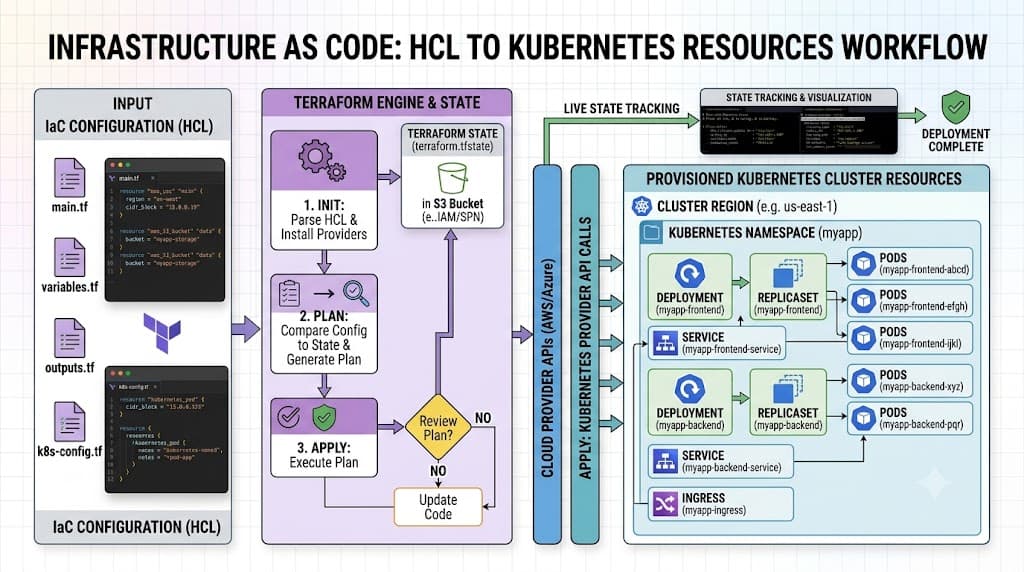
Terraform manages Kubernetes resources by using the official Terraform Kubernetes provider, which translates HCL configurations into API calls against your cluster's API server. By defining resources like deployments, services, and namespaces as code, teams gain consistent version control, automated drift detection, and unified infrastructure pipelines. To begin, configure your provider with appropriate authentication details, initialize your workspace, and execute planning and application phases just as you would with any other cloud infrastructure.
Terraform and Kubernetes Roles
Understanding the distinct responsibilities of Terraform and Kubernetes is essential for building resilient cloud-native architectures. Terraform excels at provisioning and managing infrastructure lifecycle components, including virtual private clouds, managed node groups, IAM roles, and the Kubernetes cluster control plane itself. It operates as an external orchestrator that tracks resource lifecycles across various cloud providers through state files.
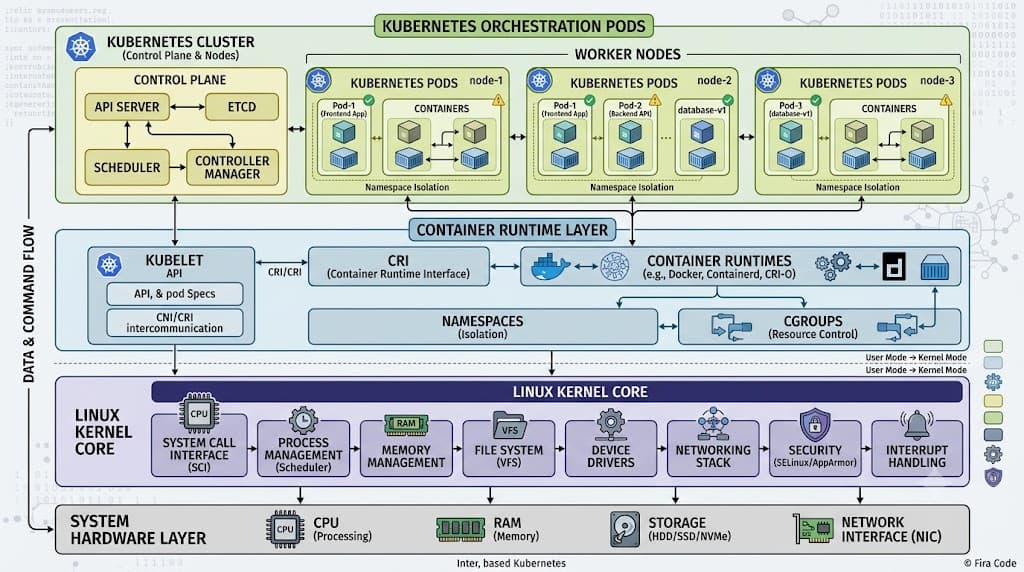
On the other hand, Kubernetes functions as an internal workload orchestrator. Once a cluster is online, Kubernetes continuously reconciles the actual state of pods, replica sets, and network policies with the desired state declared in its etcd database. While Terraform can declare intra-cluster objects such as deployments and services, Kubernetes controllers handle automated self-healing, scaling, and rolling updates internally. Blending these roles correctly prevents race conditions and ensures that infrastructure dependencies are provisioned before application workloads attempt to bind to them.
Provider Setup
Configuring the connection between your local environment or CI/CD pipeline and the target cluster is the foundational step for any infrastructure-as-code deployment. The provider block establishes the communication bridge, handling authentication tokens, client certificates, and API endpoint routing. Proper configuration ensures secure, reliable execution across development, staging, and production environments without exposing sensitive secrets.
provider kubernetes
The provider kubernetes block explicitly defines how Terraform connects to your target cluster API server. You must configure authentication parameters such as host URLs, client certificates, token credentials, or integration blocks for cloud-managed clusters like Amazon EKS, Google GKE, or Azure AKS. Below is a standard provider configuration example using cluster details:
terraform {
  required_version = ">= 1.5.0"
  required_providers {
    kubernetes = {
      source  = "hashicorp/kubernetes"
      version = "~> 2.23.0"
    }
  }
}

provider "kubernetes" {
  host                   = "https://your-cluster-endpoint.gr7.us-east-1.eks.amazonaws.com"
  cluster_ca_certificate = base64decode("LS0tLS1CRUdJTiBDRVJUSUZJQ0FURS0tLS0t...")
  token                  = data.aws_eks_cluster_auth.cluster.token
}
When configuring production clusters, avoid hardcoding sensitive tokens directly into your HCL files. Instead, leverage ephemeral authentication data sources provided by your cloud provider to dynamically fetch short-lived tokens during execution.
terraform init
Once your provider block is written, the terraform init command prepares your working directory for execution. This command downloads the required provider plugins, verifies version constraints, and initializes backend state storage. Running this command in a clean environment guarantees that all required provider binaries match the specified version hashes.
terraform init -upgrade
Verification steps during initialization include checking the .terraform directory for the downloaded provider plugins and ensuring that the backend initializes successfully. If authentication failures occur during initialization or subsequent provider checks, verify that your local kubeconfig context is active or that your cloud CLI credentials are fully refreshed.
Managing Resources
Declaring Kubernetes resources in HCL provides a familiar syntax for infrastructure engineers who want to manage raw manifests alongside cloud resources. Resources like namespaces, config maps, secrets, and deployments are represented as native Terraform resource blocks, allowing you to interpolate variables and reference outputs from other infrastructure modules.
terraform plan
The terraform plan command generates an execution execution preview, comparing your desired HCL configuration against the current state file and the live cluster state. This step highlights additions, modifications, and destructions before any changes are applied, giving engineers a crucial safety gate in production environments.
terraform plan -out=tfplan
Reviewing the output carefully helps identify unexpected recreation events, such as a change in immutable metadata fields that would force a resource to be deleted and recreated. Saving the plan to a file ensures that the exact set of verified changes is applied during the subsequent stage.
terraform apply
Executing terraform apply takes the generated execution plan and pushes the changes to your target Kubernetes cluster. The API server processes the incoming requests, creating or updating resources accordingly. Monitoring this output ensures that API rate limits, validation webhook rules, or missing prerequisites do not cause silent failures.
terraform apply "tfplan"
After application, verify deployment health using standard cluster inspection tools or by checking Terraform outputs. If a resource deployment stalls due to a webhook rejection or invalid field specification, inspect the detailed error logs returned by the Kubernetes API server and adjust your HCL configuration accordingly.
State and Drift
Terraform state is a JSON-formatted mapping file that records the correspondence between your HCL resource blocks and the real-world objects deployed in your cluster. This state file tracks unique resource IDs, metadata, and attribute values necessary for calculating accurate execution diffs during subsequent runs.
Drift occurs when external actors modify cluster resources outside of Terraform—such as manual updates via kubectl or automated changes introduced by other controllers. When drift happens, Terraform detects the discrepancy during the next plan phase and attempts to revert the cluster back to the desired state defined in your HCL. To prevent accidental overwrites in collaborative environments, always store your state file in a secure, remote backend with state locking enabled, such as an encrypted cloud object store.
Terraform vs kubectl vs Helm
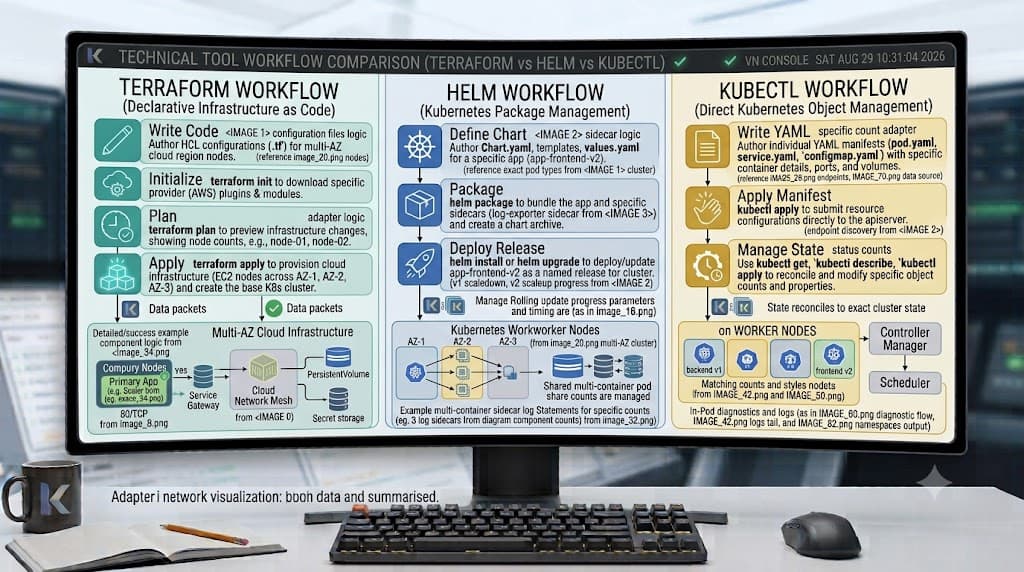
Selecting the right tool for managing containerized workloads depends on your workflow requirements, operational maturity, and complexity constraints. Each tool occupies a specific niche within modern DevOps ecosystems, and understanding their trade-offs prevents architectural friction.
| Tool | Primary Purpose | Strengths | Limitations |
|---|---|---|---|
| Terraform | Infrastructure and cross-system resource provisioning | Unified multi-cloud state tracking, robust dependency management | Less agile for rapid intra-cluster debugging and ephemeral testing |
| kubectl | Imperative and declarative direct cluster interaction | Immediate feedback, lightweight, universal debugging standard | Lacks cross-resource state tracking and automated multi-environment templating |
| Helm | Package management for pre-packaged applications | Excellent for third-party software distribution, complex chart versioning | Complex custom chart development, separate state management overhead |
In many enterprise environments, teams combine these tools effectively: Terraform provisions the underlying cluster and foundational namespaces, Helm deploys third-party platform services, and kubectl is reserved for day-two operational troubleshooting.
Practical Workflow
Integrating infrastructure as code into continuous integration and continuous deployment pipelines requires strict workflow boundaries. A common failure mode is attempting to manage complex application lifecycles and frequently updated microservice charts entirely through Terraform, which can lead to oversized state files and prolonged locking contention.
To maintain stability, establish clear ownership boundaries: let Terraform handle static cluster infrastructure, networking policies, and core namespaces. For frequently changing microservices, utilize dedicated deployment pipelines powered by Helm or GitOps controllers like Argo CD. Always test changes in isolated staging clusters, configure remote state locking to prevent concurrent modifications, and maintain robust backup procedures for your state backend to safeguard against accidental corruption.
📌 Recommended Next Guides & References
  <li>
    <a href="/article/docker-and-kubernetes-how-they-work-together-2" class="text-primary hover:underline font-semibold flex items-center gap-2">
      <span>→</span> <span>Docker and Kubernetes: How They Work Together</span>
    </a>
  </li>

  <li>
    <a href="/article/kubernetes-ingress-explained" class="text-primary hover:underline font-semibold flex items-center gap-2">
      <span>→</span> <span>Kubernetes Ingress Explained: Routing, Controllers, and TLS</span>
    </a>
  </li>

  <li>
    <a href="/article/kubernetes-ingress-controller-explained" class="text-primary hover:underline font-semibold flex items-center gap-2">
      <span>→</span> <span>Kubernetes Ingress Controller Explained: Architecture, Routing, and Implementation</span>
    </a>
  </li>