Quick Answer
Quick Answer
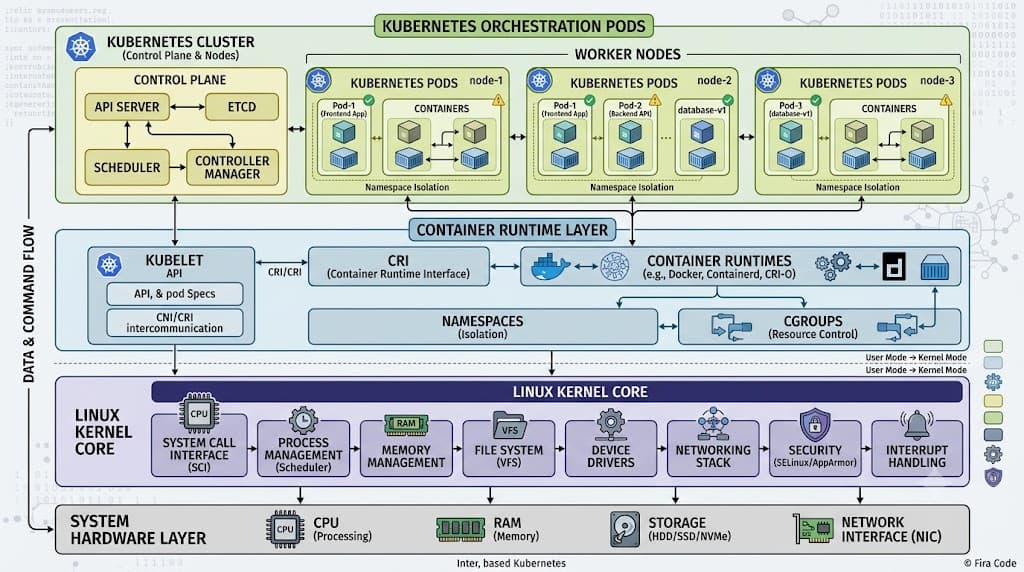
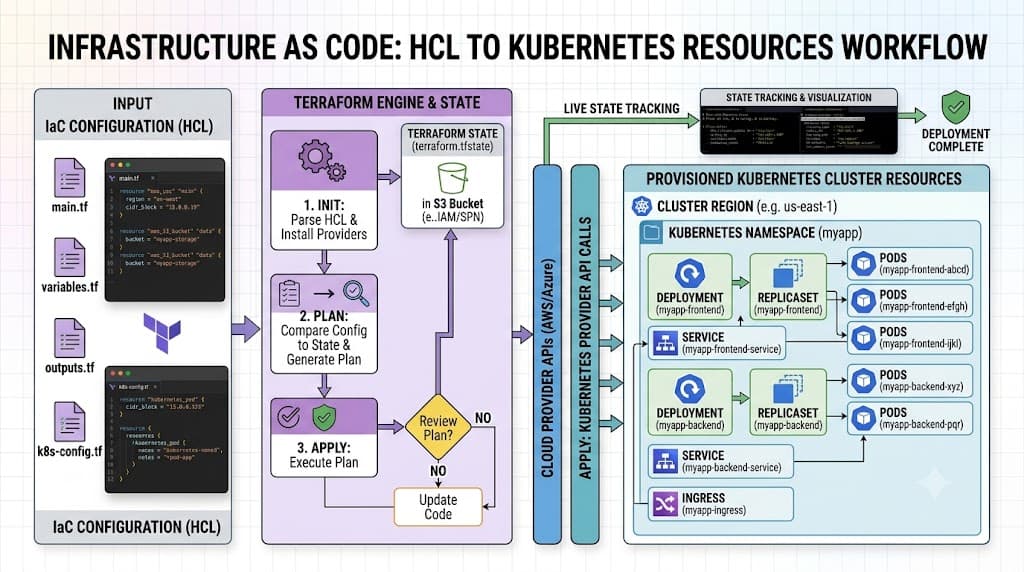
Terraform Kubernetes refers to the practice of managing Kubernetes cluster resources using HashiCorp Configuration Language (HCL) and the official Terraform Kubernetes provider. Instead of relying solely on imperative commands like kubectl apply, teams define their desired cluster state in declarative configuration files. Terraform then translates these configurations into API calls against the Kubernetes API server, automating creation, modification, and deletion while tracking the deployed resources in a state file. This approach unifies infrastructure provisioning—such as cloud virtual machines, networking, and databases—with container orchestration configurations under a single consistent workflow. To verify your setup, you initialize the provider, review planned changes using terraform plan, and apply them with terraform apply to synchronize your actual cluster state with your code.
Understanding the Concept
Infrastructure as Code (IaC) revolutionized how engineers build and maintain cloud environments by replacing manual operations with version-controlled code. When applied to container orchestration, managing resources as code means writing declarative configurations that describe deployments, services, namespaces, and custom resource definitions rather than executing imperative shell commands. This shift provides reproducibility, auditability, and collaboration benefits that manual operations lack.
At the heart of this workflow is the Terraform state file. Terraform maintains a mapping between your real-world infrastructure and your HCL definitions inside a state file (terraform.tfstate). When you modify a resource block, Terraform compares your code against the recorded state and the live cluster state, generating an execution plan that highlights precisely what will be added, changed, or destroyed. For Kubernetes, this state tracking allows teams to manage workloads across distinct clusters and environments using standard version-control systems like GitHub, integrating smoothly into continuous integration and continuous deployment (CI/CD) pipelines.
How It Works
The integration between Terraform and a Kubernetes cluster relies on the Terraform Kubernetes provider. The provider acts as a translation layer that communicates with the Kubernetes API server using standard authentication credentials, such as bearer tokens, client certificates, or cloud-provider-specific authentication plugins. When you execute Terraform commands, the provider translates your HCL resources into corresponding API requests.
Syntax and configuration
Configuring the Terraform Kubernetes provider requires specifying the provider block along with connection parameters. These parameters typically point to your cluster endpoint and provide the necessary credentials. Below is an example of how to declare the provider block in your main.tf configuration file:
terraform {
  required_version = ">= 1.0.0"
  required_providers {
    kubernetes = {
      source  = "hashicorp/kubernetes"
      version = "~> 2.20"
    }
  }
}

provider "kubernetes" {
  host                   = "https://api.k8s-cluster.example.com:6443"
  token                  = var.kubernetes_token
  cluster_ca_certificate = base64decode(var.cluster_ca_certificate)
}
In this configuration, the required_providers block locks down the provider source and version to ensure consistency across team members and automation servers. The provider block itself establishes the secure connection endpoint and authenticates via a token and certificate authority.
CLI workflow
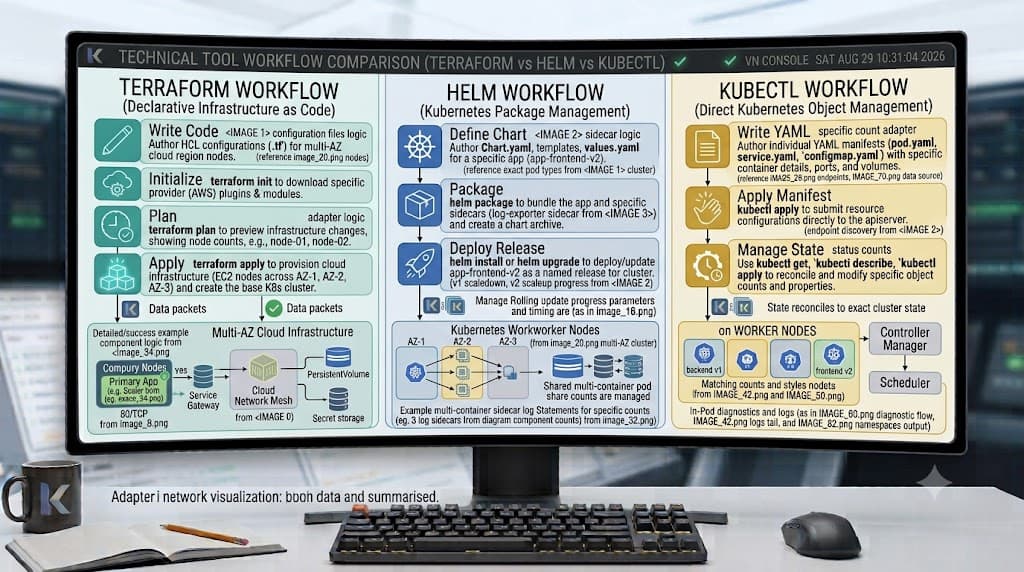
The Terraform command-line interface (CLI) governs the lifecycle of your infrastructure through a predictable sequence of commands. Understanding these commands and their distinct roles is vital for safe cluster management:
- terraform init: Downloads the required provider plugins and initializes your working directory, setting up backend storage.
- terraform plan: Analyzes your HCL configuration against the current state file and the live cluster API, generating an execution plan without making any changes.
- terraform apply: Executes the actions proposed in the execution plan against the target Kubernetes cluster after your review.
- terraform destroy: Removes all resources managed by the current configuration from the Kubernetes cluster.
It is essential to distinguish between terraform plan and terraform apply. The plan command is entirely non-destructive and read-only with respect to live infrastructure; it is your primary safety check. The apply command modifies live resources, making it critical to review every plan output carefully before proceeding.
Practical Terraform Example
To see how everything fits together, consider a complete working HCL configuration that deploys a simple NGINX web server inside a dedicated Kubernetes namespace, accompanied by a ClusterIP service to expose it internally.
resource "kubernetes_namespace" "app_namespace" {
  metadata {
    name = "production-app"
  }
}

resource "kubernetes_deployment" "nginx_deployment" {
  metadata {
    name      = "nginx-server"
    namespace = kubernetes_namespace.app_namespace.metadata[0].name
  }

  spec {
    replicas = 3

    selector {
      match_labels = {
        app = "Webserver"
      }
    }

    template {
      metadata {
        labels = {
          app = "Webserver"
        }
      }

      spec {
        container {
          image = "nginx:1.25"
          name  = "nginx"

          port {
            container_port = 80
          }

          resources {
            limits = {
              cpu    = "0.5"
              memory = "512Mi"
            }
            requests = {
              cpu    = "250m"
              memory = "256Mi"
            }
          }
        }
      }
    }
  }
}

resource "kubernetes_service" "nginx_service" {
  metadata {
    name      = "nginx-service"
    namespace = kubernetes_namespace.app_namespace.metadata[0].name
  }

  spec {
    selector = {
      app = kubernetes_deployment.nginx_deployment.spec[0].template[0].metadata[0].labels.app
    }

    port {
      port        = 80
      target_port = 80
    }

    type = "ClusterIP"
  }
}
This configuration defines three distinct resources: a namespace to isolate workloads, a deployment specifying three replicas of an NGINX container with resource limits, and a service routing traffic to those pods. Each block uses explicit references (such as kubernetes_namespace.app_namespace.metadata[0].name) to establish implicit execution dependencies, ensuring Terraform creates the namespace before deploying pods into it.
Verification
Once you have applied your configuration, verifying that the deployed infrastructure matches your expectations is a mandatory step in any reliable workflow. Verification combines Terraform's native output inspection with standard Kubernetes command-line tools.
First, you can define output blocks in your Terraform configuration to expose critical details, such as the service name or cluster IP:
output "service_name" {
  value       = kubernetes_service.nginx_service.metadata[0].name
  description = "The name of the deployed <a href="/article/kubernetes-service-accounts-explained-2" class="text-primary font-semibold hover:underline">Kubernetes service</a>."
}
After running terraform apply, you can verify the live state using kubectl commands to confirm pod health, replica counts, and service binding:
kubectl get namespaces
kubectl get deployments -n production-app
kubectl get pods -n production-app --selector=app=Webserver
kubectl get svc -n production-app
If the output reflects three running pods and an active ClusterIP service corresponding to your HCL definitions, your deployment has synchronized successfully.
Common Mistakes
Managing container clusters via Infrastructure as Code introduces specific pitfalls that engineers should actively avoid:
- Skipping terraform plan: Applying changes directly without reviewing the execution plan frequently leads to unintended deletions or resource recreation.
- Hard-coding credentials: Embedding sensitive API tokens, passwords, or cloud certificates directly into HCL files creates severe security vulnerabilities if committed to version control.
- Misunderstanding state drift: Making manual changes to cluster resources using kubectl while keeping Terraform state active causes discrepancies, leading to unexpected drift and conflicting updates during subsequent applies.
- Using outdated provider arguments: Relying on legacy or deprecated schema attributes causes upgrade friction and unpredictable validation errors during initialization.
- Assuming universal provider behavior: Assuming that all custom resource definitions (CRDs) or cloud-specific ingress controllers behave identically to core Kubernetes primitives without proper provider configuration.
Best Practices
To scale your infrastructure management safely across development, staging, and production environments, adhere to established operational standards:
- Utilize remote backends: Store your state files in remote, encrypted object storage (such as AWS S3 with DynamoDB locking) rather than keeping local state files on individual developer machines.
- Implement strict access control: Restrict who can execute apply commands against production clusters by using role-based access control within your CI/CD automation platforms.
- Leverage workspaces or directory separation: Isolate environments by maintaining separate directory structures or utilizing Terraform workspaces to prevent accidental staging modifications from affecting production.
- Never commit secrets: Pass sensitive credentials dynamically using environment variables, secret managers, or variable files excluded from version control via .gitignore.
- Pin provider versions: Always specify exact minor or patch version constraints in your required_providers block to prevent automatic updates from breaking existing resource definitions.
Troubleshooting
When things go wrong, systematic troubleshooting helps isolate whether the issue stems from authentication, state corruption, or API validation errors.
A frequent failure mode involves expired or misconfigured authentication tokens when connecting to managed cloud clusters. When this occurs, Terraform operations fail with an unauthorized error:
Error: Kubernetes cluster unreachable: invalid bearer token or expired certificate
To resolve this, refresh your local credentials or update the token source variable used by the provider block. If you encounter state locking errors because a previous process terminated unexpectedly, inspect your remote backend locking mechanism and verify that no stale lock ID persists before attempting a retry.
Another common failure mode occurs when modifying immutable resource fields. If you attempt to update a field that the Kubernetes API server does not allow to change in place, Terraform will propose destroying and recreating the resource. Always check the plan output carefully; if a destructive action is flagged unexpectedly, adjust your HCL configuration or consult official provider documentation to handle the migration safely.
📌 Recommended Next Guides & References
  <li>
    <a href="/article/docker-and-kubernetes-how-they-work-together-2" class="text-primary hover:underline font-semibold flex items-center gap-2">
      <span>→</span> <span>Docker and Kubernetes: How They Work Together</span>
    </a>
  </li>

  <li>
    <a href="/article/kubernetes-ingress-explained" class="text-primary hover:underline font-semibold flex items-center gap-2">
      <span>→</span> <span>Kubernetes Ingress Explained: Routing, Controllers, and TLS</span>
    </a>
  </li>

  <li>
    <a href="/article/kubernetes-ingress-controller-explained" class="text-primary hover:underline font-semibold flex items-center gap-2">
      <span>→</span> <span>Kubernetes Ingress Controller Explained: Architecture, Routing, and Implementation</span>
    </a>
  </li>