Quick Answer
Operating systems engineering has evolved significantly over the past decades, shifting from monolithic virtual machine architectures to lightweight, containerized distributed systems. At the center of this transformation is the Linux operating system. Understanding how Linux governs processes, network sockets, storage volumes, and user permissions is no longer just the domain of systems administrators; it is a fundamental prerequisite for modern software engineers, Site Reliability Engineers (SREs), and DevOps practitioners.
Modern infrastructure relies on containerization and orchestration layers that abstract away the raw operating system, yet they do not eliminate it. Beneath every container runtime, orchestration platform, and automated delivery pipeline lies the Linux kernel. When a container crashes due to an out-of-memory error, or when a CI/CD build runner fails because of a missing shared library, the abstraction breaks down. Developers must descend into the terminal, inspect system logs, analyze process trees, and diagnose low-level networking configurations. This guide explores the core Linux primitives that power container orchestration and automated build pipelines, equipping developers with the practical command-line knowledge needed to operate resilient production systems.
Quick Answer
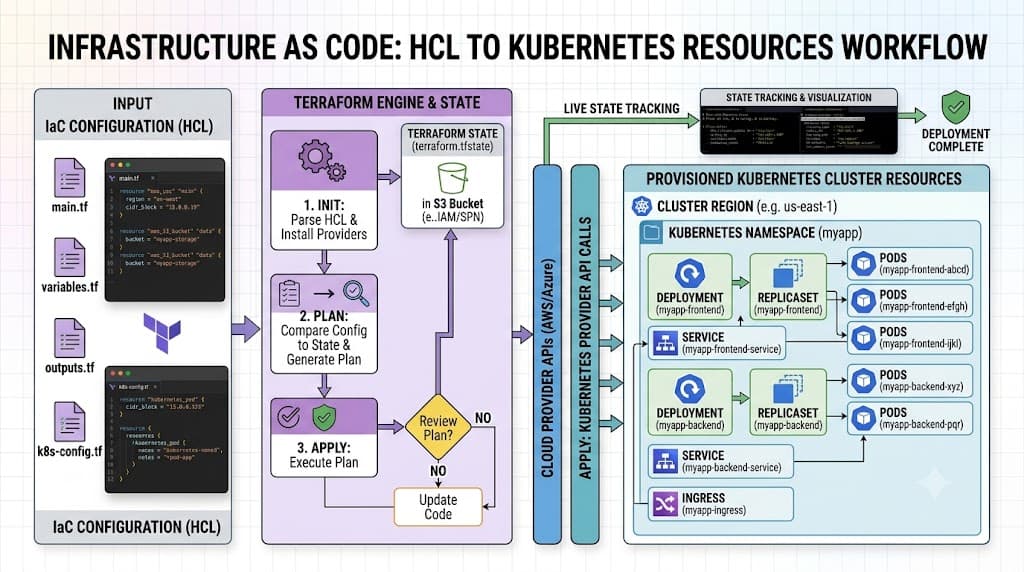
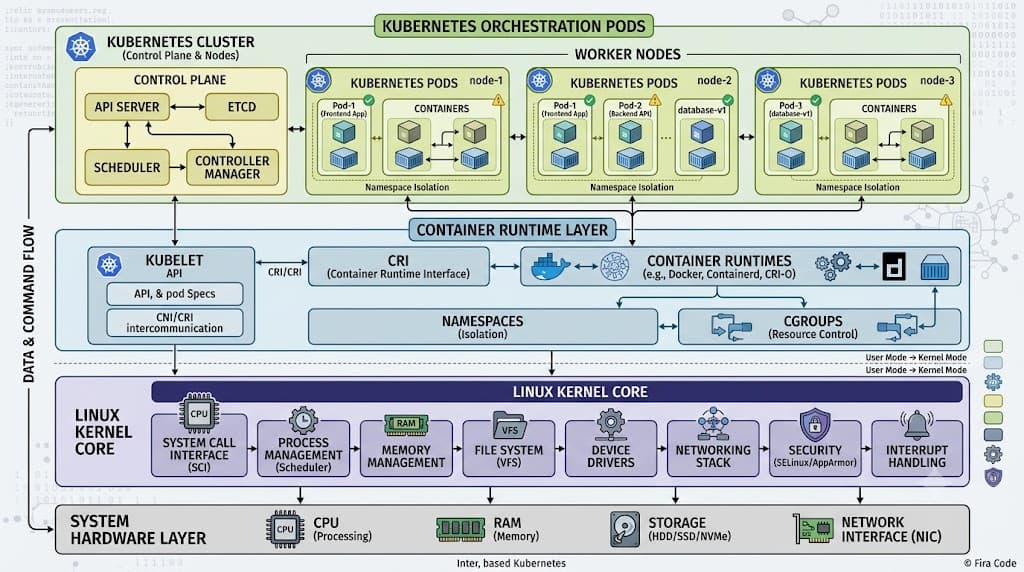
Linux kubernetes refers to the deep foundational dependency that Kubernetes, Docker, and modern CI/CD tools have on the Linux kernel and its underlying operating system primitives. Kubernetes is not a standalone hypervisor or virtual machine manager; rather, it is a distributed control plane that manages Linux host machines (nodes). These nodes execute container workloads by leveraging native Linux kernel features such as namespaces (for resource isolation), control groups or cgroups (for resource limitation and accounting), and the Linux network stack (for inter-container and external routing). Without Linux kernel isolation mechanisms, containerization and orchestration as we know them would not exist.
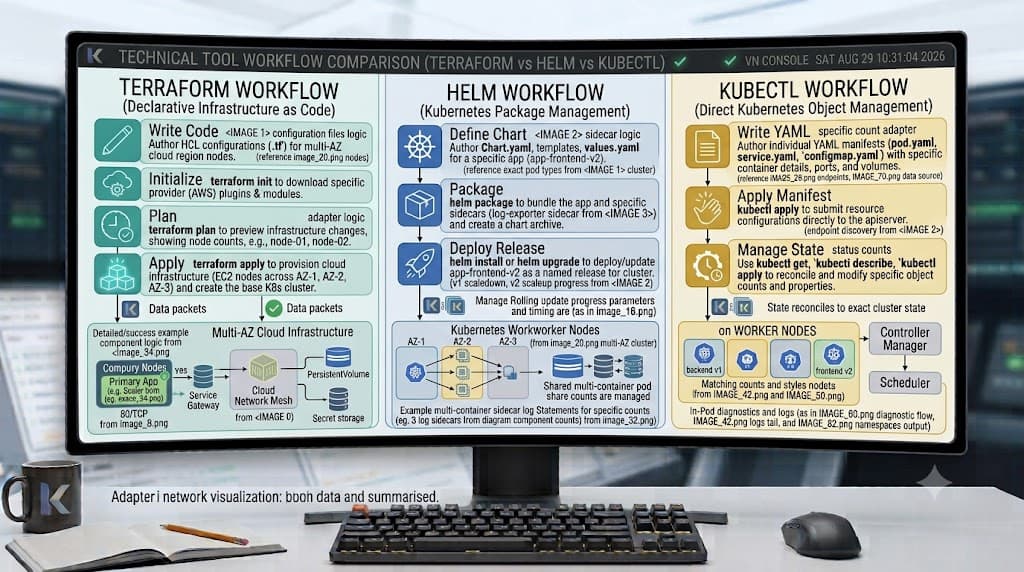
For developers and DevOps engineers, mastering this relationship means understanding that container engines like containerd or CRI-O are essentially management interfaces talking directly to the Linux kernel via system calls. When a Kubernetes pod runs a container, the kernel provisions a dedicated mount namespace, process ID namespace, network namespace, and cgroup tree for that container. In CI/CD pipelines—whether running on GitHub Actions runners, GitLab CI executors, or Jenkins nodes—jobs execute inside these same isolated Linux environments. Knowing how to navigate the Linux command line, inspect filesystem layouts, manage user identities, and troubleshoot kernel-level behaviors is essential for building reliable, secure applications that perform predictably from local development machines all the way to large-scale production clusters.
Understanding Linux Kubernetes and Core Foundations
To effectively build, deploy, and troubleshoot containerized applications, developers must move beyond high-level deployment manifests and examine the underlying operating system foundations. The Linux operating system provides the stable bedrock upon which every container runtime, service mesh, and build pipeline operates. At its core, Linux manages hardware resources, schedules CPU execution time, allocates memory pages, and enforces security boundaries. When multiple applications run on a single host machine, the operating system must ensure that these workloads coexist without interfering with one another.
In a traditional virtual machine setup, each guest OS runs a full kernel copy on top of a hypervisor, consuming significant system resources. Containerization eliminates this overhead by sharing a single host Linux kernel across all running application instances. This architecture relies entirely on the Linux kernel's ability to cleanly partition its view of the system. Every file path, process identifier, network port, and user ID is virtualized at the kernel level. Consequently, developers working with Kubernetes and CI/CD environments interact constantly with filesystem hierarchies, POSIX permission models, environment variables, and process lifecycle signals.
Understanding filesystem hierarchies is particularly critical when packaging applications into container images using tools like Dockerfiles. A container image is simply a layered tarball of files that gets unpacked into a dedicated directory structure on the host Linux filesystem. The container runtime then uses the Linux chroot or pivot_root system call to designate this directory as the root filesystem for the running processes. Similarly, process management concepts—such as parent-child process relationships, signal propagation (SIGTERM versus SIGKILL), and zombie process cleanup—directly dictate how container orchestration platforms gracefully stop or restart unresponsive workloads. When a Kubernetes deployment initiates a rolling update, the control plane sends operating system signals down to the container entrypoint, making a solid grasp of Linux process management indispensable for preventing dropped client connections during deployments.
How Container Architecture Works on Linux
Containerization is frequently misunderstood as a distinct form of virtualization, when in reality it is simply a clever application of standard Linux kernel features combined with specialized runtime tools. To understand how Kubernetes schedules and isolates pods across cluster nodes, one must examine the three primary pillars of Linux container architecture: namespaces, control groups, and union filesystems.
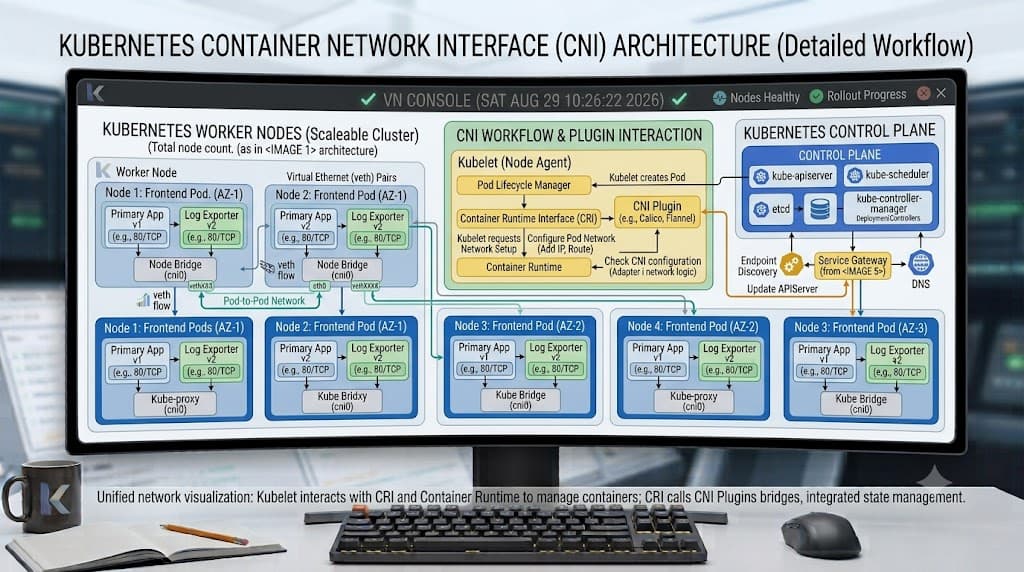
Linux namespaces provide isolation of system resources so that processes running within a specific namespace can only see and interact with the resources allocated to that namespace. There are several distinct namespace types supported by the Linux kernel. The Mount (mnt) namespace isolates filesystem mount points, ensuring that container filesystems remain separate from the host system. The Process ID (pid) namespace provides processes with an independent numbering space, meaning a containerized application can run as process ID 1 internally while appearing as an unprivileged child process on the host. The Network (net) namespace isolates network interfaces, routing tables, and firewall rules, allowing each container to have its own dedicated IP address and port space. Additional namespaces include Inter-Process Communication (ipc), UTS (hostname isolation), and User (uid/gid mapping) namespaces.
While namespaces dictate what a process can see, control groups (cgroups) dictate how much of a resource that process can consume. Cgroups are a kernel feature that aggregates sets of tasks and tracks their resource utilization. In a Kubernetes cluster, the kubelet uses cgroups to enforce the CPU requests and limits, memory limits, and block I/O constraints specified in pod manifests. If an application inside a Kubernetes pod attempts to allocate more memory than its assigned cgroup limit allows, the Linux kernel's Out-Of-Memory (OOM) killer steps in and terminates the offending process immediately, resulting in the familiar exit code 137 in container logs. Understanding cgroups helps developers properly size their resource requests and avoid unexpected pod evictions in production environments.
Finally, union mount filesystems—such as OverlayFS—enable container images to be constructed from read-only base layers stacked beneath a thin, writable container layer. When a container writes a file, OverlayFS uses copy-on-write mechanics to duplicate the file from a lower read-only layer into the upper writable layer without modifying the original image layers. This architecture drastically reduces storage overhead and accelerates container startup times across both local development clusters and remote CI/CD build agents.
Practical Commands and Examples for Developers
Operating effectively within Linux-backed container and CI/CD environments requires fluency with terminal commands that inspect kernel state, process execution, and resource consumption. Developers frequently need to debug running containers, verify storage mount points, and diagnose network connectivity issues directly from the command line.
When troubleshooting a running container or checking how a CI/CD runner is executing build steps, inspecting active processes is often the first step. The standard process listing utility ps can be executed inside a container or on a host node to examine running tasks:
ps aux --forest
Expected behavior: This command outputs a hierarchical tree view of all running processes on the system, showing parent-child relationships, CPU and memory utilization percentages, and command-line arguments. In a properly configured container, the main application process should appear at the root of the tree.
To verify that process execution is behaving as expected and check system resource allocation, developers can inspect active control groups directly on the Linux host or within modern cgroup v2 filesystems:
cat /sys/fs/cgroup/memory/memory.current
Expected behavior: This command reads the current memory consumption in bytes for the specific cgroup scope associated with the executing shell or container task. Verification can also be performed using standard diagnostic tools like top or htop to observe real-time resource pressure.
Networking troubleshooting represents another critical domain for developers working with containerized services. Because containers rely on Linux network namespaces and virtual Ethernet pairs (veth), diagnosing port binding or routing issues often involves inspecting network interfaces and socket tables:
ss -tulpn
Expected behavior: The ss utility displays socket statistics, listing all listening TCP and UDP ports along with the associated process IDs and program names. This command helps verify whether an application container has successfully bound to its designated port inside its network namespace.
When dealing with persistent storage volumes attached to Kubernetes pods or CI/CD runners, verifying mount points and disk utilization on the underlying Linux host is essential for preventing storage exhaustion:
df -hT
Expected behavior: This command outputs a human-readable table of all mounted filesystems, their underlying filesystem types (such as ext4, xfs, or overlay), total capacity, used space, and mount locations, allowing engineers to spot filling partitions before applications fail.
Common Mistakes and Destructive Risks
Managing Linux environments that support container orchestration and CI/CD pipelines carries inherent risks. Misconfigurations or poorly tested administrative commands can lead to data loss, service outages, or compromised security postures. Recognizing common anti-patterns helps developers write safer automation scripts and container definitions.
One frequent mistake is running containerized applications as the root user by default. Because containers share the host Linux kernel, an application running as UID 0 inside a container possesses root privileges within that container's namespaces. If an attacker exploits a remote code execution vulnerability in the application, they may find potential escalation paths out to the host system, particularly if namespaces are improperly configured or shared. Best practice dictates defining non-root user directives in container build files and Kubernetes pod security standards.
Another major pitfall involves improper signal handling within container entrypoint scripts. Many developers wrap their applications in shell scripts using simple execution commands without forwarding signals. When the orchestrator sends a SIGTERM signal to stop a container gracefully, the outer shell captures the signal but fails to pass it down to the child application process. As a result, the container hangs until a timeout period expires, after which the orchestrator forcefully terminates it with SIGKILL, dropping active client connections and potentially corrupting database transactions. Using the exec form in container startup definitions ensures that the application process replaces the shell as PID 1 and receives system signals directly.
Destructive administrative commands must always be handled with extreme caution. Running commands that modify system-wide storage or network routing without verification can cripple a node or build agent.
# WARNING: Destructive command. This will unmount filesystems and may corrupt active data if executed improperly.
sudo umount -f /mnt/data
Warning: Executing force-unmount commands on active storage mounts used by Kubernetes persistent volumes or CI/CD workspace directories will abruptly sever file access, causing immediate I/O errors and application crashes. Always verify active file locks using lsof or fuser before attempting storage teardowns.
Troubleshooting and Safe Verification
When a containerized workload fails or a CI/CD pipeline job stalls, a systematic troubleshooting methodology prevents guesswork and minimizes downtime. Diagnosing issues across Linux nodes and Kubernetes clusters requires moving logically from high-level orchestrator status down to low-level kernel diagnostics.
Consider a common scenario where a containerized application fails to start due to a permission denied error when accessing a configuration file or data directory. The safe troubleshooting workflow begins by verifying the exact user ID and file permissions on the Linux filesystem:
ls -la /app/config
Expected behavior: This command lists the file permissions, owner UID, and group GID of the configuration directory. Developers can then compare these values against the user context of the running container process to ensure compatibility.
If the file permissions are correct but the application still cannot read the resource, the issue may stem from Linux Security Modules (LSM) such as SELinux or AppArmor enforcing mandatory access control policies. Developers can check kernel audit logs for security denials using standard log inspection tools:
sudo journalctl -k -e | grep -i denied
Expected behavior: This command queries the systemd journal for recent kernel log entries containing security denial messages, allowing engineers to identify whether a security profile is blocking container file access or system call execution.
When network communication between microservices fails inside a Kubernetes cluster or a CI/CD build environment, verifying internal name resolution and TCP connectivity step-by-step ensures accurate diagnosis without disrupting production traffic:
getent hosts internal-service.default.svc.cluster.local
Expected behavior: This command queries the name service switch libraries to resolve the hostname within the container's network namespace, verifying that core DNS resolution is functioning correctly before attempting higher-level HTTP requests.
Best Practices for Developer and DevOps Workflows
Maintaining robust, secure, and performant container and CI/CD environments requires adhering to established engineering best practices. These guidelines bridge the gap between low-level Linux administration and high-level application delivery.
First, enforce least-privilege principles across all layers of the stack. Container images should be built with minimal base operating system layers (such as Alpine or distroless images) to reduce the potential attack surface and eliminate unnecessary binary utilities that could be leveraged by attackers. Applications must execute under dedicated, unprivileged user accounts, and Kubernetes pods should implement restrictive security contexts that disable privileged escalation and drop unnecessary Linux capabilities.
Second, optimize resource management by setting explicit CPU and memory requests and limits on all Kubernetes workloads and CI/CD job definitions. Relying on default cluster allocations often leads to noisy-neighbor performance degradation, where a single runaway build job starves critical control plane components of CPU time. Proper sizing, combined with regular monitoring of cgroup metrics, ensures predictable scaling and resource utilization.
Finally, maintain immutable infrastructure patterns where configuration changes are baked into version-controlled container images and infrastructure-as-code manifests rather than applied via manual terminal sessions on live production nodes. When debugging is required, utilize ephemeral debugging containers or non-destructive read-only inspection commands to preserve audit trails and system stability across all environments.
📌 Recommended Next Guides & References
  <li>
    <a href="/article/docker-and-kubernetes-how-they-work-together-2" class="text-primary hover:underline font-semibold flex items-center gap-2">
      <span>→</span> <span>Docker and Kubernetes: How They Work Together</span>
    </a>
  </li>

  <li>
    <a href="/article/kubernetes-ingress-explained" class="text-primary hover:underline font-semibold flex items-center gap-2">
      <span>→</span> <span>Kubernetes Ingress Explained: Routing, Controllers, and TLS</span>
    </a>
  </li>

  <li>
    <a href="/article/kubernetes-ingress-controller-explained" class="text-primary hover:underline font-semibold flex items-center gap-2">
      <span>→</span> <span>Kubernetes Ingress Controller Explained: Architecture, Routing, and Implementation</span>
    </a>
  </li>