Quick Answer
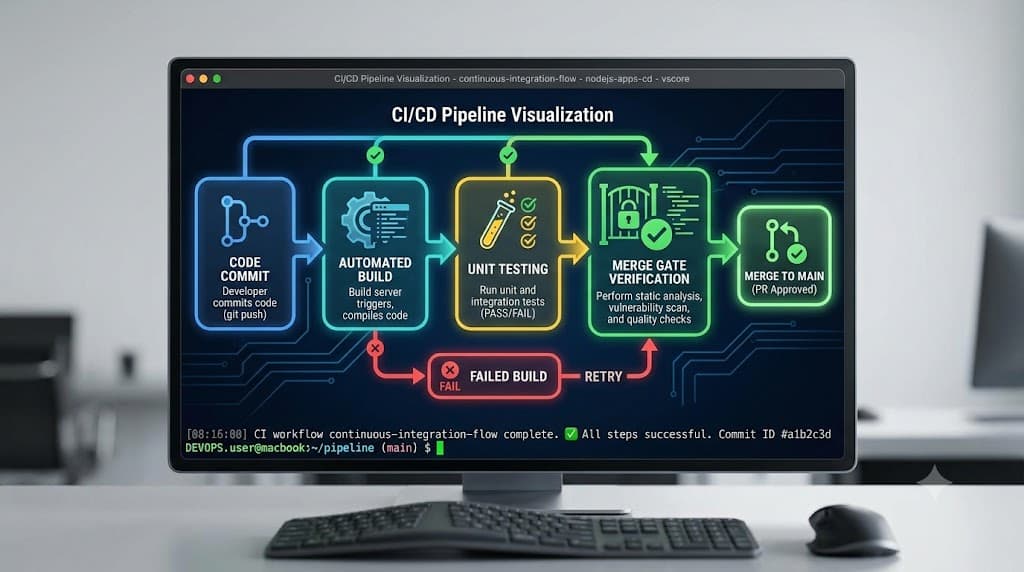
Continuous integration (CI) automatically builds and tests code changes so developers get fast feedback before changes are merged or released. This practice underpins modern software engineering, helping teams catch regressions early, reduce integration friction, and maintain high code quality across distributed codebases. By running automated builds and test suites on every pushed change, CI bridges the gap between individual feature branches and the shared main codebase.
Quick Answer
Continuous integration (CI) is a software development practice where developers frequently merge their code changes into a central repository, usually multiple times a day. Each merge is automatically verified by an automated build and a suite of tests—ranging from unit tests to integration tests. The primary goal of continuous integration is to detect errors quickly, locate them more efficiently, and improve software quality by ensuring the codebase remains in a healthy, deployable state at all times.
What Is Continuous Integration?
Continuous integration is fundamentally about cadence and automation. Historically, developers would work in isolation on separate branches for weeks or months, attempting to merge all their work at once during a grueling release cycle. This approach, often called 'integration hell,' frequently resulted in massive merge conflicts, broken functionality, and hidden bugs that were agonizingly difficult to isolate.
Continuous integration eliminates this pain point by shifting the integration process left. Instead of integrating code once a month, developers integrate their changes multiple times a day. Every single commit triggers an automated pipeline that compiles the code, executes tests, and reports the results back to the author.
A common misconception is to equate continuous integration with continuous deployment or continuous delivery (CI/CD). While CI is the foundational bedrock for CD, they serve different functions. Continuous integration primarily validates changes—ensuring that new code compiles correctly and passes all automated checks without breaking existing functionality. Continuous deployment, on the other hand, takes those verified builds and automatically pushes them out to staging or production environments. Keeping this distinction clear prevents teams from prematurely automating releases before their validation pipelines are robust and reliable.
CI Workflow
Understanding how continuous integration operates requires examining the daily developer workflow and the mechanical steps that occur behind the scenes in a version control system and CI server.
The workflow begins on a local development environment. A developer pulls the latest changes from the main branch, creates a feature branch, and writes code to implement a specific feature or fix a bug. Once the code is written and verified locally, the developer commits the changes using version control commands like git commit and pushes the branch to a remote repository hosted on platforms such as GitHub, GitLab, or Bitbucket.
The Role of Commits and Pushes
Frequent, small commits are the lifeblood of an effective continuous integration setup. When developers commit early and often, they create granular checkpoints in the development history. Each push to the remote repository acts as a trigger for the CI server. Rather than waiting for a massive feature to be completely finished, small incremental changes are validated continuously, making it immediately obvious which specific line of code introduced a regression if a build fails.
Failure Handling and Recovery
When a build or test suite fails during the CI process, the pipeline halts or flags the commit as failed. The CI server immediately notifies the developer through dashboards, email alerts, or messaging integrations like Slack. Failure handling in a mature team involves treating a broken build as a top-priority emergency. Developers stop introducing new changes, investigate the logs provided by the CI runner, fix the underlying issue locally, and push a corrective commit to restore the pipeline to a green status.
Builds and Tests
The heart of any continuous integration pipeline is the validation stage, which typically consists of compiling source code, packaging artifacts, and running comprehensive automated test suites.
Automated Compilation and Builds
Before any tests can run, the source code must be translated into an executable format or bundled appropriately for the target environment. This step is executed via a build command specific to the technology stack—such as running a package manager script or invoking a compiler. The build stage ensures that syntax errors, missing dependencies, or incompatible library versions are caught immediately.
Unit Tests and Integration Tests
Once the build succeeds, the pipeline executes automated tests to verify both individual components and their interactions.
- Unit Tests: These tests isolate individual functions, classes, or modules, executing them independently of external systems like databases or network services. Unit tests run extremely fast and provide immediate feedback on core business logic.
- Integration Tests: These tests evaluate how multiple components interact with one another, including database connections, external APIs, and file systems. While slower than unit tests, integration tests catch critical interface mismatches that unit tests miss.
Automated tests are important because manual testing cannot scale with rapid development velocity. Without an automated test suite backing up the continuous integration pipeline, human reviewers would have to manually verify every single commit, creating an unsustainable bottleneck.
Pull Requests and Merge Gates
In modern collaborative development, code rarely gets pushed directly to the main production branch. Instead, teams rely on pull requests and merge gates to enforce quality standards.
Pull Requests as Collaboration Hubs
A pull request (PR) is a formal proposal to merge a feature branch into the main codebase. When a developer opens a pull request, the CI server automatically spins up an isolated pipeline specifically for that branch. Reviewers can examine the code diff, inspect the results of the automated build and test runs, and leave inline comments.
Merge Gates and Branch Protection
Merge gates act as automated security checkpoints for the repository. Branch protection rules can be configured to block any pull request from being merged unless specific conditions are met:
- The automated CI build must complete successfully without errors.
- All required unit and integration tests must pass.
- Code coverage thresholds must be maintained without significant drops.
- Designated human reviewers must approve the changes.
By enforcing these gates, teams ensure that broken or untested code never contaminates the main branch, preserving the stability of the entire software product.
Feedback Loops
The ultimate measure of a continuous integration system's effectiveness is the speed and clarity of its feedback loops.
A fast feedback loop means a developer receives notification of a test failure within minutes of pushing code. This temporal proximity is vital: when a developer is actively working on a feature, the context is fresh in their mind. Fixing a failing test five minutes after committing takes seconds, whereas debugging the same failure two weeks later requires context-switching, re-reading code, and untangling subsequent changes made by other team members.
Optimizing feedback loops involves running fast unit tests first in the pipeline, deferring slower end-to-end or integration tests to later stages, and caching dependencies so that environment setup time is minimized. When feedback is instantaneous and actionable, developers develop greater confidence in their tooling and can move faster without fear of breaking production.
Practical Example
To ground these concepts in reality, let us examine a typical developer workflow and the commands involved in a continuous integration cycle.
Suppose you are working on a Node.js application. You write your feature code, add a corresponding test, and prepare to submit your changes:
# Stage your modified files
git add .

# Commit your changes with a descriptive message
git commit -m "feat: add user authentication validation helper"

# Push your feature branch to the remote repository
git push origin feature/auth-validation
Upon pushing, your CI configuration file (such as a GitHub Actions workflow YAML) triggers automatically. Under the hood, the runner executes commands similar to these:
# Install project dependencies
npm install

# Run the application build script
npm run build

# Execute the unit test suite
npm test
In a Python environment, the equivalent validation steps might involve pytest:
# Install dependencies in a virtual environment
pip install -r requirements.txt

# Run tests with pytest
pytest tests/unit/
If all commands exit with a status code of zero, the CI server marks the check as passed, allowing the pull request to proceed toward merging.
Best Practices
Implementing continuous integration successfully requires adhering to established industry best practices to avoid common pitfalls:
- Commit Frequently: Encourage small, incremental commits rather than monolithic code dumps at the end of the day.
- Keep Builds Fast: Optimize test suites and cache dependencies so developers are never waiting hours for pipeline results.
- Treat Test Failures Seriously: If the CI build breaks, fixing it must be the team's top priority before merging new features.
- Mirror Production Environments: Ensure that the CI runner environment closely matches staging and production environments to minimize 'it works on my machine' discrepancies.
- Do Not Skip Tests: Resist the temptation to bypass failing tests or disable checks to rush a feature through the merge gate.
📌 Recommended Next Guides & References
  <li>
    <a href="/article/docker-and-kubernetes-how-they-work-together-2" class="text-primary hover:underline font-semibold flex items-center gap-2">
      <span>→</span> <span>Docker and Kubernetes: How They Work Together</span>
    </a>
  </li>

  <li>
    <a href="/article/kubernetes-ingress-explained" class="text-primary hover:underline font-semibold flex items-center gap-2">
      <span>→</span> <span>Kubernetes Ingress Explained: Routing, Controllers, and TLS</span>
    </a>
  </li>

  <li>
    <a href="/article/kubernetes-ingress-controller-explained" class="text-primary hover:underline font-semibold flex items-center gap-2">
      <span>→</span> <span>Kubernetes Ingress Controller Explained: Architecture, Routing, and Implementation</span>
    </a>
  </li>