Quick Answer
Managing configuration dynamically across multiple containerized services is a fundamental requirement of modern software development. When deploying applications with container orchestration tools, hardcoding configuration values inside your manifests creates brittle deployments that fail when moving between local development, staging, and production environments. Container orchestration platforms provide robust mechanisms to inject dynamic configuration securely and flexibly without rebuilding container images for every target environment.
Quick Answer
To set environment variables in Docker Compose, use the environment key inside your compose.yaml file along with shell-style ${VARIABLE} interpolation syntax. You can define variables inline as key-value pairs or map them directly from your shell environment or a local .env file.
services:
  web:
    image: nginx:latest
    environment:
      - PORT=8080
      - DATABASE_URL=${DATABASE_URL}
This simple syntax allows Compose to read the value of DATABASE_URL from your execution environment or a companion configuration file and pass it straight into the running container instance.
How Compose Environment Variables Work
Docker Compose handles environment variables through a multi-layered system that distinguishes between build-time arguments, container runtime variables, and host-level interpolation. Understanding how these layers interact is critical for building predictable deployment pipelines.
When you run your orchestration commands, Compose reads your configuration files and performs variable interpolation before sending the configuration payload to the Docker daemon. This means any ${VARIABLE} syntax present in your manifest is evaluated on the host machine running the command, not inside the resulting container.
It is vital to separate runtime environment variables from build-time arguments (args in the build section). Runtime variables passed via the environment directive are available only while the container is actively running and can be updated across restarts. Conversely, build-time arguments are baked into the container image layers during the <a href="/article/mastering-docker-compose-logs-inspection-filtering-troubleshooting" class="text-primary font-semibold hover:underline">docker compose</a> build phase and cannot be modified simply by restarting the container later. Mastering this distinction ensures that sensitive runtime configurations remain decoupled from static image layers.
Using a .env File
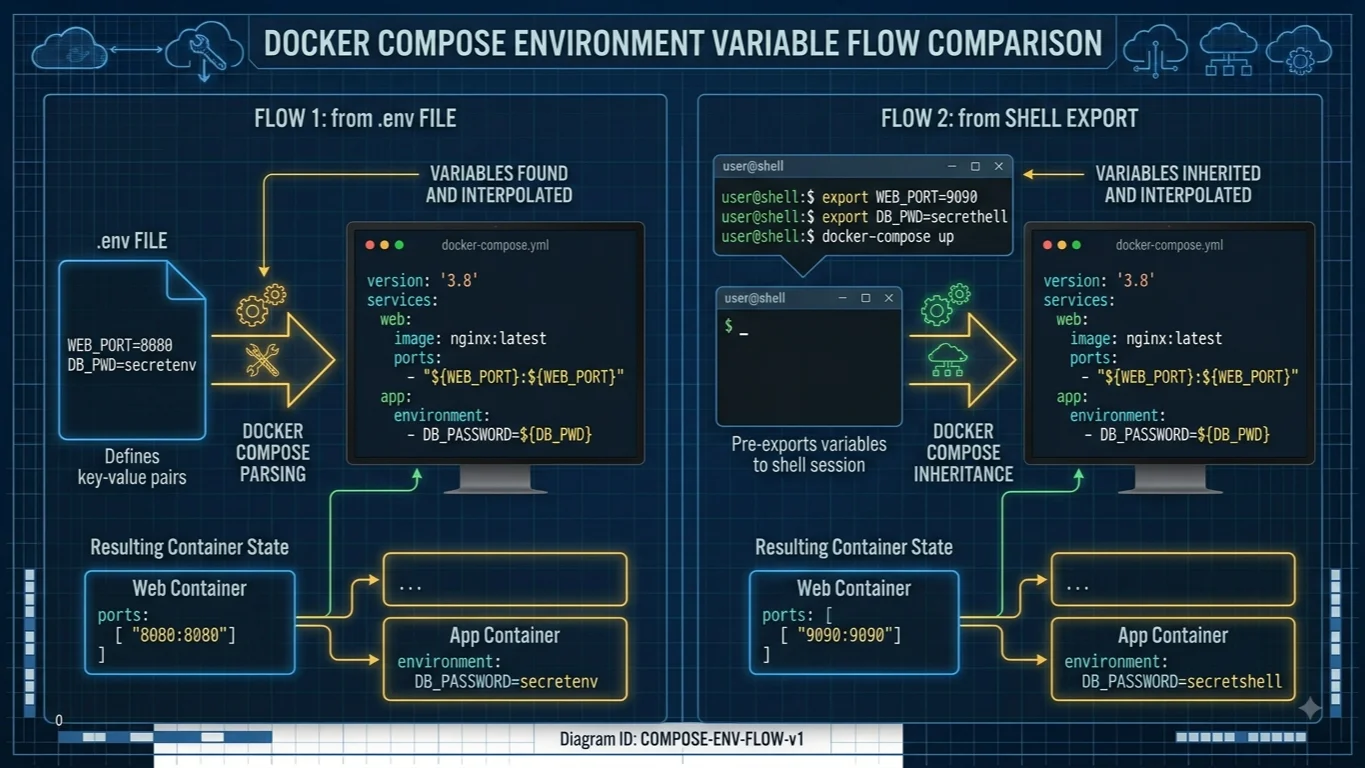
An .env file is the standard convention for storing default environment variables alongside your compose.yaml file. When you invoke orchestration commands in the same directory, Compose automatically looks for a file named .env and loads its contents into the environment for variable interpolation.
An .env file uses a straightforward KEY=VALUE format, with each variable on its own line. Comments are denoted by a hash symbol #.
POSTGRES_DB=app_production
POSTGRES_USER=dbuser
POSTGRES_PASSWORD=secretpassword
APP_PORT=3000
Once created, you can reference these variables directly in your main orchestration manifest without explicitly declaring them in an env_file block, because Compose automatically reads the default .env file during parsing.
services:
  database:
    image: postgres:15
    environment:
      POSTGRES_DB: ${POSTGRES_DB}
      POSTGRES_USER: ${POSTGRES_USER}
      POSTGRES_PASSWORD: ${POSTGRES_PASSWORD}
You can also specify default values directly within your interpolation syntax to protect against missing configuration files. For example, using ${APP_PORT:-8080} tells Compose to use 3000 if it is defined in the .env file, but fall back to 8080 if the variable is completely undefined.
Set Variables in compose.yaml
There are two primary syntaxes for setting variables directly inside your compose.yaml file: the array format and the dictionary format. Both methods are fully supported, though they offer slightly different ergonomics when handling complex string values or type safety.
The array format uses a list of strings separated by equal signs, which mirrors standard shell export syntax.
services:
  api:
    image: node:18
    environment:
      - NODE_ENV=production
      - LOG_LEVEL=debug
The dictionary format uses YAML key-value pairs, which is often cleaner to read and naturally handles special characters or multiline strings without requiring complex quoting rules.
services:
  api:
    image: node:18
    environment:
      NODE_ENV: production
      LOG_LEVEL: debug
You can even omit the value entirely in either format if you want Compose to inherit the variable directly from your current shell session at runtime.
services:
  api:
    image: node:18
    environment:
      - SECRET_KEY
If SECRET_KEY is not present in your shell environment when you execute your command, Compose will output a warning and evaluate the variable as an empty string.
Pass Variables from the Shell
Passing shell variables into your containers allows you to dynamically drive deployments from CI/CD pipelines or local developer terminals without altering configuration files on disk.
You can export variables in your active shell session before executing your commands:
export DB_HOST=db.internal.net
export APP_COLOR=blue
docker compose up -d
Alternatively, you can prefix the execution command directly on a single line to scope the environment variables to that specific invocation without cluttering your persistent shell session history:
DB_HOST=db.internal.net APP_COLOR=blue docker compose up -d
Handling host IP addresses correctly is a frequent requirement when connecting containers to services running directly on the host machine. On Linux systems, you can leverage host networking or reference the default bridge gateway. For cross-platform compatibility, many developers utilize shell substitution to capture the host IP dynamically:
services:
  app:
    image: myapp:latest
    environment:
      - HOST_IP=${HOST_IP:-172.17.0.1}
If you need to include literal dollar signs within your configuration values without triggering interpolation, you must escape them by doubling the sign, writing $$ instead of $. This ensures that strings containing currency symbols or regex patterns are interpreted correctly by the parser.
env_file vs environment
Choosing between the environment directive and the env_file directive depends on how you want to manage configuration files and scale your service definitions across multiple environments.
The environment directive injects variables inline directly within the compose.yaml file. This is ideal for static defaults, non-sensitive configuration parameters, or variables that require explicit inline documentation for every service.
The env_file directive points to external flat configuration files, keeping your main orchestration manifest clean and separating secrets or environment-specific parameters from the infrastructure blueprint.
services:
  web:
    image: myapp:latest
    env_file:
      - .env
      - ./config/backend.env
You can also specify multiple files in an array under env_file. Compose reads these files in order, meaning variables defined in later files will override matching keys defined in earlier files. This powerful mechanism allows you to load a base .env file containing universal defaults, and then override specific keys with an environment-specific file like .env.production.
Variable Precedence and Defaults
When variable declarations overlap across multiple sources, Docker Compose evaluates them using a strict hierarchical order of precedence. Understanding this hierarchy prevents confusion when expected configuration values fail to propagate into running containers.
The precedence order from lowest to highest priority is as follows:
- Values defined in the Dockerfile itself via
ENVinstructions. - Values sourced from an automatic or explicit
.envfile. - Values exported in the host shell environment.
- Values passed directly via command-line flags or inline shell overrides.
If a variable is declared in both your local shell and an .env file, the shell environment variable takes precedence and overwrites the .env value. However, if you use interpolation defaults in your manifest—such as ${VARIABLE:-default_value}—the fallback default is only used if the variable is completely unset across all higher-priority layers.
Debug Variables with docker compose config
Troubleshooting configuration issues can be challenging when variables are spread across shell exports, default files, and inline manifests. The docker compose config command is your most powerful diagnostic tool for verifying how your configuration is parsed.
Running this command processes all interpolation, resolves file inclusions, and prints the fully rendered, validated YAML configuration to your terminal.
docker compose config
You can inspect this output to verify that every ${VARIABLE} expression successfully resolved to the expected value before you launch your container cluster. If a variable prints as an empty string or retains unparsed syntax, you immediately know that the interpolation source is failing to provide the expected data.
To view environment variables inside an already running container, you can execute a standard inspection command against the container runtime:
docker compose exec web env
This prints all active environment variables present within the container environment, helping you confirm whether your runtime configuration successfully reached the application process.
Security and Secrets
One of the most critical operational warnings regarding container orchestration is that .env files and inline environment variables are not secure secret storage mechanisms.
When you pass configuration values via standard environment variables, those values are stored in plaintext within the container metadata, viewable through container inspection commands, and often logged in process tables or CI/CD execution histories. Anyone with read access to your compose.yaml file or the ability to execute container inspection commands can easily view these sensitive tokens in clear text.
For robust production security, avoid storing sensitive passwords, private keys, or API credentials in standard .env files. Instead, leverage production-grade secret management features such as Docker Secrets when running in Swarm mode, or integrate an external secrets vault that injects credentials securely into volumes at runtime rather than exposing them through process environment variables.
Troubleshooting
When environment variables are not working as expected, developers typically run into a few common failure modes that are straightforward to diagnose and fix.
If your variables are not updating when you modify your configuration files, ensure that you recreate your containers by running docker compose up --d --force-recreate. Simply restarting containers with docker compose restart does not always re-evaluate environment interpolation if the underlying container configuration remains cached.
Another frequent issue involves syntax errors within configuration files. Ensure that your .env files do not contain unquoted spaces around the equal sign and that you have properly escaped any literal dollar signs using $$. Finally, verify your file paths if you are using custom paths under env_file, as relative paths are always resolved relative to the directory containing the specific compose.yaml file, not your current working shell directory.
📌 Recommended Next Guides & References
  <li>
    <a href="/article/docker-and-kubernetes-how-they-work-together-2" class="text-primary hover:underline font-semibold flex items-center gap-2">
      <span>→</span> <span>Docker and Kubernetes: How They Work Together</span>
    </a>
  </li>

  <li>
    <a href="/article/kubernetes-ingress-explained" class="text-primary hover:underline font-semibold flex items-center gap-2">
      <span>→</span> <span>Kubernetes Ingress Explained: Routing, Controllers, and TLS</span>
    </a>
  </li>

  <li>
    <a href="/article/kubernetes-ingress-controller-explained" class="text-primary hover:underline font-semibold flex items-center gap-2">
      <span>→</span> <span>Kubernetes Ingress Controller Explained: Architecture, Routing, and Implementation</span>
    </a>
  </li>