Quick Answer
Writing production-grade container images requires careful adherence to architectural patterns that govern image size, build speed, and runtime security. Adopting disciplined dockerfile best practices ensures your applications remain lightweight, predictable, and resilient against common vulnerabilities. By shifting from ad-hoc scripts to structured, cache-aware build pipelines, engineering teams can drastically minimize attack surfaces and eliminate unnecessary bloat.
Quick Answer
The most effective way to optimize your builds is to start with a minimal base image, order your instructions from least to most frequently changing to maximize cache hits, use multi-stage builds to discard compilation toolchains, and run your final container as a non-root user. For example, structuring a Node.js or Python build by copying dependency manifests before application source code guarantees that package installations are cached independently of routine code edits.
Start with a Good Base Image
Selecting the right foundation is the most critical decision in your containerization workflow. Avoid generic or bloated tags like latest, which can change unexpectedly and introduce unpredictable behavior across builds. Instead, pin your base images to explicit minor or patch versions alongside cryptographic digests for absolute reproducibility.
When evaluating base image options, engineers frequently weigh Alpine Linux, Debian-slim, and distroless images. Alpine offers an exceptionally small footprint due to its use of the musl libc library, making it ideal for Go binaries or statically compiled applications. However, compatibility caveats can arise when running applications that rely on glibc, such as certain Python extensions or native C-bindings compiled against Debian. Debian-slim provides a reliable glibc-compatible middle ground with a manageable footprint. For ultimate security, distroless images remove package managers, shells, and all unnecessary utilities entirely, leaving only your application and its direct runtime dependencies.
Use .dockerignore
Preventing sensitive data, local build artifacts, and unnecessary context from reaching the Docker daemon is essential for both security and build performance. Every file and directory in your build context is sent to the daemon before the build begins. Omitting exclusion rules can lead to massive build contexts that slow down serialization and accidentally leak credentials, local environment files, or heavy node_modules directories.
An effective .dockerignore file should explicitly ignore version control metadata, test outputs, local configurations, and sensitive keys. For instance, a standard Node.js or Python .dockerignore should look similar to the following configuration:
node_modules
npm-debug.log
Dockerfile*
.dockerignore
.git
.github
.env
*.pyc
__pycache__/
venv/
.pytest_cache/
By ignoring these files, you ensure that local development noise does not invalidate your build cache or expose internal secrets.
Optimize Layer and Cache Order
Docker constructs images in a stacked series of read-only layers, where each instruction in your build file creates a new layer. The build engine evaluates these layers sequentially, utilizing a cache to bypass steps that have not changed since the previous build. To maximize cache efficiency, you must order your instructions strategically.
Always place commands that change infrequently, such as installing system packages or setting environment variables, at the top of your file. Commands that change frequently, such as copying application source code, should be placed near the bottom. Specifically, you should copy your dependency definition files—like package.json, requirements.lock, or go.mod—and run your package installation step before copying the rest of your source code. This ensures that modifying a single line of business logic does not force Docker to re-download and reinstall all application dependencies.
Furthermore, you should limit the number of RUN statements by combining related shell commands into single, chained instructions using logical operators. However, avoid over-consolidating unrelated tasks, as doing so can break the caching granularity of your build pipeline.
Use Multi-Stage Builds
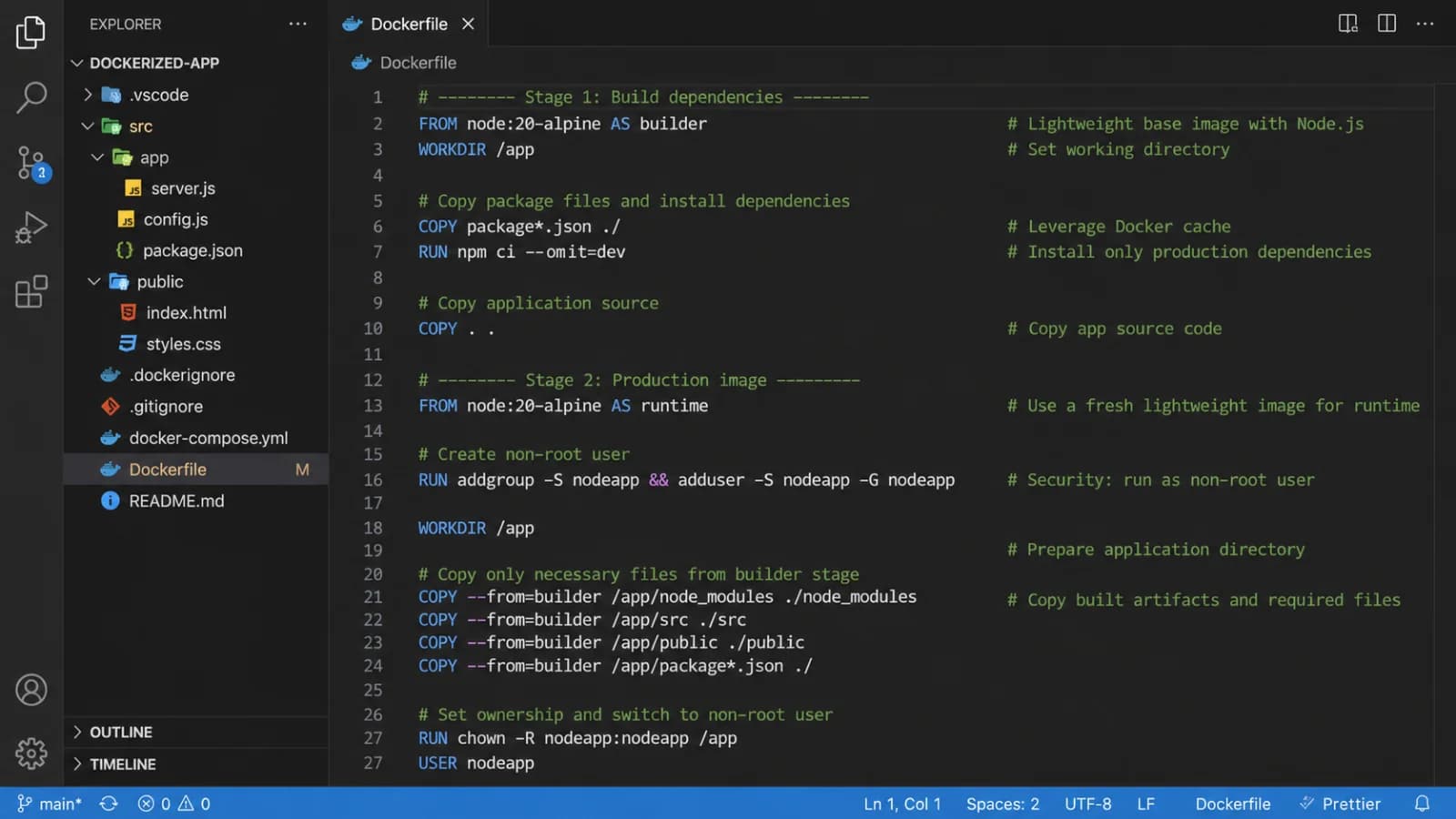
Traditional single-stage builds often trap compilation tools, SDKs, and build dependencies inside the final production artifact, bloating image size and expanding the security attack surface. Multi-stage builds solve this by allowing you to use multiple FROM statements within a single file, letting you copy only the finalized artifacts from a heavy build stage into a lightweight production runtime stage.
Consider this concrete example of a multi-stage Python or compiled application pattern:
# Stage 1: Build dependencies and compile artifacts
FROM python:3.11-slim AS builder
WORKDIR /app
RUN apt-get update && apt-get install -y --no-install-recommends build-essential
COPY requirements.txt .
RUN pip install --no-cache-dir --prefix=/install -r requirements.txt

# Stage 2: Final lightweight production image
FROM python:3.11-slim AS runner
WORKDIR /app
COPY --from=builder /install /usr/local
COPY . .
USER appuser
CMD ["python", "main.py"]
In this setup, the heavy build-essential package and compilation caches remain trapped in the builder stage, leaving the final runner image clean, small, and secure.
Run as a Non-Root User
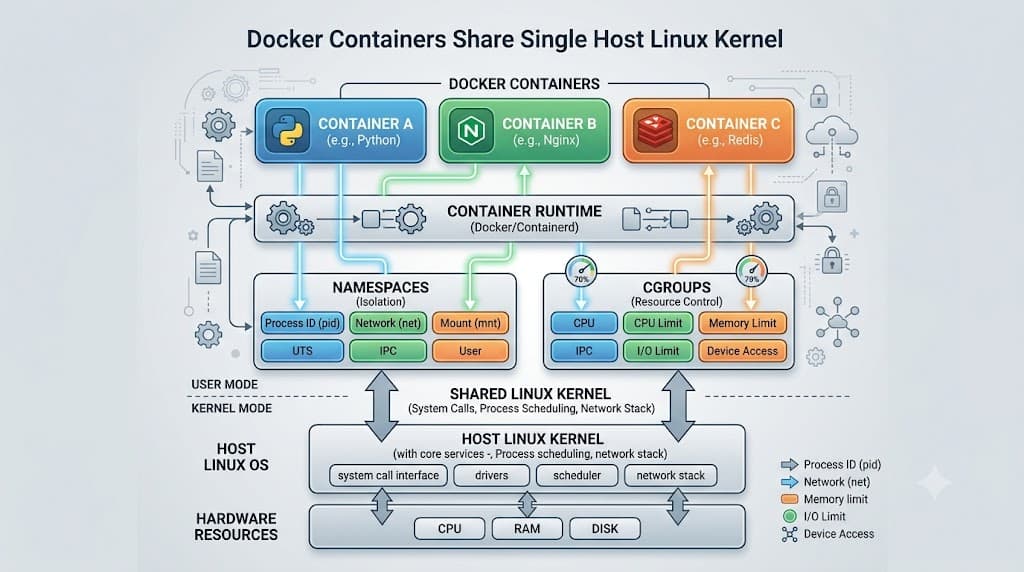
By default, containers execute commands and processes as the root user inside the container namespace. If an attacker manages to exploit a vulnerability in your application runtime, they instantly inherit root privileges within that container boundary, which can occasionally facilitate container escape vectors or host-level compromise.
To mitigate this risk, you should create a dedicated, unprivileged system user and group early in your build file and switch to that user before defining your entrypoint or command. Here is how you configure a secure non-root user in a Debian-based environment:
RUN groupadd -g 10001 appgroup && \
    useradd -u 10001 -g appgroup -m -s /bin/nologin appuser
USER appuser
Ensure that any directories or files required by your application are owned by this user before switching contexts, typically by using the --chown flag during your COPY instructions.
Handle Secrets Safely
Hard-coding API keys, database credentials, or private SSH keys into your build instructions via ENV or RUN commands is a severe security violation. Because image layers are immutable and stored within the image history, anyone with access to the image can extract hard-coded secrets using inspection commands, even if subsequent layers attempt to delete them.
Instead of baking credentials into layers, leverage modern BuildKit secret mount capabilities. By utilizing build-time secret mounts, your credentials are made available securely to the active build step without persisting in any final image layer:
# syntax=docker/dockerfile:1
FROM alpine:3.18
RUN --mount=type=secret,id=my_secret \
    cat /run/secrets/my_secret > /secure_token
This approach ensures that credentials remain strictly isolated to the transient build container and never leak into production artifacts.
Keep Dependencies Reproducible
Package installation reproducibility guarantees that your application behaves identically across local development, CI pipelines, and production clusters. Unpinned package versions can pull in unexpected updates that introduce breaking changes or security regressions.
When installing software packages, always pin exact versions. For Debian-based images using apt-get, combine your update, install, and cache-cleaning commands into a single RUN statement to prevent package lists from bloating layer size:
RUN apt-get update && apt-get install -y --no-install-recommends \
    curl=7.88.1-10+deb12u5 \
    ca-certificates=20230311 \
    && rm -rf /var/lib/apt/lists/*
Similarly, when managing language ecosystems, use lock files—such as requirements.txt with pinned hashes, poetry.lock, package-lock.json, or go.sum—to enforce exact dependency trees.
Reduce Image Size
Minimizing image footprints improves network transfer speeds, reduces storage costs, and decreases deployment latency. Beyond multi-stage builds and proper .dockerignore configurations, you can achieve significant size reductions by actively purging package manager caches and avoiding unnecessary diagnostic tools.
When using Alpine Linux, clean your apk cache directly within the installation command to avoid leaving residual index files behind:
RUN apk add --no-cache curl ca-certificates
For Python environments, disable pyc file generation if bytecode caching is unnecessary in containerized environments by setting the PYTHONDONTWRITEBYTECODE environment variable. Regularly audit your final image layers using inspection tools to identify unexpected file accumulations.
Scan and Test Images
Building secure containers does not stop once the build command finishes. Continuous vulnerability scanning is a mandatory practice for catching outdated system packages or vulnerable third-party dependencies before they reach production clusters.
Integrate container scanning utilities into your CI/CD pipeline to inspect images for Common Vulnerabilities and Exposures (CVEs). Additionally, define native container health checks using the HEALTHCHECK instruction to give orchestration platforms real-time visibility into application health:
HEALTHCHECK --interval=30s --timeout=3s --start-period=5s --retries=3 \
  CMD curl -f http://localhost:8080/health || exit 1
Automated testing of your built containers ensures that permission boundaries, entrypoints, and runtime configurations function as intended prior to deployment.
Common Dockerfile Mistakes
Developers frequently encounter pitfalls that degrade performance or compromise security. One common mistake is placing volatile COPY instructions before stable dependency installation steps, which completely invalidates the build cache for every code change. Another frequent error is running applications as root due to convenience, leaving the system exposed to privilege escalation.
Additionally, failing to clean up package manager caches—such as leaving /var/lib/apt/lists/* or apk cache directories populated—adds dead weight to every layer. Finally, relying on mutable tags or failing to use explicit build-time secret mounts rather than environment variables represents a critical compliance risk that can expose sensitive credentials in public or private registries.
📌 Recommended Next Guides & References
  <li>
    <a href="/article/docker-and-kubernetes-how-they-work-together-2" class="text-primary hover:underline font-semibold flex items-center gap-2">
      <span>→</span> <span>Docker and Kubernetes: How They Work Together</span>
    </a>
  </li>

  <li>
    <a href="/article/kubernetes-ingress-explained" class="text-primary hover:underline font-semibold flex items-center gap-2">
      <span>→</span> <span>Kubernetes Ingress Explained: Routing, Controllers, and TLS</span>
    </a>
  </li>

  <li>
    <a href="/article/kubernetes-ingress-controller-explained" class="text-primary hover:underline font-semibold flex items-center gap-2">
      <span>→</span> <span>Kubernetes Ingress Controller Explained: Architecture, Routing, and Implementation</span>
    </a>
  </li>