Quick Answer
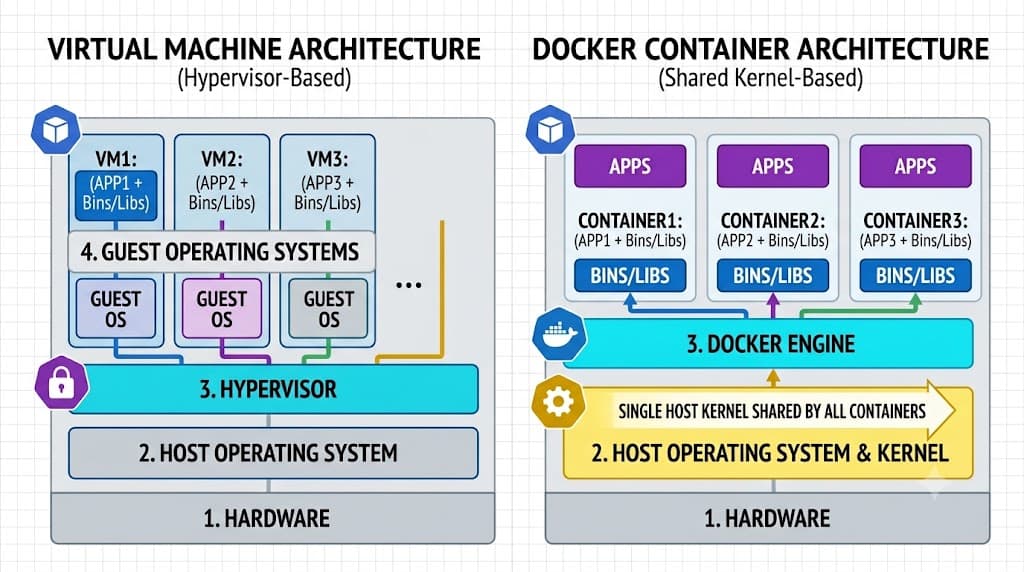
When evaluating a docker container vs virtual machine, the fundamental difference lies in how they virtualize hardware. A virtual machine runs a complete guest operating system on top of a hypervisor, virtualization layer that abstracts physical hardware. In contrast, a docker container shares the host operating system kernel and isolates application processes using Linux namespaces and control groups. This architectural distinction means containers start in seconds and require minimal memory overhead, whereas virtual machines demand dedicated CPU allocations, disk space, and memory to boot an entire OS kernel. A simple web-app architecture using containers involves packaging the application code, runtime, and dependencies into a lightweight image that runs directly on any compatible host engine. For most cloud-native deployments, containers deliver faster provisioning and higher density, while virtual machines remain favored for strict multi-tenant isolation and running distinct operating system kernels on the same hardware.
How Containers and VMs Work
To understand docker containers vs virtual machines, you must examine their underlying system architecture. Traditional virtual machines rely on a hypervisor, such as KVM, VMware ESXi, or Hyper-V, which sits directly on bare-metal hardware or runs on top of a host operating system. Each virtual machine includes virtualized hardware, system libraries, and an independent guest operating system kernel. This setup allows you to run Windows Server on a Linux host, or multiple distinct Linux distributions side by side, but it introduces heavy resource duplication since every virtual machine maintains its own OS-level processes and memory allocations.
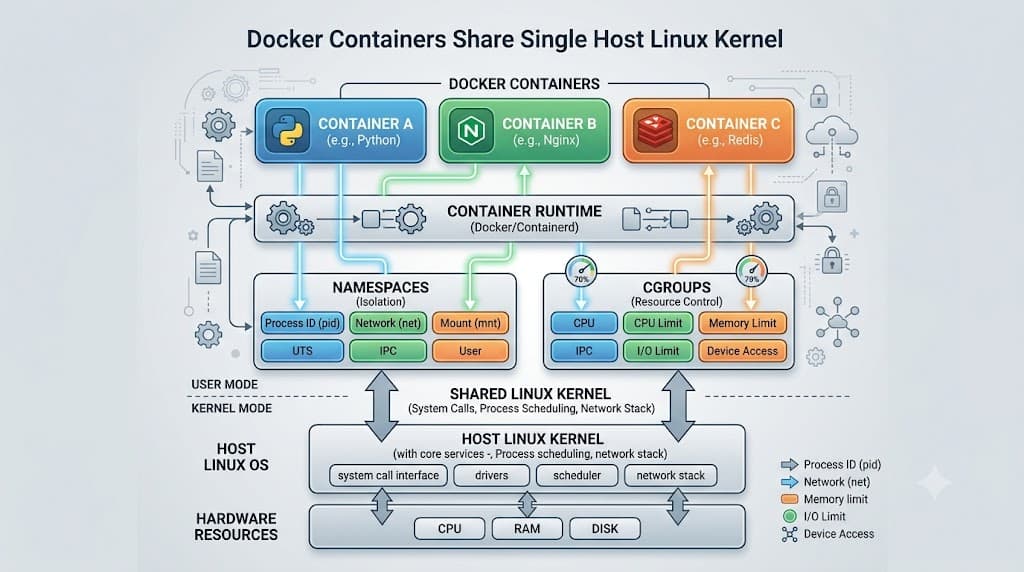
Containers take a completely different approach by leveraging operating system-level virtualization. Instead of virtualizing hardware or running a guest kernel, a containerized application shares the host system kernel. The container runtime uses kernel features like namespaces to isolate filesystem views, network interfaces, and process IDs, while control groups limit and account for CPU, memory, and I/O usage. Because there is no guest operating system to boot or maintain, container images are significantly smaller and execute directly on the host kernel with near-native CPU and memory performance.
Docker Containers vs Virtual Machines
Comparing docker containers vs vm environments highlights major trade-offs in startup speed, storage efficiency, and operational complexity. Virtual machines typically take minutes to initialize because they must perform a full boot sequence, initialize hardware drivers, and start system initialization daemons. Docker containers typically initialize in milliseconds or seconds because the application process simply starts under the supervision of the container runtime.
| Feature | Docker Container | Virtual Machine |
|---|---|---|
| Operating System | Shares host kernel | Dedicated guest OS |
| Startup Time | Milliseconds to seconds | Minutes |
| Resource Overhead | Megabytes | Gigabytes |
| Portability | High (image-based) | Moderate (disk images / OVA) |
| Isolation Level | Process-level | Hardware / hypervisor-level |
| Density | High (dozens to hundreds per host) | Low to moderate |
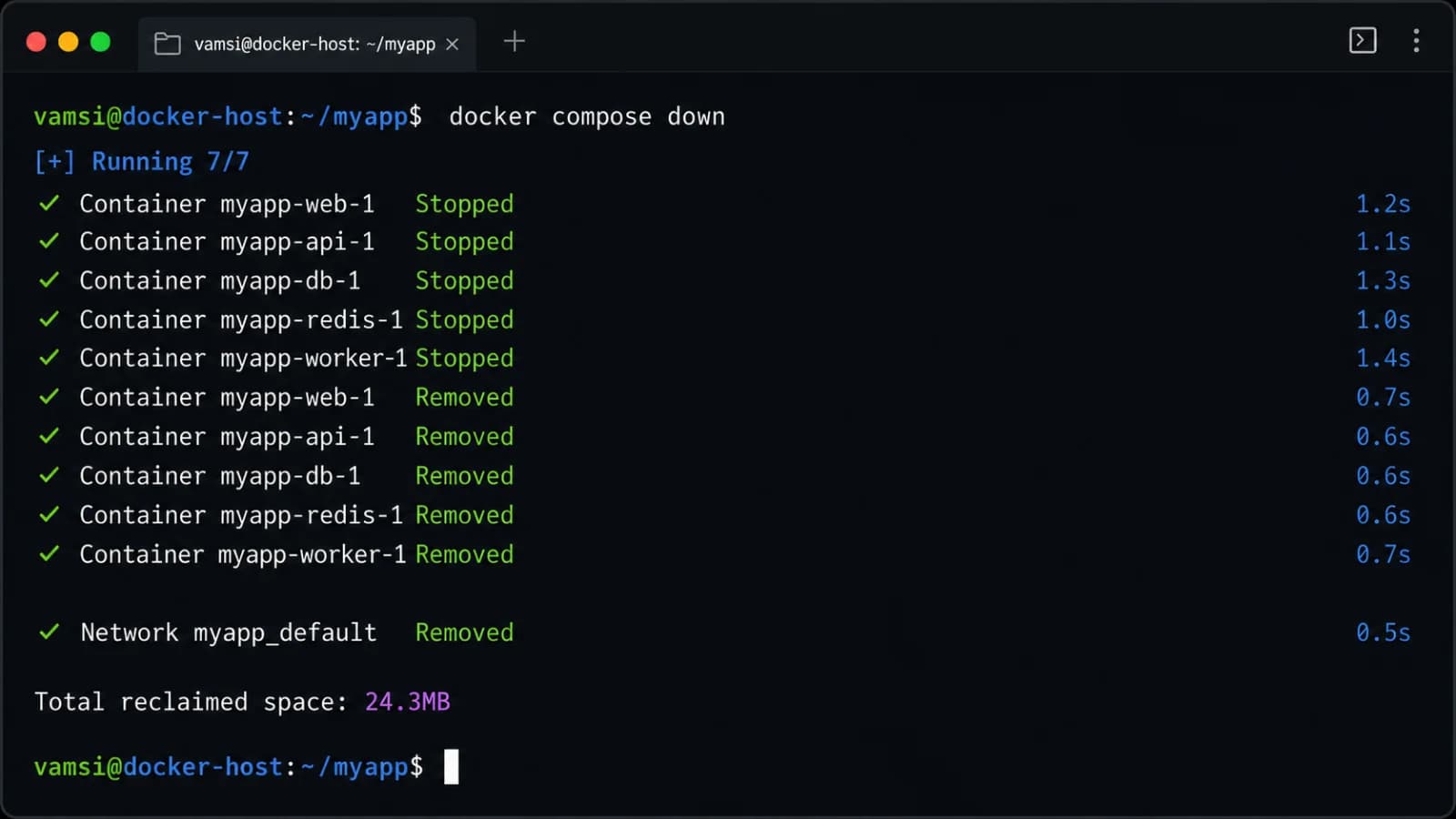
Consider the lifecycle of each technology. A virtual machine lifecycle involves provisioning a disk image, allocating static CPU and memory limits, and managing patches for both the application and the guest OS. A container lifecycle revolves around building an immutable image layer, instantiating short-lived container instances, and orchestrating them through platforms like Kubernetes or Docker Compose.
Performance and Resource Use
Analyzing resource overhead reveals why many modern microservices architectures favor containerization. Because virtual machines allocate dedicated memory and virtualized CPU cores to every guest operating system, idle virtual machines still consume substantial system resources. Furthermore, hypervisors introduce a thin translation layer for hardware instructions, which can create a measurable performance penalty for CPU-bound or memory-intensive workloads, though modern hardware-assisted virtualization has narrowed this gap significantly.
Containers bypass hypervisor translation overhead by executing application processes directly on the host operating system kernel. This direct execution model delivers performance virtually identical to running the application natively on bare metal. Memory efficiency is another major differentiator: multiple containers running the same base image can share read-only memory pages through union filesystems like OverlayFS, dramatically reducing the total RAM footprint on the host server. When scaling applications horizontally, this efficiency allows organizations to pack far higher workload density onto a single physical server or cloud instance, lowering infrastructure costs.
Isolation and Security
Security and isolation boundaries are critical factors when choosing between container vs vm isolation models. Virtual machines provide strong hardware-level isolation enforced by the hypervisor. If a vulnerability allows an attacker to compromise the guest operating system inside a virtual machine, the blast radius is typically contained within that virtual machine, and breaking out to the underlying host hardware requires exploiting complex hypervisor or physical hardware flaws.
Containers offer process-level isolation rather than hardware-level separation. Because all containers on a host share the same kernel, a kernel vulnerability or misconfiguration can potentially allow an attacker to escape the container and impact the host system or neighboring containers. To mitigate these risks, modern deployments use security profiles like seccomp, AppArmor, or SELinux, run containers as non-root users, and avoid privileged container flags. However, for strict multi-tenant environments where untrusted code executes, traditional virtual machines or specialized micro-VM technologies remain the gold standard for robust isolation.
Portability and Operations
Application portability has transformed software delivery, and both virtualization paradigms handle deployment packaging differently. Virtual machines encapsulate an entire operating system environment, configuration files, and application data into large disk images or templates (such as OVA files). While these images ensure consistency, their sheer size makes them cumbersome to transfer across networks, store in registries, or spin up rapidly in continuous integration pipelines.
Docker containers package applications along with their immediate dependencies, runtime libraries, and environment variables into highly compressed, layered images. These images can be built locally, pushed to public or private registries like Docker Hub or Amazon ECR, and pulled down on any machine running a compatible container engine. This eliminates the classic "it works on my machine" problem by ensuring that development, testing, staging, and production environments execute the exact same container image without subtle OS dependency discrepancies.
When to Use Containers
Choosing docker containers makes sense for modern cloud-native applications, microservices architectures, and rapid deployment workflows. Containers shine in scenarios requiring continuous integration and continuous deployment pipelines, where automated tests spin up and tear down instances in seconds. Applications composed of loosely coupled microservices benefit immensely from containerization, as each service can be packaged with its specific runtime requirements and scaled independently based on incoming traffic demand.
Containers are also ideal for multi-cloud and hybrid cloud strategies, where applications must move seamlessly between on-premises servers, developer laptops, and public cloud providers like AWS, Google Cloud, or Azure without modification. They provide an efficient mechanism for batch processing, web serving, and building modular applications that leverage orchestration platforms for automated healing and scaling.
When to Use VMs
Despite the popularity of containerization, traditional virtual machines remain essential for specific enterprise workloads and architectural requirements. You should choose a virtual machine when your application stack requires a different operating system than the host—such as running legacy Windows applications on a Linux infrastructure, or vice versa. Virtual machines are also necessary when workloads require direct access to low-level hardware features, specialized kernel modules, or strict multi-tenant security boundaries where complete hardware isolation is mandatory.
Additionally, many enterprise legacy applications are monolithic, stateful, and difficult to refactor into stateless container components. Running these legacy systems inside traditional virtual machines provides a stable, reliable migration path without requiring costly and time-consuming application rewrites.
Can You Use Both?
Many modern enterprise architectures do not treat containers and virtual machines as mutually exclusive; instead, they combine them in a layered approach. A common hybrid pattern involves provisioning virtual machines as the foundational infrastructure layer—either on bare metal or in a public cloud—and then running a container orchestration platform like Kubernetes directly on top of those virtual machines.
This hybrid strategy delivers the best of both worlds. The virtual machine layer provides elastic infrastructure provisioning, snapshot capabilities, and strong infrastructure-level tenancy boundaries managed by cloud providers. Meanwhile, the container layer provides rapid application deployment, fine-grained resource scaling, and consistent developer workflows. Organizations can also run lightweight container engines inside virtual machines to isolate different development teams while maintaining the operational speed of containerized software delivery.
Common Configuration and Security Mistakes
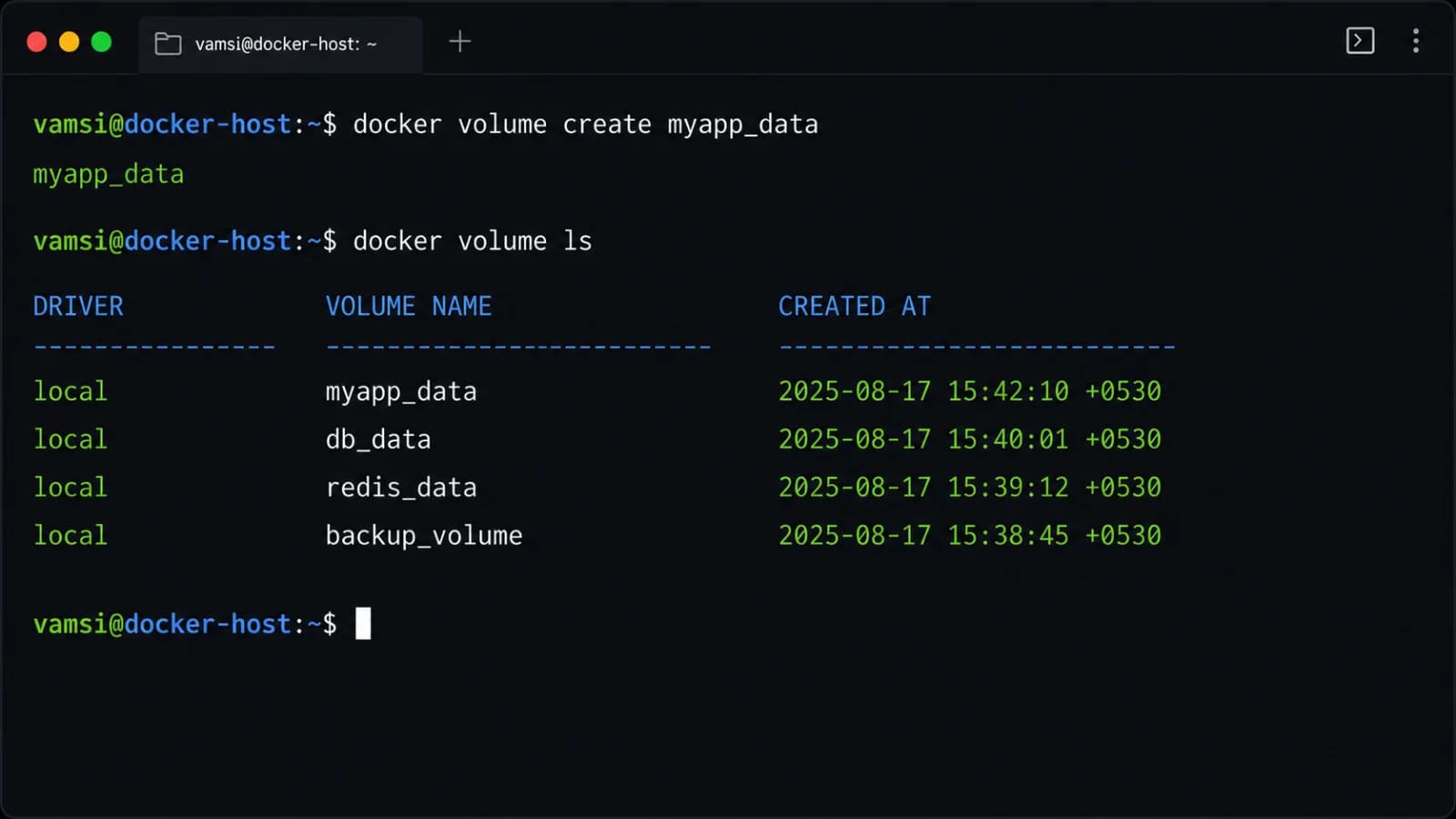
Deploying container and VM environments introduces unique operational pitfalls that engineers must avoid. A common container mistake is running applications as the root user inside the container, which grants unnecessary administrative privileges and increases the impact of any potential security breach. Another frequent error is storing persistent application data directly inside the ephemeral container filesystem instead of using external volume mounts or managed storage services, leading to data loss when the container restarts.
In virtual machine environments, common mistakes include over-provisioning CPU and memory resources without monitoring actual utilization metrics, leading to wasted capacity and inflated cloud bills. Additionally, failing to maintain rigorous patch management schedules for guest operating systems across large virtual machine fleets exposes infrastructure to known exploits. When troubleshooting container networking or storage issues, always verify host port mappings, DNS configurations, and storage driver permissions before altering application code.
📌 Recommended Next Guides & References
  <li>
    <a href="/article/docker-and-kubernetes-how-they-work-together-2" class="text-primary hover:underline font-semibold flex items-center gap-2">
      <span>→</span> <span>Docker and Kubernetes: How They Work Together</span>
    </a>
  </li>

  <li>
    <a href="/article/kubernetes-ingress-explained" class="text-primary hover:underline font-semibold flex items-center gap-2">
      <span>→</span> <span>Kubernetes Ingress Explained: Routing, Controllers, and TLS</span>
    </a>
  </li>

  <li>
    <a href="/article/kubernetes-ingress-controller-explained" class="text-primary hover:underline font-semibold flex items-center gap-2">
      <span>→</span> <span>Kubernetes Ingress Controller Explained: Architecture, Routing, and Implementation</span>
    </a>
  </li>