Quick Answer
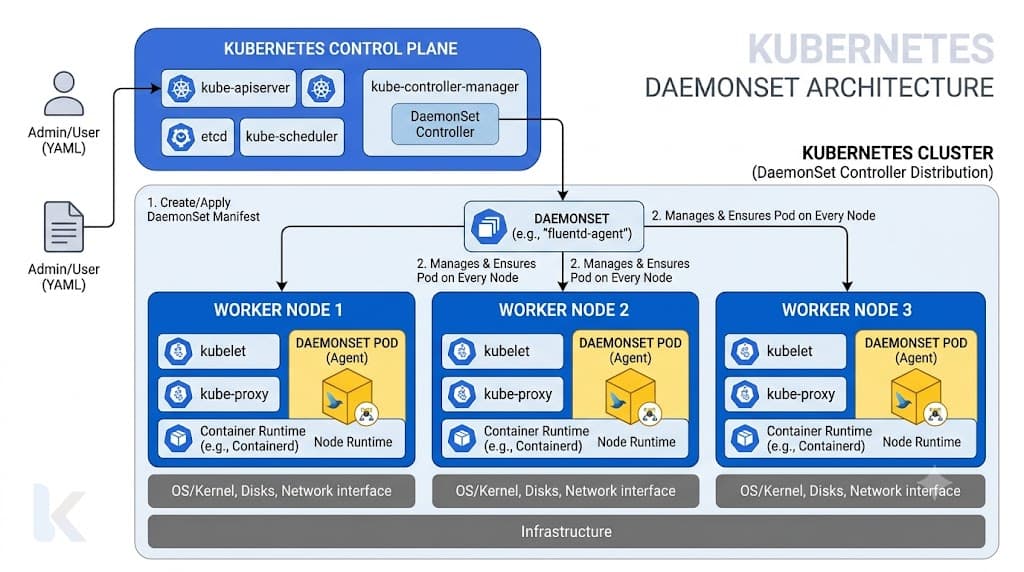
A Kubernetes DaemonSet ensures that all (or a subset of) nodes run a copy of a specific Pod. As new nodes are added to the cluster, Pods are automatically scheduled onto them, and when nodes are removed, those Pods are garbage-collected. This controller is vital for infrastructure-level tasks such as cluster storage, node monitoring, and log collection where every single machine requires dedicated background support.
Quick Answer
A Kubernetes DaemonSet is a native controller that guarantees a single Pod instance runs across qualifying nodes within a cluster. Unlike Deployments, which scale Pods horizontally based on traffic or resource metrics, DaemonSets scale vertically with the cluster's infrastructure topology, matching every node that satisfies scheduling criteria. For instance, if you operate a fifty-node production cluster, a well-configured daemonset kubernetes object ensures precisely fifty instances of your daemon Pod run concurrently, adapting dynamically as engineers scale worker groups up or down.
What a DaemonSet Is
At its core, a DaemonSet manages background Pod lifecycles across cluster nodes, making it the fundamental primitive for running cluster-wide infrastructure daemons. While standard Deployments are designed for stateless web servers or microservices where placement is largely arbitrary and managed by the global scheduler, DaemonSets are inherently node-bound. They guarantee that every target node hosts exactly one instance of the managed workload.
Consider how container orchestration environments scale. When deploying application tiers, operators rarely care which specific virtual machine hosts a given frontend container, provided enough compute capacity exists. Conversely, node-level agents require strict topological placement. If a storage daemon driver or a local cache proxy fails to run on a specific node, any application workload executing on that exact host will fail to mount volumes or communicate with the backend. DaemonSets eliminate this risk by locking the scheduling lifecycle directly to the underlying Kubernetes node inventory.
Furthermore, DaemonSets integrate tightly with the cluster's control plane to handle node lifecycle events gracefully. When a cluster administrator cordons and drains a node for maintenance, the kubelet and scheduler coordinate to terminate the node-bound Pod cleanly without disrupting other nodes. When a new virtual machine joins the cluster via autoscaling groups, the DaemonSet controller detects the addition and instantly provisions the required agent Pod before application workloads are permitted to schedule, ensuring telemetry and security guardrails are active from the very first second.
Scheduling on Nodes
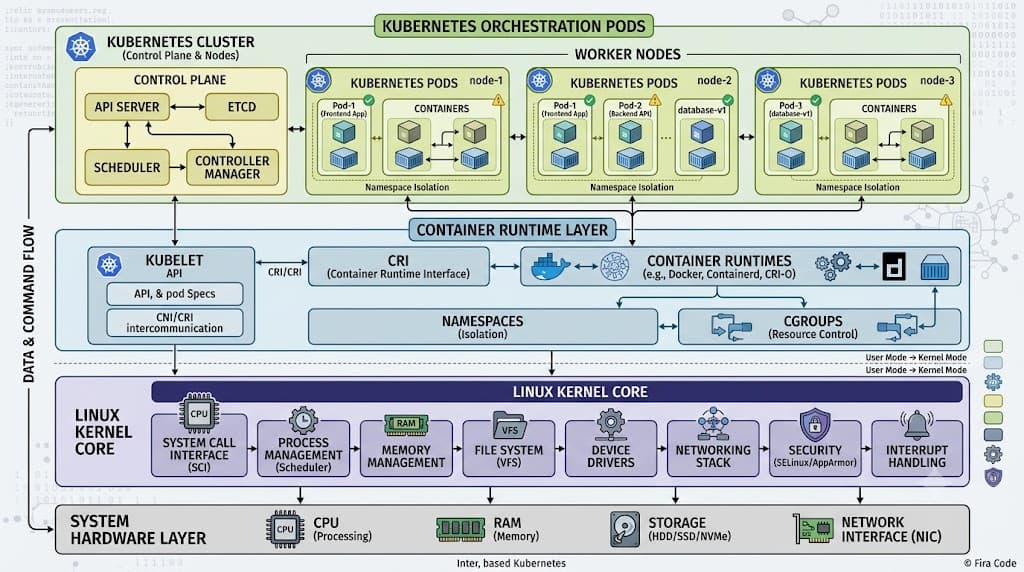
Understanding how Pod placement works requires a clear picture of the interaction between the Kubernetes scheduler, the kubelet, and the DaemonSet controller. Historically, DaemonSet Pods bypassed the standard scheduler entirely, with the controller placing them directly onto nodes by assigning the nodeName field in the Pod specification. Modern versions of Kubernetes delegate scheduling decisions to the default scheduler through standard scheduling mechanisms, while retaining strict node assignment constraints.
When a DaemonSet is created, its internal controller generates a Pod template and injects specific node affinity rules or node selectors. The default scheduler evaluates these constraints against available cluster nodes. Once evaluated, the scheduler binds the Pod to the target node. This architectural shift enables advanced scheduling features such as custom scheduler profiles, pre-emption, and inter-pod affinity rules to apply cleanly to daemon workloads, rather than treating them as isolated exceptions.
During routine cluster operations, administrators must monitor how node capacity limits interact with these workloads. If a node exhausts its available memory or CPU resources, the scheduler may mark a DaemonSet Pod as pending. Because these agents are typically critical for node health, infrastructure teams must reserve adequate system-reserved and eviction-threshold headroom within the kubelet configuration to prevent resource starvation from evicting vital monitoring or security daemons.
Tolerations and Selectors
Controlling precisely where node agents execute requires careful configuration of node selectors, node affinity, taints, and tolerations. A common misunderstanding is that a DaemonSet automatically blankets every single node in a cluster regardless of operational state. In reality, taints applied to control plane nodes, dedicated GPU pools, or isolated tenant zones will actively repel pods unless explicit tolerations are defined within the DaemonSet specification.
By default, modern Kubernetes control plane nodes are automatically tainted with node-role.kubernetes.io/control-plane or node-role.kubernetes.io/master to prevent general application workloads from running on them. However, cluster operators frequently need monitoring agents, network plugins, and storage drivers to run on master nodes to ensure complete cluster visibility. To achieve this, the DaemonSet manifest must include explicit tolerations matching those taints.
apiVersion: apps/v1
kind: DaemonSet
metadata:
  name: cluster-monitoring-agent
  namespace: kube-system
spec:
  selector:
    matchLabels:
      app: monitoring-agent
  template:
    metadata:
      labels:
        app: monitoring-agent
    spec:
      tolerations:
      - key: "node-role.kubernetes.io/control-plane"
        operator: "Exists"
        effect: "NoSchedule"
      - key: "node.kubernetes.io/unschedulable"
        operator: "Exists"
        effect: "NoSchedule"
      containers:
      - name: agent
        image: quay.io/example/node-agent:v1.2.0
In addition to tolerating taints, engineers use nodeSelectors and node affinity rules to restrict workloads to specific hardware profiles. For example, a specialized hardware telemetry agent might target nodes equipped with specific kernel modules or high-speed NVMe drives by combining node selectors with the appropriate tolerations, ensuring efficient resource utilization without polluting standard worker nodes.
Updates
Updating node-level agents across a massive production cluster requires a controlled strategy to prevent widespread outages or telemetry blackouts. DaemonSets support two primary update strategies: OnDelete and RollingUpdate. The RollingUpdate strategy is the modern default, allowing administrators to replace existing pods incrementally while maintaining strict control over availability.
When a RollingUpdate strategy is configured, the DaemonSet controller deletes old pods and creates new ones based on the updated template. The maxUnavailable parameter controls how many pods can be simultaneously unavailable during the update process. Setting this value to a low number or a percentage ensures that only a fraction of the cluster's nodes undergo updates at any given moment.
spec:
  updateStrategy:
    type: RollingUpdate
    rollingUpdate:
      maxUnavailable: 1
Platform engineers should always configure readiness probes on their daemon containers. Without adequate readiness checks, the rolling update controller might proceed to the next node before the new agent pod has successfully established connections or initialized local state, potentially causing cascading failures across log ingestion pipelines or network overlays.
Common Use Cases
See also: CNI plugins
DaemonSets are uniquely suited for workloads that must accompany every node in a distributed architecture. Understanding these patterns helps architects design resilient, self-healing platforms.
A primary application is deploying a kubernetes node agent for security, compliance, or runtime auditing. Tools that inspect system calls, scan container runtimes, or enforce kernel-level network policies operate best as node-level daemons because they require direct visibility into the host operating system's kernel and resource namespaces.
Another widespread use case involves storage provisioning and clustering daemons. Distributed block storage engines and network filesystems require local storage daemons running on every storage-participating node to manage raw disk attachments, replication streams, and local caching layers.
Finally, collecting cluster telemetry relies heavily on a robust kubernetes logging architecture. Deploying log shippers like Fluentbit, Fluentd, or Vector as DaemonSets guarantees that container stdout and stderr streams from every application pod are captured locally, enriched with node and pod metadata, and shipped securely to centralized analysis backends without requiring application code changes.
kubectl get daemonset
To verify that your infrastructure daemons are correctly deployed across your cluster nodes, operators rely on standard inspection commands. The kubectl get daemonset command provides an immediate tabular overview of resource status, desired pod counts, and scheduling progress.
kubectl get daemonset -n kube-system
Examining the output reveals several critical columns: DESIRED, CURRENT, READY, UP-TO-DATE, and AVAILABLE. If the DESIRED count matches the READY count, every qualifying node is successfully running the agent. Discrepancies between these numbers indicate scheduling blocks, resource exhaustion, or failing readiness probes that require immediate investigation using describe commands.
kubectl describe daemonset cluster-monitoring-agent -n kube-system
kubectl rollout status daemonset/...
Managing rolling updates safely requires continuous visibility into update progress. The kubectl rollout status command allows engineers to track updates in real time and integrate verification steps directly into CI/CD deployment pipelines.
kubectl rollout status daemonset/cluster-monitoring-agent -n kube-system
If an update stalls due to a failing container image or a misconfigured environment variable, this command will block and report progress until a timeout occurs. Operators can pause or undo a stuck rollout using standard rollout commands:
kubectl rollout undo daemonset/cluster-monitoring-agent -n kube-system
Combining these operational commands with Prometheus alerts ensures that engineering teams detect degraded node agent coverage before application telemetry loss impacts business operations.
Troubleshooting
When DaemonSet pods fail to schedule or enter persistent crash loops, systematic troubleshooting is essential. The most frequent failure mode involves missing tolerations where newly added nodes or tainted infrastructure nodes prevent the daemon from scheduling, leaving READY counts lower than DESIRED counts.
Another common issue is container image pull errors or incorrect credentials, which cause pods to enter ImagePullBackOff states. Because DaemonSets run on every node, a broken image tag can result in hundreds of crashing pods simultaneously consuming cluster API rate limits. Always test updates in a staging environment and utilize phased rollout configurations to catch registry authentication or syntax errors early.
📌 Recommended Next Guides & References
  <li>
    <a href="/article/docker-and-kubernetes-how-they-work-together-2" class="text-primary hover:underline font-semibold flex items-center gap-2">
      <span>→</span> <span>Docker and Kubernetes: How They Work Together</span>
    </a>
  </li>

  <li>
    <a href="/article/kubernetes-ingress-explained" class="text-primary hover:underline font-semibold flex items-center gap-2">
      <span>→</span> <span>Kubernetes Ingress Explained: Routing, Controllers, and TLS</span>
    </a>
  </li>

  <li>
    <a href="/article/kubernetes-ingress-controller-explained" class="text-primary hover:underline font-semibold flex items-center gap-2">
      <span>→</span> <span>Kubernetes Ingress Controller Explained: Architecture, Routing, and Implementation</span>
    </a>
  </li>