Quick Answer
Quick Answer
A kubernetes cronjob creates Job objects on a repeating schedule written in standard cron format, similar to a traditional Linux crontab. It automates recurring cluster operations such as database backups, batch report generation, and cache clearing by spawning ephemeral worker pods at specified intervals. To configure one, define a cron schedule kubernetes expression along with a template for the underlying Job spec inside a YAML manifest. This approach ensures that your recurring administrative tasks execute reliably within your production cluster without requiring external job schedulers or manual intervention.
What a Kubernetes Job Is
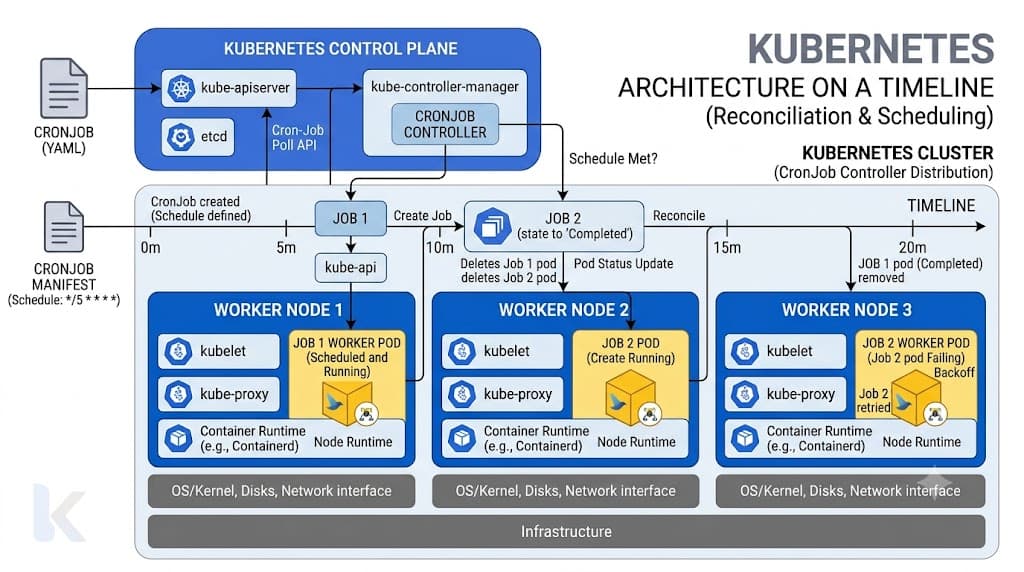
To fully understand how a scheduled task operates, you must first examine the foundational building block it relies upon: the Kubernetes Job. While a standard Deployment manages long-running stateless or stateful applications that are expected to run indefinitely, a Job is designed to run to completion. When you submit a Job resource to the API server, it creates one or more pods and ensures that a specified number of them successfully terminate. If a node fails or a pod crashes during execution while running a batch task, the Job controller recreates the pod until the required successful completions are achieved. A CronJob simply serves as a higher-level manager built on top of this primitive. Instead of executing your batch task immediately upon application, the CronJob controller acts as a clock watcher. When the time matching your specified cron expression arrives, the CronJob controller programmatically generates a new Kubernetes Job resource. This separation of concerns is powerful: the CronJob handles timing and history, while the underlying Job handles pod lifecycle management, retry backoff logic, and container completion tracking. Understanding this relationship helps engineers diagnose whether a scheduling failure stems from a malformed time expression or an issue within the underlying container execution logic.
Job YAML
Writing the correct configuration file requires understanding how to structure your cronjob yaml manifest to define both the scheduling parameters and the workload instructions. At the top level, the manifest specifies an API version of batch/v1 and a kind of CronJob. Inside the metadata block, you assign a descriptive name. The core behavior is controlled via the spec field, which contains the schedule string, the concurrencyPolicy, and a nested jobTemplate. The schedule field accepts standard five-part cron strings representing minute, hour, day of month, month, and day of week. For example, setting the schedule to 0 2 * * * instructs the cluster to trigger the workload every single day at two o'clock in the morning. Timezone considerations are vital in modern distributed environments. By default, the CronJob controller uses the local time of the master node where the kube-controller-manager runs. However, modern Kubernetes versions support explicit timezone declarations using the timeZone field at the spec level, allowing you to anchor your schedule to Coordinated Universal Time or any standard geographic zone regardless of underlying server configurations. Below the schedule, the jobTemplate section contains the exact same schema you would use for a standalone Job, including pod templates, container images, environment variables, restart policies, and resource limits. Ensuring correct indentation and valid syntax in your manifest prevents rejection by the API server upon application.
Completions and Parallelism
When configuring recurring automation tasks, managing how multiple executions overlap or run simultaneously is critical for cluster stability. The CronJob controller provides several mechanisms to control this behavior, starting with the concurrencyPolicy field. You can set this policy to one of three values: Allow, Forbid, or Replace. When configured to Allow, the controller launches new Jobs according to schedule even if previous executions are still actively running. This is suitable for independent tasks where overlap causes no harm. Setting the policy to Forbid instructs the controller to skip the new schedule tick entirely if the previous Job has not yet finished, preventing resource exhaustion. The Replace policy cancels the currently running Job and immediately spawns a new one in its place, which is useful when stale runs should be discarded in favor of fresh data. Another crucial parameter is startingDeadlineSeconds. If your cluster experiences downtime, network partitions, or resource starvation, scheduled runs might be missed. This field defines an optional window of time during which the controller is allowed to catch up. If the deadline expires before the controller can spawn the Job, the execution is marked as missed. Furthermore, within the underlying job template, you can configure completions and parallelism to orchestrate how many pods run concurrently to finish the batch workload. Parallelism dictates how many pods execute simultaneously at any given moment, while completions determine the total number of successful pod finishes required for the Job to be marked complete. Tuning these parameters ensures that heavy processing tasks scale across your worker nodes efficiently without overwhelming available CPU and memory reserves.
Retries and Cleanup
Production clusters generate extensive operational telemetry, making proper resource cleanup and failure handling mandatory to prevent etcd bloating and operational noise. When a container inside a scheduled task encounters an unhandled error, the Job controller applies exponential backoff restart policies to attempt recovery without flooding the node. You can configure backoffLimit to control how many times the system retries a failed pod before marking the entire Job as failed. Once tasks finish—whether successfully or with errors—their associated pods and Job objects consume storage in your cluster database unless pruned. To manage this footprint, CronJobs include history limits: successfulJobsHistoryLimit and failedJobsHistoryLimit. The successful limit defaults to three, meaning the cluster retains the three most recent completed Job records and automatically deletes older ones along with their finished pods. The failed limit defaults to one, retaining only the most recent failure for debugging purposes. Adjusting these values ensures that engineers have sufficient historical context to troubleshoot recurring issues during morning standups without overwhelming cluster storage or cluttering operational dashboards with thousands of completed artifact objects from historical runs.
Job vs Deployment
Choosing the correct workload primitive is fundamental to designing robust cloud-native architectures. Many engineers transitioning from traditional scripting environments mistakenly attempt to run scheduled batch tasks inside standard Deployments by utilizing infinite loops and internal sleep timers within their container entrypoints. This anti-pattern introduces severe operational risks. A Deployment is explicitly engineered to maintain a desired state of running pods indefinitely. If an application running inside a Deployment container exits—whether due to a script completion, a memory error, or an unhandled exception—the Deployment controller immediately restarts it, creating an endless loop of restarts for tasks that were intended to run only once. In contrast, CronJobs and Jobs are architected precisely for finite, bounded workloads. A Job runs until its work is finished and then terminates, transitioning into a completed state where pods can be safely cleaned up. Deployments provide continuous availability, health probing, and rolling updates for web servers and microservices, whereas CronJobs provide point-in-time execution, execution history, and automatic cleanup for batch processing, report generation, and administrative automation. Selecting the right primitive ensures your cluster resources align with the lifecycle requirements of your software applications.
Troubleshooting
Diagnosing failures in automated cluster workloads requires a systematic approach utilizing native command-line tooling to inspect scheduling states, container logs, and exit codes. Because automated tasks execute independently of direct user interaction, silent failures can occur if resource limits, environment variables, or database connections are misconfigured. Effective debugging begins by querying the API server to examine the state of both the scheduler and the executed workloads. By verifying the exact timestamps, pod termination statuses, and event streams, engineers can quickly isolate whether a problem originates from cron syntax errors, permission boundaries, or application-level exceptions.
kubectl create cronjob
The imperative command kubectl create cronjob provides a fast method for testing scheduling expressions and generating boilerplate manifests directly from the command line without writing raw YAML from scratch. For example, executing kubectl create cronjob my-backup-job --schedule="0 0 * * *" --image=postgres:15 -- /bin/sh -c "backup-script.sh" instructs the API server to instantiate a new CronJob resource that triggers daily at midnight. You can append various flags to tailor the execution environment, such as --dry-run=client -o yaml to output the complete manifest for review or version control storage before applying it to the cluster. This command is especially useful for rapid prototyping, CI/CD pipeline automation scripts, and administrative bootstrapping where manual file creation introduces unnecessary friction.
kubectl get cronjob
Once your scheduled task is deployed, monitoring its operational health requires regular inspection using kubectl get cronjob and related listing commands. Running kubectl get cronjob displays a summary table containing the active schedule, concurrency suspension status, active job counts, and the exact duration elapsed since the last successful execution. To perform a deeper inspection of the generated workloads spawned by your schedules, you combine this with kubectl get jobs, which lists all historical and active child Job instances linked to their parent CronJob. When troubleshooting a task that failed to trigger, inspecting the schedule description via kubectl describe cronjob <name> reveals critical event logs, starting deadlines, and warning messages regarding missed schedule windows. If pods fail to start or crash during execution, executing kubectl logs job/<job-name> provides the exact standard output and error streams generated by the container, enabling rapid identification of missing environment secrets, incorrect database credentials, or syntax errors within the executed script.
📌 Recommended Next Guides & References
  <li>
    <a href="/article/docker-and-kubernetes-how-they-work-together-2" class="text-primary hover:underline font-semibold flex items-center gap-2">
      <span>→</span> <span>Docker and Kubernetes: How They Work Together</span>
    </a>
  </li>

  <li>
    <a href="/article/kubernetes-ingress-explained" class="text-primary hover:underline font-semibold flex items-center gap-2">
      <span>→</span> <span>Kubernetes Ingress Explained: Routing, Controllers, and TLS</span>
    </a>
  </li>

  <li>
    <a href="/article/kubernetes-ingress-controller-explained" class="text-primary hover:underline font-semibold flex items-center gap-2">
      <span>→</span> <span>Kubernetes Ingress Controller Explained: Architecture, Routing, and Implementation</span>
    </a>
  </li>