Quick Answer
When you deploy containerized workloads into a cluster, those applications frequently need to interact with the control plane. Whether an application controller needs to watch custom resource definitions, a logging agent needs to query pod metadata, or a workload needs to communicate with external identity providers through the API server, it requires a secure mechanism for authentication and authorization. A kubernetes service account provides this exact identity foundation, separating application permissions from human user accounts and establishing a fine-grained, auditable boundary for cluster-level operations. By default, every namespace contains a default service account, but running production workloads with default credentials introduces significant security risks. Understanding how identity works, how tokens are generated and mounted, and how role-based access control governs these interactions is essential for maintaining a secure and resilient cluster architecture.
Quick Answer
A kubernetes service account is a distinct object managed by the cluster control plane that provides an explicit identity for processes running inside a pod. Applications use these credentials to authenticate securely against the API server without exposing human user credentials. To configure a workload to use a specific identity, you define the account name directly in your pod specification using the serviceAccountName property, ensuring the application inherits only the permissions explicitly granted via RBAC bindings.
Identity and Access Model
Kubernetes maintains a strict separation between human users and machine workloads. Human accounts—such as administrators, developers, and CI/CD engineers—are typically managed outside the cluster via external identity providers, OpenID Connect, client certificates, or static password files. These human identities exist globally across the entire cluster and do not belong to any single namespace. In contrast, machine workloads rely on a kubernetes service account, which is a namespaced resource native to the cluster's API. This architectural distinction ensures that permissions granted to automation agents cannot accidentally escalate into cluster-wide administrative control unless explicitly authorized by cluster operators.
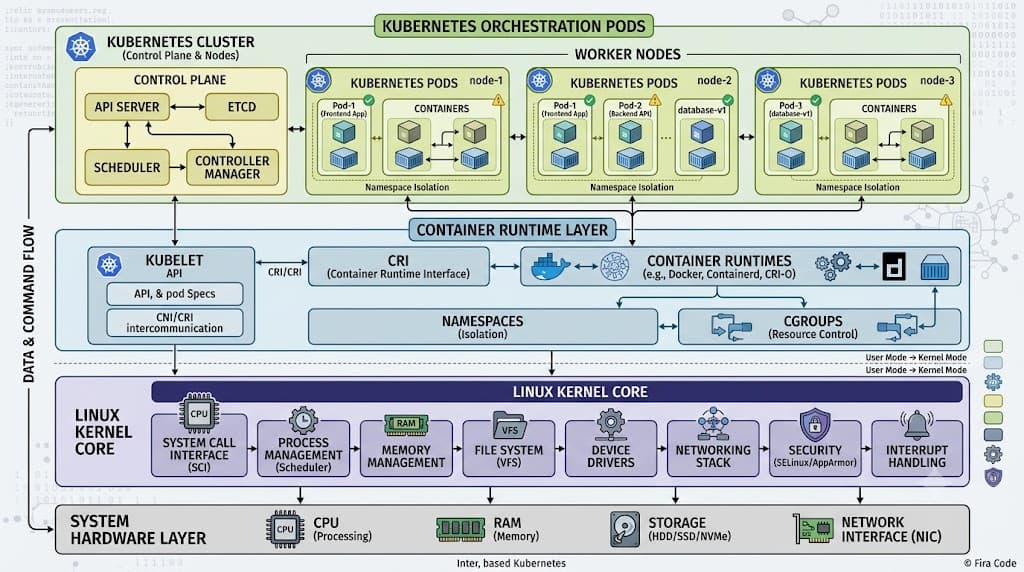
When a developer submits a deployment manifest, the scheduler assigns the pod to a node, and the kubelet initializes the runtime environment. During this initialization phase, the control plane injects the appropriate identity credentials into the pod container file system. This separation of concerns allows platform engineers to enforce the principle of least privilege, ensuring that individual microservices only possess the permissions required to execute their specific functions. Without this granular control model, compromised pods could exploit overly permissive global tokens to read sensitive cluster secrets or manipulate core infrastructure objects.
Core Objects
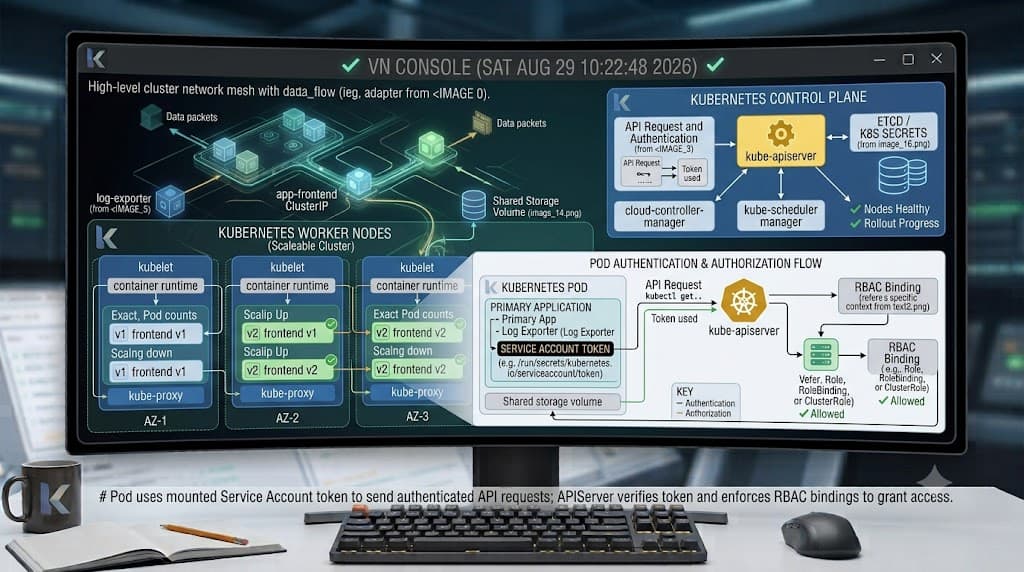
Under the hood, managing workload identity involves several interconnected API objects and control plane components. The primary resource is the ServiceAccount object itself, which acts as a lightweight anchor containing metadata, secrets references, and image pull secrets. When the API server processes a request from a pod, it inspects the presented token, maps it back to the corresponding kubernetes service account, and evaluates the associated cluster roles and role bindings to determine whether the operation is permitted.
In older versions of Kubernetes, the control plane automatically generated a long-lived static secret containing a bearer token for every service account and mounted that secret directly into pods. Modern Kubernetes distributions utilize a more secure architecture based on projected service account tokens. These projected tokens are cryptographically signed JSON Web Tokens managed directly by the token controller within the API server. They feature configurable expiration times, are automatically rotated by the kubelet, and are injected into pods using projected volumes rather than permanent static secrets. This design significantly minimizes the blast radius if a credential is leaked or exfiltrated from a running container.
Practical Configuration
Configuring workload identity correctly requires understanding both the creation of the identity object and its assignment within workload manifests. Platform engineers typically provision distinct service accounts for each distinct application tier or microservice, ensuring that permissions remain isolated. Furthermore, administrators must consider whether containers actually require API access; if an application does not interact with the Kubernetes API server, automounting credentials should be explicitly disabled to eliminate an unnecessary attack surface.
kubectl create serviceaccount
The most direct way to provision a new identity in your cluster is by using the imperative command-line utility. Executing kubectl create serviceaccount
serviceAccountName
Once an identity object exists in your cluster, you must instruct the scheduler and kubelet how to attach it to running containers. This is achieved by declaring the serviceAccountName field within the pod template specification of your Deployment, StatefulSet, or DaemonSet manifest. When the API server processes the pod creation request, it reads the serviceAccountName value—such as payment-processor—and mounts the corresponding projected token volume into the container at the standard path /var/run/secrets/kubernetes.io/serviceaccount. If you omit the serviceAccountName field entirely from your pod spec, Kubernetes automatically falls back to utilizing the default service account configured for that specific namespace. Relying on this default fallback is heavily discouraged in production environments because many standard applications or third-party charts might accidentally inherit overly broad permissions if the default account has been modified or bound to powerful cluster roles.
Testing Permissions
Deploying an identity and linking it to a workload is only half the battle; administrators must rigorously verify that the configured permissions align precisely with expected operational requirements. Because Kubernetes access control evaluates permissions dynamically based on the requesting entity, troubleshooting authorization failures requires specialized tooling that can simulate API requests on behalf of a specific service account.
kubectl auth can-i
The most effective diagnostic utility for validating authorization rules is the kubectl auth can-i command. This command queries the API server to determine whether a specific user, group, or kubernetes service account has permission to perform particular actions, such as creating pods, reading config maps, or updating deployments. To test permissions for a specific service account rather than your current administrative context, you can leverage impersonation flags. For example, running kubectl auth can-i create pods --as=system:serviceaccount:production:payment-processor -n production simulates an API request originating from the payment processor identity and immediately returns yes or no. You can also append the --list flag to output a comprehensive summary of all permitted verbs and API groups associated with that identity. This verification step is invaluable during debugging sessions, security audits, and continuous integration pipelines to ensure that kubernetes rbac bindings are correctly applied before workloads launch in production clusters.
Security Best Practices
Securing workload identity in a modern cluster requires a proactive approach that combines strict access control, proper token management, and continuous auditing. One of the most common anti-patterns is treating machine accounts as human users or sharing a single service account across entirely unrelated applications. Every microservice should maintain its own dedicated identity to adhere strictly to the principle of least privilege. Additionally, if an application has no business logic requiring interaction with the API server, you should explicitly set automountServiceAccountToken: false either at the service account level or directly within the pod specification. Disabling unnecessary token mounting neutralizes potential container breakout attacks where an attacker might attempt to scrape local secrets to escalate privileges within the cluster.
When managing kubernetes secrets and workload authentication, platform teams should also consider cloud workload identity contexts. Major cloud providers offer integrations that map kubernetes service accounts directly to cloud IAM roles using OIDC federation. This eliminates the need to store long-lived cloud credentials inside kubernetes secrets, allowing pods to securely assume cloud roles for accessing object storage, managed databases, or external key vaults. Finally, regularly review your kubernetes rbac cluster roles and role bindings to remove stale permissions, audit token usage patterns, and ensure that deprecated static tokens are completely purged from older namespaces. By enforcing these rigorous practices, organizations can build a robust, defense-in-depth security posture that protects sensitive cluster APIs from unauthorized access and potential compromise.
📌 Recommended Next Guides & References
  <li>
    <a href="/article/docker-and-kubernetes-how-they-work-together-2" class="text-primary hover:underline font-semibold flex items-center gap-2">
      <span>→</span> <span>Docker and Kubernetes: How They Work Together</span>
    </a>
  </li>

  <li>
    <a href="/article/kubernetes-ingress-explained" class="text-primary hover:underline font-semibold flex items-center gap-2">
      <span>→</span> <span>Kubernetes Ingress Explained: Routing, Controllers, and TLS</span>
    </a>
  </li>

  <li>
    <a href="/article/kubernetes-ingress-controller-explained" class="text-primary hover:underline font-semibold flex items-center gap-2">
      <span>→</span> <span>Kubernetes Ingress Controller Explained: Architecture, Routing, and Implementation</span>
    </a>
  </li>