Quick Answer
Deploying and managing complex applications across containerized environments requires sophisticated tooling to handle configuration sprawl, versioning dependencies, and deployment state. In the container ecosystem, helm kubernetes serves as the definitive standard for packaging, configuring, and deploying applications onto clusters. Without a dedicated package manager, developers must manually maintain dozens of disconnected manifest files, leading to configuration drift, version mismatches, and difficult rollbacks when things break. This guide explores every core facet of cluster package management, examining how kubernetes helm streamlines application lifecycles from initial repository creation to production-grade upgrades and emergency rollbacks.
Quick Answer
Helm kubernetes is the official package manager for Kubernetes, allowing developers to define, install, and upgrade even the most complex Kubernetes applications using reusable packages called charts. By bundling templates, default values, and dependency metadata into a single unit, Helm eliminates manual manifest juggling and maintains a revision history for every deployment in your cluster. To get started quickly, you can add a chart repository using helm repo add stable https://charts.helm.sh/stable and deploy an application with helm install my-release stable/wordpress.
What Helm Is
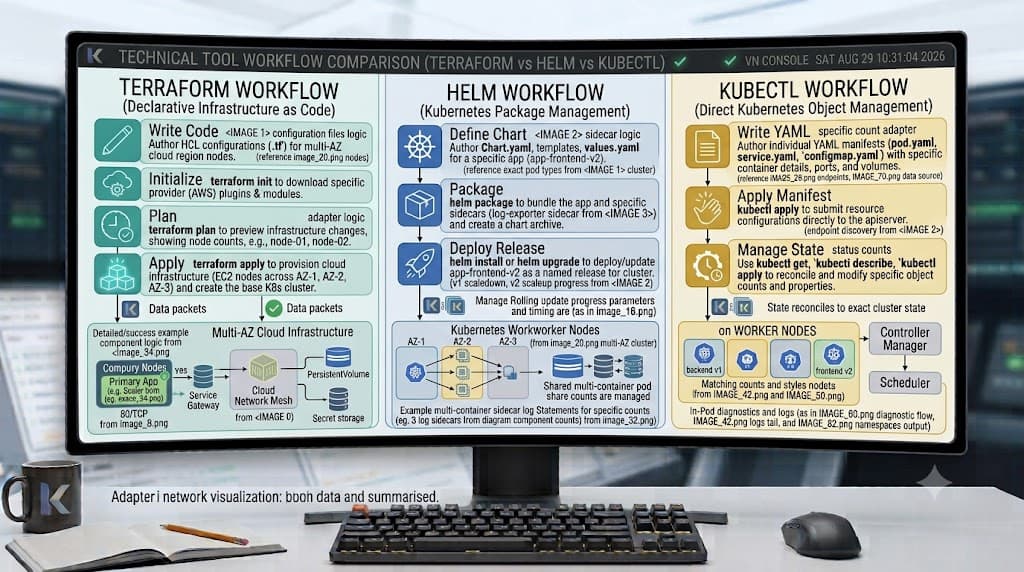
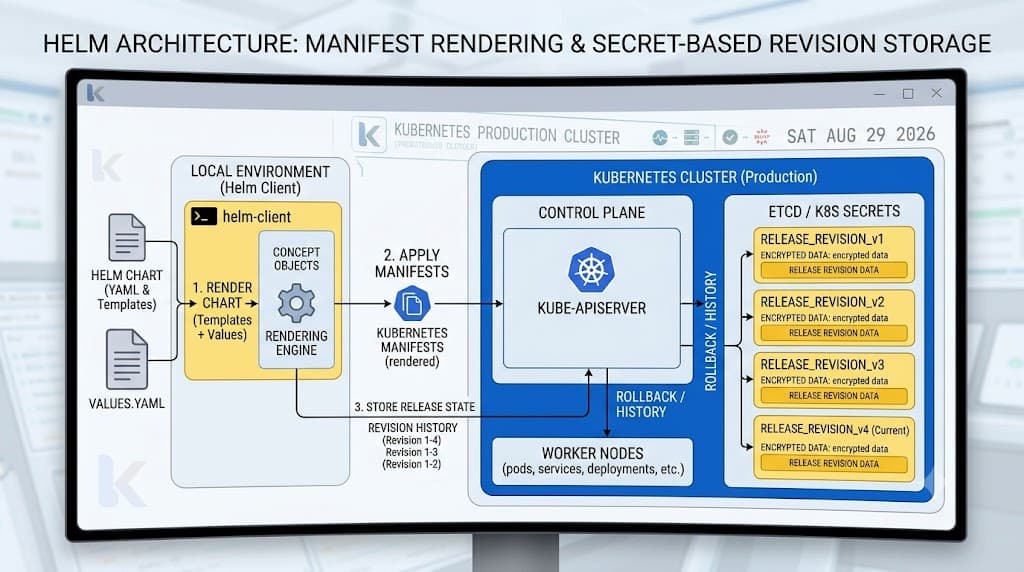
At its core, Helm operates similarly to traditional operating system package managers like APT, Yum, or Homebrew, but is purpose-built for the Kubernetes resource model. Before Helm, managing multi-component deployments meant chaining together numerous kubectl apply commands against raw YAML manifests, leaving engineers to manually track which files belonged to which application version. Helm solves this orchestration challenge by introducing a client-server architecture where the client CLI compiles templates and communicates with the cluster, while cluster-side release metadata is tracked securely within Kubernetes secrets or configmaps.
The architecture relies on three foundational pillars: the Helm CLI client, the chart repository network, and the release database stored directly inside your target cluster. When you execute a deployment command, the client renders parameterized YAML templates into standard Kubernetes manifests and submits them to the API server. This decoupling of raw manifests from configuration values enables teams to promote the exact same application package across development, staging, and production clusters with confidence, altering only the environment-specific parameter overrides.
Charts and Releases
A Helm chart is a collection of files that describe a related set of Kubernetes resources. A typical chart directory structure includes a Chart.yaml file containing metadata such as name, description, and version, alongside a values.yaml file that defines default configuration parameters. Inside the templates/ directory reside the parameterized Kubernetes manifests—deployments, services, ingress rules, and persistent volume claims—written using Go templating syntax. These templates leverage dynamic variables, conditional logic, and looping structures to generate valid YAML manifest files tailored to user inputs.
When a chart is deployed into a cluster, Helm instantiates a release. A release represents a specific instance of a chart running with a unique set of configuration values. You can install the same chart multiple times into a single cluster or across multiple namespaces, with each deployment creating a distinct release entity with its own independent revision lifecycle. Every time you modify configuration parameters or update chart templates, Helm generates a brand-new release revision, incrementing the revision counter and preserving an immutable snapshot of the previously applied manifests for effortless auditing and recovery.
Installing a Chart
Installing applications onto a cluster requires pulling packaged charts from trusted repositories, locating the correct software version, and executing the deployment pipeline with appropriate command-line flags. Understanding the underlying workflow ensures that your deployments remain repeatable, secure, and easy to audit across various cluster environments.
helm repo add
The helm repo add command registers external chart repositories with your local Helm client configuration, allowing you to fetch packages from community or enterprise registries. For example, executing helm repo add bitnami https://charts.bitnami.com/bitnami links the Bitnami repository to your local client, storing repository metadata locally. Always verify your configured repositories and ensure they are up to date by running helm repo update prior to searching or installing charts to prevent deployment failures caused by stale index files.
helm search repo
Once your repositories are registered, locating the correct package version is accomplished using helm search repo. Running helm search repo bitnami/nginx queries your local index cache for matching charts, returning available versions, app versions, and descriptive metadata. This command allows developers to inspect available charts before installation, ensuring compatibility with their target cluster version and identifying any required configuration parameters or prerequisite dependencies.
helm install
The helm install command deploys a chart into your active Kubernetes cluster, transforming templates into live cluster objects. Executing helm install my-web-app bitnami/nginx --namespace production --create-namespace provisions a new release named my-web-app inside the production namespace, automatically creating the namespace if it does not already exist. Essential command flags include --set for quick parameter overrides, --values for supplying custom configuration files, and --dry-run to inspect generated manifests locally without applying them to the cluster.
Values and Configuration
Configuration management is where Helm truly shines in enterprise environments. The values.yaml file acts as the single source of truth for all configurable parameters within a chart, defining everything from container image tags and replica counts to resource limits, environment variables, and ingress hostnames. Instead of hardcoding these values into raw manifest files, chart authors expose them as variables, allowing operators to customize deployments without modifying the core template files.
When deploying or upgrading applications, operators can override default values using two primary methods: passing inline parameters via the --set flag or supplying a separate custom YAML file using the --values flag. For instance, supplying a production-specific values file allows you to scale replica counts up, attach persistent storage classes, and configure SSL certificates cleanly. Helm merges your custom overrides with the chart's default values.yaml hierarchically, ensuring that sensitive or unconfigured parameters safely fall back to tested defaults while environment-specific tuning is cleanly maintained.
Upgrades and Rollbacks
Managing the lifecycle of production applications requires robust mechanisms for evolving deployments and recovering from unintended configuration errors or failing container image releases.
helm upgrade
The helm upgrade command applies updates to an existing release, modifying container images, scaling resource allocations, or updating configuration parameters without dropping the underlying service. Running helm upgrade my-web-app bitnami/nginx --set image.tag=1.25.2 instructs Helm to render the new templates, compute the diff against the live cluster state, and apply the necessary changes incrementally. Using the --atomic flag during upgrades ensures that if any resource fails to become ready within the timeout period, Helm automatically rolls back the entire release to the previous stable state.
helm rollback
When an upgrade introduces critical bugs or causes unexpected cluster failures, helm rollback provides an immediate escape hatch. Executing helm rollback my-web-app 1 reverts the specified release back to its initial revision number, restoring the exact configuration and manifest states captured in that historical snapshot. This capability eliminates frantic manual debugging during outages, allowing engineering teams to restore service stability within seconds while they investigate root causes in a non-production environment.
helm list
Auditing active deployments across complex cluster topologies is managed using the helm list command. Running helm list --all-namespaces provides a comprehensive inventory of every active release across all cluster namespaces, displaying release names, namespaces, chart versions, deployment status, and current revision numbers. This visibility is invaluable for platform engineering teams tracking cluster resource utilization, identifying outdated chart versions, and maintaining strict compliance across multi-tenant Kubernetes environments.
Troubleshooting
Production Kubernetes environments occasionally present deployment obstacles, repository sync timeouts, or template rendering failures that require systematic troubleshooting. Common failure modes include broken Go template syntax, unresolvable chart dependencies, cluster timeout errors during resource creation, and RBAC permission denials when the Tillerless client lacks sufficient cluster privileges to create specific API objects. When encountering chart rendering errors, always utilize helm template to inspect the generated output locally before submitting it to the cluster API server.
Another frequent pitfall involves stale repository indexes; running helm repo update resolves missing chart errors caused by upstream registry changes. Additionally, ensure your local kubectl context points directly to the intended cluster namespace before executing installation or upgrade operations to avoid deploying resources into unintended environments. By combining rigorous local verification with Helm's built-in revision tracking, engineering teams can maintain highly reliable, secure, and reproducible Kubernetes deployments at scale.
📌 Recommended Next Guides & References
  <li>
    <a href="/article/docker-and-kubernetes-how-they-work-together-2" class="text-primary hover:underline font-semibold flex items-center gap-2">
      <span>→</span> <span>Docker and Kubernetes: How They Work Together</span>
    </a>
  </li>

  <li>
    <a href="/article/kubernetes-ingress-explained" class="text-primary hover:underline font-semibold flex items-center gap-2">
      <span>→</span> <span>Kubernetes Ingress Explained: Routing, Controllers, and TLS</span>
    </a>
  </li>

  <li>
    <a href="/article/kubernetes-ingress-controller-explained" class="text-primary hover:underline font-semibold flex items-center gap-2">
      <span>→</span> <span>Kubernetes Ingress Controller Explained: Architecture, Routing, and Implementation</span>
    </a>
  </li>