Quick Answer
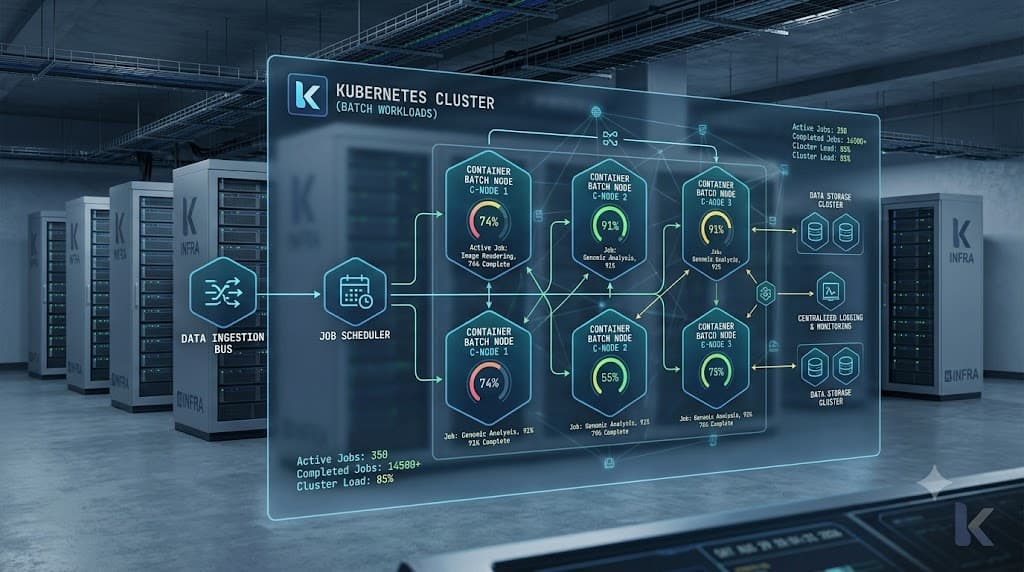
Kubernetes Jobs represent a vital controller abstraction designed specifically for running finite, batch-oriented tasks that run to completion and then terminate, unlike long-running services managed by Deployments. When developers need to execute database migrations, batch data processing scripts, backup routines, or one-off computational workloads inside a cluster, standard continuous-running Pods are inappropriate because they automatically restart upon exiting. A Job controller creates one or more Pods and ensures that a specified number of them successfully terminate. If a Pod fails or is deleted due to a node hardware failure during execution, the Job controller transparently spawns a replacement Pod on a healthy node, tracking successful completions until the entire batch objective is satisfied. This capability underpins reliable distributed batch processing in modern cloud-native infrastructures, bridging the gap between ephemeral compute needs and robust cluster orchestration.
What a Kubernetes Job Is
A Kubernetes Job is a native API object that manages finite workloads within a cluster. While a Deployment maintains a desired state of continuously running replicas to serve web traffic or message queues, a Job creates Pods intended to run to completion and exit with a zero status code. The core lifecycle of a Job starts when the controller reads the Job specification, instantiates the required Pods, and monitors their execution phases. As Pods run, the Job controller aggregates their states into active, successful, and failed counts. Understanding this lifecycle is crucial for building resilient CI/CD pipelines, nightly database maintenance scripts, and large-scale data ingestion workflows. Unlike raw Pods which disappear or remain in completed states depending on cluster configuration, Jobs provide an administrative boundary that preserves execution metadata, logs, and completion states until they are explicitly cleaned up or pruned by automated garbage collection mechanisms. By abstracting away the low-level mechanics of Pod scheduling and failure recovery, Jobs allow platform engineers and developers to focus entirely on the application logic of their batch scripts.
Job YAML
Configuring a production-ready manifest requires understanding several key fields within the API specification. Below is a representative configuration for a data processing script that defines restart behavior, execution limits, and tracking properties.
apiVersion: batch/v1
kind: Job
metadata:
  name: batch-data-processor
  namespace: default
spec:
  backoffLimit: 4
  activeDeadlineSeconds: 600
  template:
    spec:
      containers:
      - name: processor
        image: my-company/batch-processor:v2.1.0
        command: ["python", "process.py"]
        resources:
          limits:
            cpu: "2"
            memory: 4Gi
          requests:
            cpu: "1"
            memory: 2Gi
      restartPolicy: OnFailure
In this manifest, the restartPolicy field is restricted to either OnFailure or Never. This constraint prevents infinite restart loops that would occur under an Always policy typical of Deployments. The backoffLimit field dictates how many times Kubernetes will retry a failed Pod before marking the entire Job as failed, implementing an exponential backoff delay between attempts. Additionally, activeDeadlineSeconds enforces a strict time limit on the total duration of the Job, terminating all active child Pods if the execution exceeds the allotted window. This prevents hanging scripts or blocked I/O operations from consuming cluster resources indefinitely. Careful tuning of resource limits within the template ensures that intensive batch computations do not starve critical system services running on the same worker nodes.
Completions and Parallelism
When dealing with large volumes of work, executing tasks sequentially inside a single container becomes a bottleneck. Kubernetes Jobs support advanced scaling mechanisms through completions and parallelism parameters, enabling distributed batch processing across multiple Pods. The completions field specifies the total number of successful Pod completions required for the Job to be considered complete. The parallelism field controls how many Pods can run simultaneously at any given moment. By configuring these parameters together, engineers can orchestrate sophisticated parallel pipelines. For instance, setting completions: 10 and parallelism: 3 instructs the cluster to run up to three Pods concurrently, spinning up new ones as previous Pods finish successfully, until exactly ten successful runs are recorded. There are two primary patterns for managing completions: non-parallel jobs where a single Pod runs to completion, and work queue jobs where multiple Pods consume tasks from a shared external queue or process indexed slices of a dataset using the completion index feature introduced in modern Kubernetes versions. This index-based approach allows each spawned Pod to inspect its assigned index via the JOB_COMPLETION_INDEX environment variable, enabling seamless sharding of large data processing tasks without requiring complex external coordination services.
Retries and Cleanup
Failure handling and post-execution hygiene are paramount in automated batch environments. When a container exits with a non-zero exit code, the Job controller evaluates the restartPolicy. If set to OnFailure, the Pod is restarted locally on the same node; if the node experiences issues or if the failure persists, the controller terminates the failing Pod and schedules a new one. Each failure increments the internal retry counter, measured against the configured backoffLimit. Once the backoffLimit is breached, the Job enters a failed state, and no further Pods are scheduled, leaving the failed Pods intact for debugging and log inspection. Managing disk space and etcd object bloat after thousands of short-lived batch runs requires effective cleanup strategies. Modern Kubernetes clusters support the ttlSecondsAfterFinished field within the Job specification. When configured, this property automatically schedules the Job and all its associated child Pods for deletion after the specified duration expires following completion. This automated garbage collection prevents etcd clutter and keeps the cluster clean without requiring custom cron scripts or manual administrative intervention.
Job Deployment vs Job
Choosing the correct abstraction between a Job and a Deployment is essential for cluster stability. A Deployment is optimized for continuous, stateless, long-running services such as web APIs, gRPC microservices, and background message consumers that must remain available indefinitely. Deployments expect traffic to hit their replicas continuously, replacing unhealthy instances instantly to maintain desired replica counts. Conversely, Jobs are explicitly designed for finite workloads that have a definitive beginning and end. Using a Deployment to run a one-off database migration script is an architectural anti-pattern because once the migration container completes and exits, the Deployment controller will treat the exit as a failure and continuously restart the container in an endless loop. Understanding this fundamental dichotomy ensures that developers apply the right controller to the right workload characteristic, avoiding infinite restart loops, resource waste, and operational confusion.
Troubleshooting
Diagnosing failures in batch workloads requires a structured approach to inspecting controller states, event logs, and container outputs. When a batch execution stalls or fails unexpectedly, administrators must utilize specific command-line tools to trace the failure mode back to its root cause.
kubectl create job
The kubectl create job command enables engineers to imperatively spawn one-off tasks directly from the command line without writing raw YAML manifests. This is particularly useful for immediate testing, emergency data patches, or ad-hoc administrative tasks. For example, running kubectl create job manual-backup --image=backup-tool:latest instantly instantiates a Job resource that executes the container image once. Operators can also use the --from flag to base an imperative Job on an existing CronJob template, facilitating manual triggers of scheduled routines outside their normal temporal cadence. Combining this command with dry-run flags (--dry-run=client -o yaml) allows developers to rapidly generate compliant manifest templates that can be customized and checked into version control repositories for repeatable deployments.
kubectl get jobs
Monitoring the progress of batch executions relies heavily on kubectl get jobs and its associated output modifiers. Executing this command displays the status of all active, successful, and failed Jobs in the current namespace, highlighting completion counts such as 1/1 or 3/5. To obtain deeper insight into cluster-wide batch health, operators append flags like --watch to stream real-time state transitions, or -o wide to inspect associated selectors and node assignments. When a Job appears stuck in an active state longer than anticipated, inspecting the detailed status conditions via kubectl describe job <job-name> reveals critical events regarding scheduling blocks, image pull backoffs, or resource quota limitations that prevent child Pods from launching successfully.
kubectl logs job/...
Retrieving container output from a finished or running batch workload is accomplished using kubectl logs job/<job-name>. Because a Job often spawns multiple Pods—especially when parallelism is enabled—targeting the Job resource directly aggregates or directs log retrieval to the relevant container streams. For multi-container Pods, operators must specify the container name using the -c flag. When investigating intermittent failures, inspecting previous container logs using the --previous flag provides invaluable diagnostic data if the workload crashed due to an out-of-memory error or unhandled exception before restart. Combining these log inspection techniques with descriptive metadata queries empowers engineering teams to resolve transient network timeouts, database connection limits, and application bugs quickly without disrupting broader cluster operations.
FAQ
What is a Kubernetes Job? A Kubernetes Job is a built-in controller object that creates one or more Pods and ensures that a specified number of them successfully terminate. It is specifically designed for finite, batch-oriented workloads that run to completion rather than continuous long-running services.
How is it different from a Deployment? A Deployment manages stateless, long-running services that are expected to run continuously and restart indefinitely upon exiting. A Job is intended for finite tasks that run once, complete successfully, and then terminate permanently.
How do retries and completions work? Completions define how many successful Pod runs are required for a Job to finish, while parallelism controls how many Pods run concurrently. Retries are managed via a backoff limit, which dictates how many times a failed Pod will be recreated before the entire Job is marked as failed.
When should I use a kubernetes cronjob instead of a standard Job? You should use a CronJob when your finite batch workload needs to run on a recurring time-based schedule, such as nightly backups, hourly reports, or periodic data synchronization tasks.
📌 Recommended Next Guides & References
  <li>
    <a href="/article/docker-and-kubernetes-how-they-work-together-2" class="text-primary hover:underline font-semibold flex items-center gap-2">
      <span>→</span> <span>Docker and Kubernetes: How They Work Together</span>
    </a>
  </li>

  <li>
    <a href="/article/kubernetes-ingress-explained" class="text-primary hover:underline font-semibold flex items-center gap-2">
      <span>→</span> <span>Kubernetes Ingress Explained: Routing, Controllers, and TLS</span>
    </a>
  </li>

  <li>
    <a href="/article/kubernetes-ingress-controller-explained" class="text-primary hover:underline font-semibold flex items-center gap-2">
      <span>→</span> <span>Kubernetes Ingress Controller Explained: Architecture, Routing, and Implementation</span>
    </a>
  </li>