Quick Answer
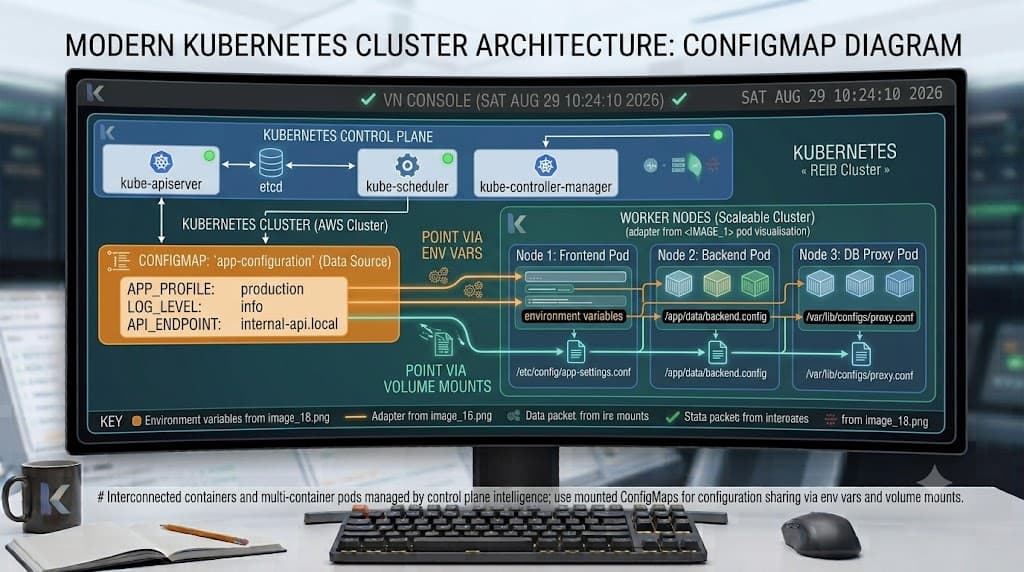
A kubernetes configmap is an API object used to store non-confidential key-value data separately from container images. By decoupling configuration artifacts from your application code, a kubernetes configuration lets you maintain portable, immutable container images across multiple environments without rebuilding artifacts. You can consume these configuration values as environment variables, command-line arguments, or files mounted inside a volume.
Quick Answer
A kubernetes configmap is a dedicated API resource that stores non-sensitive configuration parameters as key-value pairs, allowing Pods to consume these values at runtime without hardcoding settings into container images. To create one quickly, you can use the command kubectl create configmap app-config --from-literal=environment=production, and then inject those values into a Pod using standard environment injection blocks or volume mounts. This approach ensures your deployment workflows remain secure, version-controlled, and clean across staging and production clusters.
What a ConfigMap Is
At its core, a kubernetes configmap acts as a decoupled storage mechanism for application settings, configuration files, and feature flags. In traditional monolithic architectures, configuration settings were often baked directly into binaries or configuration files stored within deployment artifacts. This tight coupling made promotion across development, staging, and production clusters risky and tedious, requiring separate builds for every environment variation.
Kubernetes resolves this challenge by introducing configmap kubernetes primitives. A ConfigMap object stores configuration data as plaintext key-value pairs. Because the underlying container image does not contain environment-specific connection strings or feature flags, the exact same container image can be promoted from a local developer cluster to an enterprise production cluster unchanged. Only the underlying configuration resources change between namespaces or clusters.
Understanding how a kubernetes configuration functions involves looking at how the API server persists these objects inside etcd. ConfigMaps are scoped to namespaces, meaning distinct development teams can maintain separate configuration datasets without interfering with one another. When a Pod starts up, the kubelet retrieves the referenced configuration data from the API server and injects it into the container according to your manifest specifications.
Creating ConfigMaps
Creating configuration resources is a foundational task for cluster administrators and developers. Kubernetes provides multiple ways to instantiate a ConfigMap, ranging from quick command-line flags for literals to fully declarative YAML manifests stored in Git repositories. Choosing the right method depends heavily on your team's automation maturity and continuous deployment pipelines.
When writing declarative manifests, you define an API version of v1 and a kind of ConfigMap. Inside the metadata block, you assign a unique name and specify the target namespace. The actual configuration payload resides within the data or binaryData fields. The data field handles UTF-8 strings, while binaryData accommodates raw byte sequences like small images or encrypted assets encoded in base64. Keeping your configuration definitions declarative ensures reproducibility and seamless integration with infrastructure-as-code tools.
kubectl create configmap
The imperative kubectl create configmap command offers a fast way to generate configuration resources directly from the terminal during debugging or local testing. You can supply individual key-value pairs using the --from-literal flag, or ingest entire files and directories using --from-file. For example, running kubectl create configmap web-config --from-literal=LOG_LEVEL=info --from-literal=PORT=8080 generates an object containing those exact keys. You can verify the successful creation and inspect the stored contents by executing kubectl describe configmap web-config or kubectl get configmap web-config -o yaml, which outputs the exact YAML representation stored in the cluster.
Environment Variables
See also: kubernetes environment variables
Injecting configuration data as environment variables is one of the most common consumption patterns in cloud-native applications. Most modern programming languages and frameworks natively read runtime configurations from process environment variables, making this integration seamless. Kubernetes allows you to map individual keys from a configuration resource directly to specific environment variables inside your container specification.
To wire individual keys, you configure your container spec with env blocks using configMapKeyRef, pointing explicitly to the name of the ConfigMap and the specific key you wish to expose. Alternatively, if your application expects dozens of settings simultaneously, you can ingest an entire configuration dataset at once, transforming every key in the object into an environment variable automatically. This flexibility allows developers to adapt legacy applications to containerized environments without rewriting core configuration parsing logic.
envFrom
The envFrom field provides a powerful mechanism for injecting an entire configuration resource into a container as environment variables in a single declarative block. Instead of listing every key individually, you reference the target ConfigMap name under envFrom, and Kubernetes automatically translates every key-value pair within that object into an active environment variable for the running container process. Below is a practical example demonstrating how to structure this in a Pod YAML manifest:
apiVersion: v1
kind: Pod
metadata:
  name: demo-envfrom-pod
spec:
  containers:
    - name: app-container
      image: my-app:latest
      envFrom:
        - configMapRef:
            name: app-config
When using this pattern, take caution with key naming conventions. If a key inside your configuration resource contains invalid shell characters or hyphens, Kubernetes may skip importing that specific key and log an environment validation warning.
configMapKeyRef
When you need granular control over specific keys rather than a wholesale environmental dump, the configMapKeyRef approach is the preferred method. This configuration pattern maps a single key from a named configuration object to a designated environment variable name inside your container. Here is how you implement this pattern within a Pod specification:
apiVersion: v1
kind: Pod
metadata:
  name: demo-keyref-pod
spec:
  containers:
    - name: app-container
      image: my-app:latest
      env:
        - name: DATABASE_TIMEOUT
          valueFrom:
            configMapKeyRef:
              name: database-config
              key: timeout_seconds
This method prevents naming collisions, provides explicit documentation within your Pod manifest regarding where each variable originates, and ensures that only the necessary parameters are exposed to the running container process.
Volume Mounts
Beyond environment variables, Kubernetes allows you to consume configuration resources by mounting them as files inside a container filesystem using volumes. This method is particularly useful when your application expects to read traditional configuration files from disk, such as XML, JSON, YAML, or INI configuration files, rather than relying strictly on process environment variables.
When you mount a ConfigMap as a volume, each key in the object becomes a filename inside the target directory, and the corresponding value becomes the file content. Kubernetes manages these mounted files dynamically. One critical operational behavior to understand is that file mounts linked to configuration objects update automatically over time. When an administrator updates the underlying ConfigMap, the kubelet eventually syncs the updated file contents into the running container filesystem, though this propagation can experience a slight delay depending on your kubelet sync frequency and cache settings. However, note that if you mount specific individual keys as files rather than the entire directory, those specific files will not receive dynamic updates.
ConfigMap vs Secret
Choosing between a ConfigMap and a Secret is a critical architectural decision for cluster administrators. While both API objects manage key-value pairs for containerized workloads, their intended security boundaries and underlying cluster handling differ significantly.
A kubernetes configmap is explicitly designed for non-confidential configuration data. Data stored in a ConfigMap is kept in plain text within the etcd datastore (unless cluster-level encryption at rest is explicitly enabled by your cluster administrator) and is easily readable by anyone with read access to the namespace. Secrets, by contrast, are specifically designed to hold sensitive information such as passwords, OAuth tokens, SSH keys, or TLS certificates. Secrets feature base64-encoded storage in manifests and benefit from specialized RBAC controls and potential encryption mechanisms.
Never put credentials, database passwords, or private API keys in a ConfigMap. Mistakenly placing sensitive authentication material into configuration resources is a common security anti-pattern that exposes sensitive credentials to anyone with read permissions on the namespace. Always utilize Kubernetes Secrets for sensitive data, and reserve ConfigMaps strictly for non-sensitive application parameters, feature flags, and environment settings.
Updates and Troubleshooting
Operating configuration resources in production requires familiarity with common failure modes, update behaviors, and troubleshooting techniques. One frequent challenge developers encounter is realizing that environment variables injected via env or envFrom do not update dynamically when the underlying configuration object changes. Because environment variables are evaluated strictly at container startup time, modifying a ConfigMap requires a full Pod restart or rolling deployment for existing containers to register the new values.
When troubleshooting configuration issues in your cluster, several diagnostic commands help isolate problems quickly. If an application fails to start due to missing configuration keys, run kubectl describe pod <pod-name> to inspect container start events and verify whether the API server successfully resolved the referenced object names. If you encounter errors indicating that a referenced object does not exist, double-check that your ConfigMap resides in the exact same namespace as the consuming Pod, as Kubernetes resources cannot reference configuration objects across different namespaces by default.
📌 Recommended Next Guides & References
  <li>
    <a href="/article/docker-and-kubernetes-how-they-work-together-2" class="text-primary hover:underline font-semibold flex items-center gap-2">
      <span>→</span> <span>Docker and Kubernetes: How They Work Together</span>
    </a>
  </li>

  <li>
    <a href="/article/kubernetes-ingress-explained" class="text-primary hover:underline font-semibold flex items-center gap-2">
      <span>→</span> <span>Kubernetes Ingress Explained: Routing, Controllers, and TLS</span>
    </a>
  </li>

  <li>
    <a href="/article/kubernetes-ingress-controller-explained" class="text-primary hover:underline font-semibold flex items-center gap-2">
      <span>→</span> <span>Kubernetes Ingress Controller Explained: Architecture, Routing, and Implementation</span>
    </a>
  </li>