Quick Answer
Quick Answer
A kubernetes ingress controller is a specialized reverse proxy and load balancer running inside a cluster that manages external HTTP and HTTPS access to internal services. Unlike standard Layer 4 load balancers that operate strictly on IP addresses and ports, the controller interprets high-level HTTP routing rules defined in Ingress resources to direct traffic based on hostnames and URL paths. To inspect available ingress controllers and their associated configuration classes in your cluster immediately, run the command kubectl get ingressclass to verify cluster-level routing capabilities.
What Kubernetes Ingress Is
Kubernetes Ingress represents an API object that defines rules for routing external HTTP and HTTPS traffic into cluster services. However, the Ingress resource itself is merely a declarative specification; it performs no actual traffic processing until a separate component known as an ingress controller consumes those rules. This separation of concerns allows operators to decouple routing configuration from the underlying implementation details of the proxy.
Crucially, an ingress controller is not included in a default Kubernetes installation. While core components like the kube-apiserver, kube-scheduler, and etcd ship with every standard cluster, traffic management tools such as NGINX, HAProxy, Traefik, or Envoy-based controllers must be installed separately via Helm manifests or operator deployments. This modular design gives platform engineers the flexibility to select a proxy that matches their performance requirements, security postures, and operational familiarity.
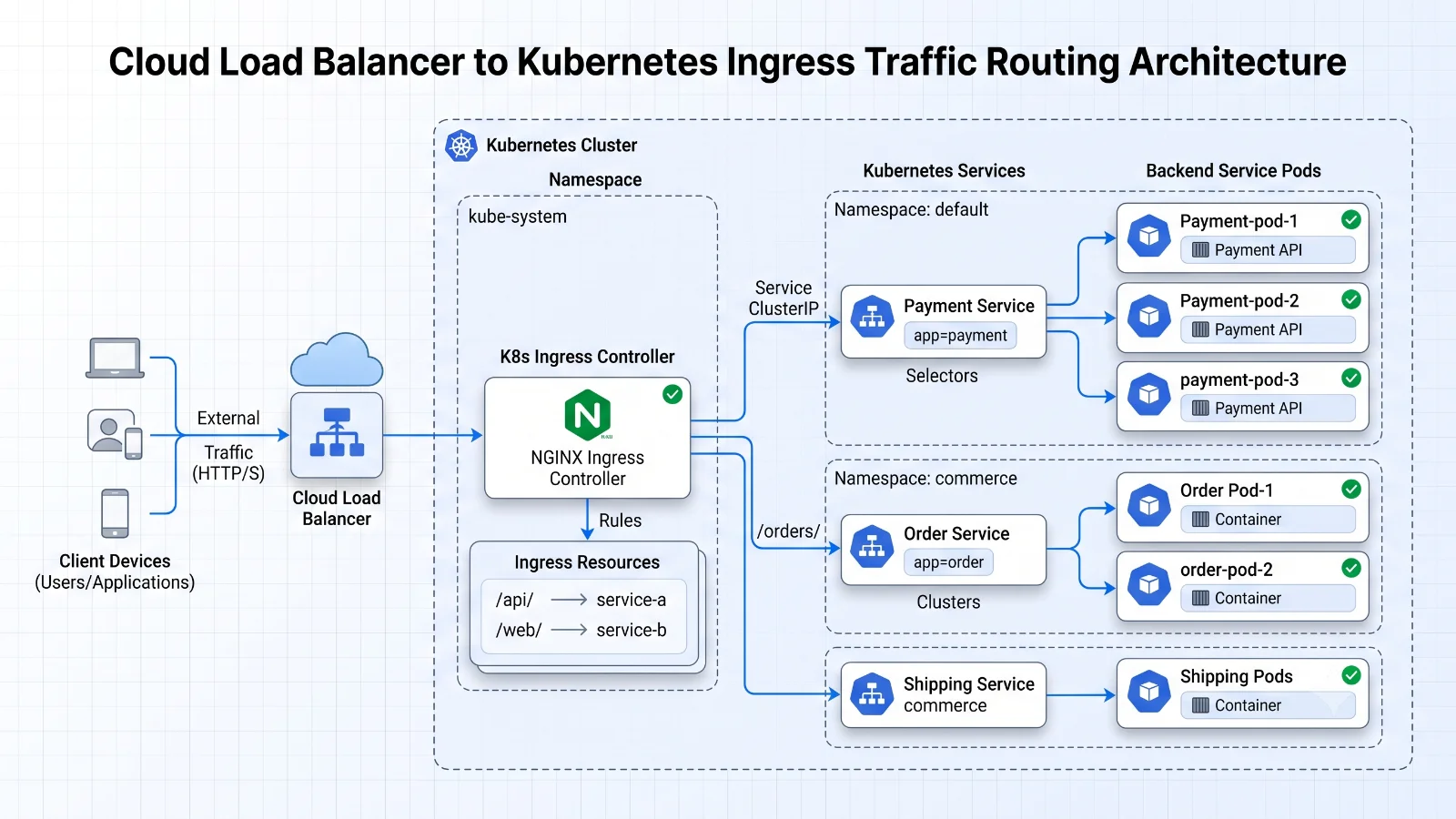
When comparing Ingress to alternative traffic exposure methods like NodePort or LoadBalancer services, Ingress offers significant cost and architectural advantages. Instead of provisioning a dedicated cloud provider load balancer for every individual microservice—which quickly becomes expensive and difficult to manage—an ingress controller consolidates all inbound traffic through a single entry point. This single load balancer can handle SSL/TLS termination, name-based virtual hosting, and path-based routing for dozens or hundreds of backend applications simultaneously, reducing cloud infrastructure overhead while simplifying certificate management.
How Routing Works
Understanding how a kubernetes ingress controller processes incoming traffic requires examining the continuous reconciliation loop between the Kubernetes API server and the proxy instance. When a DevOps engineer creates an Ingress resource using YAML manifests, the API server persists this object into etcd. The ingress controller, running as a deployment or daemonset inside the cluster, continuously watches the API server for additions, updates, and deletions of Ingress resources, endpoints, and secrets.
Upon detecting a change, the controller translates these Kubernetes API objects into native configuration files or internal data structures understood by the underlying proxy engine. For example, if an Ingress rule specifies that traffic destined for api.example.com/v1 should be routed to a backend service named user-service on port 8080, the controller parses this rule, resolves the service name to its corresponding pod IP addresses through Kubernetes endpoints, and dynamically updates the proxy routing table without requiring a full service restart.
Incoming HTTP and HTTPS requests first hit the external load balancer pointing to the controller's node ports or external IP. The ingress controller receives the request, inspects the Host header and the request URI path, matches these attributes against its active routing table, and forwards the packet to the appropriate pod. If path rewriting or custom headers are configured via annotations, the controller modifies the request before proxying it to the backend container, ensuring seamless integration with legacy applications or microservices expecting specific URL structures.
IngressClass and Controllers
Modern Kubernetes environments often run multiple ingress controller instances for different teams, security zones, or traffic tiers. To manage this cleanly, the IngressClass resource was introduced to decouple Ingress objects from specific controller implementations. An IngressClass cluster-scoped object defines which controller should process a given set of Ingress rules, eliminating the older and less explicit method of using controller-specific annotations.
When configuring an ingress controller kubernetes deployment, administrators define an IngressClass resource specifying the controller's unique name string under the controllerName field. Developers then reference this class name within their Ingress resource using the ingressClassName field. This explicit binding prevents routing conflicts when multiple proxy implementations operate within the same shared cluster environment.
kubectl get ingressclass
To inspect the available ingress classes configured within your cluster and determine which controller manages each class, run the command kubectl get ingressclass. This command queries the API server and returns a tabular output displaying the name of each IngressClass, the designated controller identifier, and the creation timestamp. For deeper inspection, running kubectl describe ingressclass
kubectl describe ingress
When troubleshooting routing discrepancies or verifying whether an Ingress resource has been successfully reconciled by the active proxy, DevOps engineers rely heavily on the command kubectl describe ingress
controller logs
Inspecting controller logs provides direct visibility into how the ingress controller interprets configuration rules and handles live traffic. Because controllers run as standard containerized workloads, operators can stream runtime output using kubectl logs -n
TLS
Securing production endpoints requires terminating Transport Layer Security (TLS) at the edge before traffic reaches internal microservices. A kubernetes ingress controller handles this responsibility by reading cryptographic certificates and private keys stored securely within Kubernetes Secret objects of type kubernetes.io/tls. By referencing these secrets inside the tls block of an Ingress resource, administrators instruct the proxy to negotiate secure HTTPS connections with external clients while optionally proxying plain HTTP or re-encrypting traffic to backend pods.
Configuring secure routing involves defining the secret name and the list of hostnames covered by the certificate. When the ingress controller initializes, it mounts or extracts the TLS certificate and private key, configuring the underlying reverse proxy to listen on port 443 with the appropriate cipher suites and SNI (Server Name Indication) parameters. If a certificate approaches expiration or a new domain is added, updating the underlying Kubernetes Secret triggers an automatic configuration reload in modern controllers without dropping active connections.
Furthermore, automated certificate management tools such as cert-manager integrate directly with ingress controllers to issue and renew TLS certificates via Let's Encrypt or internal Public Key Infrastructures. By adding specific annotations to the Ingress resource, cert-manager automatically provisions certificates and updates the corresponding TLS secrets, eliminating manual operational toil and drastically reducing the risk of unexpected outages caused by expired certificates.
Troubleshooting
Operating a production-grade ingress layer requires familiarity with common failure modes, version-sensitive API behaviors, and environment-specific constraints. One frequent pitfall involves annotation drift; legacy ingress controllers relied heavily on custom annotations for routing parameters, rate limiting, and timeouts. Because annotations are unstructured key-value strings, syntax errors often go unnoticed until runtime, causing the controller to reject configuration updates or fall back to default fallback behaviors.
Another critical area of concern is version skew between the Kubernetes cluster control plane and the installed ingress controller release. Upgrading Kubernetes minor versions can deprecate beta APIs or alter admission webhook behaviors, causing deployment failures or disrupting traffic reconciliation. Engineers must verify that their controller version officially supports the target Kubernetes version before performing cluster upgrades.
When traffic fails to reach backend pods, debugging typically follows a systematic path. First, verify that the Ingress resource references an active IngressClass and that the controller deployment is running healthy without crash loops. Next, check the endpoints of the target backend service using kubectl get endpoints
Ingress vs Other Options
Deciding how to expose Kubernetes workloads requires careful architectural evaluation of alternative traffic routing primitives, specifically LoadBalancer services and the newer Kubernetes Gateway API. A standard Service of type LoadBalancer provisions a dedicated cloud provider infrastructure resource for a single service, which provides simple Layer 4 routing but lacks advanced Layer 7 capabilities like URL path routing, header manipulation, and content-based load balancing.
Conversely, the Kubernetes Gateway API represents the evolution of traffic management, designed to supersede Ingress by offering a more expressive, role-oriented, and extensible set of resources such as GatewayClass, Gateway, and HTTPRoute. Unlike Ingress, which relies heavily on opaque vendor-specific annotations for advanced configuration, the Gateway API standardizes features like traffic splitting, header-based routing, and multi-tenant access control across different infrastructure providers natively.
However, despite the growing adoption of the Gateway API, the traditional ingress controller remains widely deployed, robust, and supported across virtually all Kubernetes distributions. DevOps teams migrating from legacy setups or running stable, straightforward HTTP routing architectures often find that established ingress controllers provide a mature, well-documented solution that satisfies their operational requirements without requiring immediate architectural redesigns.
📌 Recommended Next Guides & References
  <li>
    <a href="/article/docker-and-kubernetes-how-they-work-together-2" class="text-primary hover:underline font-semibold flex items-center gap-2">
      <span>→</span> <span>Docker and Kubernetes: How They Work Together</span>
    </a>
  </li>

  <li>
    <a href="/article/kubernetes-ingress-explained" class="text-primary hover:underline font-semibold flex items-center gap-2">
      <span>→</span> <span>Kubernetes Ingress Explained: Routing, Controllers, and TLS</span>
    </a>
  </li>

  <li>
    <a href="/article/kubernetes-networking-explained" class="text-primary hover:underline font-semibold flex items-center gap-2">
      <span>→</span> <span>Kubernetes Networking Explained: Pods, Services, CNI, and Troubleshooting</span>
    </a>
  </li>