Quick Answer
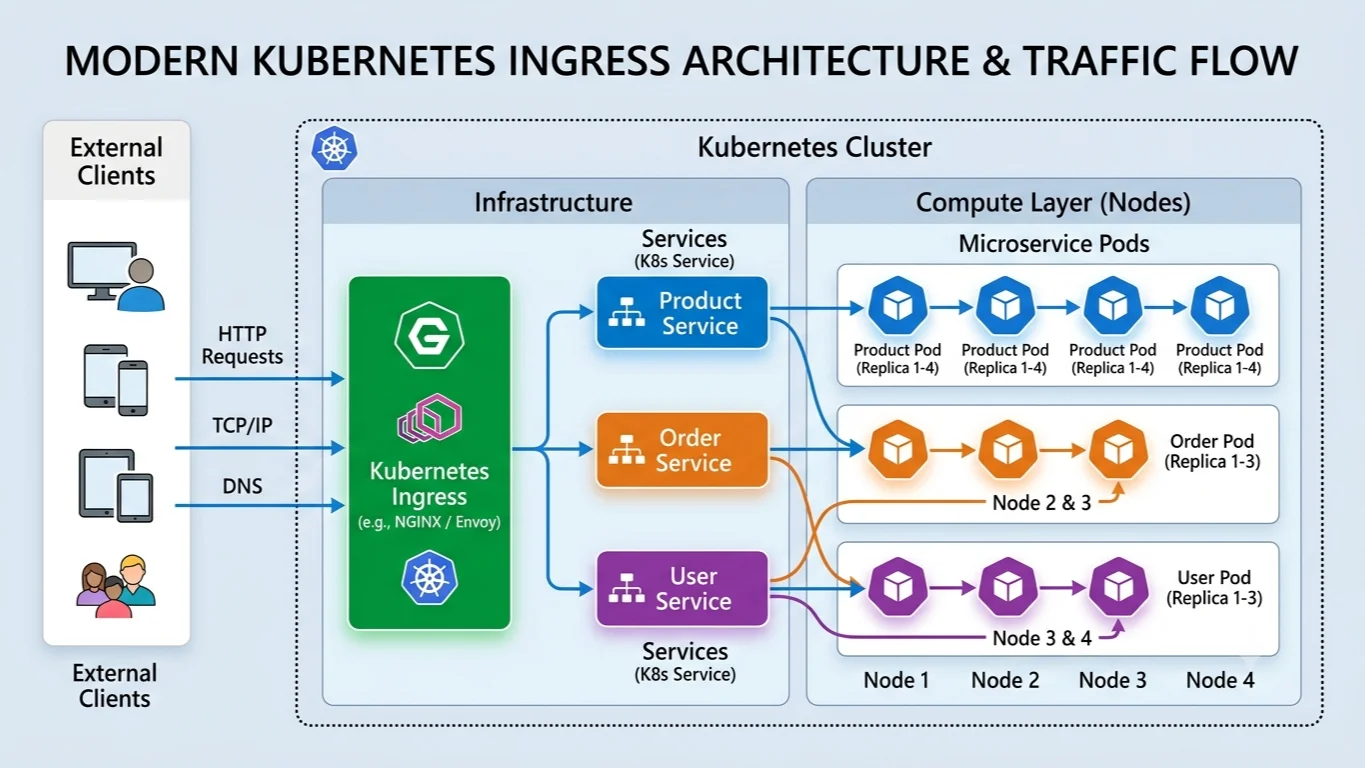
Kubernetes Ingress manages external access to the services inside a cluster, typically routing HTTP and HTTPS traffic from outside the cluster to internal services. Unlike basic Service objects that operate at Layer 4 via NodePort or LoadBalancer primitives, a kubernetes ingress resource functions at Layer 7. This means it can inspect HTTP paths, host headers, and request methods to make intelligent routing decisions, while also handling SSL/TLS termination and name-based virtual hosting out of the box. By abstracting routing rules away from individual application code and consolidating them into a single declarative API object, platform engineers can securely manage external traffic entry points for dozens of microservices without repeatedly provisioning cloud provider load balancers.
Quick Answer
Kubernetes ingress is an API resource that defines external HTTP and HTTPS routing rules to direct client traffic to internal cluster services. To use it, you must deploy an ingress controller inside your cluster to act as the reverse proxy and implementation engine that reads these rules. The most common quick verification command is running kubectl get ingress to list existing ingress resources, verify their assigned IP addresses, and check configured hostnames.
What Kubernetes Ingress Is
At its core, a kubernetes ingress resource is a declarative configuration object defined in YAML that sits in front of your Kubernetes services. In the broader landscape of kubernetes networking, standard container networking assigns internal cluster IPs to pods, and Services provide load-balanced access across those pods internally. However, exposing multiple microservices externally traditionally meant provisioning a dedicated cloud load balancer for every single service, which quickly becomes cost-prohibitive and difficult to manage. The ingress model solves this architectural challenge by introducing a single unified entry point that accepts all external traffic and delegates requests to the appropriate backend services based on rules defined in the API object.
The ingress architecture is fundamentally split into two distinct parts: the API resource itself and the ingress controller. The API resource is simply a record of intent stored in the Kubernetes API server, containing rules for hosts, paths, backends, and TLS settings. By itself, creating an ingress YAML file does nothing because the Kubernetes control plane does not include a built-in reverse proxy. You must install a separate ingress controller—such as NGINX, Traefik, HAProxy, or Envoy-based gateways—which constantly watches the API server for changes to ingress resources. When it detects a new or updated rule, the controller dynamically updates its internal configuration routes, reloads its proxy worker processes, and immediately begins accepting and routing production traffic without any downtime.
How Routing Works
Kubernetes ingress routing relies heavily on HTTP host headers and URL path matching to direct incoming traffic to the correct backend Service. When a client sends an HTTP request to your cluster, the request carries a Host header and a request URI path. The ingress controller inspects these values against the rules defined in your active ingress resources. If a matching host and path combination is found, the controller forwards the request to the designated Kubernetes Service and its associated backend endpoints. If no rule matches the incoming request, the controller typically returns a standard 404 Not Found error, though many controllers allow you to configure custom default backend handlers for unhandled traffic.
Host-based routing allows a single ingress controller IP to manage multiple domains, such as api.example.com pointing to one backend service and app.example.com pointing to an entirely different service. Path-based routing enables you to partition traffic under a single domain name based on the URL prefix. For example, requests arriving at example.com/shop can be routed to an e-commerce microservice, while requests arriving at example.com/blog are directed to a content management service. Controllers support various path matching types, including Exact matches, Prefix matching, and Regular Expression matching depending on the specific controller implementation. Understanding these matching precedence rules is critical when designing complex routing trees to prevent broader wildcard paths from unintentionally capturing more specific API routes.
IngressClass and Controllers
Managing multiple ingress controllers within a single cluster is a common requirement in modern enterprise environments, especially when different teams require distinct proxy capabilities, security policies, or cloud load-balancer tiers. This multi-controller segregation is handled by the IngressClass resource and the ingressClassName field within individual ingress objects. Before the IngressClass resource was introduced in Kubernetes 1.18, controllers relied on custom annotations to claim ingress objects, which often resulted in conflicts when multiple controllers were installed. Today, the IngressClass resource provides a clean, native way to declare which controller should process a specific ingress object, decoupling the routing rules from the underlying proxy implementation.
Because the ingress model relies entirely on a third-party controller to translate API objects into actual proxy routing rules, behavior depends heavily on the specific controller implementation you choose. For instance, while core features like host-based routing, path-based routing, and basic TLS termination are universally supported, advanced features such as rate limiting, JWT authentication, circuit breaking, and custom headers are handled through controller-specific annotations or Custom Resource Definitions (CRDs). An annotation that works seamlessly in the NGINX Ingress Controller will generally be completely ignored by Traefik or HAProxy. DevOps engineers must carefully evaluate controller documentation, performance characteristics, and community support before standardizing on a specific ingress controller for production workloads.
TLS Configuration and Security
Securing external traffic using kubernetes tls is a critical requirement for production environments. An ingress resource supports TLS termination, meaning the ingress controller decrypts incoming HTTPS traffic at the edge and forwards plain HTTP traffic to the backend pods inside the cluster, or re-encrypts traffic depending on your security requirements. To enable TLS, you must store your SSL/TLS private key and certificate inside a standard Kubernetes Secret of type kubernetes.io/tls. This secret is then referenced within the tls block of your ingress manifest, specifying which hostnames the certificate covers.
Managing certificates manually in large environments quickly becomes tedious, leading modern Kubernetes platforms to adopt automated certificate management solutions like cert-manager. Cert-manager integrates with Let's Encrypt and other Certificate Authorities to automatically provision, renew, and mount TLS certificates directly into Kubernetes Secrets. When configuring TLS, you must ensure that the domain names listed in the spec.tls.hosts array match the common names or Subject Alternative Names (SANs) on the certificate, and that the secret is mounted in the exact namespace where the ingress resource resides. Failing to align these namespaces or domain names is one of the most common causes of SSL handshake failures and browser security warnings in production clusters.
Troubleshooting and Operational Best Practices
Diagnosing traffic flow issues in a Kubernetes cluster requires a systematic approach to examining both the API control plane and the running proxy pods. Common failure modes include incorrect service port mappings, missing backend endpoints, mismatched IngressClass definitions, and expired TLS certificates. When traffic fails to reach your application, you should first verify that the ingress controller itself is running healthy, has a public IP assigned, and can successfully communicate with the underlying Kubernetes services. Checking the controller pod logs often reveals syntax errors in custom annotations or failures when attempting to reload proxy configuration files.
Operational best practices for production ingress management include locking down administrative access to the ingress controller namespace, implementing robust readiness and liveness probes on proxy pods, and using validation webhooks to catch syntax and schema errors before manifests are applied to the cluster. Additionally, you should avoid relying heavily on complex, controller-specific annotations when possible, as they make migrating between different ingress controller implementations difficult in the future. Instead, favor declarative Custom Resource Definitions provided by your controller when advanced configuration is required, as they offer better schema validation and clearer error messages.
kubectl get ingress
Using kubectl get ingress is the fastest initial verification step when debugging routing issues in your cluster. When you run this command, it queries the Kubernetes API server and returns a summary table displaying the name of the ingress resource, the associated IngressClass, the hostnames configured for routing, the backend address, and the public IP or load balancer hostname assigned by the cluster. You can append the -A or --all-namespaces flag to check ingress resources across every namespace simultaneously, which is especially useful during cluster audits. If the ADDRESS column remains blank indefinitely, it typically indicates that your ingress controller's service load balancer is stuck in a pending state, or that the controller lacks the necessary cloud provider permissions to provision external networking infrastructure. You can also use output formatting flags like -o wide or -o yaml to inspect raw metadata, timestamps, and controller annotations directly from the command line without opening full text editors.
kubectl describe ingress
When kubectl get ingress indicates that an ingress resource exists but traffic is still failing to reach your backend services, running kubectl describe ingress <ingress-name> provides the granular diagnostic depth needed to pinpoint the failure. This command outputs a detailed, human-readable breakdown of the ingress object, including its exact YAML spec, associated annotations, active TLS secret references, and a real-time event log section at the bottom. The events section is particularly valuable because it records operational messages emitted by the ingress controller whenever it successfully syncs the resource or encounters a configuration error. For example, if your referenced TLS secret does not exist or has an invalid format, the describe output will explicitly display a warning event detailing the validation failure. By reviewing these events alongside the host and path mapping tables, you can quickly verify whether the controller has successfully translated your routing intent into active proxy rules.
Example Manifest
Deploying a robust, production-ready ingress resource requires combining host routing, path prefix matching, service backends, and TLS encryption into a single clean YAML manifest. Below is a comprehensive example demonstrating how these components fit together in a real-world scenario:
apiVersion: networking.k8s.io/v1
kind: Ingress
metadata:
  name: production-web-ingress
  namespace: default
  annotations:
    cert-manager.io/cluster-issuer: "letsencrypt-prod"
    nginx.ingress.kubernetes.io/ssl-redirect: "true"
    nginx.ingress.kubernetes.io/proxy-body-size: "50m"
spec:
  ingressClassName: nginx
  tls:
  - hosts:
    - app.example.com
    secretName: app-tls-cert
  rules:
  - host: app.example.com
    http:
      paths:
      - path: /api
        pathType: Prefix
        backend:
          service:
            name: api-service
            port:
              number: 8080
      - path: /
        pathType: Prefix
        backend:
          service:
            name: frontend-service
            port:
              number: 80
This manifest configures an NGINX ingress controller to manage traffic for app.example.com. It automatically requests a TLS certificate via cert-manager, forces insecure HTTP traffic to redirect to HTTPS, and increases the maximum allowed request body size to 50 megabytes. Traffic hitting /api is routed to the api-service on port 8080, while all other general traffic hitting the root path is directed to the frontend-service on port 80.
Ingress vs Other Options
Choosing the right networking primitive in Kubernetes requires understanding the trade-offs between Ingress, NodePort, LoadBalancer, and emerging standards like the Gateway API. A NodePort service exposes your application on a static port across every node in the cluster, which is simple for local development or testing but introduces security risks and requires an external load balancer to handle production traffic safely. A LoadBalancer service provisions a dedicated cloud provider load balancer for every individual service, which provides robust external access but becomes expensive and difficult to manage when running dozens of microservices that all require external entry points.
Kubernetes Ingress solves the cost and management overhead of the LoadBalancer approach by allowing a single cloud load balancer and controller to multiplex traffic across multiple internal services using Layer 7 routing rules. However, traditional Ingress has limitations, particularly its tight coupling with controller-specific annotations and its inability to handle advanced Layer 4 routing, TCP/UDP stream routing, or multi-tenant delegation cleanly. To address these architectural shortcomings, the Kubernetes community developed the Gateway API as the modern successor to Ingress. The Gateway API uses role-oriented resource splitting—separating infrastructure provisioning from developer routing configuration—and offers native support for advanced traffic management, cross-namespace routing, and multi-protocol networking. While Ingress remains widely deployed and fully supported, understanding the Gateway API context is essential for future-proofing modern cloud-native networking architectures.
📌 Recommended Next Guides & References
  <li>
    <a href="/article/docker-and-kubernetes-how-they-work-together-2" class="text-primary hover:underline font-semibold flex items-center gap-2">
      <span>→</span> <span>Docker and Kubernetes: How They Work Together</span>
    </a>
  </li>

  <li>
    <a href="/article/kubernetes-ingress-controller-explained" class="text-primary hover:underline font-semibold flex items-center gap-2">
      <span>→</span> <span>Kubernetes Ingress Controller Explained: Architecture, Routing, and Implementation</span>
    </a>
  </li>

  <li>
    <a href="/article/kubernetes-networking-explained" class="text-primary hover:underline font-semibold flex items-center gap-2">
      <span>→</span> <span>Kubernetes Networking Explained: Pods, Services, CNI, and Troubleshooting</span>
    </a>
  </li>