Quick Answer
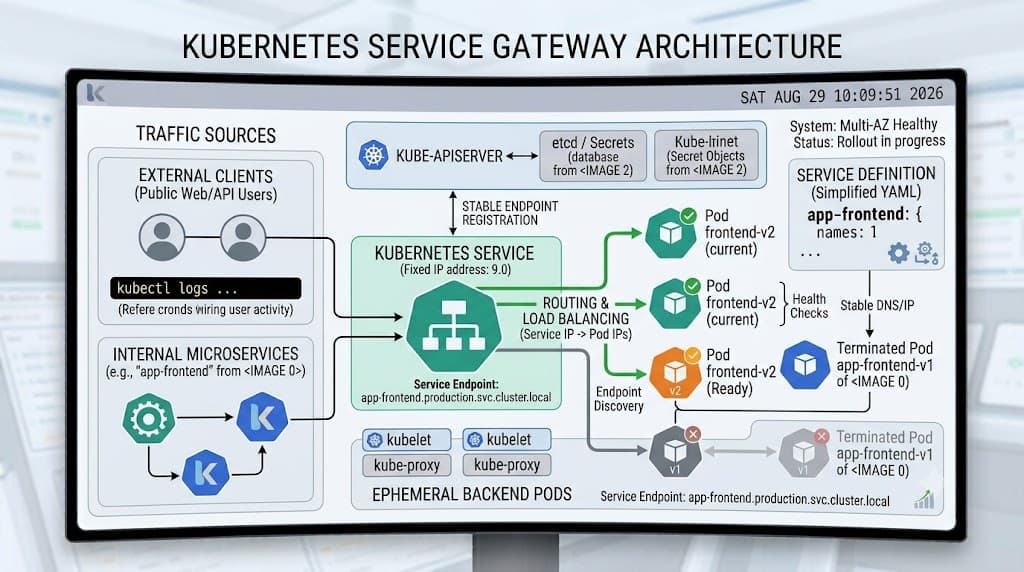
A kubernetes service is a stable abstraction layer that exposes a set of running Pods as a single network network destination with a reliable IP address and DNS name. Because individual Pods are ephemeral by nature—created, destroyed, and rescheduled dynamically across nodes as workloads scale or nodes fail—relying directly on Pod IP addresses for internal or external communication is brittle. A kubernetes service monitors these changing endpoints via selectors and routes traffic seamlessly to healthy instances, ensuring continuous availability even during rolling updates or autoscaling events.
Quick Answer
A kubernetes service acts as a persistent network gateway for a dynamic set of Pods, decoupling client requests from the underlying ephemeral infrastructure. To deploy one quickly, you can use the command kubectl expose deployment my-app --port=80 --target-port=8080, which automatically generates a ClusterIP service routing traffic to your application. For permanent configurations, developers define a Service manifest in YAML specifying selectors, ports, and the appropriate service type to manage internal or external traffic flow reliably.
What a Kubernetes Service Is
See also: Kubernetes networking fundamentals
Kubernetes operates on the principle of dynamic infrastructure. Pods are ephemeral entities that have their own lifecycle; when a node fails, a deployment rolls out an update, or an autoscaler scales down, old Pods are terminated and new Pods are spawned with entirely new IP addresses. If an upstream application attempts to hardcode or cache a specific Pod IP address, it will inevitably experience broken connections when that Pod disappears. A kubernetes service solves this architectural challenge by introducing a stable virtual IP address and DNS entry. This abstraction layer sits in front of your Pods, intercepting incoming traffic and load-balancing it across whichever Pods currently match the service definition. By continuously tracking the health and existence of backing Pods, the service ensures that clients never need to know the individual, fleeting IP addresses of your backend containers. This fundamental architectural pattern underpins almost all microservices topologies deployed within cluster environments, providing a dependable foundation for service-to-service communication, ingress controllers, and external client exposure.
Service Types
Kubernetes offers several distinct service types to handle different networking boundaries, access requirements, and traffic topologies. Choosing the right type depends entirely on whether your traffic originates from inside the cluster, from external clients over the public internet, or from an external enterprise network.
ClusterIP
ClusterIP is the default and most common service type. It exposes the service on an internal IP address that is only routable from within the cluster itself. Use this type when your microservices need to talk to each other securely behind the scenes without exposing any endpoints to the outside world. Because traffic never leaves the private cluster network, it provides high performance and tight security controls.
NodePort
NodePort builds upon ClusterIP by exposing the service on a static port across every node's IP address in the cluster. Kubernetes allocates a port from a pre-configured range (typically 30000-32767). Any incoming traffic sent to <NodeIP>:<NodePort> is automatically redirected to the service. While this makes it easy to reach your application from outside the cluster without relying on cloud-specific load balancers, it comes with security and maintenance trade-offs, such as managing firewall rules and remembering awkward port numbers. It is frequently used for bare-metal environments, development clusters, or staging setups.
LoadBalancer
See also: Kubernetes Ingress
LoadBalancer integrates your Kubernetes cluster directly with your cloud provider's external load-balancing infrastructure (such as AWS Elastic Load Balancing, Google Cloud Load Balancing, or Azure Load Balancer). The cloud provider provisions a dedicated external IP address and automatically routes external traffic down to the NodePort and subsequently to the matching Pods. This is the standard production approach for exposing web applications, APIs, and public-facing microservices to end users. Note that cloud load balancer behavior and cost models vary significantly by provider, so you must review your cloud vendor's documentation regarding idle timeouts, cross-zone load balancing, and annotation support.
Selectors and Endpoints
Under the hood, a kubernetes service relies on selectors and EndpointSlices to know which Pods should receive traffic. A selector is a set of key-value label pairs defined in the service spec that must match the labels assigned to your Pods. When you create a service with a selector like app: web, the Kubernetes control plane continuously scans the cluster for any running Pods bearing that exact label. As matching Pods appear or disappear, the control plane dynamically updates an internal API object called an EndpointSlice. These EndpointSlices contain the precise, current IP addresses and ports of all healthy backend Pods. When a packet hits the service IP, kube-proxy—a daemon running on every node—consults these endpoints and uses iptables or IPVS rules to distribute the traffic across the active Pods. This decoupled architecture ensures that routing rules update instantaneously whenever your application scales up or down, completely shielding callers from infrastructure churn.
DNS
Kubernetes includes an integrated cluster DNS service (typically CoreDNS) that automatically assigns DNS names to every kubernetes service created in the cluster. This native DNS integration is a cornerstone of modern kubernetes networking, allowing applications to locate dependencies using predictable, human-readable domain names rather than raw IP addresses. A service created in the default namespace named payment-api is automatically resolvable from any other Pod in the same namespace simply as payment-api. For cross-namespace communication, services can be addressed using their fully qualified domain name, structured as <service-name>.<namespace>.svc.cluster.local. Furthermore, headless services—services where the clusterIP field is set to None—bypass default load balancing and return the actual IP addresses of the backing Pods directly via DNS, enabling custom service discovery mechanisms, stateful database clusters, and peer-to-peer applications to coordinate effectively without a centralized proxy.
Load Balancing
Traffic distribution across backend pods is managed primarily by kube-proxy, which operates on every node in the cluster. When a client sends a request to a service IP, kube-proxy intercepts the packet and selects a backend Pod from the active EndpointSlice using round-robin or randomized routing algorithms. In larger clusters with thousands of services and pods, modern Kubernetes installations rely on IPVS (IP Virtual Server) mode rather than legacy iptables rules to achieve higher throughput, lower CPU overhead, and significantly faster rule-refresh times. It is vital to understand that cloud-native load balancing behaves differently depending on your underlying hosting environment. In managed Kubernetes services (EKS, GKE, AKS), provisioning a LoadBalancer type service triggers the creation of an external cloud load balancer. However, features like health check intervals, SSL/TLS termination, and proxy protocol support are often controlled via cloud-specific annotations in your metadata. Always verify how your specific cloud provider handles connection draining, session affinity, and cross-zone traffic routing to avoid unexpected latency or dropped connections during peak traffic spikes.
Troubleshooting
Even with robust automation, network misconfigurations, missing labels, and firewall blocks can cause service disruptions. Diagnosing these issues requires a systematic approach using native command-line tooling to inspect state, endpoints, and event logs. Below are the essential diagnostic workflows every developer should master.
kubectl expose deployment
When rapidly prototyping or testing connectivity in a development cluster, the kubectl expose deployment command allows you to generate a service directly from an existing workload without writing a manual YAML manifest. For example, running kubectl expose deployment web-server --type=NodePort --port=80 --target-port=8080 instructs the cluster to create a service that listens on port 80 and forwards traffic to container port 8080 on pods labeled with the deployment name. While extremely convenient for local testing and quick iterations, production environments should always rely on version-controlled YAML configuration files to ensure reproducibility, proper resource tagging, and auditable infrastructure changes.
kubectl get svc
The first step when troubleshooting any connectivity issue is executing kubectl get svc to verify that the service exists, check its assigned cluster and external IP addresses, review its designated ports, and confirm its age. If you suspect routing issues or want to inspect all services across every namespace, you can append the --all-namespaces flag. Reviewing the output of kubectl get svc helps you quickly identify whether a service is missing, whether its type was misconfigured as ClusterIP instead of LoadBalancer, or if the external IP is stuck in a pending state waiting for a cloud provider controller to respond.
kubectl describe svc
When basic listing commands reveal that a service exists but traffic is still failing to reach your backend application, kubectl describe svc <service-name> provides deep inspection capabilities. This command outputs comprehensive metadata, including the exact selector strings, the IP family policy, session affinity settings, and crucially, the Endpoint list. If the Endpoints section reads <none> or is empty, it indicates a mismatch between the service's selector labels and the labels on your running Pods. Furthermore, kubectl describe svc displays recent cluster events related to the service, helping you diagnose controller errors, cloud load-balancer provisioning failures, or port collision warnings before they impact your users.
📌 Recommended Next Guides & References
  <li>
    <a href="/article/docker-and-kubernetes-how-they-work-together-2" class="text-primary hover:underline font-semibold flex items-center gap-2">
      <span>→</span> <span>Docker and Kubernetes: How They Work Together</span>
    </a>
  </li>

  <li>
    <a href="/article/kubernetes-ingress-controller-explained" class="text-primary hover:underline font-semibold flex items-center gap-2">
      <span>→</span> <span>Kubernetes Ingress Controller Explained: Architecture, Routing, and Implementation</span>
    </a>
  </li>

  <li>
    <a href="/article/kubernetes-environment-variables-complete-guide-2" class="text-primary hover:underline font-semibold flex items-center gap-2">
      <span>→</span> <span>Kubernetes Environment Variables: Complete Guide to ConfigMaps, Secrets, and YAML Examples</span>
    </a>
  </li>