Quick Answer
As modern containerized workloads scale in complexity, securing ephemeral and shared storage volumes becomes a paramount concern for platform engineers. In multi-tenant environments, default storage configurations often expose underlying host filesystems or allow unauthorized container processes to manipulate shared volumes, leaving systems vulnerable to escalation. Kubernetes v1.37 introduces powerful storage hardening features that address these foundational risks directly. By incorporating granular emptyDir permission modes and advanced bind mount options, this release equips administrators with the fine-grained controls necessary to enforce the principle of least privilege across all container filesystems.
Understanding Kubernetes v1.37 Storage Hardening
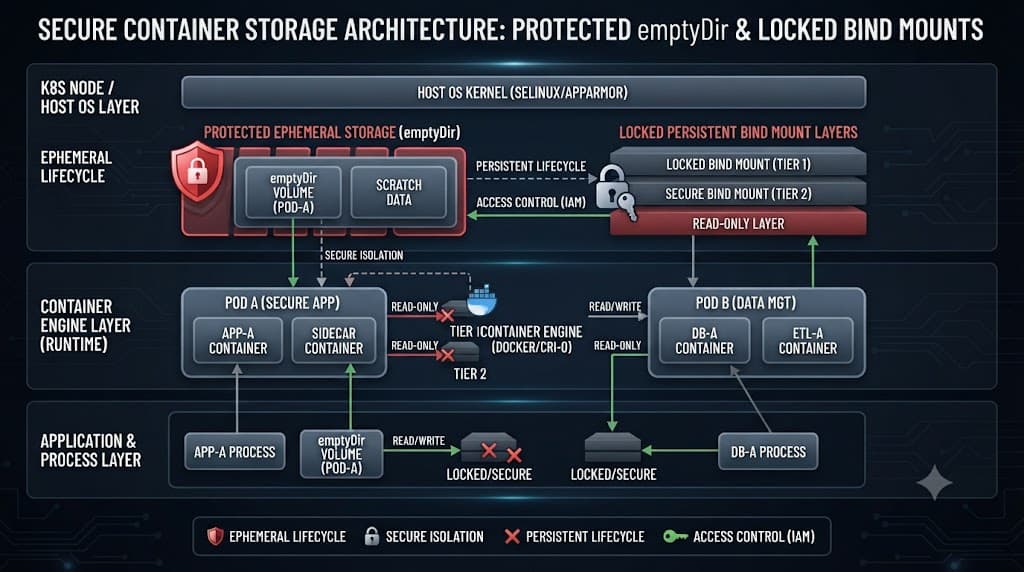
Historically, ephemeral storage allocated through emptyDir volumes initialized with broad, sometimes unsafe default permissions. Containers running as root could freely modify, delete, or reconfigure files shared within a pod, heightening the risk of accidental corruption or malicious tampering. Storage security in enterprise kubernetes clusters requires deterministic boundaries where container storage behavior is strictly governed. Kubernetes v1.37 directly mitigates these vectors by decoupling volume lifecycle ownership from raw user IDs, offering operators absolute authority over file mode bits.
Beyond basic emptyDir controls, previous versions of kubernetes lacked streamlined native mechanisms to enforce specific bind mount options directly within standard volume declarations. This forced teams to rely on complex container runtime patches or privileged init containers just to apply basic flags like nosuid or nodev. Kubernetes v1.37 changes this dynamic by baking these capabilities into the core API, allowing declarative enforcement of container storage protection.
[!NOTE] Architectural Note: These storage security features depend heavily on container runtime support (such as containerd v2.0+ or CRI-O) capable of interpreting the new volume attributes during the container setup phase.
Configuring EmptyDir Permission Modes
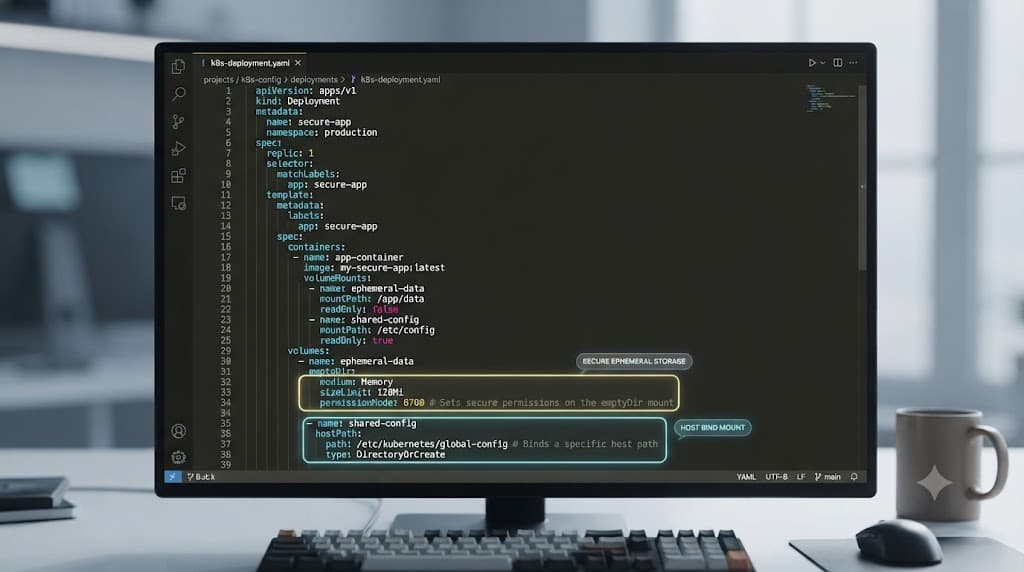
The introduction of explicit permission modes for emptyDir volumes represents a monumental shift for container storage hardening. Previously, files written to an emptyDir defaulted to permissions inherited from the node or runtime defaults, often resulting in world-writable directories. With Kubernetes v1.37, administrators can explicitly specify a medium and a permissionMode property within the volume specification YAML.
apiVersion: v1
kind: Pod
metadata:
  name: secure-storage-pod
spec:
  containers:
  - name: app-container
    image: nginx:alpine
    volumeMounts:
    - mountPath: /cache
      name: cache-volume
  volumes:
  - name: cache-volume
    emptyDir:
      medium: Memory
      permissionMode: "0600"
Implementing strict permission modes prevents lateral movement if a single container within a pod is compromised. By setting the permission mode to restricted octal values like 0600 or 0640, you ensure that unprivileged helper sidecar containers cannot read sensitive temporary state data unless explicitly granted access via group ownership or shared service accounts.
[!TIP]
Pro Tip: Always pair your emptyDir permission modes with non-root security contexts (runAsNonRoot: true) to maximize the isolation benefits introduced in Kubernetes v1.37.
Leveraging Bind Mount Options for Enhanced Security
Mount options govern how the Linux kernel interprets a filesystem, dictating whether files can be executed, whether setuid binaries are honored, or if the filesystem is mounted strictly read-only. In Kubernetes v1.37, container storage configurations can now leverage explicit bind mount options to strip unnecessary privileges at the mount layer. This prevents an attacker who gains remote code execution from abusing storage vectors to escalate privileges on the host or bypass container boundaries.
Consider a scenario where an application container requires access to a shared host path or volume, but must be strictly prohibited from executing binary files or creating new device nodes. By passing options such as nodev, noexec, and nosuid directly within the storage specification, you harden the container filesystem against entire classes of local exploits.
✓ Advantages
- Granular control over file access permissions
- Native declarative enforcement without custom init containers
- Mitigation of privilege escalation via mounted executables
- Improved compliance posture for multi-tenant environments
✕ Limitations
- Requires compatible underlying container runtime versions
- Misconfigured mount flags can break legacy application workflows
- Increased complexity in debugging permission-denied errors
Adopting these advanced mount options requires careful testing across your CI/CD pipelines. Because certain legacy applications expect to execute binaries out of temporary scratch spaces or shared caches, abruptly applying noexec can cause sudden application failures. Always audit your workload behavior in a staging environment before rolling out these storage hardening configurations to production clusters.