Quick Answer
Quick Answer
The Container Network Interface, commonly referred to as kubernetes cni, is a specification and standards-based framework that defines how networking plugins configure network interfaces for application containers in Kubernetes. Without a CNI plugin installed, a cluster cannot allocate pod IP addresses, establish node-to-node pod communication, or enforce network isolation policies. When deploying a fresh cluster, administrators must select and apply a CNI-compliant network plugin such as Calico, Cilium, or Flannel to initialize the cluster data plane and satisfy the foundational requirement that every pod receives a unique, routable IP address within the cluster.
Kubernetes Networking Model
See also: Kubernetes Networking Explained
The Kubernetes networking model establishes a fundamental set of design rules that every compliant cluster must implement. At its core, the model dictates a flat, cluster-wide IP-per-pod architecture where every pod receives its own unique IP address. This design intentionally avoids traditional network address translation port mapping for pod-to-pod communication, ensuring that pods can communicate with all other pods across any node in the cluster without requiring explicit port allocation on the host machine. Furthermore, agents on a node, such as the kubelet, can communicate directly with all pods running on that same node. To achieve this, the underlying infrastructure must provide a mechanism to bridge container network namespaces to the physical network interface or establish an overlay network encapsulation layer such as VXLAN or Geneve. This ensures that IP addresses are completely unique and non-overlapping across the entire cluster domain. Network routing tables or distributed key-value stores manage the tracking of pod IP allocations to host node mappings, allowing packets to traverse physical boundaries seamlessly. When designing production clusters, engineers must evaluate whether a routed native L3 network fabric or an overlay encapsulation mechanism best aligns with their cloud provider constraints, security requirements, and performance expectations. Enforcing these core rules guarantees predictable application behavior, simplifies microservice discovery, and eliminates the port collision complexities commonly found in legacy containerized environments.
Pod Networking
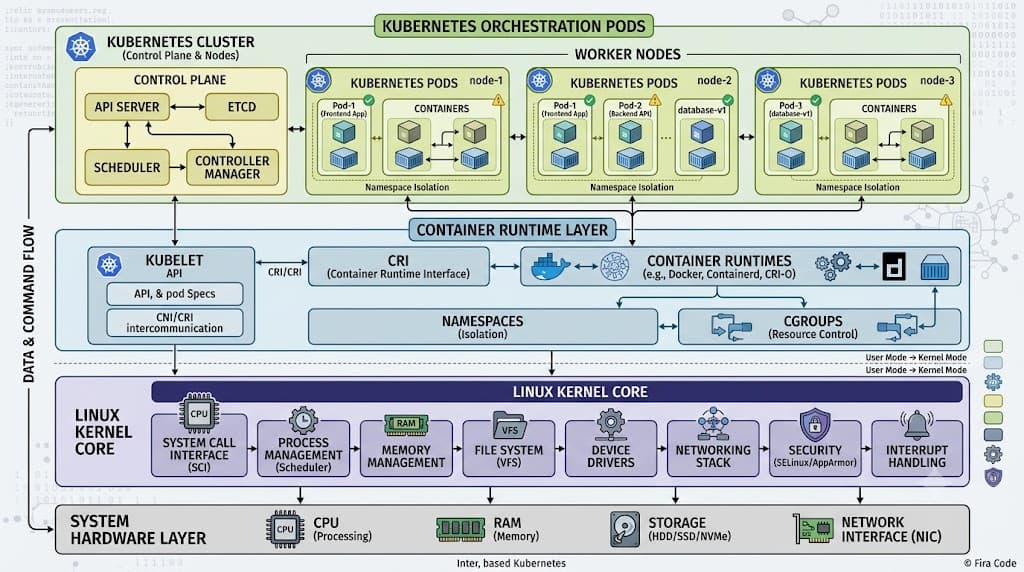
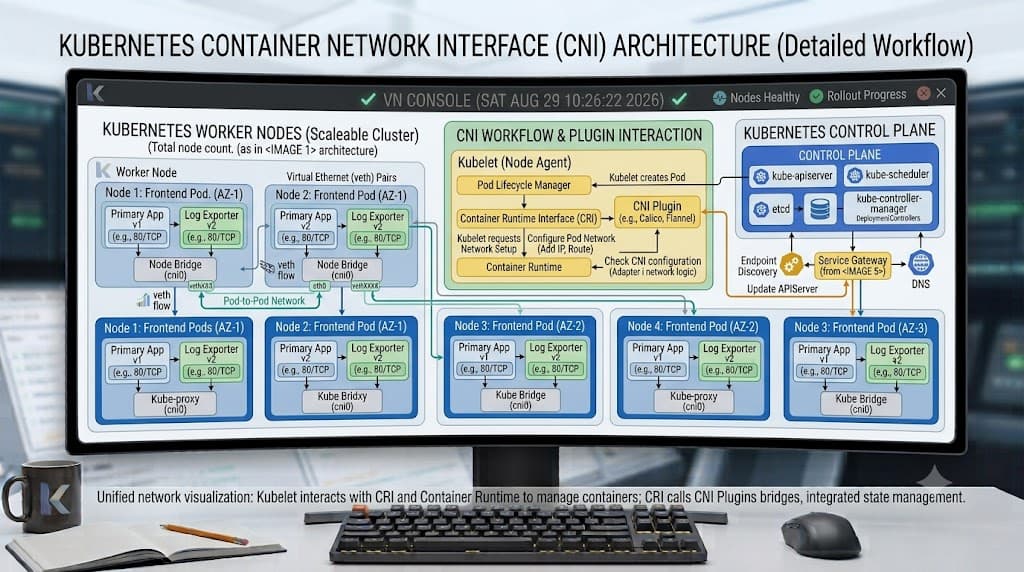
Pod networking forms the operational bedrock of distributed application execution in modern container orchestrators. Every pod in a Kubernetes cluster encapsulates one or more containers sharing a single network namespace, which includes their own loopback device, network interfaces, routing tables, and iptables rules. When a new pod is scheduled to a worker node, the kubelet interacts with the local container runtime to set up this isolated network namespace. The local container runtime then invokes the configured kubernetes cni binary, passing configuration JSON payloads that dictate IP address management rules, bridge attachments, and interface naming conventions. The CNI plugin assigns an IP address from a pre-allocated cluster subnet, provisions virtual ethernet pairs where one end resides inside the pod namespace and the other attaches to the host bridge, and updates the host routing table so inbound and outbound packets flow correctly. Across multiple nodes, packets leaving a pod traverse the virtual ethernet pair into the host network stack, where they are either encapsulated into UDP packets for overlay networks or routed directly via native host routing rules managed by the CNI daemonset. This architecture ensures that regardless of where a pod is scheduled, it maintains persistent connectivity. Engineers frequently inspect these low-level allocations during routine operations and incident responses to verify that subnets are not exhausted and that routing tables accurately reflect active nodes. Maintaining this robust pod network requires careful planning of cluster CIDR blocks, node subnet sizes, and IPAM allocation limits to prevent bottlenecks as workloads scale.
kubectl get pods -o wide
The kubectl get pods -o wide command is an indispensable diagnostic utility for inspecting the cluster-wide distribution of pod IP addresses and their assigned worker nodes. When executed against a namespace, this command appends critical networking metadata to standard output, including the specific IP address allocated to each pod and the exact node where the pod is currently executing. By examining this output, operators can immediately identify which node hosts a misbehaving pod, verify whether pods are clustering unevenly on specific worker nodes due to scheduling constraints, and cross-reference pod IPs against the expected CIDR ranges of the underlying network plugin. For example, if a pod displays an IP address belonging to an entirely different subnet range than the node running it, it indicates an IPAM configuration mismatch or an out-of-sync routing table. Furthermore, comparing output from multiple nodes helps isolate whether connectivity failures are localized to a single worker or represent a cluster-wide routing breakdown. Integrating this command into initial triage workflows allows DevOps engineers to quickly establish the physical and logical mapping of their workloads before diving into deeper network packet captures or controller logs.
Services and DNS
While the underlying pod network provides direct, routable IP connectivity between individual pods, pod IP addresses are inherently ephemeral and subject to frequent churn caused by scaling events, deployments, and node failures. To solve this volatility, Kubernetes introduces Services and CoreDNS to abstract pod lifecycles behind stable virtual IP addresses and predictable DNS names. A Kubernetes Service monitors a dynamic set of pods using label selectors and load-balances incoming traffic across healthy endpoints. When a client application queries a service name, CoreDNS resolves that name to the service's cluster IP, and iptables or IPVS rules programmed on the host node transparently route the traffic to one of the backing pod IPs. It is critical to understand that CNI is fundamentally distinct from a Service or an Ingress controller. The CNI operates at layers 2 and 3 of the OSI model, handling raw packet transport, IP allocation, and virtual interface plumbing between network namespaces and nodes. In contrast, Services operate at layers 3 and 4 to provide load balancing and virtual IP abstractions, while Ingress controllers operate at layer 7 to manage HTTP and HTTPS routing, TLS termination, and path-based traffic splitting. Recognizing this architectural boundary ensures that engineers do not attempt to solve low-level routing problems with Ingress rules or expect network plugins to handle application-layer load balancing.
CNI
The Container Network Interface specification defines a generic protocol for configuring network interfaces in Linux containers. In the Kubernetes ecosystem, the CNI architecture relies on executable binaries installed on every worker node and invoked by the kubelet during pod lifecycle events. When a pod starts, the kubelet reads the CNI configuration file typically located in /etc/cni/net.d/, determines which plugin to execute, and passes environment variables alongside JSON payloads detailing the container's network namespace path and interface requirements. The CNI plugin, often managed as a cluster-wide DaemonSet for plugins like Calico or Cilium, executes the necessary bridging, IPAM, and tunneling setups. IP Address Management is a critical sub-component of this architecture; the IPAM plugin tracks which IP addresses are currently leased to active pods, preventing duplicate assignments and ensuring clean reclamation when pods terminate. Understanding how these binaries and configuration files interact allows administrators to customize routing behaviors, attach multiple network interfaces to a single pod using secondary CNI frameworks like Multus, and debug low-level initialization errors when the kubelet fails to provision a pod network namespace.
inspect node and network plugin docs
Inspecting node configurations and network plugin documentation is a mandatory step when auditing cluster health, planning capacity upgrades, or troubleshooting complex routing anomalies. Administrators should begin by examining the contents of /etc/cni/net.d/ on worker nodes to review active JSON configuration files, paying close attention to parameters such as IPAM ranges, encapsulation modes, and chained plugin sequences. Next, inspecting the DaemonSet manifests or operator logs for the deployed cni kubernetes plugin reveals runtime configuration flags, custom resource definitions, and backend connectivity parameters. Plugin documentation typically outlines specific requirements for kernel modules, eBPF capabilities, or iptables rules that must be present on the host operating system. For instance, plugins utilizing eBPF data planes require newer Linux kernel versions and specific header configurations, while overlay-based plugins require specific UDP ports to be open across cloud provider security groups. Reviewing these sources ensures that cluster nodes meet all prerequisites and that network plugin configurations align with organizational security and performance mandates.
Ingress and NetworkPolicy
Securing cluster traffic requires distinguishing between layer-7 traffic management and layer-3/layer-4 network isolation. Ingress controllers operate at the application layer, routing external HTTP and HTTPS traffic into internal cluster services based on hostnames and URL paths. They act as reverse proxies and are managed separately from the core network plumbing. Conversely, NetworkPolicy resources operate at layers 3 and 4, leveraging the underlying CNI plugin to enforce granular security rules regarding which pods can communicate with one another and with external endpoints. When a NetworkPolicy is applied, the CNI plugin translates these declarative rules into low-level packet filtering rules, such as iptables chains, nftables rules, or eBPF maps, executed directly within the pod network namespace or node kernel. This allows DevOps engineers to implement zero-trust security postures, isolating database pods from frontend web tiers while permitting specific monitoring traffic. Properly configured network policies are essential for multi-tenant clusters, ensuring that workloads residing on the same node or shared subnets remain strictly isolated unless explicitly authorized by policy objects.
Troubleshooting
Network troubleshooting in distributed container environments demands a systematic approach that isolates layer-2 framing, layer-3 routing, layer-4 port connectivity, and layer-7 application resolution. Common failure modes include IPAM exhaustion where subnets run out of available addresses, misconfigured MTU sizes causing packet fragmentation drops across overlay tunnels, and incorrect security group or firewall rules blocking underlying node communication. When pods fail to communicate across different nodes, administrators should verify that the underlying cni kubernetes components are running healthily across all worker nodes and that no conflicting iptables rules have been injected by external security agents. Utilizing systematic diagnostic workflows helps pinpoint whether packet drops occur at the virtual ethernet interface, the host bridge, or the physical network fabric. Maintaining visibility into these failure domains ensures rapid incident resolution and minimizes application downtime in production environments.
connectivity test Pod
Deploying a temporary connectivity test pod is a practical and highly effective technique for isolating network failures, verifying cross-node routing, and diagnosing plugin misconfigurations in real-time. Operators can spin up lightweight diagnostic pods using standard container images equipped with networking utilities like curl, netcat, and dnsutils. By scheduling test pods onto different worker nodes using node selectors or affinities, engineers can execute direct TCP and UDP connectivity tests to target pod IPs, cluster service IPs, and external endpoints. For instance, executing a command such as nc -zv <target-pod-ip> <port> from within a test pod immediately reveals whether traffic is successfully traversing the pod network or being dropped by a restrictive NetworkPolicy or firewall. If connectivity fails between nodes while succeeding locally, the issue typically points to encapsulation failures, blocked UDP ports in the cloud provider fabric, or routing table desynchronization within the CNI plugin daemon. Cleaning up these temporary test pods immediately after diagnosis maintains a secure and clutter-free cluster environment.
📌 Recommended Next Guides & References
  <li>
    <a href="/article/docker-and-kubernetes-how-they-work-together-2" class="text-primary hover:underline font-semibold flex items-center gap-2">
      <span>→</span> <span>Docker and Kubernetes: How They Work Together</span>
    </a>
  </li>

  <li>
    <a href="/article/kubernetes-ingress-explained" class="text-primary hover:underline font-semibold flex items-center gap-2">
      <span>→</span> <span>Kubernetes Ingress Explained: Routing, Controllers, and TLS</span>
    </a>
  </li>

  <li>
    <a href="/article/kubernetes-ingress-controller-explained" class="text-primary hover:underline font-semibold flex items-center gap-2">
      <span>→</span> <span>Kubernetes Ingress Controller Explained: Architecture, Routing, and Implementation</span>
    </a>
  </li>