Quick Answer
Developing an application locally using containers and scaling that same workload reliably in a production cluster requires understanding how docker kubernetes environments integrate. Docker builds and packages container images containing your application code, dependencies, and runtime environment into an immutable artifact. Kubernetes then takes those packaged artifacts, schedules them across a multi-node cluster, and manages their scaling, networking, and self-healing lifecycle. Together, they form the foundation of modern cloud-native software architecture, bridging local developer workflows with enterprise-grade orchestration.
Quick Answer
Docker and Kubernetes work together through a clean separation of concerns: Docker handles the creation and packaging of container images, while Kubernetes orchestrates, schedules, and scales those containers across a cluster of servers. To deploy your code, you first build an image with Docker and push it to a registry, then create a Kubernetes Deployment object that instructs the cluster to pull and run that image. This combination allows developers to test code locally in identical environments before handing it over to Kubernetes for robust, automated production management.
Docker + Kubernetes: How They Work Together
The relationship between Docker and Kubernetes is often misunderstood by engineers transitioning from single-host environments to distributed infrastructure. At its core, Docker provides the tooling to define container files, build OCI-compliant container images, and run them on a local machine using the Docker Engine. However, as applications grow into microservices architectures spanning multiple machines, managing those containers manually becomes impractical.
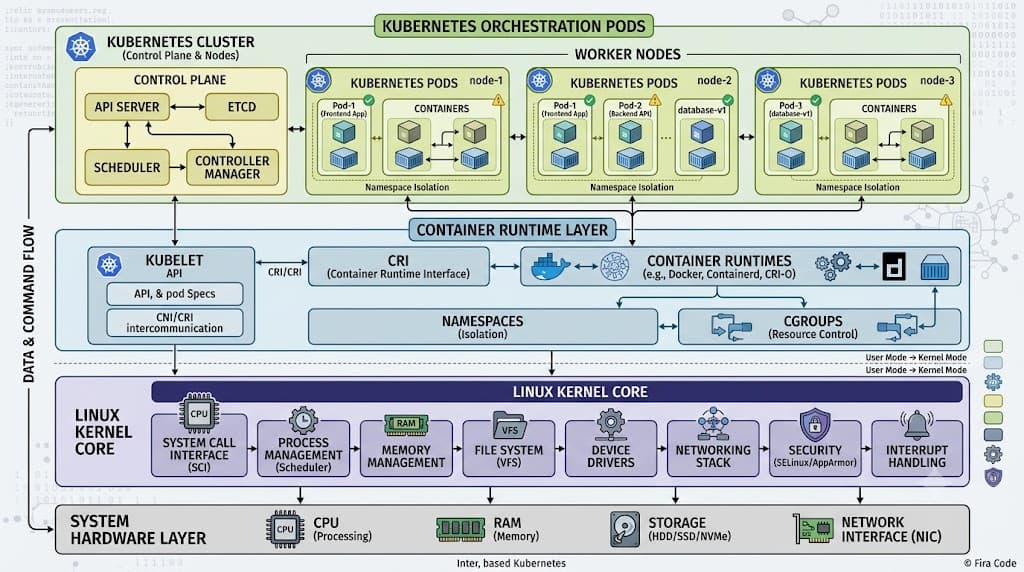
This is where Kubernetes enters the picture. Kubernetes is a container orchestrator designed to manage thousands of containers across a cluster of virtual or physical machines. Importantly, Kubernetes does not replace Docker; rather, it consumes the standardized output of Docker. When you configure docker kubernetes pipelines, Docker creates the standardized images, and Kubernetes runs them inside its own structural primitives called Pods. Modern Kubernetes clusters use container runtimes like containerd or CRI-O directly through the Container Runtime Interface (CRI), but the images themselves remain fully compatible with standard OCI specifications generated by Docker builds.
How the Two Technologies Work
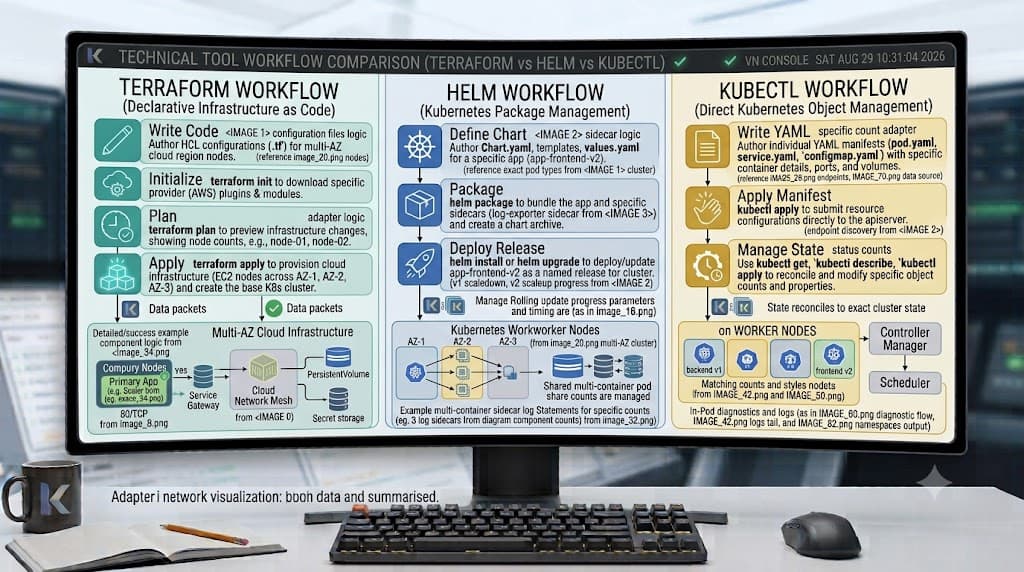
To successfully bridge local development with cluster operations, you must understand the exact lifecycle of an artifact as it moves from your laptop into a distributed environment. This journey involves building, tagging, pushing, deploying, exposing, and verifying workloads using a standard set of command-line tools.
Building Images
See also: container images
The first step in any containerized workflow is packaging your source code and its dependencies into a reproducible image. You achieve this using the docker build command, which reads a Dockerfile instructions file. For example, running docker build -t my-app:v1 . instructs the Docker daemon to assemble your filesystem layers, install packages, set environment variables, and tag the resulting OCI image locally. This ensures that your application runs in an identical user space regardless of where the underlying operating system executes it.
Pushing to a Registry
Once an image exists on your local development machine, it remains trapped there until you make it accessible to your cluster nodes. To solve this, you use the docker push command to upload your packaged artifact to a container registry, such as Docker Hub, Amazon Elastic Container Registry (ECR), or Google Artifact Registry. Running docker push my-org/my-app:v1 transmits the compressed image layers securely. Your Kubernetes cluster nodes can then pull this image down from the registry during runtime initialization.
Creating Deployments and Pods
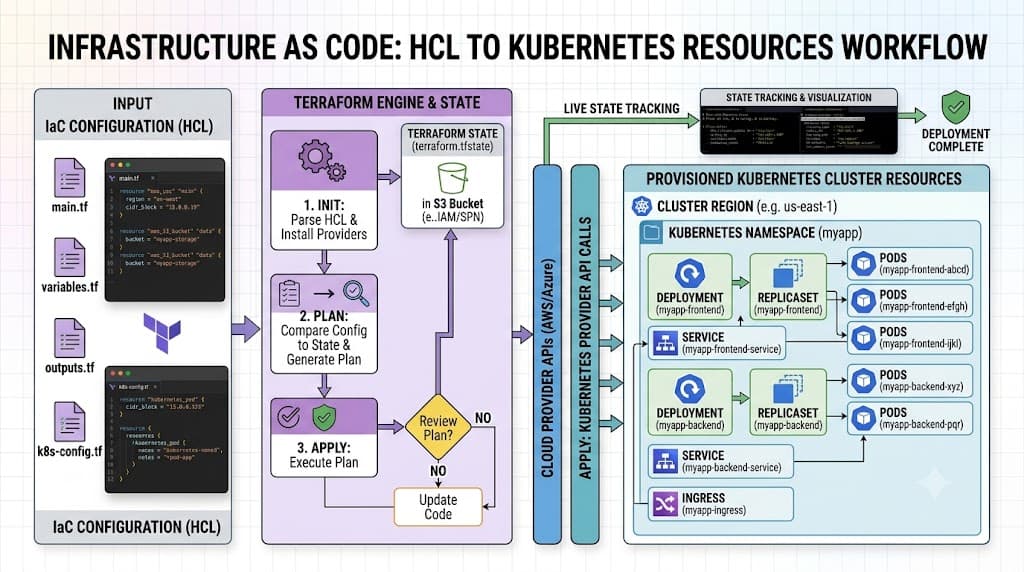
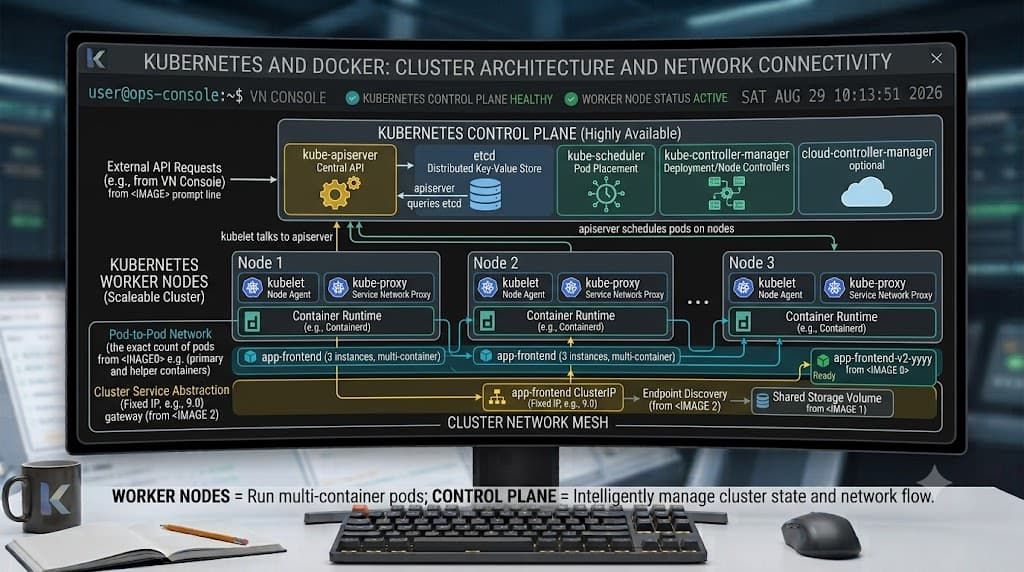
With your image safely stored in a registry, you interact with Kubernetes to run it. Instead of executing individual containers directly, Kubernetes manages workloads through higher-level abstractions called Deployments. By executing a command like kubectl create deployment web-app --image=my-org/my-app:v1, you tell the Kubernetes control plane to maintain a specified number of Pod replicas running your container image. The cluster automatically schedules these Pods onto available worker nodes and monitors their health continuously.
Exposing Services
Containers running inside Pods are isolated behind internal cluster IP addresses by default, meaning external clients or other microservices cannot reach them directly. To solve network access, you use the kubectl expose command or a Kubernetes Service manifest. Running kubectl expose deployment web-app --type=LoadBalancer --port=80 creates a stable networking abstraction that routes external traffic to your Pod replicas, balancing requests evenly across all healthy instances in the deployment group.
Verifying with Pods
After submitting your configuration manifests or imperative commands, verifying the operational state of your cluster is critical. Executing kubectl get pods lists all active Pods in the current namespace, displaying their status, restart counts, and age. If a container fails to start due to a missing environment variable or bad configuration, this verification step allows you to inspect pod logs using kubectl logs and diagnose initialization bottlenecks quickly.
Key Differences
While both technologies utilize containers, their architectural scopes differ fundamentally. Docker is engineered primarily as a single-node developer tool. It excels at building images, running local containers, managing local volumes, and orchestrating multi-container local environments using Docker Compose. Its control plane is lightweight and runs directly on a single operating system kernel.
Kubernetes, conversely, is a multi-node distributed operating system for containers. It abstracts away underlying server infrastructure, providing automated load balancing, self-healing, rolling updates, horizontal auto-scaling, and secure secret management across hundreds of machines. Where Docker asks 'How do I run this container on my laptop?', Kubernetes asks 'How do I maintain desired state for thousands of containers across a fleet of servers?'
When to Use Each
Understanding docker compose vs kubernetes comparisons helps teams choose the right tool for each stage of the software lifecycle. Docker and Docker Compose are ideal for local development, unit testing, and integration testing. They allow developers to spin up complex stacks—such as a web server, database, and cache—on a single machine using a simple YAML configuration file within seconds.
Kubernetes is designed for staging and production environments where high availability, fault tolerance, and dynamic scaling are mandatory. If your application needs to survive node hardware failures, automatically scale up during traffic spikes, or route traffic across multiple cloud availability zones, Docker Compose is insufficient, and Kubernetes becomes necessary. Most engineering teams use Docker for daily development and testing, and transition to Kubernetes when deploying to staging and production.
Common Mistakes
Transitioning from local containers to cluster orchestration frequently introduces avoidable errors. One common mistake is treating Kubernetes as if it were simply a remote Docker daemon, expecting to run individual docker commands directly on cluster nodes. Another anti-pattern is using the mutable latest tag for container images in production, which prevents Kubernetes from detecting image updates or rolling back deployments reliably.
Engineers also frequently misconfigure resource requests and limits within Kubernetes Pod specifications, leading to cascading node failures or CPU throttling. Always specify explicit CPU and memory resource bounds for your docker images kubernetes workloads to ensure predictable scheduling and fair node resource allocation.
Troubleshooting
When deploying container workloads to a cluster, developers often encounter mysterious failure modes such as ImagePullBackOff or CrashLoopBackOff. An ImagePullBackOff error typically indicates that Kubernetes cannot pull the specified container image from the registry, often due to authentication failures, private registry pull secrets missing from the namespace, or typographical errors in the image name.
A CrashLoopBackOff error means the container starts successfully but exits immediately due to an internal application error, a missing configuration file, or an unhandled exception. Troubleshooting requires inspecting detailed container logs using kubectl logs <pod-name> and reviewing cluster events with kubectl describe pod <pod-name> to identify exact exit codes and environmental discrepancies.
📌 Recommended Next Guides & References
  <li>
    <a href="/article/kubernetes-ingress-explained" class="text-primary hover:underline font-semibold flex items-center gap-2">
      <span>→</span> <span>Kubernetes Ingress Explained: Routing, Controllers, and TLS</span>
    </a>
  </li>

  <li>
    <a href="/article/kubernetes-ingress-controller-explained" class="text-primary hover:underline font-semibold flex items-center gap-2">
      <span>→</span> <span>Kubernetes Ingress Controller Explained: Architecture, Routing, and Implementation</span>
    </a>
  </li>

  <li>
    <a href="/article/kubernetes-networking-explained" class="text-primary hover:underline font-semibold flex items-center gap-2">
      <span>→</span> <span>Kubernetes Networking Explained: Pods, Services, CNI, and Troubleshooting</span>
    </a>
  </li>
Related Reading: CI/CD pipeline tutorial