Quick Answer
When working with containers, ensuring data persists beyond the lifecycle of a single container instance is crucial. Docker provides multiple mechanisms to store data on the host machine, with named volumes and bind mounts being the two primary approaches. Understanding the nuances between a docker volume vs bind mount helps developers and DevOps engineers design resilient, performant, and secure applications. At its core, a Docker volume is managed entirely by Docker and stored in a dedicated directory on the host filesystem, isolated from core operating system mechanics. In contrast, a bind mount maps any arbitrary file or directory from your host machine directly into the container filesystem.
Quick Answer
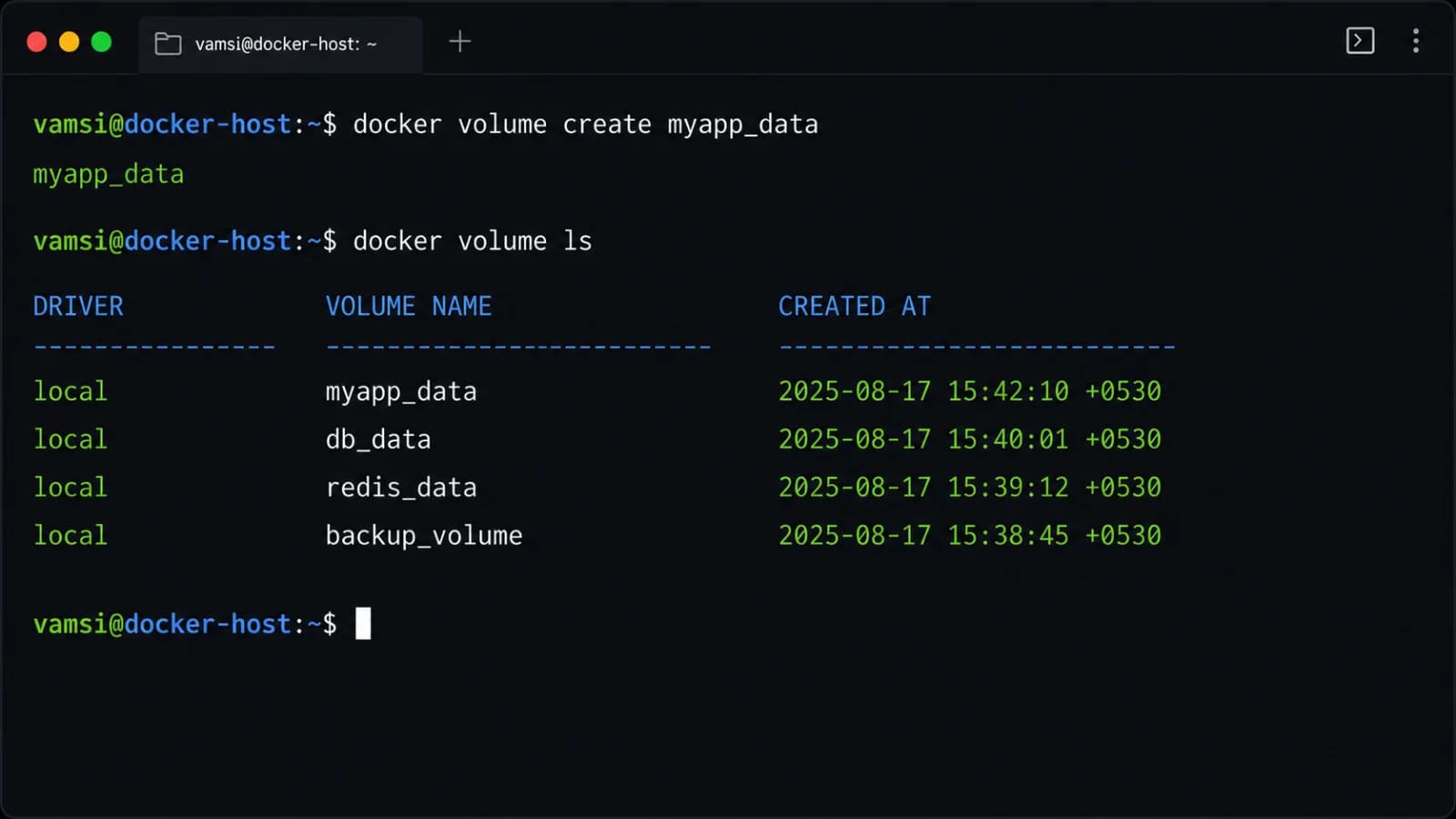
If you need the simplest correct command and concept to get started, use a named volume for isolated data persistence or a bind mount for live-reload development. For a managed volume, you can use the modern flag syntax via docker run --mount type=volume,src=my-volume,dst=/app/data nginx. If you prefer host integration during development, a bind mount links your local source code directly using docker run --mount type=bind,src=$(pwd),dst=/app nginx. Named volumes are managed by Docker under /var/lib/docker/volumes/ on Linux hosts, keeping them decoupled from your local development workflow. Bind mounts rely on the absolute path of your host system, allowing instant file synchronization between your code editor and the running container. Choosing between them depends on whether you prioritize host file access or Docker-managed isolation.
Docker Volumes vs Bind Mounts
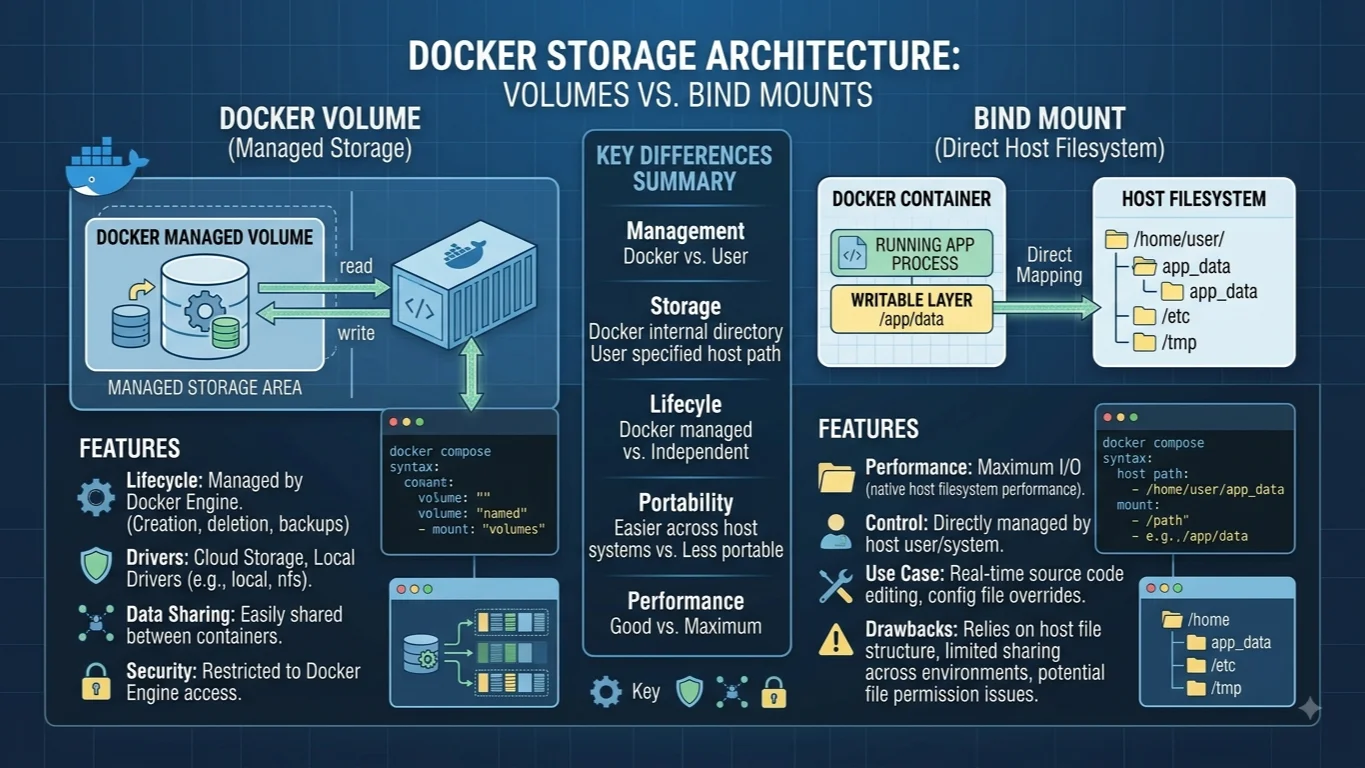
The debate surrounding docker volumes vs bind mounts centers on where data lives and who controls its lifecycle. Docker-managed volumes are created and managed by the Docker engine itself. You give the volume a name, and Docker handles the underlying storage location on the host machine. Because Docker abstracts the filesystem details away, these storage units remain completely separate from the host operating system's directory structure, making them portable and safe from accidental host-level modifications. Bind mounts, however, give you direct access to the host machine's filesystem. You explicitly define an absolute path on your host, which is then mounted directly into the container. This direct coupling offers distinct advantages for local development where you want file changes on your host to reflect immediately inside the running container, but it also introduces platform-specific permission challenges and security considerations.
How Named Volumes Work
Named volumes are the preferred mechanism for persisting data generated by and used by Docker containers. When you create a named volume, Docker allocates a specific storage area on the host filesystem that is managed through the Docker daemon. Because these storage areas are entirely separated from the host's normal directory trees, standard host processes cannot inadvertently alter or corrupt container data unless they have root privileges and know where Docker stores its internal state. Named volumes also excel during container updates and migrations. You can stop a container, remove it, create a new container image version, and attach the exact same named volume without losing any database records, user uploads, or application state. Docker also supports volume drivers that allow you to store data on remote cloud storage providers, network-attached storage, or encrypted filesystems transparently.
How Bind Mounts Work
Bind mounts rely on the directory structure and permission model of the host machine. Instead of letting Docker manage a dedicated storage location, you point a container path directly to a folder on your laptop or production server. Any file creation, modification, or deletion performed inside the container happens directly on the host filesystem at the specified path. This mechanism is extremely powerful for local development workflows because it bypasses the need to rebuild container images every time you edit a source code file. However, bind mounts tie your container tightly to the host's specific operating system structure. If you run your application on a macOS development machine and deploy it to a Linux production server, the underlying path structures and permission enforcement mechanisms will differ significantly, requiring careful configuration management to avoid runtime errors.
Syntax and Examples
Mastering the command-line flags and configuration syntax is essential for deploying containers correctly. The legacy -v or --volume flag combines the volume name or host path, container path, and optional configuration flags into a single colon-separated string. For example, using the legacy syntax for a volume looks like docker run -d -v my_volume:/app/data nginx, while a bind mount uses docker run -d -v /path/on/host:/app/data nginx. Modern Docker best practices strongly encourage the more explicit --mount flag syntax, which uses comma-separated key-value pairs. To mount a named volume using this explicit syntax, run docker run -d --mount type=volume,source=my_volume,target=/app/data nginx. To mount a host directory using the modern syntax, use docker run -d --mount type=bind,source=$(pwd),target=/app/data nginx. When working with multi-container applications in Docker Compose, you define these storage mechanisms under the top-level volumes section and map them inside individual service definitions using concise shorthand or explicit long-syntax configurations.
Permissions and Security
Permissions and security represent one of the most critical differences between these two storage models. With named volumes, Docker automatically sets up correct permissions based on the Docker daemon's configuration, ensuring that the container user can read and write to the volume seamlessly. Bind mounts, however, inherit the exact user and group permissions of the host directory. If a file is created inside a container via a bind mount, it may be owned by the root user on the host system, making it difficult for your normal user account to edit or delete those files outside of Docker. Furthermore, bind mounts expose host system files to the container environment. If a containerized application is compromised, an attacker could potentially access sensitive configuration files or system directories if the bind mount was configured too broadly, such as mounting the root directory or sensitive host system paths.
Performance and Portability
Performance characteristics vary significantly depending on the host operating system and the storage type chosen. On Linux hosts, both bind mounts and named volumes offer native near-native disk performance because Docker containers run directly on the Linux kernel. However, on macOS and Windows hosts, running Docker inside a lightweight virtual machine creates virtualization overhead. Bind mounts that traverse the boundary between the host operating system and the Linux virtual machine can suffer from severe performance degradation when dealing with heavy file I/O operations, such as running JavaScript node_modules or dependency-heavy build tools. Named volumes generally perform better in these cross-platform development scenarios because the data resides entirely within the managed Linux VM filesystem rather than synchronizing continuously with the macOS or Windows host filesystem. In terms of portability, named volumes are infinitely more portable across different host environments because they abstract away host path differences, whereas bind mounts require host-specific absolute paths.
Development vs Production
Choosing between these storage mechanisms depends heavily on your current workflow stage. During local development, bind mounts are exceptionally useful because they enable live-reload features, allowing developers to see code changes instantly without rebuilding images or restarting containers. Conversely, named volumes are the absolute gold standard for production environments. Production workloads demand data isolation, automated backup capabilities, security hardening, and freedom from host-specific filesystem dependencies. Using named volumes in production ensures that containerized databases, persistent caches, and uploaded assets remain safe, portable, and correctly managed by the Docker engine, regardless of underlying server hardware replacements or OS upgrades.
Which Should You Choose?
Selecting the appropriate storage strategy requires evaluating your application requirements against the core strengths of each approach. If you are building a local development environment where rapid file synchronization and code editing are paramount, a bind mount is the right choice. If you are deploying a database, persistent application state, or running workloads in a production cluster where data safety, portability, and isolation matter most, a named volume is the correct choice. Reviewing a structured comparison helps clarify these tradeoffs:
| Feature | Named Volume | Bind Mount |
|---|---|---|
| Managed By | Docker Engine | Host Operating System |
| Host Path | Internal Docker storage area | Arbitrary user-defined path |
| Portability | High (independent of host paths) | Low (tied to host absolute paths) |
| Performance | Fast across all host platforms | Slower on macOS/Windows due to VM boundary |
| Security | Isolated from host filesystem | Exposes host files/folders to container |
| Best Used For | Production data and databases | Local live-reload development |
Common Mistakes and Troubleshooting
Engineers frequently encounter pitfalls related to syntax, data overriding, and permission denied errors. One common mistake is accidentally hiding existing container image data by mounting an empty volume or bind mount over a directory that already contains files in the image; Docker automatically populates named volumes with existing image data upon initial creation, but bind mounts will completely obscure existing container files with whatever is present in the host directory. Another frequent issue is encountering permission errors when starting a container with a bind mount on Linux; this happens when the container process runs as a non-root user while the host directory is owned by root, requiring explicit user mapping or pre-adjusting host directory ownership. When troubleshooting storage issues, always verify your path syntax, inspect container inspection metadata using docker inspect, and ensure that SELinux or AppArmor profiles on enterprise Linux distributions are not blocking container access to host bind mounts.
📌 Recommended Next Guides & References
  <li>
    <a href="/article/docker-and-kubernetes-how-they-work-together-2" class="text-primary hover:underline font-semibold flex items-center gap-2">
      <span>→</span> <span>Docker and Kubernetes: How They Work Together</span>
    </a>
  </li>

  <li>
    <a href="/article/kubernetes-ingress-explained" class="text-primary hover:underline font-semibold flex items-center gap-2">
      <span>→</span> <span>Kubernetes Ingress Explained: Routing, Controllers, and TLS</span>
    </a>
  </li>

  <li>
    <a href="/article/kubernetes-ingress-controller-explained" class="text-primary hover:underline font-semibold flex items-center gap-2">
      <span>→</span> <span>Kubernetes Ingress Controller Explained: Architecture, Routing, and Implementation</span>
    </a>
  </li>