Quick Answer
Kubernetes administrators and developers frequently face scenarios where an application inside a cluster needs to be refreshed, its configuration reloaded, or a transient memory leak cleared. Understanding how to execute a kubernetes restart pod operation is critical for maintaining high availability. Unlike traditional virtual machines where you might log in and restart a service via systemctl, Kubernetes treats pods as ephemeral, disposable resources. The correct method depends entirely on whether the pod is managed by a controller like a Deployment or StatefulSet, or if it runs as an unmanaged standalone instance.
Quick Answer
To perform a kubernetes restart pod operation safely, you should generally avoid manually deleting managed pods if a controller can handle it gracefully. For pods controlled by a Deployment, the most reliable and idiomatic approach is to trigger a rolling update using kubectl rollout restart deployment. If you are dealing with a standalone pod not bound to any higher-level controller, you must use kubectl delete pod, keeping in mind that the pod will not be automatically recreated unless managed by a ReplicaSet, DaemonSet, or similar controller.
What a Pod Is
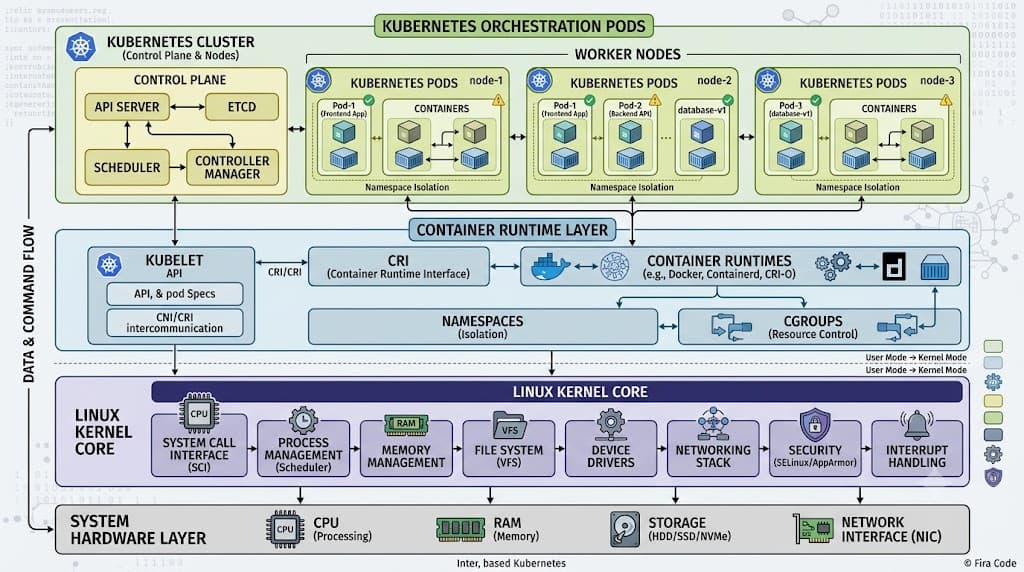
At the core of the Kubernetes architecture lies the Pod, which represents the smallest deployable unit of computing that can be created and managed. A Pod encapsulates one or more application containers, storage resources, a unique network IP, and options governing how the containers should run. Understanding this foundational abstraction is vital when examining any kubernetes pod restart strategy. Pods are designed to be ephemeral rather than permanent entities. When a pod is created, it is scheduled to run on a node in your cluster, where it remains until it completes its execution task, fails, is evicted due to resource pressure, or is terminated by a controller.
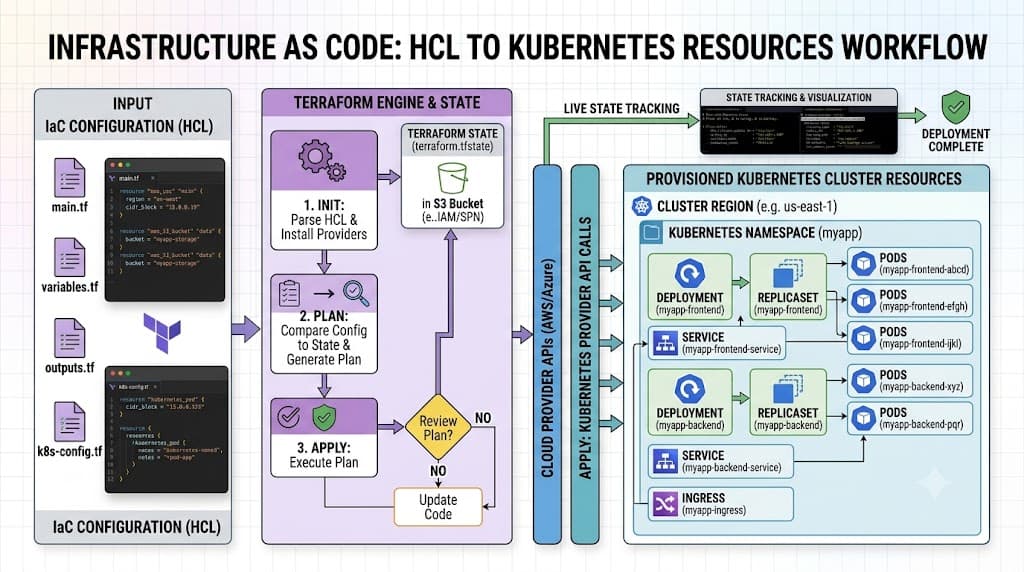
Because pods lack self-healing capabilities on their own, production workloads almost always wrap pods inside higher-level controllers such as Deployments, StatefulSets, or DaemonSets. These controllers monitor the cluster state, ensuring that the actual number of running pods matches the desired state specified in the configuration manifests. When you initiate a kubernetes restart deployment or modify a pod template spec, the controller orchestrates the replacement of old pods with new ones according to rolling update strategies, ensuring minimal disruption to client traffic and maintaining application uptime.
Pod Anatomy
See also: ConfigMaps
Every pod definition in Kubernetes contains a rich structure of nested objects, specifications, and metadata. Examining the internal anatomy of a pod helps clarify why a simple configuration change or a kubernetes restart deployment forces a complete teardown and recreation of the container runtime environment. Inside a pod specification, you define metadata such as labels and annotations, a restart policy, and an array of container specifications that dictate image sources, environment variables, resource limits, volume mounts, and security contexts.
The container execution context is bound to the pod lifecycle. If you modify an environment variable, an image tag, or a mounted ConfigMap within the pod template, the running container instance cannot simply ingest those updates dynamically in place unless the application supports hot-reloading. Instead, Kubernetes forces a pod restart or a rollout sequence to spin up a new container instance equipped with the updated configuration. This guarantees that your application state precisely matches the declared YAML manifest, eliminating configuration drift across your cluster nodes.
Multi-Container Pods
While many applications run as single-container pods, Kubernetes natively supports multi-container pods where multiple containers share the same network namespace, localhost loopback, and storage volumes. Common patterns include sidecar containers—such as logging agents, service mesh proxies, or authentication helpers—that run alongside the primary application container. When executing a kubernetes restart pod workflow, all containers within that specific pod are terminated and restarted simultaneously as a single atomic unit.
This coupled lifecycle has important operational implications. If a sidecar container crashes or fails a readiness probe, or if you force a restart of the entire pod, every container inside the pod goes through the shutdown and startup sequence together. Developers must design multi-container applications with proper startup sequencing in mind. For instance, if a primary application container attempts to connect to a local sidecar proxy during initialization, both containers must be ready to accept traffic before the pod marks itself as healthy and routes incoming requests.
Networking and Storage
See also: Kubernetes Networking
Networking and storage behaviors during a pod restart require careful consideration to prevent data loss or connection drops. When a pod is deleted and recreated during a kubernetes pod restart, its underlying IP address changes. Kubernetes assigns a brand-new IP address from the cluster's pod CIDR range to the newly spawned pod instance. Client applications inside or outside the cluster should never hardcode pod IP addresses; instead, they must route traffic through stable abstractions like Services or Ingress resources that automatically track endpoints.
Storage persistence behaves differently depending on the volume type. Ephemeral storage volumes, such as emptyDir, are tied directly to the lifetime of the pod. When a pod is terminated, any data stored in an emptyDir volume is permanently erased. Conversely, when dealing with StatefulSets or pods attached to PersistentVolumeClaims (PVCs), the underlying storage remains intact independently of the pod lifecycle. When a StatefulSet pod restarts, it reattaches to its dedicated PersistentVolume, preserving state across restarts, which is crucial for databases and stateful caching layers.
Lifecycle
Managing pods effectively requires a thorough grasp of the pod lifecycle, including restart policies, health probes, and termination grace periods. Every pod specification includes a restartPolicy field, which accepts values like Always, OnFailure, and Never. This policy dictates how the kubelet on the worker node handles container exits. For instance, a restartPolicy of Always means that if the application container crashes, the kubelet automatically restarts it on the same node without involving higher-level controllers.
During a graceful shutdown, Kubernetes follows a well-defined sequence. First, the pod is marked as terminating, and endpoints controllers remove its IP from any associated Services to stop incoming traffic. Next, any defined preStop hooks execute, giving the application time to drain active connections and flush buffers. The system then sends a SIGTERM signal to the container processes, followed by a countdown matching the terminationGracePeriodSeconds (defaulting to 30 seconds). If processes are still running when the grace period expires, Kubernetes forces termination via SIGKILL.
Inspecting and Debugging Pods
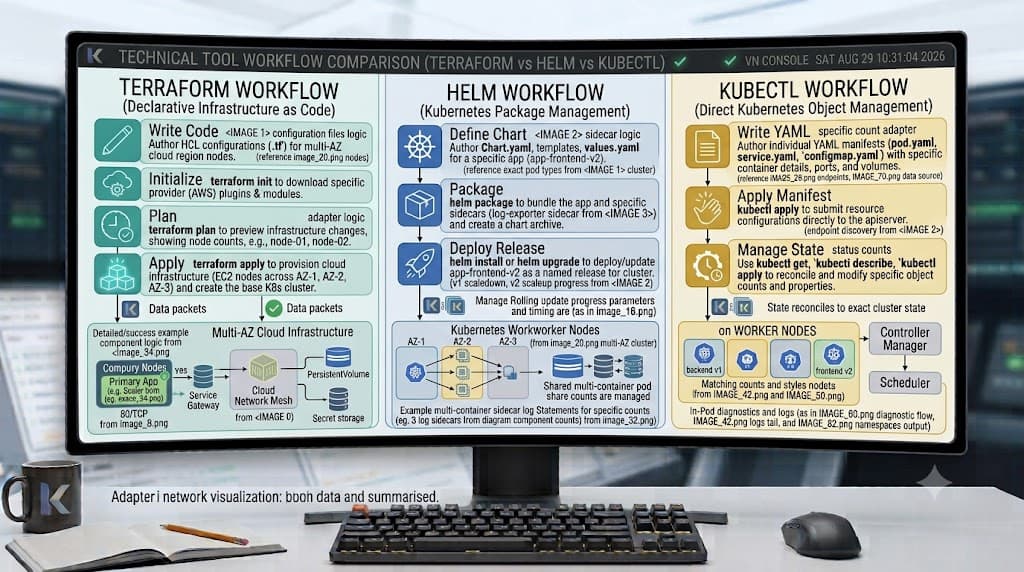
Before performing any destructive actions on your cluster workloads, you must inspect the current state of your resources and verify that your troubleshooting steps are targeting the correct components. Troubleshooting failing pods involves checking logs, examining exit codes, and watching rollout statuses to ensure stability. Below are the primary methods used by engineers to handle rollouts and deletions safely.
kubectl rollout restart deployment
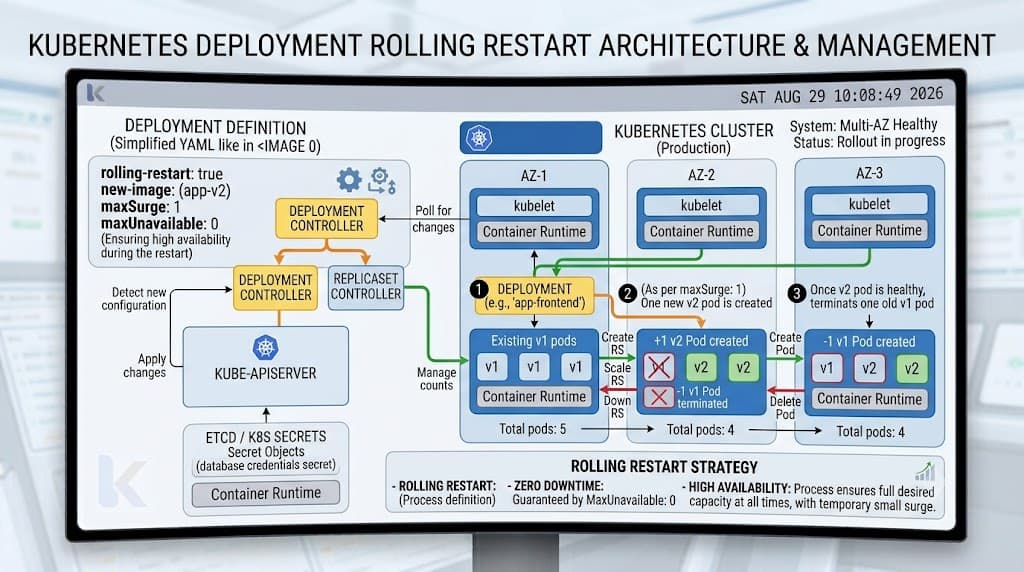
For workloads managed by a Deployment, the cleanest way to trigger a refresh without causing downtime is to execute a rollout restart. This command instructs the Deployment controller to perform a rolling update, sequentially terminating old pods and spinning up new ones based on the existing template.
kubectl rollout restart deployment my-app-deployment
Under the hood, this command patches the Deployment's pod template annotation with a timestamp, tricking the controller into detecting a configuration change. The controller then respects your maxSurge and maxUnavailable rollout parameters, ensuring high availability throughout the process.
kubectl delete pod
When dealing with standalone pods or when an emergency cleanup is required, engineers often use pod deletion. However, you must be cautious: deleting a standalone pod means it is gone forever and will not be recreated. Always verify controller ownership first.
kubectl delete pod my-standalone-pod
If the pod belongs to a Deployment, ReplicaSet, or StatefulSet, deleting it forces the controller to immediately spin up a replacement pod on a worker node. While useful for clearing transient bugs, excessive manual deletion should be replaced by proper rollout mechanisms in production pipelines.
kubectl rollout status
After initiating a rollout or restart, verifying the deployment progress is essential to ensure your application healthy state. The rollout status command blocks until the rollout completes successfully or fails, returning real-time feedback to your terminal.
kubectl rollout status deployment/my-app-deployment
This command checks whether all replicas have been successfully updated, confirming that the new pod instances passed their readiness probes and are actively serving traffic before marking the operation as complete.
📌 Recommended Next Guides & References
  <li>
    <a href="/article/docker-and-kubernetes-how-they-work-together-2" class="text-primary hover:underline font-semibold flex items-center gap-2">
      <span>→</span> <span>Docker and Kubernetes: How They Work Together</span>
    </a>
  </li>

  <li>
    <a href="/article/kubernetes-ingress-explained" class="text-primary hover:underline font-semibold flex items-center gap-2">
      <span>→</span> <span>Kubernetes Ingress Explained: Routing, Controllers, and TLS</span>
    </a>
  </li>

  <li>
    <a href="/article/kubernetes-ingress-controller-explained" class="text-primary hover:underline font-semibold flex items-center gap-2">
      <span>→</span> <span>Kubernetes Ingress Controller Explained: Architecture, Routing, and Implementation</span>
    </a>
  </li>