Quick Answer
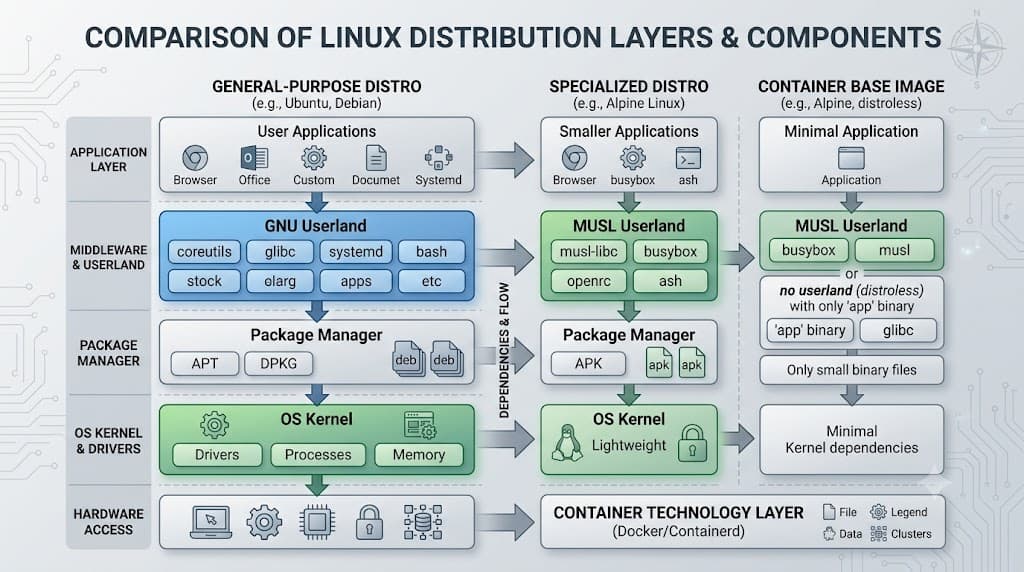
Linux distros form the foundation of modern software engineering, powering everything from local developer laptops and continuous integration pipelines to massive Kubernetes clusters running in production cloud environments. When engineers talk about linux distros, they are referring to complete, ready-to-install operating systems built around the Linux kernel, paired with GNU utilities, a package manager, system initialization frameworks, and default software configurations. Understanding how these distributions differ, how their underlying components interlock, and how to inspect them correctly is a core skill for any developer or DevOps professional managing code from development to production. This comprehensive guide explores what linux distros are, how they operate under the hood, essential terminal commands for inspecting them, and best practices for selecting them in containerized workflows. ## Quick Answer: What Is a Linux Distro? A Linux distribution, commonly called a linux distro, is an operating system assembled from a collection of software packages based around the Linux kernel. While Linus Torvalds and the open-source community develop the Linux kernel, the kernel alone is not a complete operating system; it manages hardware, CPU scheduling, memory, and low-level device drivers, but it lacks user interfaces, text editors, compilers, and file utilities. To make Linux usable, projects bundle the kernel with the GNU userland—including core utilities like grep, awk, bash, and coreutils—alongside a package management system to install, update, and remove software. Popular examples include Ubuntu, Debian, Red Hat Enterprise Linux (RHEL), Alpine Linux, and Arch Linux. Each distro tailors its software selection, default security policies, release cycles, and package formats to suit different operational use cases, ranging from lightweight container environments to enterprise-grade cloud servers. ## Understanding Linux Distros in Modern Development To navigate the vast landscape of linux distros effectively, developers must understand the four primary architectural pillars that distinguish one distribution from another: the package management system, the initialization (init) system, the C standard library implementation, and the release lifecycle model. Every distribution chooses a specific combination of these components to optimize for stability, performance, developer velocity, or resource efficiency. Package management represents the most visible difference among linux distros. Debian-based distributions like Ubuntu rely on the Advanced Package Tool (APT) and .deb packages, which excel at providing vast repositories of precompiled software ready for immediate deployment. In contrast, enterprise distributions such as RHEL, AlmaLinux, and Rocky Linux utilize the Yellowdog Updater Modified (YUM) or DNF engine alongside .rpm packages, emphasizing strict enterprise validation, long-term support cycles, and robust vendor backing. Alpine Linux utilizes the apk package manager, specifically engineered around a lightweight musl libc environment to minimize container image sizes. Initialization systems manage how userland services start during boot and how they run throughout the lifecycle of the host or container. Most modern linux distros have standardized on systemd for managing system daemons, socket activation, logging via the journal, and resource isolation through control groups (cgroups). However, lightweight distributions or specialized container runtimes may employ alternative init systems such as OpenRC, runit, or BusyBox init to reduce boot times and eliminate unnecessary background overhead. Understanding your distro's init system is vital when configuring system services, debugging startup failures, or writing automated deployment scripts that interact with system daemons. Release lifecycles dictate how frequently updates arrive and how long security patches are guaranteed. Long-Term Support (LTS) distributions prioritize rigorous stability and backward compatibility, offering maintenance windows spanning five to ten years, making them the standard choice for production servers and enterprise workloads. Conversely, rolling-release distributions deliver continuous updates for every component, providing developers with the latest compiler versions, kernel patches, and tooling at the expense of potential regression risks. Choosing the right distribution requires balancing the need for bleeding-edge features against the strict stability requirements of production software engineering. ## How It Works: The Linux Command Line and Filesystem Architecture Beneath the surface of every linux distro lies a standardized architecture governed by POSIX standards and the Filesystem Hierarchy Standard (FHS). While distributions differ in their package managers and default configurations, they share a common directory tree and command-line interface paradigm. The shell acts as the primary command interpreter—commonly Bash or Zsh—allowing engineers to execute programs, pipe data streams together, and automate administrative tasks. The filesystem begins at the root directory (/), branching into specialized subdirectories designed to maintain clean separation of concerns. The /bin and /usr/bin directories house essential and user-level binary executables, while /etc contains system-wide configuration files in plain text format. Log files and transient runtime data reside in /var, and temporary files generated by applications occupy /tmp. Understanding this layout ensures that developers can locate configuration files, inspect application logs, and troubleshoot permission issues regardless of which linux distro they encounter. Permissions and ownership govern access to every file and process within a linux distro. Utilizing standard POSIX permission bits—read, write, and execute for user, group, and others—alongside modern Access Control Lists (ACLs) and security modules like SELinux or AppArmor, distributions enforce strict isolation between users and system processes. Processes execute under specific user identities, and privilege escalation is strictly controlled via tools like sudo to protect the operating system from unauthorized modification. ## Practical Commands, Examples, and Verification Inspecting the underlying characteristics of a running linux distro is a frequent requirement when debugging container environments, troubleshooting build failures, or verifying CI/CD runner configurations. Utilizing accurate terminal commands allows engineers to extract detailed system information quickly and reliably. To identify the exact release and version of a linux distro, administrators can inspect the standard release files located in /etc or utilize modern system utility commands. The following examples demonstrate safe verification techniques across multiple common distributions. ### Inspecting Distribution Release Information To check the specific distribution name, version identifier, and support codename, query the operating system release file using the standard cat utility: bash cat /etc/os-release Expected behavior: The terminal outputs key-value pairs detailing the distribution name (e.g., NAME="Ubuntu"), version number (VERSION="22.04.3 LTS (Jammy Jellyfish)"), and ID strings that can be parsed safely within shell scripts. Alternatively, many modern distros provide the hostnamectl utility, which provides a comprehensive summary of the operating system, kernel version, and hardware architecture: bash hostnamectl Verification: Review the output line labeled "Operating System" to confirm the exact distro variant currently active in your shell or container session. ### Inspecting Kernel Version and Architecture Hardware and kernel compatibility frequently dictate whether specific software binaries or container images will execute correctly. To verify the active Linux kernel release and CPU architecture, execute the uname command with appropriate flags: bash uname -r && uname -m Expected behavior: The command outputs the precise kernel release string (such as 5.15.0-88-generic) followed by the hardware architecture identifier (such as x86_64 or aarch64). This verification step is crucial when debugging compilation errors caused by mismatched target architectures in multi-platform build pipelines. ### Checking Package Manager Status and Installed Software Depending on the specific linux distro you are targeting, package management commands vary significantly. For Debian-based environments, verifying installed packages or checking for updates requires the apt toolset: bash dpkg-query -l | grep curl Expected behavior: The system queries the local database and lists all installed packages matching the search term curl, verifying whether the required utility is present before running dependent automation scripts. For Red Hat-based systems, the equivalent inspection command utilizes rpm: bash rpm -qa | grep curl Safe troubleshooting example: If a build fails due to missing shared libraries, inspecting the package dependencies prevents blind modifications. Always run query and verification commands before attempting package installation or removal. ## Connecting Linux Distros to Docker, Kubernetes, and CI/CD The concept of linux distros extends directly into modern cloud-native engineering, particularly within containerization platforms and orchestration engines. When building Docker containers, developers must select a base image that serves as the runtime foundation for their application code. This base image is essentially a stripped-down linux distro filesystem packaged without the standard Linux kernel, relying instead on the host machine's kernel for system calls. Choosing the correct container base image involves balancing security, size, and package availability. Minimal distributions like Alpine Linux—weighing only a few megabytes—are popular for microservices because their tiny attack surface minimizes vulnerability exposure. However, Alpine's use of the musl C library can occasionally cause compatibility issues with precompiled binary wheels or proprietary software compiled specifically against glibc, such as certain Java runtimes or Python data-science packages. In such scenarios, developers often opt for slim Debian or Ubuntu base images to ensure flawless binary compatibility. Within Kubernetes clusters, the underlying node operating system—whether it is Bottlerocket, Flatcar Linux, Ubuntu, or RHEL—determines how container runtimes, networking plugins, and system security policies interact at the host level. DevOps engineers must ensure version parity and consistent security patching across cluster nodes to prevent runtime anomalies. Similarly, CI/CD pipeline runners executed on GitHub Actions, GitLab CI, or Jenkins rely on specific linux distro environments. Understanding whether a workflow runs on an Ubuntu runner or a custom containerized runner ensures that shell scripts, package installations, and compiler toolchains execute consistently without unexpected environment drift. ## Common Mistakes and Safe Troubleshooting Operating within diverse linux distros often leads to predictable configuration errors and administrative pitfalls. Recognizing these common mistakes helps engineering teams maintain secure, stable environments across development and production stages. A frequent mistake among developers transitioning between ecosystems is assuming uniform package manager syntax. Attempting to execute apt-get install on a Red Hat or Alpine container results in immediate pipeline failures. Always verify the active distribution family before writing provisioning scripts or Dockerfile instructions. Another critical error involves improper permission management. Executing commands as the root user inside containers or virtual machines unnecessarily expands the security blast radius if a vulnerability is exploited. Best practices dictate running applications under dedicated unprivileged user accounts whenever possible. When troubleshooting system failures, engineers must exercise caution with destructive commands. Warning: Executing commands such as rm -rf / or recursive permission modifications like chmod -R 777 / without precise path specification can instantly corrupt the filesystem or compromise system security. Always verify target paths using pwd and ls before executing batch modifications or file deletions. Safe troubleshooting involves isolating issues by inspecting system logs through the journalctl utility rather than making arbitrary configuration changes: bash journalctl -u docker.service --since "1 hour ago" Verification: Review the filtered log output to pinpoint exact service failures, error codes, or daemon crashes without altering live system configurations. ## Best Practices for Selecting and Managing Distros Standardizing the selection and management of linux distros across an organization reduces operational friction and enhances security posture. Engineering teams should establish an approved list of base images and server operating systems aligned with their long-term support requirements and security compliance frameworks. For production servers and mission-critical cloud infrastructure, select stable, long-term support (LTS) distributions that offer predictable patch cycles, robust enterprise vendor support, and extensive documentation. Reserve rolling-release distributions for local developer workstations or specialized experimental environments where immediate access to the latest software toolchains outweighs stability risks. Automate infrastructure provisioning and configuration management using declarative tools such as Ansible, Terraform, or immutable container images. By codifying system configurations rather than relying on manual shell administration, teams ensure absolute reproducibility across development, staging, and production environments, eliminating configuration drift and streamlining troubleshooting workflows.
📌 Recommended Next Guides & References
  <li>
    <a href="/article/docker-and-kubernetes-how-they-work-together-2" class="text-primary hover:underline font-semibold flex items-center gap-2">
      <span>→</span> <span>Docker and Kubernetes: How They Work Together</span>
    </a>
  </li>

  <li>
    <a href="/article/kubernetes-ingress-explained" class="text-primary hover:underline font-semibold flex items-center gap-2">
      <span>→</span> <span>Kubernetes Ingress Explained: Routing, Controllers, and TLS</span>
    </a>
  </li>

  <li>
    <a href="/article/kubernetes-ingress-controller-explained" class="text-primary hover:underline font-semibold flex items-center gap-2">
      <span>→</span> <span>Kubernetes Ingress Controller Explained: Architecture, Routing, and Implementation</span>
    </a>
  </li>