Quick Answer
Integrating code from one branch into another is a foundational routine in modern software development. As teams scale and feature branches multiply, developers inevitably face a core architectural dilemma: should they preserve the exact, unaltered history of every branch merge, or should they maintain a clean, linear project history that reads like a storybook? This tension is at the heart of the ongoing debate between git merge and git rebase. Both commands serve the ultimate purpose of combining code changes across different lines of development, but they achieve this goal through radically different underlying mechanics. Choosing the wrong strategy in a collaborative environment can lead to tangled commit graphs, confusing merge conflicts, and accidental destruction of public history. To make informed decisions, engineers must understand not only the syntax of these commands, but also their philosophical foundations, internal pointer mechanics, and the long-term impact they have on codebases.
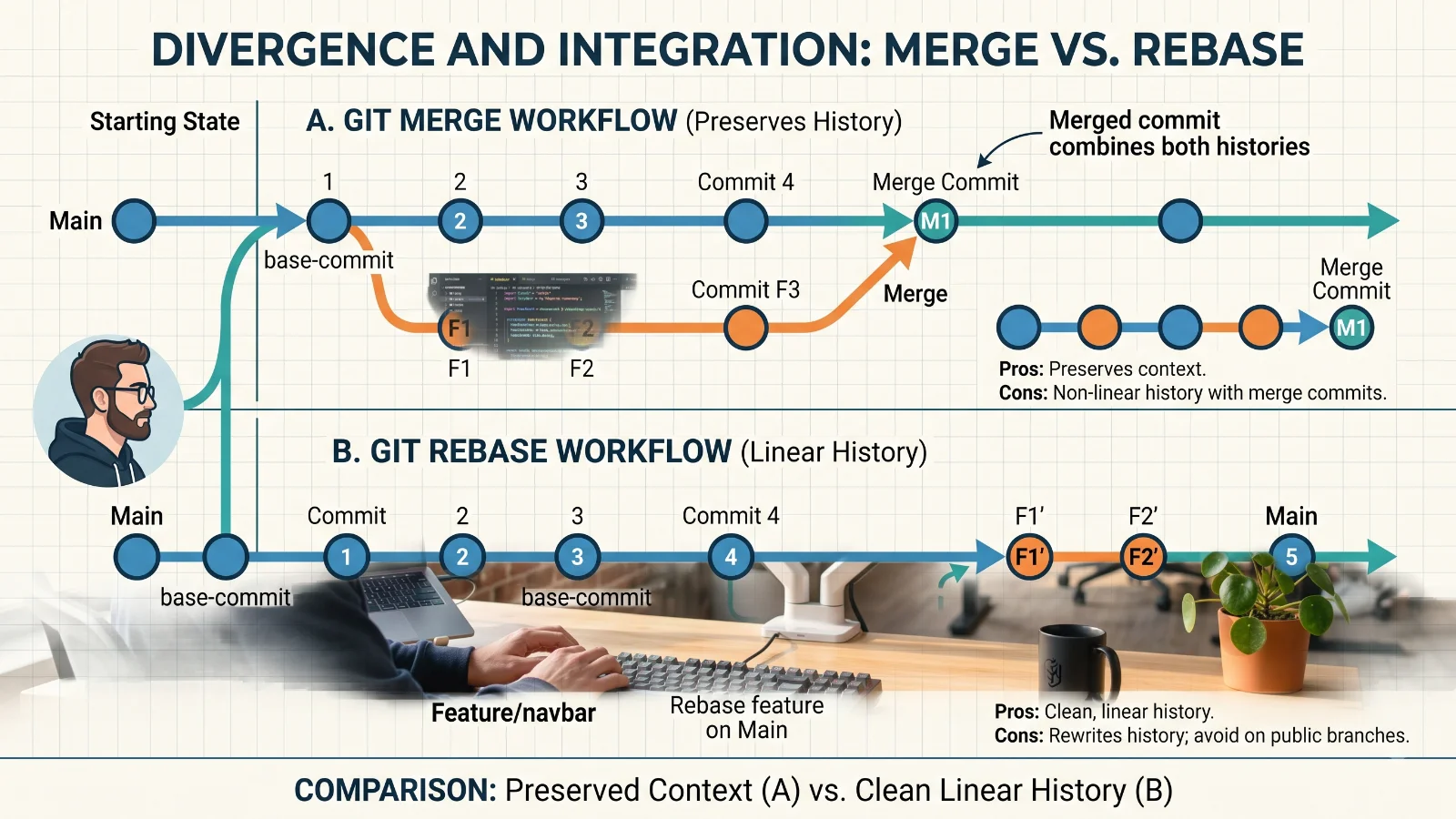
At a fundamental level, Git merge and Git rebase are two distinct mechanisms for integrating changes from one branch into another, each driven by a unique philosophy regarding version control history. The Git merge command embraces the philosophy of absolute historical fidelity. When you merge a feature branch into a main branch, Git preserves every single commit, branch intersection, and point of divergence exactly as it happened in reality. It treats your repository history as an immutable record of events. If a developer works on a feature for two weeks, creating dozens of granular commits along the way, a merge operation preserves every single one of those commits and connects them to the main branch via a special merge commit. Conversely, Git rebase adopts the philosophy of a curated, linear history. Instead of preserving the chaotic reality of divergent development, rebase rewrites history by taking your feature branch commits and reapplying them on top of the tip of the target branch. The core idea behind rebase is to make it appear as though you wrote your feature branch starting from the very latest code on the main branch, effectively eliminating unnecessary merge commits and keeping the project timeline perfectly straight. While merge values preservation and transparency of context, rebase values readability, simplicity, and a distraction-free commit graph.
To truly master git merge vs git rebase, you must examine the exact mechanics behind how each command operates under the hood. When you execute a standard git merge command, Git looks for three distinct components: the two branching points (the tips of the branches you are combining) and their common ancestor commit, known as the merge base. Git performs a three-way merge between these three snapshots. It takes the changes from the feature branch, the changes from the target branch, and their shared ancestor state to automatically synthesize a new combined state. If there are no conflicting changes, Git automatically creates a brand-new commit on the target branch called a merge commit, which has two parent pointers instead of one. This merge commit explicitly documents that two distinct lines of development have converged. On the other hand, the mechanics of git rebase are entirely transformational rather than additive. When you initiate a git rebase, Git identifies the common ancestor of your current branch and the target branch. It then temporarily saves all the commits of your current branch into a temporary area, resets your current branch to match the tip of the target branch, and then sequentially reapplies each saved commit one by one. As each commit is reapplied, Git generates a completely new commit hash for it, because the parent commit has changed. This process essentially lifts your entire feature branch off its original base and plants it firmly onto the updated main branch, rewriting the lineage of those commits in the process.
Understanding the internal architecture of Git helps clarify why merge and rebase behave so differently. At the core of both operations are commit graphs, pointers, and parent commits. In Git, every commit is an object that contains a pointer to one or more parent commits. A standard linear commit has exactly one parent. When a merge commit is created, it natively accepts two parents: the tip of the branch you are merging into and the tip of the branch being merged. This dual-parent structure creates a directed acyclic graph that branches out and rejoins, visually resembling a river delta on graph visualizers like git log --graph. This structure is fantastic for auditing because you can trace exactly when a feature branch was created and when it was integrated. Rebase, however, deliberately alters this graph topology. By taking the commits of the feature branch and generating new child commits whose parent points to the latest commit on the target branch, rebase forces a purely linear chain of single-parent commits. There are no branching forks or joining nodes; the history reads like a straight highway. This structural difference directly influences how automated tools, CI/CD pipelines, and human reviewers traverse the repository history. While a merge graph retains the authentic chronological context of parallel work, a rebase graph optimizes for human consumption and bisecting efficiency, making it much easier to track down regressions using git bisect without getting lost in side branches.
To see these concepts in action, consider a practical scenario where a developer named Alex is working on a feature branch called feature-login, while the main branch continues to receive updates from other team members. Alex has made three commits on feature-login: adding a login form, implementing authentication logic, and writing unit tests. Meanwhile, main has advanced with two new bug fix commits. If Alex decides to use git merge, they switch to main and run git merge feature-login. Git performs a three-way merge, combines the changes, and generates a new merge commit on main. The resulting log shows the parallel history, clearly indicating that feature-login was developed concurrently and integrated at a specific point in time. If Alex instead chooses the rebase route, they stay on feature-login and run git rebase main. Git rewinds the feature branch to the original divergence point, applies the two new main commits, and then replays Alex's three login commits one by one on top of main, assigning them new cryptographic hashes. Now, when Alex merges feature-login into main, it results in a fast-forward merge, meaning Git simply moves the main branch pointer forward to the tip of feature-login without creating any merge commit at all. The resulting history looks as though Alex started the login feature only after all main branch updates were already completed.
Both merge and rebase offer powerful benefits that make them indispensable depending on the context of your workflow. The primary advantage of git merge is its non-destructive nature. Because merge never alters existing commits or rewrites history, it is exceptionally safe for collaborative environments. Every developer's work is preserved exactly as they committed it, complete with original timestamps and author information. Merge provides a true historical audit trail, which is particularly crucial in large enterprises, open-source projects, or regulated industries where compliance requires knowing the exact sequence of events. Furthermore, merge is straightforward to troubleshoot; if a conflict arises, you resolve it once during the merge process, and the merge commit permanently records that resolution. Conversely, the primary benefit of git rebase is the creation of a pristine, linear history. A clean commit log makes it infinitely easier to read project history, generate changelogs, review past changes, and use debugging tools like git bisect to pinpoint the exact commit that introduced a bug. Rebase avoids the clutter of dozens of merge commits that often say nothing more than Merge branch 'main' into feature, keeping the signal-to-noise ratio of your commit history exceptionally high.
Despite their benefits, both approaches come with distinct limitations and operational hazards that developers must respect. The main drawback of git merge is the resulting visual clutter in the commit graph. In busy projects with dozens of developers merging branches multiple times a day, the commit graph can quickly transform into an unreadable tangle of intersecting lines often referred to as spaghetti history. This complexity can make code reviews and historical auditing arduous. On the other hand, git rebase introduces severe risks if mishandled, most notably the danger of rewriting public history. Because rebase rewrites commit hashes, rebasing branches that have already been pushed to a shared remote repository destroys the synchronization between local and remote copies of the repository. When other developers pull the rewritten history, their local repositories diverge catastrophically, requiring painful manual resets and recovery steps. Therefore, the cardinal rule of rebasing is never to rebase public or shared branches like main, staging, or active feature branches shared with teammates. Rebase should be strictly reserved for local, unpushed topic branches where you are the sole author.
Related Reading
For more detail, see resolve merge conflicts.
📌 Recommended Next Guides & References
  <li>
    <a href="/article/docker-and-kubernetes-how-they-work-together-2" class="text-primary hover:underline font-semibold flex items-center gap-2">
      <span>→</span> <span>Docker and Kubernetes: How They Work Together</span>
    </a>
  </li>

  <li>
    <a href="/article/kubernetes-ingress-explained" class="text-primary hover:underline font-semibold flex items-center gap-2">
      <span>→</span> <span>Kubernetes Ingress Explained: Routing, Controllers, and TLS</span>
    </a>
  </li>

  <li>
    <a href="/article/kubernetes-ingress-controller-explained" class="text-primary hover:underline font-semibold flex items-center gap-2">
      <span>→</span> <span>Kubernetes Ingress Controller Explained: Architecture, Routing, and Implementation</span>
    </a>
  </li>