Quick Answer
Kubernetes is an open-source container orchestration platform designed to automate the deployment, scaling, and management of containerized applications. Originally developed by Google and now maintained by the Cloud Native Computing Foundation (CNCF), it abstracts away underlying infrastructure so operators can manage applications as a unified logical system rather than dealing with individual virtual machines. When teams ask what is kubernetes, they are usually looking for a reliable way to solve the operational chaos of running dozens or hundreds of interconnected microservices across distributed server environments.
Quick Answer
Kubernetes is a portable, extensible, open-source platform for managing containerized workloads and services, facilitating both declarative configuration and automation. It groups containers that make up an application into logical units for easy management and discovery, automatically routing traffic, handling hardware failures, and scaling resources up or down based on real-time demand. For teams moving beyond single-server Docker setups, deploying a managed kubernetes cluster provides enterprise-grade resilience, rolling updates, and uniform infrastructure control across diverse cloud and on-premises environments.
What Is Kubernetes?
See also: Docker images
To fully understand what is kubernetes, you must first understand containerization. Containers package application code with all its runtime dependencies, libraries, and configuration files into a single immutable image. While tools like Docker revolutionized how software is packaged and run locally, managing hundreds of independent containers in production creates massive operational hurdles. Containers crash, traffic spikes require rapid horizontal scaling, and updates demand zero-downtime deployment strategies. This is where container orchestration enters the picture.
Container orchestration refers to the automated configuration, coordination, and management of software containers. Kubernetes acts as the central brain for these distributed workloads. It is frequently asked: what is kubernetes used for? Organizations use it to automate rolling deployments, perform automated load balancing, self-heal application failures by restarting failed containers, and automatically provision storage and compute resources on demand.
A common point of confusion for beginners is the relationship between Kubernetes and Docker. A frequent misconception is that Kubernetes is a container runtime or that it replaces Docker entirely. In reality, Docker is a containerization platform used to build and run individual containers, whereas Kubernetes is an orchestration engine that manages fleets of containers across multiple hosts. Furthermore, modern Kubernetes supports multiple container runtimes through the Container Runtime Interface (CRI), meaning Docker is just one of several tools that can execute the actual container images managed by a kubernetes cluster.
Core Concepts
See also: kubernetes networking fundamentals
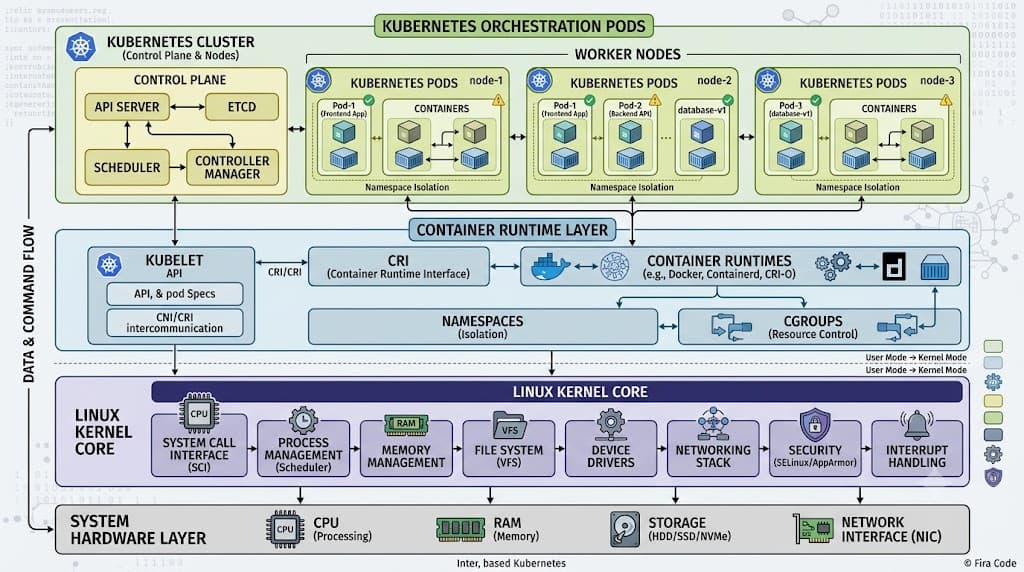
Understanding Kubernetes requires mastering its core architectural pillars. At its foundation, a Kubernetes installation is known as a cluster. A kubernetes cluster consists of a control plane and a set of worker machines, called worker nodes. The control plane makes global decisions about the cluster—such as scheduling workloads—and detects and responds to cluster events. The worker nodes host the actual application workloads.
The control plane is composed of several critical components. The kube-apiserver exposes the Kubernetes API, acting as the frontend for the control plane. etcd is a consistent and highly available key-value store used as the backing store for all cluster data. kube-scheduler watches for newly created pods with no assigned node and selects one for them to run on. kube-controller-manager runs controller processes that regulate the state of the cluster, handling node lifecycles and job replication.
Worker nodes run the applications. Each worker node contains a kubelet, an agent that ensures containers are running inside a pod. A kube-proxy maintains network rules on nodes, enabling network communication to your pods from network sessions inside or outside of your cluster. A container runtime—such as containerd or CRI-O—is responsible for pulling container images from a registry, unpacking them, and running the containers.
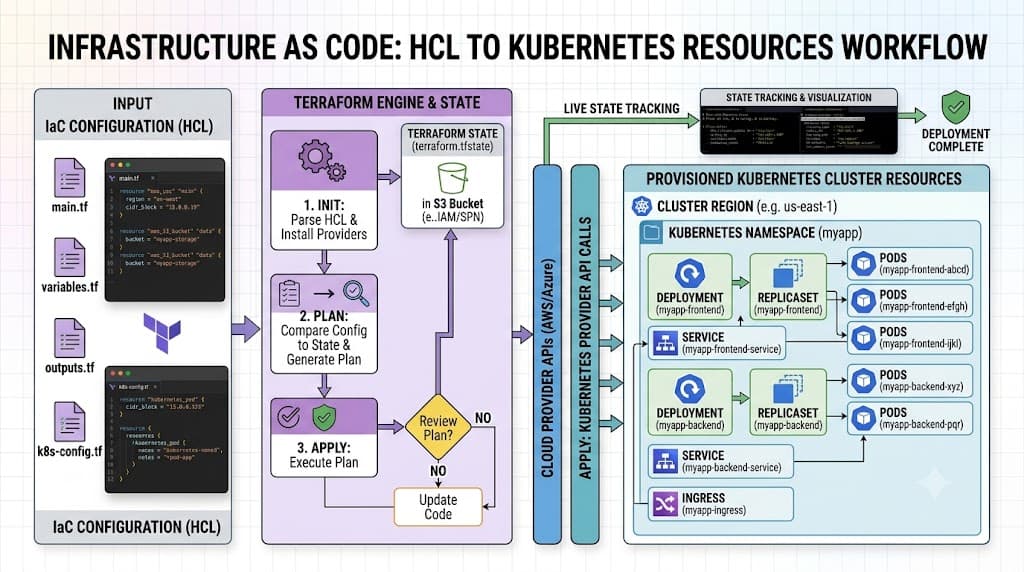
At the workload level, the fundamental building block is the kubernetes pod. A pod represents a single instance of a running process in your cluster and can contain one or more tightly coupled containers sharing storage and network resources. Because pods are ephemeral and mortal—they can be created, destroyed, or rescheduled dynamically—operators rarely manage pods directly. Instead, they use higher-level abstractions like a kubernetes deployment to manage stateless applications with declarative updates and automatic scaling. To expose these pods to internal or external traffic, engineers rely on a kubernetes service, which provides a stable IP address and a DNS name for a set of pods.
How It Works
Kubernetes operates on a declarative model. Instead of giving the system a procedural list of commands to execute, administrators define the desired state of the application using declarative manifests written in YAML. The Kubernetes control plane continuously compares the actual state of the cluster against this desired state and takes corrective action whenever a discrepancy is detected.
This continuous reconciliation loop drives two of the platform's most powerful features: self-healing and horizontal scaling. If a worker node fails, the control plane notices that the active pod count has dropped below the desired replica count specified in the kubernetes deployment manifest. It automatically schedules replacement pods onto healthy nodes elsewhere in the kubernetes cluster. Similarly, if traffic surges, Horizontal Pod Autoscalers (HPA) can automatically increase the number of running pods based on CPU, memory, or custom metrics, routing incoming requests through the configured kubernetes service to maintain application responsiveness.
Practical Example
Working with Kubernetes typically involves the command-line interface tool, kubectl. Below is a step-by-step practical guide demonstrating how to inspect a cluster, deploy an application, and expose it to network traffic.
kubectl get nodes
Before deploying any workloads, you must verify that your cluster is operational and that worker nodes are in a healthy state. Run the following command to list all nodes in the cluster:
kubectl get nodes
This command queries the API server and returns a tabular view showing the node names, their operational status (e.g., Ready), the version of Kubernetes running, and how long they have been active. If a node shows a NotReady status, administrators inspect cluster logs or node conditions to troubleshoot networking or resource exhaustion issues.
kubectl get pods
To inspect existing running workloads across all namespaces or within your current namespace, use the pod inspection command:
kubectl get pods -A
Passing the -A flag tells kubectl to list pods across all namespaces. The output displays the pod name, container count, current status (such as Running, CrashLoopBackOff, or Pending), restart counts, and age. This is the primary command engineers use during routine health checks and troubleshooting sessions.
kubectl create deployment
To deploy a containerized application, you create a deployment object. This tells Kubernetes how many replicas of your application container to run and which image to use. Execute the following command to create a deployment named nginx-app using the official NGINX image:
kubectl create deployment nginx-app --image=nginx:latest --replicas=3
Here, --image=nginx:latest specifies the container image to pull, and --replicas=3 instructs the control plane to maintain three identical running instances of this container. Kubernetes automatically generates a kubernetes deployment resource and distributes the pods across available worker nodes.
kubectl expose deployment
By default, pods running inside a cluster are only reachable via internal cluster networking. To make your deployment accessible to users or other services, you must create a service. Run the following command to expose your deployment:
kubectl expose deployment nginx-app --type=NodePort --port=80
In this command, --type=NodePort tells Kubernetes to open a specific port across all worker nodes, forwarding external traffic to port 80 on your container pods. Once exposed, you can inspect the newly created kubernetes service to find the assigned port and test connectivity.
Troubleshooting and Common Mistakes
While Kubernetes offers immense power, it introduces significant operational complexity. Beginners often encounter common failure modes that can derail projects if left unmanaged. One frequent mistake is treating Kubernetes as a drop-in replacement for traditional server hosting without adequate training. Teams often migrate monolithic applications directly into containers without refactoring for ephemeral infrastructure, leading to unexpected data loss when pods restart.
Another common pitfall involves resource management. Failing to define CPU and memory requests and limits in pod specifications can lead to 'noisy neighbor' issues, where a single runaway container consumes all available node resources, starving other critical workloads. Additionally, improper liveness and readiness probe configurations frequently cause cascading deployment failures or infinite restart loops.
Trade-offs are inherent in any orchestration platform. For small applications, simple projects, or teams with limited DevOps staffing, the steep learning curve and operational overhead of maintaining a kubernetes cluster often outweigh the benefits. In such cases, simpler Platform-as-a-Service (PaaS) offerings or container services without cluster management overhead may be far more appropriate. Careful evaluation of team capabilities and architectural requirements is essential before adopting Kubernetes in production environments.
📌 Recommended Next Guides & References
  <li>
    <a href="/article/docker-and-kubernetes-how-they-work-together-2" class="text-primary hover:underline font-semibold flex items-center gap-2">
      <span>→</span> <span>Docker and Kubernetes: How They Work Together</span>
    </a>
  </li>

  <li>
    <a href="/article/kubernetes-ingress-explained" class="text-primary hover:underline font-semibold flex items-center gap-2">
      <span>→</span> <span>Kubernetes Ingress Explained: Routing, Controllers, and TLS</span>
    </a>
  </li>

  <li>
    <a href="/article/kubernetes-ingress-controller-explained" class="text-primary hover:underline font-semibold flex items-center gap-2">
      <span>→</span> <span>Kubernetes Ingress Controller Explained: Architecture, Routing, and Implementation</span>
    </a>
  </li>