Quick Answer
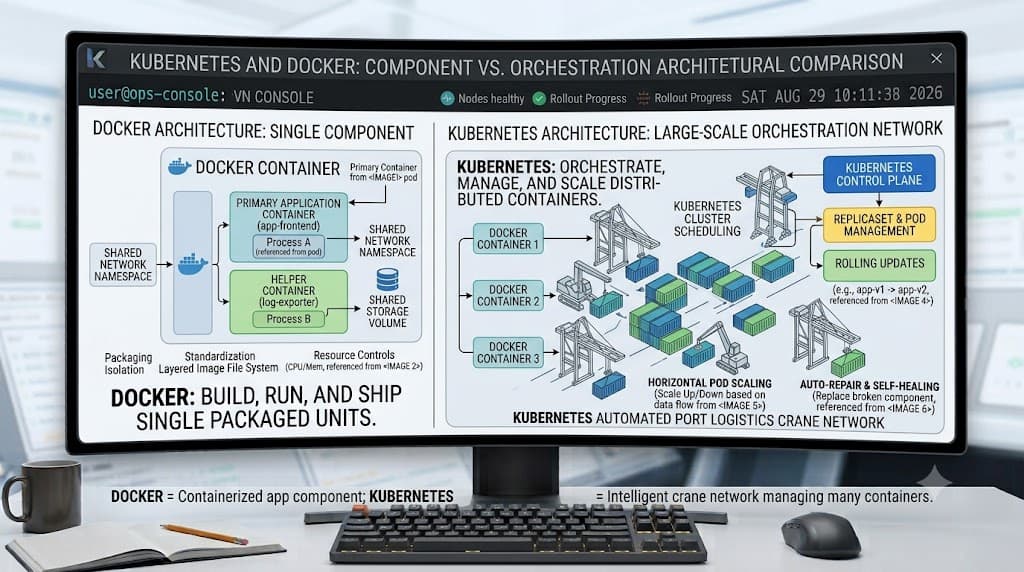
When developers begin modernizing application infrastructure, they frequently encounter two dominant projects that forever changed modern software packaging and deployment. A common point of confusion is how these technologies relate, leading to the central question of kubernetes vs docker. In short, Docker is a containerization platform used to build, package, and run individual containers on a single machine, whereas Kubernetes is an enterprise-grade container orchestration system designed to manage hundreds or thousands of those containers across distributed clusters. They are not competing alternatives; rather, they are complementary tools that frequently work together in production pipelines.
Kubernetes vs Docker: What's the Difference?
See also: virtual machines
To understand the fundamental difference between Docker and Kubernetes, you must look at the specific problem each tool was engineered to solve. Docker revolutionized the software development lifecycle by introducing a lightweight, portable packaging format. Before Docker, moving an application from a developer's laptop to a staging server often meant dealing with 'it works on my machine' syndrome due to missing system dependencies, conflicting library versions, or divergent operating system configurations. Docker solved this by bundling an application and its entire user-space environment into a single, immutable container image.
Once packaged, that image can be executed using Docker on virtually any host operating system that supports containerization. However, as organizations scaled their architectures from a monolithic service or a handful of microservices to dozens or hundreds of distributed microservices, managing those containers manually became unsustainable. If a container crashed, how would it automatically restart? If traffic spiked, how would you spin up additional instances across multiple machines? How would incoming requests be load-balanced across those instances?
This is where container orchestration enters the picture, and where Kubernetes takes over. Kubernetes (often abbreviated as K8s) was designed by Google based on years of internal experience running massive container workloads. It does not replace Docker's role as an image builder or single-node runtime; instead, it takes the container images you built with Docker and manages their lifecycle across an entire cluster of physical or virtual machines. Kubernetes handles automated rollouts, rollbacks, self-healing, storage orchestration, and service discovery. Asking whether Kubernetes is a replacement for Docker is similar to asking whether an architectural blueprint replaces a single brick. You need both, operating at different layers of the software delivery stack.
How the Two Technologies Work
See also: Docker image
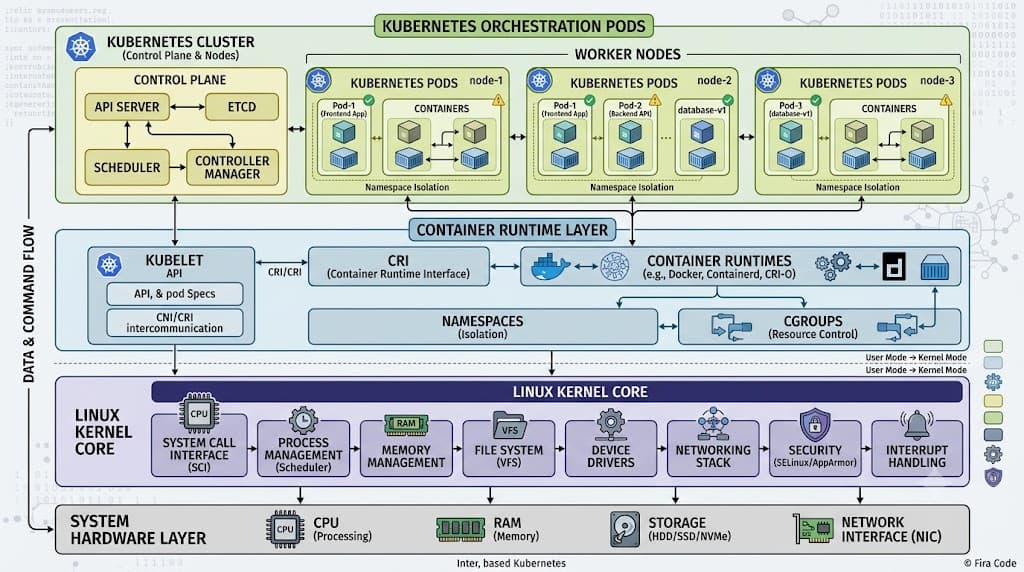
To appreciate how docker kubernetes environments operate in practice, it is essential to examine container runtimes, image specifications, and system architecture. At the foundation of both tools lies operating system-level virtualization, utilizing Linux kernel features such as namespaces (for process isolation) and cgroups (for resource limiting).
Docker popularized the Open Container Initiative (OCI) image specification. When you create a container image, it consists of read-only layers stacked together, topped with a writable container layer during execution. Historically, the Docker daemon (dockerd) handled both the build process and the container execution via containerd. In modern developer workflows, Docker uses containerd or other OCI-compliant runtimes under the hood to execute containers.
However, a common misconception is that Kubernetes talks directly to the Docker daemon to run containers in a cluster. This is factually incorrect and represents a critical architectural distinction. Modern Kubernetes clusters communicate with a container runtime interface (CRI) plugin, such as containerd, CRI-O, or Mirantis Container Runtime, rather than invoking the Docker engine directly. While Kubernetes can run containers built by Docker because they follow the standard OCI image format, it bypasses the Docker daemon entirely during production scheduling and node execution. Understanding this separation ensures you do not design production clusters expecting Docker-specific daemon dependencies on worker nodes.
Key Differences
See also: Ingress controllers
See also: Kubernetes networking fundamentals
Examining the technical divergence between docker vs kubernetes highlights how their scopes differ across development and operations:
- Scope and Scale: Docker is fundamentally focused on the single node. It builds images, manages local container lifecycles, and executes simple multi-container local environments. Kubernetes is engineered for distributed systems across multi-node clusters, managing networking, storage volumes, and health checks across diverse hardware infrastructure.
- Object Abstraction: Docker operates with containers, networks, volumes, and compose files. Kubernetes introduces a richer, more declarative set of abstractions including Pods (the smallest deployable computing units), Deployments, Services, ReplicaSets, StatefulSets, and Ingress controllers.
- Networking and Service Discovery: Docker provides basic bridge and overlay networks for local or single-host isolation. Kubernetes builds comprehensive internal DNS, load balancing, and routing policies directly into the cluster fabric, ensuring services can discover and communicate with each other dynamically regardless of which physical node they land on.
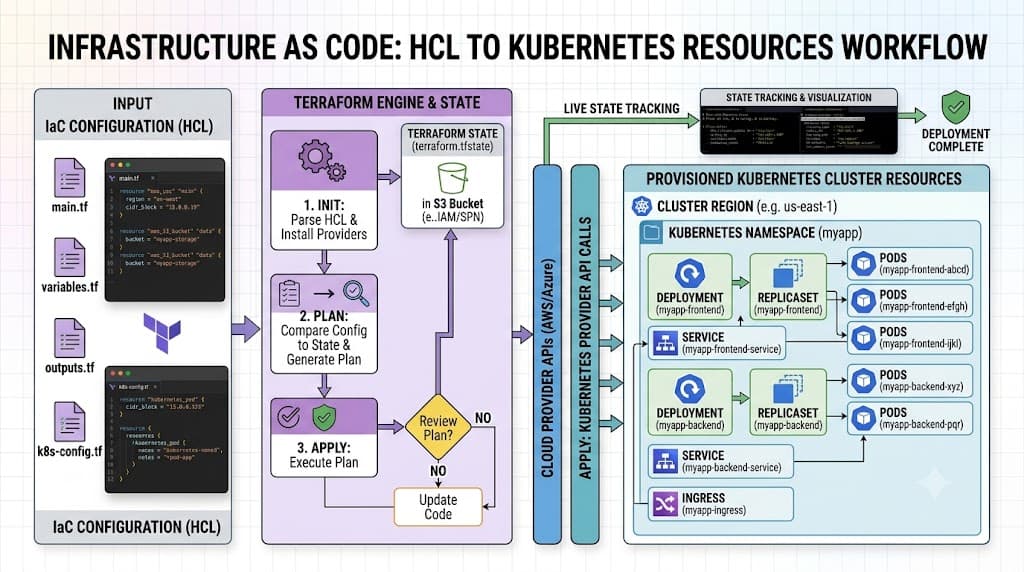
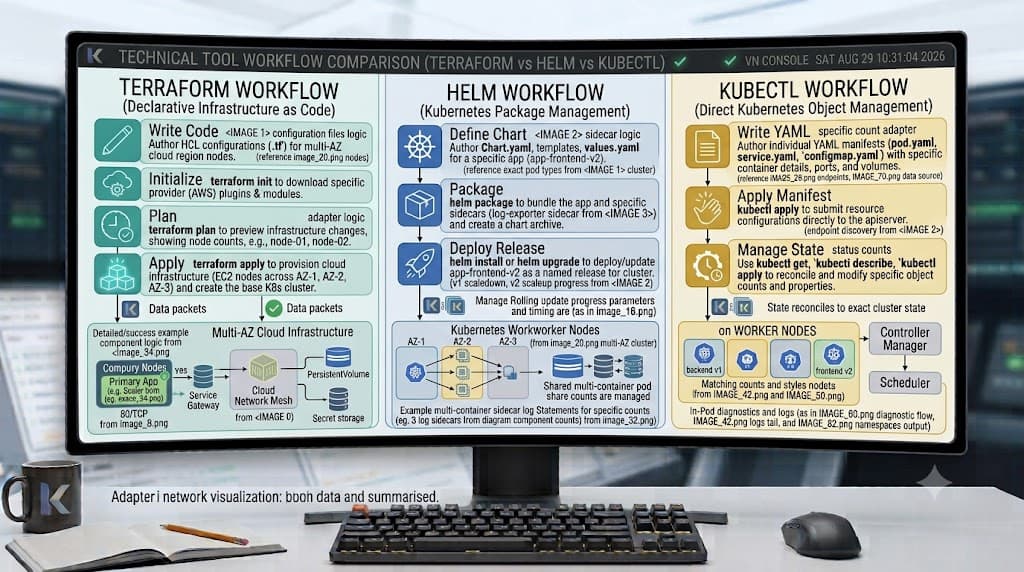
- Declarative Configuration: Docker workflows are often imperative (e.g., running CLI flags or executing docker run commands), though Docker Compose introduces declarative multi-container definitions. Kubernetes is strictly declarative; you submit desired-state manifests (YAML files) to the API server, and the cluster control plane continuously reconciles actual state with your declared intent.
When comparing docker and kubernetes alongside local development orchestration like Docker Compose, the distinctions become even sharper. Docker Compose excels at spinning up an entire application stack (such as a web app, database, and cache) on a developer's workstation with a single command. Kubernetes, by contrast, introduces significant operational overhead for local testing, though tools like Minikube, Kind, and Docker Desktop's built-in Kubernetes cluster have made local K8s testing much more accessible.
When to Use Each
Choosing the right tool depends entirely on your project's architecture, scale, team expertise, and infrastructure requirements. Below is a decision framework comparing Docker alone versus a full Kubernetes deployment.
| Criteria | Docker (Standalone / Compose) | Kubernetes | Recommended Context |
|---|---|---|---|
| Infrastructure Scale | Single server, virtual machine, or developer workstation. | Multi-node clusters across cloud providers, on-premise hardware, or hybrid clouds. | Use Docker for local development and single-server deployments; use Kubernetes for multi-node enterprise scale. |
| Deployment Complexity | Low. Minimal learning curve; straightforward CLI and YAML configuration. | High. Steep learning curve; requires mastering control plane components, networking plugins, and RBAC. | Use Docker when rapid prototyping and simplicity are paramount; use Kubernetes when high availability and automated scaling justify the operational cost. |
| Traffic & Load Balancing | Manual port mapping or basic reverse proxies (e.g., Nginx). | Built-in service discovery, automated load balancing, and dynamic ingress routing. | Use Kubernetes when handling unpredictable traffic spikes requiring automated horizontal pod autoscaling. |
| Fault Tolerance & Healing | Basic restart policies (unless managed by external init systems). | Automated container restarts, node failure rescheduling, self-healing probes, and rolling updates with zero downtime. | Use Kubernetes for mission-critical production environments requiring guaranteed uptime and automated self-healing. |
For smaller applications, internal tooling, or early-stage startups, running containers via Docker Compose on a robust cloud virtual private server is often more than sufficient and saves countless hours of cluster maintenance. Conversely, large enterprises running dozens of interdependent microservices with strict uptime SLAs will quickly find that the difference between docker and kubernetes makes the latter indispensable for production resilience.
Practical Example
To solidify how these technologies integrate in a real-world pipeline, let's walk through concrete commands and configurations, demonstrating how code transitions from a local Docker build to a Kubernetes deployment.
docker build
The first step in containerizing any application is creating an immutable image. Inside your project directory containing your application code and Dockerfile, you run:
docker build -t my-web-app:v1.0.0 .
This command instructs the Docker engine to read the instructions in the Dockerfile, execute layer caching, install dependencies, and package the output into a tagged local image named my-web-app:v1.0.0.
docker run
Before deploying to a cluster, developers frequently test the image locally to verify functionality:
docker run -d --name web-test -p 8080:80 my-web-app:v1.0.0
Flags used here include -d to run the container in detached mode (background), --name to assign a friendly container name, and -p 8080:80 to map port 8080 on your host machine to port 80 inside the container. You can verify execution using docker ps and access your app at http://localhost:8080.
docker compose
For multi-container applications involving databases and caches, developers rely on local orchestration via docker-compose.yml:
version: '3.8'
services:
  web:
    image: my-web-app:v1.0.0
    ports:
      - "8080:80"
    environment:
      - DB_HOST=database
  database:
    image: postgres:15-alpine
    environment:
      - POSTGRES_PASSWORD=secret
Spinning this stack up locally is accomplished with:
docker compose up -d
kubectl apply
Once the image is built and tested, you push it to a container registry (such as Docker Hub or a private registry). To run this image within a Kubernetes cluster, you define a declarative deployment manifest (deployment.yaml):
apiVersion: apps/v1
kind: Deployment
metadata:
  name: web-app-deployment
spec:
  replicas: 3
  selector:
    matchLabels:
      app: web
  template:
    metadata:
      labels:
        app: web
    spec:
      containers:
      - name: web
        image: myregistry.azurecr.io/my-web-app:v1.0.0
        ports:
        - containerPort: 80
You apply this configuration to your cluster using the Kubernetes command-line tool:
kubectl apply -f deployment.yaml
kubectl get pods
To verify that your deployment was successfully scheduled and that your pods are running healthily across cluster nodes, execute:
kubectl get pods -l app=web
If pods encounter startup errors (such as ImagePullBackOff or CrashLoopBackOff), troubleshooting involves inspecting detailed container logs and cluster events:
kubectl describe pod <pod-name>
kubectl logs <pod-name>
Common Mistakes
When adopting containerization and orchestration platforms, teams frequently stumble into several well-documented pitfalls:
- Assuming Kubernetes Replaces Docker Entirely: A prevalent misconception is that adopting Kubernetes means uninstalling Docker from developer workstations. In reality, developers still rely on Docker to build, tag, and test container images locally before pushing them to registries where Kubernetes pulls them.
- Treating Containers Like Virtual Machines: Developers often SSH into running containers or store persistent application state inside the container file system. Containers are ephemeral; any unmounted data written inside a container layer is lost when the container terminates. Always use Kubernetes PersistentVolumes (PVs) and PersistentVolumeClaims (PVCs) for stateful data.
- Overcomplicating Small Projects: Deploying a simple CRUD application or static website directly onto a managed Kubernetes cluster introduces unnecessary operational drag, certificate management complexity, and cloud expenditure. Match your orchestration tooling to your actual architectural requirements.
- Ignoring Resource Requests and Limits: Failing to set CPU and memory requests and limits in Kubernetes manifests can lead to 'noisy neighbor' scenarios where a single runaway container starves other workloads on the same worker node, causing cluster instability or unexpected node evictions.
📌 Recommended Next Guides & References
  <li>
    <a href="/article/docker-and-kubernetes-how-they-work-together-2" class="text-primary hover:underline font-semibold flex items-center gap-2">
      <span>→</span> <span>Docker and Kubernetes: How They Work Together</span>
    </a>
  </li>

  <li>
    <a href="/article/kubernetes-ingress-controller-explained" class="text-primary hover:underline font-semibold flex items-center gap-2">
      <span>→</span> <span>Kubernetes Ingress Controller Explained: Architecture, Routing, and Implementation</span>
    </a>
  </li>

  <li>
    <a href="/article/kubernetes-environment-variables-complete-guide-2" class="text-primary hover:underline font-semibold flex items-center gap-2">
      <span>→</span> <span>Kubernetes Environment Variables: Complete Guide to ConfigMaps, Secrets, and YAML Examples</span>
    </a>
  </li>